Multi-Boot Nightmares

Trailerman

New member
Local time
12:49 AM
Messages
57
Location
Manchester, UK
Hi, new to the forum and wondered if I could beg some help.

Yesterday I create a clone of my Windows 7 partition for beta testing, using Norton Ghost to copy my existing Windows 7 partition onto a completely new and unformatted drive. Everything ran fine. I may have also ticked the box which instructed Ghost to copy the MBR to the new drive (I don't recall for sure), but for some reason I now have a completely messed up boot situation which I desperately need to try and resolve.

Basically, after I added the newly created Windows 7 partition to the BCD (using EasyBCD) I tried a reboot, and selected the old, original Windows 7 partition to boot into. The system got to the point where I would normally expect the login screen to appear, and I got a black screen with the error:

"autochk program not found, skipping autocheck"

Followed by a blue screen. This happened everytime I tried to boot into the old partition. As far as I was aware, nothing on this drive should have been changed, this is my original Windows 7 partition.

So, I rebooted and tried to boot into the newly created Windows 7 partition - this worked fine, except that, according to Explorer, I'd actually booted into my original Windows 7 partition! I could see that changes I was making on the desktop were appearing in my old system drive (Drive C) and not in the new one (Drive H). When I checked in Disk Manager, Drive H (the new partition) appears to be the active drive - it has 'Boot, Page File, Active, Crash Dump etc.' visible in the disk management GUI for that partition, but no changes are being made to that drive.

So, bottom line, I seem to have arrived at a situation where booting into my old partition doesn't work - I get the autochk error. Booting into the new partition seems to perhaps be using the MBR on the new drive, but actually loading the old OS. I can't delete either volume because they appear to be mutually dependant, and I can't find a way to straighten things out.

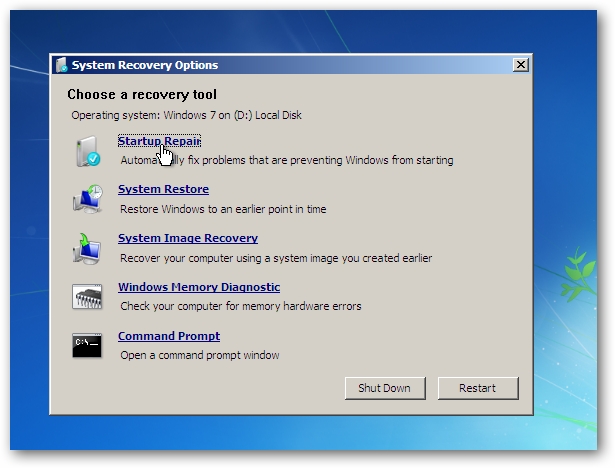
I've tried using the Windows 7 Startup Recovery, but this just results in only the new partition being bootable, which in turn appears to actually load the old OS, as described above.

Is there any way of fixing both MBR's on both drives and whatever else needs fixing, on both drives, so that I can at the very least boot into my original partition and delete the newly created one?

Sorry if the explanation above is confusing - I'm not sure I totally understand the situation myself.

Thanks in advance for any help.

Jules
 

My Computer

OS
Windows 7
Did you change the size of your partition C?

Try Startup Repair:

Troubleshoot Startup Problems with Startup Repair Tool in Windows 7


14srt.png


If startup repair doesn't fix it, choose command line and type bootsect /nt60 C:/.


~~~~~~~~~~~~

( http://www.sevenforums.com/crashes-debugging/96879-blue-screen-death-bsod-posting-instructions.html )
 

My Computer

Computer Manufacturer/Model Number
ASUS
OS
Windows 7 x64
CPU
Core2Quad Q9400
Motherboard
ASUS P5Q EM Do
Memory
Corsair 8 Gb
Graphics Card(s)
EAH ATI 5870 1 Gb
Sound Card
Realtek HD 7.1
Monitor(s) Displays
ASUS 27"
Screen Resolution
1280 x 720
Hard Drives
Maxtor 320 x 2 RAID 0
PSU
650 W
Cooling
Zalman
Keyboard
Sweex Multimedia
Mouse
A4 Tech 2 wheels 5 buttons
Other Info
http://www.youtube.com/watch?v=nvJXlBH6yJI
Hi Cybercore - many thanks for your response.

Can you perhaps explain what the bootsect command does?

Do the symptoms I describe suggest that the new OS volume is somehow linked to the original volume?

Thanks again for your help.

Jules
 

My Computer

OS
Windows 7
I understand you resized C (?), created another partition from it, and now you can't boot - correct?
 

My Computer

Computer Manufacturer/Model Number
ASUS
OS
Windows 7 x64
CPU
Core2Quad Q9400
Motherboard
ASUS P5Q EM Do
Memory
Corsair 8 Gb
Graphics Card(s)
EAH ATI 5870 1 Gb
Sound Card
Realtek HD 7.1
Monitor(s) Displays
ASUS 27"
Screen Resolution
1280 x 720
Hard Drives
Maxtor 320 x 2 RAID 0
PSU
650 W
Cooling
Zalman
Keyboard
Sweex Multimedia
Mouse
A4 Tech 2 wheels 5 buttons
Other Info
http://www.youtube.com/watch?v=nvJXlBH6yJI
Not quite. I cloned C: onto a new physical drive which was unformated (H).

When I try and boot to C: I get 'autochk program not found'. When I try and boot to H: it appears to use the MBR on that drive, but actually loads the OS on C:. I'm guessing slightly here, but that's what it looks like - C: shows changes made on the desktop, whereas H doesn't, even though H appears to be the active drive in Disk Management.

It looks to me like I need to completely rebuild the boot strucure for the whole machine so that I can then boot into one OS cleanly.

Thanks for your hlep.

Jules
 

My Computer

OS
Windows 7
See you cloned your C:, not backed up, but cloned. So your MBR was on C:, and now it is the same MBR on 2 partitions.
 

My Computer

Computer Manufacturer/Model Number
ASUS
OS
Windows 7 x64
CPU
Core2Quad Q9400
Motherboard
ASUS P5Q EM Do
Memory
Corsair 8 Gb
Graphics Card(s)
EAH ATI 5870 1 Gb
Sound Card
Realtek HD 7.1
Monitor(s) Displays
ASUS 27"
Screen Resolution
1280 x 720
Hard Drives
Maxtor 320 x 2 RAID 0
PSU
650 W
Cooling
Zalman
Keyboard
Sweex Multimedia
Mouse
A4 Tech 2 wheels 5 buttons
Other Info
http://www.youtube.com/watch?v=nvJXlBH6yJI
Hi Cybercore - I suspect you're right.

Is there any way of remedying the situation? Also, why would this mean that I am no longer able to boot into C:?


If I just wipe the new partition (H), will I be back to where I was?

I'm reluctant to do this whilst I can't boot into my original partition, because of the 'autochk program not found' error

Thanks again

Jules
 
Last edited by a moderator:

My Computer

OS
Windows 7
First run Startup Repair.
If it doesn't fix, have 7 DVD in drive -> cmd -> sfc /scannow.
 

My Computer

Computer Manufacturer/Model Number
ASUS
OS
Windows 7 x64
CPU
Core2Quad Q9400
Motherboard
ASUS P5Q EM Do
Memory
Corsair 8 Gb
Graphics Card(s)
EAH ATI 5870 1 Gb
Sound Card
Realtek HD 7.1
Monitor(s) Displays
ASUS 27"
Screen Resolution
1280 x 720
Hard Drives
Maxtor 320 x 2 RAID 0
PSU
650 W
Cooling
Zalman
Keyboard
Sweex Multimedia
Mouse
A4 Tech 2 wheels 5 buttons
Other Info
http://www.youtube.com/watch?v=nvJXlBH6yJI
If none of that works.

Turn off PC and unplug power and data cable to cloned HD.
The main HD may boot then.

If not use this. http://www.sevenforums.com/tutorials/104341-bootmgr-missing-fix.html?ltr=B
That should get you back into the main HD since it can't boot into the clone.
You will be back where you started before cloning.

You can reformat or reinstall from the main OS.
If you plug in the clone with PC off it will possibly try to boot to clone again.


Then I'll find some tutorials if you need to use a system image using Macrium for your dual system if needed.

For later after we get you back into the main HD and OS if your interested.
http://www.sevenforums.com/tutorials/73828-imaging-free-macrium.html

I asked for some help with getting the cloned drive working.
Mike
 
Last edited:

My Computer

Computer Manufacturer/Model Number
Hopalong/ Godzilla
OS
Windows7 Pro 64bit SP-1; Windows XP Pro 32bit
CPU
Intel Core i7-870 Lynnfield 2.93GHz LGA 1156 95W Quad-Core
Motherboard
ASUS P7P55D-E PRO
Memory
8GB@1400MHz Crucial Ballistix DDR3-1600 4x2GB
Graphics Card(s)
ASUS ENGTX460 DirectCU/2DI/1GD5 1GB 256-bit GDDR5
Sound Card
VIA Onboard
Monitor(s) Displays
Asus VS248H-P 24"; Samsung SyncMaster 941BW 19"ws
Screen Resolution
1920x1080; 1440x900
Hard Drives
Samsung 830 120GB SSD
Intel 320 120GB SSD
Western Digital Caviar Black WD7501AALS 750GB 7200 RPM SATA 3.0Gb/s
Western Digital Caviar Black WD6401AALS 640GB 7200 RPM SATA 3.0Gb/s
PSU
COOLER MASTER Silent Pro RS850-AMBAJ3-US 850W Modular
Case
COOLER MASTER HAF 932 RC-932-KKN5-GP Black
Cooling
Scythe "Mugen-2 Rev.B" (2 ScytheKaze-Jyuni PWM fans)
Keyboard
Logitech K-320
Mouse
Kensington
Antivirus
Avast Inernet Suite
Browser
IE 9 ; Chrome
Many thanks for the helpful suggestions.

So far, I have run startup repair from the Win7 install DVD, and have run Bootsect and Bootrec.exe with various MBR suffixes as suggested here and elsewhere. None of these processes have made any difference.

The Startup Repair DVD only sees the new Win7 install (H), and although the system boots into this drive ok, it then appears to run the actual OS from drive C. I've confirmed this by umounting C whilst booted into drive by running chkdsk, which causes all desktop icons disappear, and all programs to become unavailable. I guess it's booting into H but because the MBR was copied, it's referencing C for all OS files and data.

I'll try the scannow command now and will try disconnecting the drive tomorrow and see if Windows is able to find the old system volume and boot into that, if it can't I guess I'm stuffed. Your offer of help setting up a dual system is appreciated Hopalong X. At this stage I'd just like to get one partition working properly and go from there.

Thanks again.

Jules
 

My Computer

OS
Windows 7
Many thanks for the helpful suggestions.

So far, I have run startup repair from the Win7 install DVD, and have run Bootsect and Bootrec.exe with various MBR suffixes as suggested here and elsewhere. None of these processes have made any difference.

The Startup Repair DVD only sees the new Win7 install (H), and although the system boots into this drive ok, it then appears to run the actual OS from drive C. I've confirmed this by umounting C whilst booted into drive by running chkdsk, which causes all desktop icons disappear, and all programs to become unavailable. I guess it's booting into H but because the MBR was copied, it's referencing C for all OS files and data.

I'll try the scannow command now and will try disconnecting the drive tomorrow and see if Windows is able to find the old system volume and boot into that, if it can't I guess I'm stuffed. Your offer of help setting up a dual system is appreciated Hopalong X. At this stage I'd just like to get one partition working properly and go from there.

Thanks again.

Jules

Read the first part of my post and you will get back to your main HD and OS.

That I thought was your goal at this point.
 

My Computer

Computer Manufacturer/Model Number
Hopalong/ Godzilla
OS
Windows7 Pro 64bit SP-1; Windows XP Pro 32bit
CPU
Intel Core i7-870 Lynnfield 2.93GHz LGA 1156 95W Quad-Core
Motherboard
ASUS P7P55D-E PRO
Memory
8GB@1400MHz Crucial Ballistix DDR3-1600 4x2GB
Graphics Card(s)
ASUS ENGTX460 DirectCU/2DI/1GD5 1GB 256-bit GDDR5
Sound Card
VIA Onboard
Monitor(s) Displays
Asus VS248H-P 24"; Samsung SyncMaster 941BW 19"ws
Screen Resolution
1920x1080; 1440x900
Hard Drives
Samsung 830 120GB SSD
Intel 320 120GB SSD
Western Digital Caviar Black WD7501AALS 750GB 7200 RPM SATA 3.0Gb/s
Western Digital Caviar Black WD6401AALS 640GB 7200 RPM SATA 3.0Gb/s
PSU
COOLER MASTER Silent Pro RS850-AMBAJ3-US 850W Modular
Case
COOLER MASTER HAF 932 RC-932-KKN5-GP Black
Cooling
Scythe "Mugen-2 Rev.B" (2 ScytheKaze-Jyuni PWM fans)
Keyboard
Logitech K-320
Mouse
Kensington
Antivirus
Avast Inernet Suite
Browser
IE 9 ; Chrome
Sorry I missed the 'Bootmanager is missing fix' you referenced on first reading. Is that what you're referring to, or do you mean I should go stright to the hardware disconnection approach?

Sorry if I'm being dense here, and thanks again.

Jules
 

My Computer

OS
Windows 7
Disconnect the cloned drive. PC offf!!!!

Restart it may boot properly into main OS.
If not then do the boot is missing fix .
You already tried it with both HD's running and it only boots the clone.

This will not get the clone working right necessarily but it will get you back into your main OS and HD.

We can go from there on the cloned drive.
I hopefully have some help coming to assist with that.

Mike

Help coming I think.
 

My Computer

Computer Manufacturer/Model Number
Hopalong/ Godzilla
OS
Windows7 Pro 64bit SP-1; Windows XP Pro 32bit
CPU
Intel Core i7-870 Lynnfield 2.93GHz LGA 1156 95W Quad-Core
Motherboard
ASUS P7P55D-E PRO
Memory
8GB@1400MHz Crucial Ballistix DDR3-1600 4x2GB
Graphics Card(s)
ASUS ENGTX460 DirectCU/2DI/1GD5 1GB 256-bit GDDR5
Sound Card
VIA Onboard
Monitor(s) Displays
Asus VS248H-P 24"; Samsung SyncMaster 941BW 19"ws
Screen Resolution
1920x1080; 1440x900
Hard Drives
Samsung 830 120GB SSD
Intel 320 120GB SSD
Western Digital Caviar Black WD7501AALS 750GB 7200 RPM SATA 3.0Gb/s
Western Digital Caviar Black WD6401AALS 640GB 7200 RPM SATA 3.0Gb/s
PSU
COOLER MASTER Silent Pro RS850-AMBAJ3-US 850W Modular
Case
COOLER MASTER HAF 932 RC-932-KKN5-GP Black
Cooling
Scythe "Mugen-2 Rev.B" (2 ScytheKaze-Jyuni PWM fans)
Keyboard
Logitech K-320
Mouse
Kensington
Antivirus
Avast Inernet Suite
Browser
IE 9 ; Chrome
Please post back a screenshot of your maximized full Disk Management drive map with listings, with all drives attached. Use Snipping Tool in Start Menu.

If you wrote the MBR to the new clone you should be able to boot either via the BIOS boot order or BIOS Boot Menu key. Test this.

Bootsect and bootrec are automated in Win7 Startup Repair. If either Win7 is not marked System now, mark it Active and run Startup Repair x3 while the other drives are unplugged.
http://www.sevenforums.com/tutorials/105541-startup-repair-run-3-separate-times.html
http://www.sevenforums.com/tutorials/71432-partition-mark-active.html

If you have any questions or are unsure wait until we read the screenshot. There may be other complications which will become clear once we see it. Going surfing til 7 pm PST.
 
I removed all drives except the original Windows 7 drive and booted up.

As before, it got to the point where I would normally get the login screen and then I got the 'autochk program not found - skipping autocheck' message followed by a blue screen.

I'm trying the boot is missing fix now, but it doesn't sound like the MBR is missing on this drive.

Jules
 

My Computer

OS
Windows 7
Sorry Greg - missed you post.

Is it ok to try and troubleshoot this with just the single drive in place? Seems to make more sense. I'll run startup repair on this drive and see if that helps. Maybe previous runs were actually runnig it on the clone ...

Jules
 

My Computer

OS
Windows 7
PS. Sorry - should have mentioned this before, but I also had an old WinXp partition on the system, again on a separate drive. Not been used for ages, but maybe it's MBR was also contributing to the mess. Now removed.
 

My Computer

OS
Windows 7
Greg

He is following my instructions before you got here.

Let him know what you want and I'll just watch.;)

Just got the surfing reference. Go.
Trailerman can be working on your posted cures.

Mike
 

My Computer

Computer Manufacturer/Model Number
Hopalong/ Godzilla
OS
Windows7 Pro 64bit SP-1; Windows XP Pro 32bit
CPU
Intel Core i7-870 Lynnfield 2.93GHz LGA 1156 95W Quad-Core
Motherboard
ASUS P7P55D-E PRO
Memory
8GB@1400MHz Crucial Ballistix DDR3-1600 4x2GB
Graphics Card(s)
ASUS ENGTX460 DirectCU/2DI/1GD5 1GB 256-bit GDDR5
Sound Card
VIA Onboard
Monitor(s) Displays
Asus VS248H-P 24"; Samsung SyncMaster 941BW 19"ws
Screen Resolution
1920x1080; 1440x900
Hard Drives
Samsung 830 120GB SSD
Intel 320 120GB SSD
Western Digital Caviar Black WD7501AALS 750GB 7200 RPM SATA 3.0Gb/s
Western Digital Caviar Black WD6401AALS 640GB 7200 RPM SATA 3.0Gb/s
PSU
COOLER MASTER Silent Pro RS850-AMBAJ3-US 850W Modular
Case
COOLER MASTER HAF 932 RC-932-KKN5-GP Black
Cooling
Scythe "Mugen-2 Rev.B" (2 ScytheKaze-Jyuni PWM fans)
Keyboard
Logitech K-320
Mouse
Kensington
Antivirus
Avast Inernet Suite
Browser
IE 9 ; Chrome

My Computer

Computer Manufacturer/Model Number
Hopalong/ Godzilla
OS
Windows7 Pro 64bit SP-1; Windows XP Pro 32bit
CPU
Intel Core i7-870 Lynnfield 2.93GHz LGA 1156 95W Quad-Core
Motherboard
ASUS P7P55D-E PRO
Memory
8GB@1400MHz Crucial Ballistix DDR3-1600 4x2GB
Graphics Card(s)
ASUS ENGTX460 DirectCU/2DI/1GD5 1GB 256-bit GDDR5
Sound Card
VIA Onboard
Monitor(s) Displays
Asus VS248H-P 24"; Samsung SyncMaster 941BW 19"ws
Screen Resolution
1920x1080; 1440x900
Hard Drives
Samsung 830 120GB SSD
Intel 320 120GB SSD
Western Digital Caviar Black WD7501AALS 750GB 7200 RPM SATA 3.0Gb/s
Western Digital Caviar Black WD6401AALS 640GB 7200 RPM SATA 3.0Gb/s
PSU
COOLER MASTER Silent Pro RS850-AMBAJ3-US 850W Modular
Case
COOLER MASTER HAF 932 RC-932-KKN5-GP Black
Cooling
Scythe "Mugen-2 Rev.B" (2 ScytheKaze-Jyuni PWM fans)
Keyboard
Logitech K-320
Mouse
Kensington
Antivirus
Avast Inernet Suite
Browser
IE 9 ; Chrome
OK - Startup Repair sees the drive fine. First run through went fine - found some boot related stuff and did it's thing.

Second run through I get:

Startup Repair cannot repair this computer automatically.

Details show:

Problem event name : StartupRepairOffline
Problem Signature 01: 6.1.7600.16385
Problem Signature 02: 6.1.7600.16385
Problem Signature 03: Unknown
Problem Signature 04: 157
Problem Signature 05: ExternalMedia
Problem Signature 06: 1
Problem Signature 07: BadDriver

etc.etc

Will rerun and then see where we are with booting.

Jules

PS. Massively appreciate all the help.
 

My Computer

OS
Windows 7
Back
Top