
Multi Booting

Bare Foot Kid

R.I.P. August 13th 2014
SF Team
Local time
6:00 PM
Messages
22,809
Location
The Lowcountry
I would make four partitions: 100GB, 100GB, 50 to 80GB and the rest for storage. You do have a 500GB drive???

The first one I would install is XP to the third 50 to 80GB partition; that way you won't have to mess with boot issues but I wonder if XP will then be the (I don't know the term) default partition that can't be formatted from within an OS; do you know what I'm referring to?

Then I would install Vista to the second 100GB partition; then W7 to the first, as that would give 7 the fastest partition for future use.

I would be very interested in your thoughts on this setup, this is the way I intend to install to the new machine when I get it finished.

I just tried to format my Vista (the first OS installed on the first HDD) from within my Win7 and the format option is grayed out. This is what I was trying to say in the statement below; the reason this would ever matter is for any reason you should ever need to format the partition XP (or the first installed OS) is on you would have to use a third party partition manager to do so.

Hello all.

These are excerpts from PMs I sent. I would like to 'hear' everyone's thoughts on this.
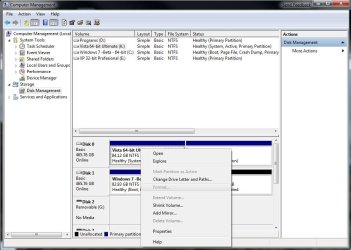
Format_Vista.JPG


Later :shock: Ted
 

My Computer

Computer Manufacturer/Model Number
* BFK Customs *
OS
W 7 64-bit Ultimate
CPU
Intel Q9550 Yorkfield
Motherboard
ASUS P5Q Pro
Memory
8GB Dominator 8500C5D
Graphics Card(s)
ATI : XFX 5870
Sound Card
Realtek HD Audio 7-1
Monitor(s) Displays
1x 47" LCD HDMI & 3x 26" LCD HDMI
Screen Resolution
1920x1080P & 1920x1200
Hard Drives
1x 80GB Intel X25-M G2 SSD : 1x 500GB & 1x 640GB WD Caviar Black(s)
PSU
Corsair 620HX
Case
Cooler Master RC-690
Cooling
Tuniq Tower 120, 2x 140mm and 3x 120mm case fans
Keyboard
Microsoft 500
Mouse
Razer Diamondback 3G
Internet Speed
14 Mb/s
Other Info
1x Koutech 3Gb/s SATA HDD Hot Swap Rack
When you do a clean install of W7 on a disk using full space, it creates the 200mb boot partition where it stores the \boot\BCD boot loader.

If you install W7 while having already Windows XP or Vista, it uses that partition as the boot partition, since it already is the boot partition, and it hides it to prevent damage to the boot files , probably. (This "hiding" might happen only in Beta, we don't know yet).

Now, since the XP or VISTA partition when found, it's used to store the boot loader files, it's reasonable that Windows wouldn't let you delete it, or format it. However, it happens only in Disk Management.

using DISKPART, windows lets you assign drive letter, unoumnt and/or delete the hidden/boot/VISTA partition. (at least for assign/unassign I'm sure of. Disk Management doesn't let you unassign once you've assigned a letter to that partition)

But , of course, by deleting that partition , you lose the \boot\bcd record, and then you can't boot. Normally, a startup repair would fix that and isntall the boot loader on the one main partition C:, or attempt to create another small one of 200mb. That's what I think .

I believe having a small partition just for the boot loader could be convenient and helpful. Now, as for hidden , you can unhide it, easily. Those who can't , well then , they probably shouldn't.

Those who need it back, well, they can just unhide it.
 

My Computer

Computer Manufacturer/Model Number
ENIAC
OS
Windows 7 RC 7100 32bit/64bit
CPU
Intel Core2Duo E4500 2.20 GHz
Motherboard
ASUS P5LD2-X/1333
Memory
2x1GB Kinsgston DDR2 800MHz
Graphics Card(s)
Nvidia 8500GT
Sound Card
Onboard High Definition Audio Device
Monitor(s) Displays
Sony Bravia 42"
Case
LINKW 2222
Cooling
Standard Intel
Keyboard
Some cheap one
Mouse
Microsoft Intellimouse something
Internet Speed
24MBps ADSL
Back
Top