Multi-colored lines cross-hatch screen when booting up?

flycaster

New member
Member
VIP
Local time
5:23 AM
Messages
472
Location
Boynton Beach, FL
Duplicate post, please delete...

old age and damn bad cold has caused me to re-post the question below. Want to delete it, but don't see how.

This has happened ocassionally: When first booting my Gateway desktop (DX-4720-03, running W7 HP 64-bit with a Samsung 193P monitor), vertical and horizontal cross-hatching lines (many line of different colors) would appear on the monitor...and nothing else. I would then manually turn the computer off and re-boot. On re-booting, the black and white screen gives me various choices on how to open, I choose "open normally," and all is well. Other than that, I have had no problems with the computer or monitor's functioning. Any ideas? If this is the wrong forum for this question, please redirect.
 
Last edited:

My Computer My Computer

At a glance

Windows 7 HP 64-bit4GB/4GB
Computer Manufacturer/Model Number
Gateway DX4720-03/HP Pavilion dv6
OS
Windows 7 HP 64-bit
Memory
4GB/4GB
Antivirus
Avast Pro
Browser
Firefox, the latest
Sounds like your video is going out, might want to replace the Motherboard if it is integrated video, or get a graphics card if you have an APG/PCI-E graphics card slot so you could avoid replacing the Motherboard.
 

My Computer My Computer

At a glance

Windows 7 Home Premium 64-bit SP1Intel core i7 920 @ 2.67Ghz; Bloomfield 45nm ...16GB Dual-Channel DDR3 @ 540MHz (7-7-7-19)4095MB NVIDIA GeForce GTX 960 (EVGA)
Computer type
PC/Desktop
Computer Manufacturer/Model Number
Frankenstein PC
OS
Windows 7 Home Premium 64-bit SP1
CPU
Intel core i7 920 @ 2.67Ghz; Bloomfield 45nm Technology
Motherboard
Intel Corporation DX58SO (J1PR)
Memory
16GB Dual-Channel DDR3 @ 540MHz (7-7-7-19)
Graphics Card(s)
4095MB NVIDIA GeForce GTX 960 (EVGA)
Sound Card
N/A Integrated Audio
Monitor(s) Displays
Acer S231HLbid LED Monitor 23"
Screen Resolution
1920x1080 1080p 60Hz
Hard Drives
BOOT: 59GB ADATA SP900 (SSD)
STORAGE 1: 977GB Hitachi HDS721010CLA (SATA) @7200RPM;
STORAGE 2: 465GB Western Digital WDC WD5000AAKS-65YGA0 (SATA) @ 7200RPM;
PSU
EVGA SuperNOVA 750 G1 80+ Gold (120-G1-0750-XR)
Case
Cooler Master Elite Gaming Case Black 430
Cooling
Cooler Master Hyper 212 Heatsink. Front and rear 120mm fan
Keyboard
Rosewill RIKB-11003
Mouse
James Donkey 112S
Internet Speed
200/40
Antivirus
Avast! Antivirus Free
Browser
Cyberfox x64 / FireFox / PaleMoon x64; kept up-to-date
Other Info
Windows Installed on March 21, 2014
Sounds like your video is going out, might want to replace the Motherboard if it is integrated video, or get a graphics card if you have an APG/PCI-E graphics card slot so you could avoid replacing the Motherboard.

Damn, computer is less that 2 years old. Would hate to replace the motherboard. But, if I know how, or even if one can replace the graphics card with this computer, that's what i would do. Another suggestion has been to monitor the boards to see if there is any heat build up causing the problem. But I doubt that as the lines occur when the computer has been off and is freshly booted???

As for the graphics card, here's what I have: 256MB (shared) NVidia GeForce 7100 integrated graphics chip. Can it be replaced?

Read more: Gateway DX 4720-03 Review - Desktops - CNET Reviews
 

My Computer My Computer

At a glance

Windows 7 HP 64-bit4GB/4GB
Computer Manufacturer/Model Number
Gateway DX4720-03/HP Pavilion dv6
OS
Windows 7 HP 64-bit
Memory
4GB/4GB
Antivirus
Avast Pro
Browser
Firefox, the latest
Integrated graphics chips cannot be replaced due to them being built into the Motherboard, if you want to continue using integrated, then you will need to replace the Motherboard.
If the computer is under a warranty then you should be able to get a replacement by sending it in, but if it is not under warranty or you don't want to send it in get a PCI-E x16 graphics card since they are replaceable.
 

My Computer My Computer

At a glance

Windows 7 Home Premium 64-bit SP1Intel core i7 920 @ 2.67Ghz; Bloomfield 45nm ...16GB Dual-Channel DDR3 @ 540MHz (7-7-7-19)4095MB NVIDIA GeForce GTX 960 (EVGA)
Computer type
PC/Desktop
Computer Manufacturer/Model Number
Frankenstein PC
OS
Windows 7 Home Premium 64-bit SP1
CPU
Intel core i7 920 @ 2.67Ghz; Bloomfield 45nm Technology
Motherboard
Intel Corporation DX58SO (J1PR)
Memory
16GB Dual-Channel DDR3 @ 540MHz (7-7-7-19)
Graphics Card(s)
4095MB NVIDIA GeForce GTX 960 (EVGA)
Sound Card
N/A Integrated Audio
Monitor(s) Displays
Acer S231HLbid LED Monitor 23"
Screen Resolution
1920x1080 1080p 60Hz
Hard Drives
BOOT: 59GB ADATA SP900 (SSD)
STORAGE 1: 977GB Hitachi HDS721010CLA (SATA) @7200RPM;
STORAGE 2: 465GB Western Digital WDC WD5000AAKS-65YGA0 (SATA) @ 7200RPM;
PSU
EVGA SuperNOVA 750 G1 80+ Gold (120-G1-0750-XR)
Case
Cooler Master Elite Gaming Case Black 430
Cooling
Cooler Master Hyper 212 Heatsink. Front and rear 120mm fan
Keyboard
Rosewill RIKB-11003
Mouse
James Donkey 112S
Internet Speed
200/40
Antivirus
Avast! Antivirus Free
Browser
Cyberfox x64 / FireFox / PaleMoon x64; kept up-to-date
Other Info
Windows Installed on March 21, 2014
According to the link you posted, you can install a graphics card, but I would check with Gateway for compatibility (esp. for footprint):


"As far as expansion, there's room for aftermarket audio and video cards, three additional hard drives, and even a half-height PCI express card. You'll also find an integrated graphics chip in both machines,..."

Read more: Gateway DX 4720-03 Review - Desktops - CNET Reviews


James
 

My Computer My Computer

At a glance

Win7U 64 RTMQ95508GB GskillASUS|EAH4850/HTDI/1GD3/A
OS
Win7U 64 RTM
CPU
Q9550
Motherboard
GA-EP45-UD3R
Memory
8GB Gskill
Graphics Card(s)
ASUS|EAH4850/HTDI/1GD3/A
Sound Card
xfi Plat
Monitor(s) Displays
Dell 2405fpw
Screen Resolution
1920x1200
Hard Drives
Seagate & WD sata Drives
PSU
Antec
Case
Antec
Keyboard
MS Natural Ergonomic 4000
Mouse
Logitech MX610 USB Cordless
Integrated graphics chips cannot be replaced due to them being built into the Motherboard, if you want to continue using integrated, then you will need to replace the Motherboard.
If the computer is under a warranty then you should be able to get a replacement by sending it in, but if it is not under warranty or you don't want to send it in get a PCI-E x16 graphics card since they are replaceable.

Computer not under warranty, won't be replacing motherboard. Sound like getting a PCI-E card would be the way to go. However, could you bear with me on few more quetions?

Does the card go into an external slot, or into a slot inside the computer? EDIT: Thanks, James, and I also just saw (Googled) that there is an expansion slot for a PCI-e x16 card. OK that certainly will make life easy.

Will I have to disable Nvidia?

What would be a good card that will at least give me the functionality, or even a little better, than the Nvidia?

Either way, after installation, is there a lot to do to get it working? Obviously, I know very little about this aspect of computers. Thanks for your help.
 

My Computer My Computer

At a glance

Windows 7 HP 64-bit4GB/4GB
Computer Manufacturer/Model Number
Gateway DX4720-03/HP Pavilion dv6
OS
Windows 7 HP 64-bit
Memory
4GB/4GB
Antivirus
Avast Pro
Browser
Firefox, the latest
Integrated graphics chips cannot be replaced due to them being built into the Motherboard, if you want to continue using integrated, then you will need to replace the Motherboard.
If the computer is under a warranty then you should be able to get a replacement by sending it in, but if it is not under warranty or you don't want to send it in get a PCI-E x16 graphics card since they are replaceable.

Computer not under warranty, won't be replacing motherboard. Sound like getting a PCI-E card would be the way to go. However, could you bear with me on few more quetions?

Does the card go into an external slot, or into a slot inside the computer? EDIT: Thanks, James, and I also just saw (Googled) that there is an expansion slot for a PCI-e x16 card. OK that certainly will make life easy.

Will I have to disable Nvidia?

What would be a good card that will at least give me the functionality, or even a little better, than the Nvidia?

Either way, after installation, is there a lot to do to get it working? Obviously, I know very little about this aspect of computers. Thanks for your help.
The slot for the PCI-Express slot is inside the computer, upon opening the case the slot would be at the bottom were you would see multiple expansion slots, the PCI-Express slot is usually blue or black in color.

I have never installed a card myself, but I believe it might have to be disabled in BIOS.

These two seem budget-fitting and should work with you well, and don't worry about it being worse than the integrated, a PCI-Express video card is 99.9% better than integrated:
Newegg.com - ZOTAC ZT-72SEG7N-HSL GeForce 7200GS 256MB (512MB TurboCache) 64-bit GDDR2 PCI Express x16 HDCP Ready Video Card
Newegg.com - Galaxy 84GFE6DC2EMM GeForce 8400 GS 512MB 64-bit DDR2 PCI Express x16 HDCP Ready Low Profile Ready Video Card

It usually requires just popping in the CD for the drivers and following the instructions to get it working, they aren't usually much of a hassle.
 

My Computer My Computer

At a glance

Windows 7 Home Premium 64-bit SP1Intel core i7 920 @ 2.67Ghz; Bloomfield 45nm ...16GB Dual-Channel DDR3 @ 540MHz (7-7-7-19)4095MB NVIDIA GeForce GTX 960 (EVGA)
Computer type
PC/Desktop
Computer Manufacturer/Model Number
Frankenstein PC
OS
Windows 7 Home Premium 64-bit SP1
CPU
Intel core i7 920 @ 2.67Ghz; Bloomfield 45nm Technology
Motherboard
Intel Corporation DX58SO (J1PR)
Memory
16GB Dual-Channel DDR3 @ 540MHz (7-7-7-19)
Graphics Card(s)
4095MB NVIDIA GeForce GTX 960 (EVGA)
Sound Card
N/A Integrated Audio
Monitor(s) Displays
Acer S231HLbid LED Monitor 23"
Screen Resolution
1920x1080 1080p 60Hz
Hard Drives
BOOT: 59GB ADATA SP900 (SSD)
STORAGE 1: 977GB Hitachi HDS721010CLA (SATA) @7200RPM;
STORAGE 2: 465GB Western Digital WDC WD5000AAKS-65YGA0 (SATA) @ 7200RPM;
PSU
EVGA SuperNOVA 750 G1 80+ Gold (120-G1-0750-XR)
Case
Cooler Master Elite Gaming Case Black 430
Cooling
Cooler Master Hyper 212 Heatsink. Front and rear 120mm fan
Keyboard
Rosewill RIKB-11003
Mouse
James Donkey 112S
Internet Speed
200/40
Antivirus
Avast! Antivirus Free
Browser
Cyberfox x64 / FireFox / PaleMoon x64; kept up-to-date
Other Info
Windows Installed on March 21, 2014

My Computer My Computer

At a glance

Win7U 64 RTMQ95508GB GskillASUS|EAH4850/HTDI/1GD3/A
OS
Win7U 64 RTM
CPU
Q9550
Motherboard
GA-EP45-UD3R
Memory
8GB Gskill
Graphics Card(s)
ASUS|EAH4850/HTDI/1GD3/A
Sound Card
xfi Plat
Monitor(s) Displays
Dell 2405fpw
Screen Resolution
1920x1200
Hard Drives
Seagate & WD sata Drives
PSU
Antec
Case
Antec
Keyboard
MS Natural Ergonomic 4000
Mouse
Logitech MX610 USB Cordless
First, and foremost, I truly thank both James and PwnFrnzy for going the extra mile to give such thoughtful and good instructions on how to take care of my problem.

Here is the only part that I don't understand and would appreciate a little clarification: "...I believe it might have to be disabled in BIOS." Are you saying that it is the Nvidia chip that may have to be disabled? If so, how? But if you don't know, I will continue searching to find out just how properly install the PCI-e card.
 

My Computer My Computer

At a glance

Windows 7 HP 64-bit4GB/4GB
Computer Manufacturer/Model Number
Gateway DX4720-03/HP Pavilion dv6
OS
Windows 7 HP 64-bit
Memory
4GB/4GB
Antivirus
Avast Pro
Browser
Firefox, the latest
I couldn't find any documentation regarding the bios, but generally, you will see an item (generally in the 'peripherals' section) called 'Onboard Graphics' or something similar ( you could contact Gateway or ask in a Gateway forum for bios help if necessary). The following are the steps one might follow in a given circumstance:

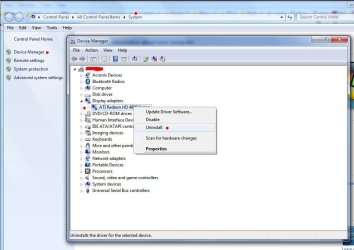
1) In Windows Device Manager, find the Display device. Right click and choose uninstall (all as per screen shot)
2) Shut down your machine, unplug the power, open the case.
3) Making sure that you are grounded against the case with bare arm or hand (devices are sensitive to static electricity), insert the new card
4) connect monitor to back of new card, plug machine back in, turn on, boot into bios (often the Del or F2 key)
5) Look for bios item (as per first paragraph)
6) Disable Onboard graphics
7) save & exit
8) Allow machine to boot into windows.

Chances are that windows will have a driver for it, although it may not be the best choice...I use ATI's drivers. You should DL the latest 64 bit driver from Nvidia (since your specs state that you are running 64 bit). Point windows to the driver (or use windows driver if you prefer). That should do it.

Post back if you have problems or further questions.

Good luck,
James

Edit: It might be worth mentioning that the PCI-E slot will likely have a rentention clip (usually plastic), which you should take note of and position accordingly.
 

Attachments

  • Device Manager.JPG
    Device Manager.JPG
    73.1 KB · Views: 30
Last edited:

My Computer My Computer

At a glance

Win7U 64 RTMQ95508GB GskillASUS|EAH4850/HTDI/1GD3/A
OS
Win7U 64 RTM
CPU
Q9550
Motherboard
GA-EP45-UD3R
Memory
8GB Gskill
Graphics Card(s)
ASUS|EAH4850/HTDI/1GD3/A
Sound Card
xfi Plat
Monitor(s) Displays
Dell 2405fpw
Screen Resolution
1920x1200
Hard Drives
Seagate & WD sata Drives
PSU
Antec
Case
Antec
Keyboard
MS Natural Ergonomic 4000
Mouse
Logitech MX610 USB Cordless
Been recuperating from knee replacement surgery, so this is my first time bakt to the computer in a while. Anyway, thanks Jim for your detailed help. As the computer has been running just fine, I think I'll leave well enugh alone. However, if the graphic device does go all the way south, I'll have your post as reference on repair.
 

My Computer My Computer

At a glance

Windows 7 HP 64-bit4GB/4GB
Computer Manufacturer/Model Number
Gateway DX4720-03/HP Pavilion dv6
OS
Windows 7 HP 64-bit
Memory
4GB/4GB
Antivirus
Avast Pro
Browser
Firefox, the latest
Back
Top