Multi core CPUs

Franky

New member
Member
VIP
Local time
8:02 AM
Messages
472
Location
Kurdistan
Hello,

Nowadays most of the PCs have a multi-core CPU with a clock speed in GHZ. My question is about that clock speed and the cores.
For example consider a CPU which has a 2 actual cores and 2 virtual cores (e.g., Intel core i3) and the computer system properties shows the 3.0 GHz as clock cycle speed.

1- Does that (say) 3.0 GHz show the clock speed of each core (from that core i3 CPU so that totally speed will be 4*3.0 GHZ = 12.0 GHZ!?) or that 3.0 GHZ is the entire speed of all cores?

2- Do the virtual cores have the identical effect as the actual cores in performance!?

And as well as I have a question about ROM :) .
Do ROMs anymore exist in current new PCes?

Thanks.
 
Last edited:

My Computer

Computer type
PC/Desktop
OS
windows 7 32-bit
CPU
Intel(R) Core(TM) i3-2120 CPU @ 3.30GHz
Motherboard
Gigabyte Technology Co., Ltd. P61A-D3
Memory
4.00 GB
Graphics Card(s)
NVIDIA GeForce GTS 450
Sound Card
(1) NVIDIA High Definition Audio (2) NVIDIA Virtual Audio
Monitor(s) Displays
Samsung
Hard Drives
ST500DM002-1BC142 ATA Device
Internet Speed
1 Mbps
Antivirus
KIS 2013
Browser
chrome
Each core is clocked at the same speed, so that they are performing their functions at the clock speed of the processor.
3.0GHz is entire speed of all cores in your example.

Things occur in parallel (each core) it does not multiply the clock by 4 in the case of a 4 core processor.

Virtual cores do not have the same performance as actual cores but they do allow for some parallel processing.

True ROMs are not likely found in modern PC's but programmable ROMs are in the form of the BIOS.
 

My Computer

Computer type
PC/Desktop
Computer Manufacturer/Model Number
Custom Built
OS
Windows 10 Pro x64, Windows 8.1 Pro x64, Windows 7 Ultimate x64 SP1,
CPU
INTEL i9-7920X LGA 2066
Motherboard
Gigabyte X299-WU8 F3
Memory
64 GB (4 X 16 GB) G-Skill V Series DDR4 3200 Quad Channel
Graphics Card(s)
EVGA GTX 1060 SC 3 GB
Sound Card
Realtek Onboard ALC1220
Monitor(s) Displays
2 x Samsung S27E310
Screen Resolution
1920x1080
Hard Drives
Samsung 2 x 970 EVO Plus 500 GB NVMe
1 x 6TB WD 6003FZBX SATA
1 x 6TB WD 60EFRX SATA
12 x 3TB WD 30EFRX SATA
PSU
Seasonic X-1050
Case
Thermaltake Armor+
Cooling
Corsair H80i V2 Liquid AOI Cooler
Keyboard
Logitech G510s
Mouse
Logitech MX Master 2S
Internet Speed
200 Mb/s
Antivirus
ESET NOD32 13.1
Browser
EDGE (Dev, Canary, Beta), Chrome
Other Info
ASUS RT-AC68U router
Malwarebytes 4.0.4
1. I've seen some unscrupulous sellers on Ebay advertising amazing 6GHz computers (and higher), but when you read the spec you only get some old dual core Pentium that the seller says is 2 x 3GHz ie 6GHz. A rip off.

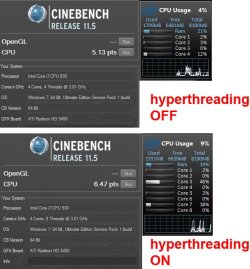
2. Hyper-threading may give extra cores, but they are not equal to real cores. I did a test a while ago using a quad core i7 930, with HT turned on + off in the BIOS. Using Cinebench (equivalent to video rendering), the scores are directly proportional to cpu power. Hyperthreading gave a 26% boost - see pic

ht_on_off.jpg

all cores were at 100% during the test - the screenshots were taken after the test so cores on idle. BTW not all software is written to utilize multiple threads to 100%. You can compare different cpu's power on this site

PassMark - CPU Benchmarks - List of Benchmarked CPUs
 

My Computer

Computer type
PC/Desktop
Computer Manufacturer/Model Number
self build
OS
Windows 7 pro x64 SP1
CPU
Intel i7-2600k o/c to 4.6GHz
Motherboard
MSI Z68-GD80
Memory
8GB Mushkin 1866MHz
Graphics Card(s)
Nvidia GTX 750 Ti 2GB
Sound Card
integrated
Monitor(s) Displays
Liyama ProLite 27"
Screen Resolution
1920*1080 px
Hard Drives
Seagate 2TB
PSU
Coolermaster GX 750W
Case
Antec 300 case + 5 fans
Cooling
Dark Rock Pro
Internet Speed
62Mbit down 18Mbit up
Antivirus
MSE
Browser
Firefox
Other Info
Blackgold BGT3650 Quad HD TV card. Also have various 3770 + 4770K render boxes.
The number of cores and the clock speed are independent specifications and there is no relationship between them.

When hyper threading is enabled for each core there is a real physical core and a logical core. The OS will see them as 2 cores. But the logical core doesn't have any processing hardware of it's own so can't directly contribute to performance. They do benefit performance under some situations for reasons that are quite technical which I will attempt to describe.

Older systems like XP had only limited awareness of hyper threading and prior systems had none at all. In these systems hyper hyper threading would often impair performance. Newer systems have a better awareness and hyper threading will be of benefit. But don't expect much, maybe 10-20% at most.
 

My Computer

Computer type
PC/Desktop
Computer Manufacturer/Model Number
HP
OS
Windows 7 Pro 64 bit
CPU
Xeon W3520
Memory
8 GB
Graphics Card(s)
Nvidia Geforce 210

My Computer

Computer type
PC/Desktop
Computer Manufacturer/Model Number
self build
OS
Windows 7 pro x64 SP1
CPU
Intel i7-2600k o/c to 4.6GHz
Motherboard
MSI Z68-GD80
Memory
8GB Mushkin 1866MHz
Graphics Card(s)
Nvidia GTX 750 Ti 2GB
Sound Card
integrated
Monitor(s) Displays
Liyama ProLite 27"
Screen Resolution
1920*1080 px
Hard Drives
Seagate 2TB
PSU
Coolermaster GX 750W
Case
Antec 300 case + 5 fans
Cooling
Dark Rock Pro
Internet Speed
62Mbit down 18Mbit up
Antivirus
MSE
Browser
Firefox
Other Info
Blackgold BGT3650 Quad HD TV card. Also have various 3770 + 4770K render boxes.
Thank you all. :)
The number of cores has been increased for performing parallel computing.
And also logical cores/threads again has been introduced for performing parallel computing when possible.
If so, so both multi-core and multi-thread (per each core) are useful just for parallel computing and just when possible. Yes?
 
Last edited:

My Computer

Computer type
PC/Desktop
OS
windows 7 32-bit
CPU
Intel(R) Core(TM) i3-2120 CPU @ 3.30GHz
Motherboard
Gigabyte Technology Co., Ltd. P61A-D3
Memory
4.00 GB
Graphics Card(s)
NVIDIA GeForce GTS 450
Sound Card
(1) NVIDIA High Definition Audio (2) NVIDIA Virtual Audio
Monitor(s) Displays
Samsung
Hard Drives
ST500DM002-1BC142 ATA Device
Internet Speed
1 Mbps
Antivirus
KIS 2013
Browser
chrome
Within reasonable limits having more cores will always be a benefit. But there is always a point of diminishing returns beyond which little gain will be noticed. Writing software that can take full advantage of multiple cores is difficult and as a result most software does not. You might have many applications open but most, if not all, are spending most of their time simply waiting for something to do. And as the old saying goes "All computers wait at the same speed".

Going from a single to dual core CPU will usually provide significant benefits, in system responsiveness if not in actual performance. With 4 and more cores benefits will be harder to find. Games will usually see little benefit, being more reliant on good graphics performance.

Of course there are exceptions, video rendering being one. These applications are very much dependent on CPU performance and developers do their best to take advantage of the CPU resources. As developers gain more experience with this and multiple core systems gain market share benefits will spread to other types of applications.
 

My Computer

Computer type
PC/Desktop
Computer Manufacturer/Model Number
HP
OS
Windows 7 Pro 64 bit
CPU
Xeon W3520
Memory
8 GB
Graphics Card(s)
Nvidia Geforce 210
Thank you very much lmiller for the explanations.
 

My Computer

Computer type
PC/Desktop
OS
windows 7 32-bit
CPU
Intel(R) Core(TM) i3-2120 CPU @ 3.30GHz
Motherboard
Gigabyte Technology Co., Ltd. P61A-D3
Memory
4.00 GB
Graphics Card(s)
NVIDIA GeForce GTS 450
Sound Card
(1) NVIDIA High Definition Audio (2) NVIDIA Virtual Audio
Monitor(s) Displays
Samsung
Hard Drives
ST500DM002-1BC142 ATA Device
Internet Speed
1 Mbps
Antivirus
KIS 2013
Browser
chrome
Back
Top