multiple BSOD all pointing towards ntkrnlmp.exe

That's good. Do some Disc checks on the other HDD.

  1. Re-seat the sata and power for both the HDD and SSD).

    72974453_zps85c47d93.jpg
  2. Run chkdsk /f/r, following the option two of the tutorial Disk Check
  3. Seatool for dos: SeaTools | Seagate download
    Burn it in a blank cd. boot from the CD, click on "Accept", wait for it to finish detecting the drives, then in the upper left corner select "Basic Tests", then select "Long Test" and let it run.
  4. Post a screenshot of both the HDD and SSD using CrystalDiskInfo - Software - Crystal Dew World.
How old the motherboard is, by the way? I guess it is not very old?
 

My Computer My Computer

Computer type
PC/Desktop
Computer Manufacturer/Model Number
Self Assembled
OS
Microsoft Windows 10 Pro Insider Preview 64-bit
CPU
Intel(R) Core(TM) i3-4130 CPU @ 3.40GHz
Motherboard
Gigabyte Technology Co., Ltd. B85M-D3H
Memory
Corsair Vengence 4GB x2 (8.00GB Dual-Channel DDR3 @ 798MHz)
Graphics Card(s)
2047MB GeForce GTS 450 (ZOTAC International)
Sound Card
Onboard (Realtek High Definition Audio)
Monitor(s) Displays
LG Flatron E2040T
Screen Resolution
1600x900
Hard Drives
Western Digital 1 TB
Seagate 500 GB
PSU
Corsair VS550
Case
Cooler Master K380
Cooling
Cooler Master Seidon 120V Plus
Keyboard
Logitech MK260r
Mouse
Logitech MK260r
Internet Speed
PMPL Broadband
Antivirus
Windows Defender + MBAM
Browser
Firefox
Other Info
Dell Studio 15" Laptop
alright ive done everything you asked so so far, in the rar file attached is the screen shots, the HDD i reused from my old computer that's why its been used so much. and for the mother board do you mean like since it came out? im going to guess 2013/05/24 (in the downloads page on the website, that's the date for when the manual was released)
 

My Computer My Computer

Computer type
PC/Desktop
Computer Manufacturer/Model Number
custom build
OS
windows 7 professional x64
CPU
i5-4670
Motherboard
gigabyte Z87M-D3H
Memory
kingston genisis 16 gb (4gb x 4)
Graphics Card(s)
GTX 650ti
Screen Resolution
1920 x 1080
Hard Drives
samsung ssd 840 120GB
hitachi 2TB
PSU
seasonic 550w
Case
dragon slayer microatx
Cooling
intel stock heatsink
Antivirus
MSE, malyware bytes
Browser
Chrome
Other Info
wireless card: linksys AE2500
Hdds are seeming to be good, apparently. All the failures are not expressed in CrystalDiscInfo though.

Disc failure is continuing here.
Code:
*******************************************************************************
*                                                                             *
*                        Bugcheck Analysis                                    *
*                                                                             *
*******************************************************************************

Use !analyze -v to get detailed debugging information.

BugCheck F4, {3, fffffa800ecd19e0, fffffa800ecd1cc0, fffff800037d6350}

----- ETW minidump data unavailable-----
Probably caused by : wininit.exe

Followup: MachineOwner
---------
In this situation, I'd like to see some more info.
upload your MSINFO32.nfo file.

  1. Click on the start button
  2. Type "msinfo32" (without quotes) in the search bar of the start menu, click the resulting link. It will open the System Information window.
  3. File>Save. In the "File Name" filed, put "MSINFO32" (without Quote), give the save location to desktop, and click the "save" button.
  4. Give the time for processing, it will save a .nfo file on your desktop.
  5. Zip it, and upload it following the instruction.
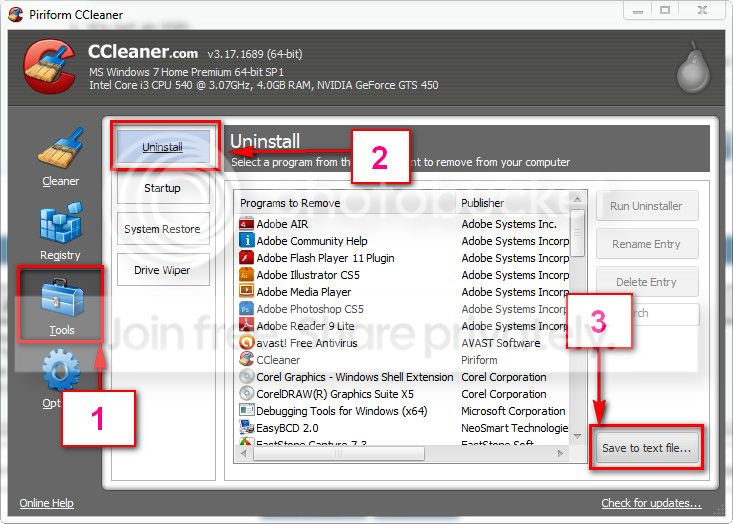
Download and install CCleaner. Then run it.
Go to "Tools" .... by default it will open the "uninstall" tab.
Click on save as text file. Save it on your desktop.
Upload the text file for us.
2012-11-02_224417.jpg


Realtek WiFi driver is also participation in the issue.
Code:
*******************************************************************************
*                                                                             *
*                        Bugcheck Analysis                                    *
*                                                                             *
*******************************************************************************

Use !analyze -v to get detailed debugging information.

BugCheck D1, {20, 2, 0, fffff88005b08dc3}

*** WARNING: Unable to verify timestamp for [URL="http://www.carrona.org/drivers/driver.php?id=rtl8192Ce.sys"]rtl8192Ce.sys[/URL]
*** ERROR: Module load completed but symbols could not be loaded for [URL="http://www.carrona.org/drivers/driver.php?id=rtl8192Ce.sys"]rtl8192Ce.sys[/URL]
Probably caused by : [URL="http://www.carrona.org/drivers/driver.php?id=rtl8192Ce.sys"]rtl8192Ce.sys [/URL]( rtl8192Ce+b3dc3 )

Followup: MachineOwner
---------
And the driver is old enough.
Code:
fffff880`05a55000 fffff880`05bc0000   rtl8192Ce T (no symbols)           
    Loaded symbol image file: rtl8192Ce.sys
    Image path: rtl8192Ce.sys
[COLOR=Red]    Image name: rtl8192Ce.sys
    Timestamp:        Fri Dec 03 16:26:21 2010[/COLOR] (4CF8CCD5)
    CheckSum:         00118EED
    ImageSize:        0016B000
    Translations:     0000.04b0 0000.04e4 0409.04b0 0409.04e4
Update it from Realtek

Let us know the results.
 

My Computer My Computer

Computer type
PC/Desktop
Computer Manufacturer/Model Number
Self Assembled
OS
Microsoft Windows 10 Pro Insider Preview 64-bit
CPU
Intel(R) Core(TM) i3-4130 CPU @ 3.40GHz
Motherboard
Gigabyte Technology Co., Ltd. B85M-D3H
Memory
Corsair Vengence 4GB x2 (8.00GB Dual-Channel DDR3 @ 798MHz)
Graphics Card(s)
2047MB GeForce GTS 450 (ZOTAC International)
Sound Card
Onboard (Realtek High Definition Audio)
Monitor(s) Displays
LG Flatron E2040T
Screen Resolution
1600x900
Hard Drives
Western Digital 1 TB
Seagate 500 GB
PSU
Corsair VS550
Case
Cooler Master K380
Cooling
Cooler Master Seidon 120V Plus
Keyboard
Logitech MK260r
Mouse
Logitech MK260r
Internet Speed
PMPL Broadband
Antivirus
Windows Defender + MBAM
Browser
Firefox
Other Info
Dell Studio 15" Laptop
well, i updated the ralink driver, but it was just continuous blue screens about 5 seconds after i logged in so i went to an old save. im starting to think maybe just format the drive and re install windows at this point. the blue screens are starting to get worse also, every coupleof minutes or so, windows task manager will cras; the task bar and icons on the desktop will disapear then about 10 seconds later it blue screens. i uploaded the stuff you asked for in the rar
 

My Computer My Computer

Computer type
PC/Desktop
Computer Manufacturer/Model Number
custom build
OS
windows 7 professional x64
CPU
i5-4670
Motherboard
gigabyte Z87M-D3H
Memory
kingston genisis 16 gb (4gb x 4)
Graphics Card(s)
GTX 650ti
Screen Resolution
1920 x 1080
Hard Drives
samsung ssd 840 120GB
hitachi 2TB
PSU
seasonic 550w
Case
dragon slayer microatx
Cooling
intel stock heatsink
Antivirus
MSE, malyware bytes
Browser
Chrome
Other Info
wireless card: linksys AE2500

My Computer My Computer

Computer type
PC/Desktop
Computer Manufacturer/Model Number
Self Assembled
OS
Microsoft Windows 10 Pro Insider Preview 64-bit
CPU
Intel(R) Core(TM) i3-4130 CPU @ 3.40GHz
Motherboard
Gigabyte Technology Co., Ltd. B85M-D3H
Memory
Corsair Vengence 4GB x2 (8.00GB Dual-Channel DDR3 @ 798MHz)
Graphics Card(s)
2047MB GeForce GTS 450 (ZOTAC International)
Sound Card
Onboard (Realtek High Definition Audio)
Monitor(s) Displays
LG Flatron E2040T
Screen Resolution
1600x900
Hard Drives
Western Digital 1 TB
Seagate 500 GB
PSU
Corsair VS550
Case
Cooler Master K380
Cooling
Cooler Master Seidon 120V Plus
Keyboard
Logitech MK260r
Mouse
Logitech MK260r
Internet Speed
PMPL Broadband
Antivirus
Windows Defender + MBAM
Browser
Firefox
Other Info
Dell Studio 15" Laptop
alright, i ran both of those. the antirootkit found 7 things, i deleted them all. then the windows defender didnt find anything after a full search. also i ran memtest for around 12 hours and got 13 passes.

i have had one or two blue screens today, but i managed to go around 5 hours since the last one. which compared to the 5 minutes per blue screen feels pretty darn great.

now im not sure if its fixed yet or not, only time will tell. but thank you so much for helping me through all this
 

My Computer My Computer

Computer type
PC/Desktop
Computer Manufacturer/Model Number
custom build
OS
windows 7 professional x64
CPU
i5-4670
Motherboard
gigabyte Z87M-D3H
Memory
kingston genisis 16 gb (4gb x 4)
Graphics Card(s)
GTX 650ti
Screen Resolution
1920 x 1080
Hard Drives
samsung ssd 840 120GB
hitachi 2TB
PSU
seasonic 550w
Case
dragon slayer microatx
Cooling
intel stock heatsink
Antivirus
MSE, malyware bytes
Browser
Chrome
Other Info
wireless card: linksys AE2500
The latest BSODs are stop 0xf4, too. And it appears that you havent informed us properly about the results of the tests. What was the result of memtest?

Have you performed the seatools test as suggested earlier in post #21? What was the result?
 

My Computer My Computer

Computer type
PC/Desktop
Computer Manufacturer/Model Number
Self Assembled
OS
Microsoft Windows 10 Pro Insider Preview 64-bit
CPU
Intel(R) Core(TM) i3-4130 CPU @ 3.40GHz
Motherboard
Gigabyte Technology Co., Ltd. B85M-D3H
Memory
Corsair Vengence 4GB x2 (8.00GB Dual-Channel DDR3 @ 798MHz)
Graphics Card(s)
2047MB GeForce GTS 450 (ZOTAC International)
Sound Card
Onboard (Realtek High Definition Audio)
Monitor(s) Displays
LG Flatron E2040T
Screen Resolution
1600x900
Hard Drives
Western Digital 1 TB
Seagate 500 GB
PSU
Corsair VS550
Case
Cooler Master K380
Cooling
Cooler Master Seidon 120V Plus
Keyboard
Logitech MK260r
Mouse
Logitech MK260r
Internet Speed
PMPL Broadband
Antivirus
Windows Defender + MBAM
Browser
Firefox
Other Info
Dell Studio 15" Laptop
Back
Top