Multiple BSODs at random use

romkush

New member
Local time
9:59 PM
Messages
9
Hello,
I'm having BSODs randomly, its very frustrating and I cant pinpoint to a single issue.
It come while playing games, facebook games, youtube videos and other things stressing my PC.
RAM is fine. I ran memtest86 all night without any errors.
CPU temp is 66 under full load.
Windows is up to date.
Single hardware change - adding a USB WiFi dapter (TP-Link 822)
Tried reinstalling ATI drivers and it didnt help. tried uninstalling it and using the windows driver, also didnt help.
Updated all my drivers and no change whatsoever.
Hope you can help me sort this thing out.
My setup:
OS: Windows 7 Home Premium 64bit GenuineCPU: Intel C2D E8400 Motherboard: Gigabyte EP43-DS3L Memory: 4GB G.Skill DDR2 PI-Black Graphics Card: XFX HD6870 Black Edition Hard Drive: WD 500GB Caviar Blue
 

My Computer

Computer type
PC/Desktop
OS
Windows 7 Home Premium 64bit
CPU
C2D E8400
Motherboard
Gigabyte EP43-DS3L
Memory
4GB G.Skill DDR2 PI-Black
Graphics Card(s)
XFX HD6870 Black Edition
Hard Drives
WD 500GB Caviar Blue
Antivirus
ESET
Browser
Firefox
Welcome to the forum romkush,

Reduce items at start-up:
Perform a clean boot:
If you are overclocking, please stop.

Please update these older drivers. Links are included to assist in looking up the source of the drivers. If unable to find an update, please remove (un-install) the program responsible for that driver. DO NOT manually delete/rename the driver as it may make the system unbootable!:-

Alpham264.sys Tue Mar 20 15:51:03 2007 (45FFAE87)
Ideazon ZBoard/Ideazon Fang MM USB HID driver
Driver Reference Table - Alpham264.sys

Alpham164.sys Mon Jul 23 13:57:03 2007 (46A45F4F)
Ideazon ZBoard/Ideazon ZBoard Fang MM USB HID
Driver Reference Table - Alpham164.sys

WinRing0x64.sys Sat Jul 26 19:29:37 2008 (488B26C1)
many different programs that center around the using of the WinRing libraries (RealTemp, Corsair Link2 (known BSOD issues w/Win8), Razer GameBooster, etc)
Driver Reference Table - WinRing0x64.sys

AppleCharger.sys Mon Jan 10 15:57:29 2011 (4D2AD809)
GIGABYTE On/Off Charge driver. See here for details - GIGABYTE ON/OFF Charge [br] May cause BSOD on Win7/8 systems - uninstall to test (haven't seen recently (15Jan2013))
Driver Reference Table - AppleCharger.sys

To perform a clean install of a driver, follow this tutorial:
Use Revo Uninstaller to uninstall stubborn software. Opt for Advance Mode while uninstalling which allows you to remove leftover registry:-
Run the System File Checker that scans the of all protected Windows 7 system files and replaces incorrect corrupted, changed/modified, or damaged versions with the correct versions if possible:
Recommended antivirus software for Windows 7 based on stability compared to others:-
   Warning
:warn: Do not start the free trial of Malware Bytes; remember to deselect that option when prompted.

picture.php

Check for heating issues using Speccy or HWmonitor

Upload a screen shot:
Post a screenshot of your Hard Drive(s) using Crystal Disk Info software:
Run a Hard Drive test:
BSOD BUGCHECK SUMMARY:

Code:
[FONT="Lucida Console"]Built by: 7601.18409.amd64fre.win7sp1_gdr.140303-2144
Debug session time: Mon Jun 23 01:58:37.485 2014 (UTC + 6:00)
System Uptime: 0 days 4:39:10.829
BugCheck A, {fffff88009834ff8, d, 1, fffff80003a768bb}
Probably caused by : ntkrnlmp.exe ( nt!KiPageFault+260 )
BUGCHECK_STR:  0xA
PROCESS_NAME:  plugin-contain
¨¨¨¨¨¨¨¨¨¨¨¨¨¨¨¨¨¨¨¨¨¨¨¨¨¨¨¨¨¨¨¨¨¨¨¨¨¨¨¨¨¨¨¨¨¨¨¨¨¨¨¨¨¨¨¨¨¨¨¨¨¨¨¨¨¨¨¨¨¨¨¨¨¨¨¨¨¨¨¨¨¨¨¨¨¨``
Built by: 7601.18409.amd64fre.win7sp1_gdr.140303-2144
Debug session time: Sun Jun 22 14:10:08.727 2014 (UTC + 6:00)
System Uptime: 0 days 11:37:01.054
BugCheck 50, {fffff900c2fd5ff8, 0, fffff96000175ce0, 0}
Probably caused by : win32k.sys ( win32k!memmove+300 )
BUGCHECK_STR:  0x50
PROCESS_NAME:  ASC.exe
¨¨¨¨¨¨¨¨¨¨¨¨¨¨¨¨¨¨¨¨¨¨¨¨¨¨¨¨¨¨¨¨¨¨¨¨¨¨¨¨¨¨¨¨¨¨¨¨¨¨¨¨¨¨¨¨¨¨¨¨¨¨¨¨¨¨¨¨¨¨¨¨¨¨¨¨¨¨¨¨¨¨¨¨¨¨``
Built by: 7601.18409.amd64fre.win7sp1_gdr.140303-2144
Debug session time: Fri Jun 20 19:21:17.238 2014 (UTC + 6:00)
System Uptime: 0 days 6:36:59.565
BugCheck 3B, {c0000005, fffff8800f1be569, fffff880093be7b0, 0}
Probably caused by : atikmdag.sys ( atikmdag+127569 )
BUGCHECK_STR:  0x3B
PROCESS_NAME:  killteam.exe
¨¨¨¨¨¨¨¨¨¨¨¨¨¨¨¨¨¨¨¨¨¨¨¨¨¨¨¨¨¨¨¨¨¨¨¨¨¨¨¨¨¨¨¨¨¨¨¨¨¨¨¨¨¨¨¨¨¨¨¨¨¨¨¨¨¨¨¨¨¨¨¨¨¨¨¨¨¨¨¨¨¨¨¨¨¨``
Built by: 7601.18409.amd64fre.win7sp1_gdr.140303-2144
Debug session time: Fri Jun 20 12:43:12.880 2014 (UTC + 6:00)
System Uptime: 0 days 0:02:15.082
BugCheck 50, {fffff88006c3aff8, 0, fffff80003acb8b5, 0}
Probably caused by : ntkrnlmp.exe ( nt! ?? ::FNODOBFM::`string'+4518f )
BUGCHECK_STR:  0x50
PROCESS_NAME:  svchost.exe
¨¨¨¨¨¨¨¨¨¨¨¨¨¨¨¨¨¨¨¨¨¨¨¨¨¨¨¨¨¨¨¨¨¨¨¨¨¨¨¨¨¨¨¨¨¨¨¨¨¨¨¨¨¨¨¨¨¨¨¨¨¨¨¨¨¨¨¨¨¨¨¨¨¨¨¨¨¨¨¨¨¨¨¨¨¨``
[/FONT]
 

My Computer

Computer type
PC/Desktop
Computer Manufacturer/Model Number
Self assembled
OS
Windows 10 Home 64Bit
CPU
Intel Core i5 10400 @ 2.90GHz
Motherboard
Intel Corporation DG41WV (PROCESSOR)
Memory
8.00GB Single-Channel Unknown @ 1329MHz (16-20-20-38)
Sound Card
Realtek High Definition Audio
Monitor(s) Displays
DELL E170S
Screen Resolution
1280x1024 pixels
Hard Drives
931GB TOSHIBA DT01ACA100 (SATA)
238GB TEAM TM8PS7256G (SATA SSD)
Case
Nothing Fancy
Cooling
Fans
Keyboard
A4 Tech Co LTD
Mouse
A4 Tech Co Ltd/Logitech
Internet Speed
25 Mbps
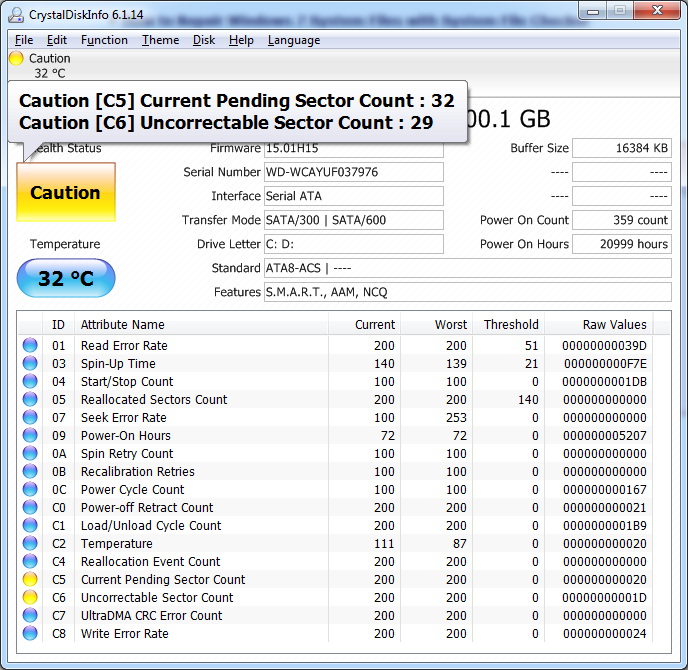
Short DST - FAILED with seatools but scandisk wont find any errors.
Cant repair because its a WD drive.
CrystalDiskInfo screenshot:

W150YTr.png
 

My Computer

Computer type
PC/Desktop
OS
Windows 7 Home Premium 64bit
CPU
C2D E8400
Motherboard
Gigabyte EP43-DS3L
Memory
4GB G.Skill DDR2 PI-Black
Graphics Card(s)
XFX HD6870 Black Edition
Hard Drives
WD 500GB Caviar Blue
Antivirus
ESET
Browser
Firefox
Anyone?
 

My Computer

Computer type
PC/Desktop
OS
Windows 7 Home Premium 64bit
CPU
C2D E8400
Motherboard
Gigabyte EP43-DS3L
Memory
4GB G.Skill DDR2 PI-Black
Graphics Card(s)
XFX HD6870 Black Edition
Hard Drives
WD 500GB Caviar Blue
Antivirus
ESET
Browser
Firefox
Follow this

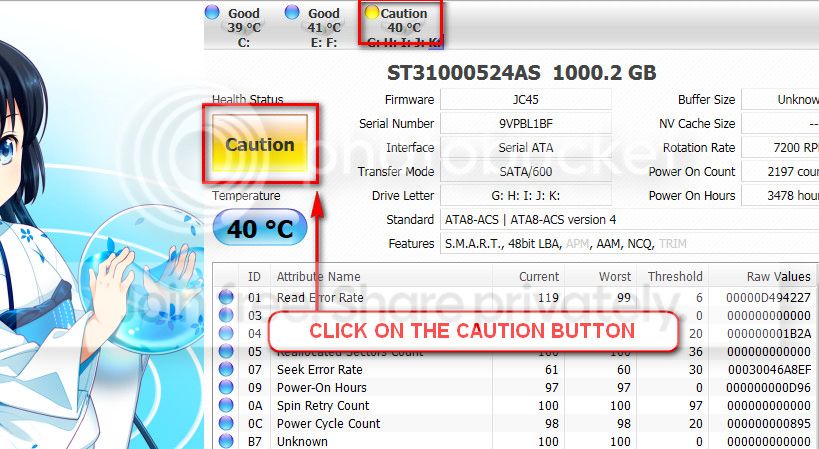
The caution indication can be converted to good using CrystalDiscInfo. Click on the caution Button, you will get another window ....
1_zps1eeadfca.jpg


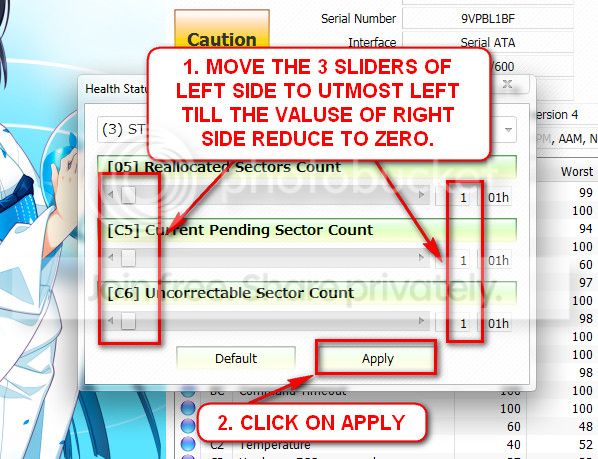
In the resulting window, there are three sliders in the left. Drag them to the ultimate left, and notice the values at the right side are converting to zeros.
2_zps50ae6eec.jpg


Now click the apply button, and notice that the caution is gone.
 

My Computer

Computer type
PC/Desktop
Computer Manufacturer/Model Number
Self assembled
OS
Windows 10 Home 64Bit
CPU
Intel Core i5 10400 @ 2.90GHz
Motherboard
Intel Corporation DG41WV (PROCESSOR)
Memory
8.00GB Single-Channel Unknown @ 1329MHz (16-20-20-38)
Sound Card
Realtek High Definition Audio
Monitor(s) Displays
DELL E170S
Screen Resolution
1280x1024 pixels
Hard Drives
931GB TOSHIBA DT01ACA100 (SATA)
238GB TEAM TM8PS7256G (SATA SSD)
Case
Nothing Fancy
Cooling
Fans
Keyboard
A4 Tech Co LTD
Mouse
A4 Tech Co Ltd/Logitech
Internet Speed
25 Mbps
Have you completed the rest of the steps? :sarc:
 

My Computer

Computer type
PC/Desktop
Computer Manufacturer/Model Number
Self assembled
OS
Windows 10 Home 64Bit
CPU
Intel Core i5 10400 @ 2.90GHz
Motherboard
Intel Corporation DG41WV (PROCESSOR)
Memory
8.00GB Single-Channel Unknown @ 1329MHz (16-20-20-38)
Sound Card
Realtek High Definition Audio
Monitor(s) Displays
DELL E170S
Screen Resolution
1280x1024 pixels
Hard Drives
931GB TOSHIBA DT01ACA100 (SATA)
238GB TEAM TM8PS7256G (SATA SSD)
Case
Nothing Fancy
Cooling
Fans
Keyboard
A4 Tech Co LTD
Mouse
A4 Tech Co Ltd/Logitech
Internet Speed
25 Mbps
No because I have no idea how to update the drivers.
I dont have any of the programs listed with them.
 

My Computer

Computer type
PC/Desktop
OS
Windows 7 Home Premium 64bit
CPU
C2D E8400
Motherboard
Gigabyte EP43-DS3L
Memory
4GB G.Skill DDR2 PI-Black
Graphics Card(s)
XFX HD6870 Black Edition
Hard Drives
WD 500GB Caviar Blue
Antivirus
ESET
Browser
Firefox
WinRing0x64.sys belongs to real temp which should be updated or removed.

Alpham is a USB HID driver that's part of Ideazon which you have installed.

I would say looking at the dumps strong indication of bad RAM but given that you've already ran it all night with no errors I think it could be a driver issue.

I suggest running Driver Verifier.


   Information
What is Driver Verifier?


Driver Verifier is a driver monitoring program built into Windows from Windows 2000 and later.
Depending on the settings Driver Verifier stresses the driver selected and tries to force them to crash which causes a BSOD.


How to enable Driver Verifier:


Go to Start
Type in verifier.exe
Click on Create customer settings (for code developers)
Select Standard settings and IRP Logging
Then hit next
Click Select driver names from a list
Select all drivers not created by Microsoft, Macrovision or Unknown
Finally click finish then reboot your computer


What happens if it finds something?


When Driver Verifier finds a violation with a driver it bugchecks the system hopefully with the driver responsible identified.


How long should I run it for?


Normally around 24 hours, if it finds nothing by then chances are it's not a driver issue.


Do I need to do anything in particular when running Driver Verifier?


No, just do what you normally do when the system crashes to help maximize the chances of a crash.
 

My Computer

Computer type
PC/Desktop
With driver ferifier enabled system crashes at the windows welcome screen.
No new dumps were created.
 

My Computer

Computer type
PC/Desktop
OS
Windows 7 Home Premium 64bit
CPU
C2D E8400
Motherboard
Gigabyte EP43-DS3L
Memory
4GB G.Skill DDR2 PI-Black
Graphics Card(s)
XFX HD6870 Black Edition
Hard Drives
WD 500GB Caviar Blue
Antivirus
ESET
Browser
Firefox
Today i installed a new HDD, reinstalled windows, motherboard drivers, GPU driver and wifi adapter driver.
Several BSODs while updating windows and after.
Attached new dumps.
 

My Computer

Computer type
PC/Desktop
OS
Windows 7 Home Premium 64bit
CPU
C2D E8400
Motherboard
Gigabyte EP43-DS3L
Memory
4GB G.Skill DDR2 PI-Black
Graphics Card(s)
XFX HD6870 Black Edition
Hard Drives
WD 500GB Caviar Blue
Antivirus
ESET
Browser
Firefox
I'm seeing a lot of memory corruption here.

Code:
BugCheck 3B, {[COLOR="Red"]c0000005[/COLOR], fffff800030b8ea5, fffff88006f51f80, 0}

Probably caused by : [COLOR="red"]memory_corruption[/COLOR] ( [COLOR="Red"]nt!MiDeleteVirtualAddresses+49d[/COLOR] )

Code:
BugCheck [COLOR="red"]BE[/COLOR], {fffff8a00a18dff8, [COLOR="Green"]8000000088435121[/COLOR], fffff88006c4f5b0, b}

Attempted write of read only memory can easily be caused by bad RAM.

Code:
0: kd> [COLOR="rgb(46, 139, 87)"]!pte 8000000088435121[/COLOR]
                                           VA 8000000088435121
PXE at FFFFF6FB7DBED000    PPE at FFFFF6FB7DA00010    PDE at FFFFF6FB40002210    PTE at FFFFF680004421A8
Unable to get PXE FFFFF6FB7DBED000
[COLOR="Red"]WARNING: noncanonical VA, accesses will fault ![/COLOR]

Code:
BugCheck 1E, {[COLOR="red"]ffffffffc0000005[/COLOR], fffff8000309b878, 0, [COLOR="red"]ffffffffffffffff[/COLOR]}

Here we see and access violation, with an attempt to read from an invalid address.

Code:
0: kd> [COLOR="Green"].trap fffff880`034fb820[/COLOR]
NOTE: The trap frame does not contain all registers.
Some register values may be zeroed or incorrect.
rax=0000000000003921 rbx=0000000000000000 rcx=0000000000000001
rdx=0000058000000000 rsi=0000000000000000 rdi=0000000000000000
rip=fffff8000309b878 rsp=fffff880034fb9b0 rbp=fffff6800004f280
 r8=0000000000000008  r9=fffff800032b6680 r10=0000000fffffffff
r11=fffff68000000000 r12=0000000000000000 r13=0000000000000000
r14=[COLOR="red"]0000000000000000[/COLOR] r15=0000000000000000
iopl=0         nv up ei pl nz na po nc
nt!MiDispatchFault+0x548:
fffff800`0309b878 410fb6561a      [COLOR="red"]movzx[/COLOR]   edx,byte ptr [[COLOR="Red"]r14+1Ah[/COLOR]] ds:00000000`0000001a=??

The register is zeroed, this may be true or the minidump hasn't recorded the information.

With all this said, I suggest running Memtest86+

   Information
Download it here:

Memtest86+ - Advanced Memory Diagnostic Tool

Which one should I download?

You have two options to choose from, you can either download the ISO version then burn it do a CD and boot it from there.
The other option is downloading the auto installer for USB sticks, you then boot from that USB stick.
Be warned though, it will format your USB then install the files needed to make it bootable so any files left over will be wiped off.

So how does it work?

It works by writing a series of test patterns to most memory addresses over 9 tests, it then reads the data back to compare it for errors.

The default pass does 9 different tests varying in access patterns and test data. A tenth pass is optional from the menu which writes all the memory in zeroes then sleeps for 90 minutes and compares it to see if any address have changed, this takes 3 hours per pass each time.

My memtest86 isn't booting! What should I do?

This can be caused by a number of different reasons, common ones include your BIOS not setting using the correct settings, you might want to change your boot priority order.
Other causes include your motherboard not supporting bootable USB sticks in which case you'll need to use a CD (or floppy drive).

Any other issues you might want to look here:

FAQ : please read before posting
 

My Computer

Computer type
PC/Desktop
@Thedoctor44

I ran memtest86+ all night and discovered no errors.
 

My Computer

Computer type
PC/Desktop
OS
Windows 7 Home Premium 64bit
CPU
C2D E8400
Motherboard
Gigabyte EP43-DS3L
Memory
4GB G.Skill DDR2 PI-Black
Graphics Card(s)
XFX HD6870 Black Edition
Hard Drives
WD 500GB Caviar Blue
Antivirus
ESET
Browser
Firefox
Enable Driver Verifier again, if it crashes and you can't get into Windows boot into Safe Mode.
Make sure you create a restore point before hand to allow you to restore back if you can't boot into safe mode.
 

My Computer

Computer type
PC/Desktop
@Thedoctor44

Enabled verifier - crashes on windows welcome screen with reference to srvnet.sys and ntfs.sys.
I am on safe mode now. attached the dumps.
 

My Computer

Computer type
PC/Desktop
OS
Windows 7 Home Premium 64bit
CPU
C2D E8400
Motherboard
Gigabyte EP43-DS3L
Memory
4GB G.Skill DDR2 PI-Black
Graphics Card(s)
XFX HD6870 Black Edition
Hard Drives
WD 500GB Caviar Blue
Antivirus
ESET
Browser
Firefox
I'm struggling to find anything despite Driver Verifier being enabled, it looks like a driver is hiding from it so I thought it'd be best to dump the raw stack.
System service exceptions can be caused by Anti Virus programs which we can see here. It's not surprising with the amount of filter drivers and other kernel mode drivers that issues are bound to happen with some of them.

Code:
fffff880`0294c5a0  fffff880`03cb0394Unable to load image \SystemRoot\system32\DRIVERS\eamonm.sys, Win32 error 0n2
*** WARNING: Unable to verify timestamp for eamonm.sys
*** ERROR: Module load completed but symbols could not be loaded for eamonm.sys
 [COLOR="Red"]eamonm+0x29394[/COLOR]

The ESET Amon driver is causing problems, more specifically it's causing working set corruption.

For testing purposes I suggest you replace it with MSE and Malwarebytes.

Microsoft Security Essentials - Microsoft Windows

Malwarebytes | Free Anti-Malware & Internet Security Software

   Tip

Make sure you don't enable the free trial of malwarebytes pro, deselect the option when prompted.


picture.php
 

My Computer

Computer type
PC/Desktop
It may have been a memory issue after all.
I have G.skill PI Black DDR2 memory rated at 900mhz CL4 at 2.1V
I underclocked it to 800mhz at 1.8V and so far no BSOD.
Could be wishful thinking but i hope that solves this issue.
 

My Computer

Computer type
PC/Desktop
OS
Windows 7 Home Premium 64bit
CPU
C2D E8400
Motherboard
Gigabyte EP43-DS3L
Memory
4GB G.Skill DDR2 PI-Black
Graphics Card(s)
XFX HD6870 Black Edition
Hard Drives
WD 500GB Caviar Blue
Antivirus
ESET
Browser
Firefox
Back
Top