Multiple Cause BSODs plaguing me, looking to fix as many as possible

Wrek

New member
Member
Local time
10:52 AM
Messages
32
Been plagued by several types of BSODs, its come to the point I could use some help with it. (And maybe even learn a thing or two!)
SF Diagnostic Tool "grab all" zip:
SF_13-06-2013.zip
 

My Computer My Computer

At a glance

Windows 7 Professional x64AMD Phenom(tm) II X6 1100T Processor 3.30GHz16,0 GB Kingston 4x4GBNvidia GTX 580
Computer type
PC/Desktop
Computer Manufacturer/Model Number
Custom Build
OS
Windows 7 Professional x64
CPU
AMD Phenom(tm) II X6 1100T Processor 3.30GHz
Motherboard
Asus Crosshair IV Formula
Memory
16,0 GB Kingston 4x4GB
Graphics Card(s)
Nvidia GTX 580
Hard Drives
one 596GB HD
one 931GB HD
Antivirus
Panda Global Protection 2013
Browser
20.1 Firefox
okay the dumps lead to many different suspects, but this one is in particular more specific.
Code:
Microsoft (R) Windows Debugger Version 6.2.9200.16384 AMD64
Copyright (c) Microsoft Corporation. All rights reserved.


Loading Dump File [C:\Users\Skyler\AppData\Local\Temp\Rar$DIa0.091\012513-19843-01.dmp]
Mini Kernel Dump File: Only registers and stack trace are available

Symbol search path is: SRV*C:\SymCache*http://msdl.microsoft.com/download/symbols
Executable search path is: 
Windows 7 Kernel Version 7601 (Service Pack 1) MP (6 procs) Free x64
Product: WinNt, suite: TerminalServer SingleUserTS
Built by: 7601.17944.amd64fre.win7sp1_gdr.120830-0333
Machine Name:
Kernel base = 0xfffff800`02a15000 PsLoadedModuleList = 0xfffff800`02c59670
Debug session time: Fri Jan 25 03:11:59.538 2013 (UTC - 5:00)
System Uptime: 0 days 6:22:57.694
Loading Kernel Symbols
.

Press ctrl-c (cdb, kd, ntsd) or ctrl-break (windbg) to abort symbol loads that take too long.
Run !sym noisy before .reload to track down problems loading symbols.

..............................................................
................................................................
.........................................
Loading User Symbols
Loading unloaded module list
........
*******************************************************************************
*                                                                             *
*                        Bugcheck Analysis                                    *
*                                                                             *
*******************************************************************************

Use !analyze -v to get detailed debugging information.

BugCheck 1E, {ffffffffc0000005, fffff8800c291380, 0, 0}

*** WARNING:[COLOR="red"] Unable to verify timestamp for NETTDI64.SYS[/COLOR]
*** ERROR: Module load completed but symbols could not be loaded for NETTDI64.SYS
[COLOR="red"]Probably caused by : NETTDI64.SYS [/COLOR]( NETTDI64+c286 )

Followup: MachineOwner
---------

5: kd> !analyze -v
*******************************************************************************
*                                                                             *
*                        Bugcheck Analysis                                    *
*                                                                             *
*******************************************************************************

KMODE_EXCEPTION_NOT_HANDLED (1e)
This is a very common bugcheck.  Usually the exception address pinpoints
the driver/function that caused the problem.  Always note this address
as well as the link date of the driver/image that contains this address.
Arguments:
Arg1: ffffffffc0000005, The exception code that was not handled
Arg2: fffff8800c291380, The address that the exception occurred at
Arg3: 0000000000000000, Parameter 0 of the exception
Arg4: 0000000000000000, Parameter 1 of the exception

Debugging Details:
------------------


READ_ADDRESS: GetPointerFromAddress: unable to read from fffff80002cc3100
GetUlongFromAddress: unable to read from fffff80002cc31c0
 ffffffffffffffff 

EXCEPTION_CODE: (NTSTATUS) 0xc0000005 - The instruction at 0x%08lx referenced memory at 0x%08lx. The memory could not be %s.

FAULTING_IP: 
+0
fffff880`0c291380 a822            test    al,22h

EXCEPTION_PARAMETER2:  ffffffffffffffff

BUGCHECK_STR:  0x1E_c0000005_R

CUSTOMER_CRASH_COUNT:  1

DEFAULT_BUCKET_ID:  WIN7_DRIVER_FAULT

PROCESS_NAME:  System

CURRENT_IRQL:  2

LAST_CONTROL_TRANSFER:  from fffff80002a986d0 to fffff80002a9937c

CONTEXT:  fffff8800c291b00 -- (.cxr 0xfffff8800c291b00)
rax=ffff9739bea17f15 rbx=fffffa800ff18000 rcx=fffffa800ff40040
rdx=fffffa800ff40148 rsi=0000000000000000 rdi=fffffa800ff40040
rip=fffff80002a9937c rsp=fffff8800c2924e0 rbp=fffffa800ca96040
 r8=fffffa800ff40040  r9=0000000000000008 r10=fffff80002a15000
r11=fffff8800c292530 r12=0000000000000000 r13=0000000d9780b44f
r14=00000000c0000016 r15=fffffa800ed2dec2
iopl=0         nv up ei ng nz na pe cy
cs=0010  ss=0018  ds=002b  es=002b  fs=0053  gs=002b             efl=00210283
nt!KiDeferredReadyThread+0x7c:
fffff800`02a9937c a12003000080f7ffff mov   eax,dword ptr [FFFFF78000000320h] ds:002b:fffff780`00000320=????????
Resetting default scope

STACK_TEXT:  
fffff880`0c2924e0 fffff800`02a986d0 : fffff880`03088180 fffffa80`0ff180e0 00000000`00000002 00000000`00000000 : nt!KiDeferredReadyThread+0x7c
fffff880`0c292560 fffff880`04685286 : fffffa80`00000000 00000000`00000000 fffffa80`0f488100 fffffa80`0ff40148 : nt!KeSetEvent+0x190
fffff880`0c2925d0 fffffa80`00000000 : 00000000`00000000 fffffa80`0f488100 fffffa80`0ff40148 00000000`0000011c : NETTDI64+0xc286
fffff880`0c2925d8 00000000`00000000 : fffffa80`0f488100 fffffa80`0ff40148 00000000`0000011c fffff880`0468ffd3 : 0xfffffa80`00000000


FOLLOWUP_IP: 
NETTDI64+c286
fffff880`04685286 ??              ???

SYMBOL_STACK_INDEX:  2

SYMBOL_NAME:  NETTDI64+c286

FOLLOWUP_NAME:  MachineOwner

MODULE_NAME:[COLOR="Red"] NETTDI64

IMAGE_NAME:  NETTDI64.SYS[/COLOR]

DEBUG_FLR_IMAGE_TIMESTAMP:  4abcb367

STACK_COMMAND:  .cxr 0xfffff8800c291b00 ; kb

FAILURE_BUCKET_ID:  X64_0x1E_c0000005_R_NETTDI64+c286

BUCKET_ID:  X64_0x1E_c0000005_R_NETTDI64+c286

Followup: MachineOwner
---------

now
NETTDI64.SYS = Panda Internet Security TDI Filter
so this is a quick reply while i look through the rest. For now uninstall panda Internet security, to see if the contemporary issues will stop at least provisionally. Also make sure your computer is clean of malware.
And while looking, i found another culprit. Probably the more likely reason.
dtsoftbus01.sys = Daemon Tools driver
This one above is a very popular BSOD giving program.
I Highly suggest uninstalling this one. Panda you may keep for now, but make sure Dameon tools is gone. Whatever you use it for we might be able to find and alternative. I will again continue searching through the rest of the dumps.
Another dump points to this : nvlddmkm.sys = nvidia drivers. Please use this link and update your graphics drivers = http://www.nvidia.com/Download/Scan.aspx

And finally this yk62x64.sys = Marvell Yukon networking
I would also try updating the drivers for this ^ which should be here as the 1st of the 3 results.
http://www.marvell.com/support/down...hXMsyT2tbDffvyry3ZpKjcy5hL4yzRPG7P!645878663#
 

My Computer My Computer

At a glance

Microsoft Windows 7 Ultimate 64-bit 7601 Mult...Intel(R) Core(TM) i7 CPU Q [email protected] (Turbo...4.00 GBATI Mobility Radeon HD 5730
Computer type
Laptop
Computer Manufacturer/Model Number
Lenovo Y560 Laptop
OS
Microsoft Windows 7 Ultimate 64-bit 7601 Multiprocessor Free Service Pack 1
CPU
Intel(R) Core(TM) i7 CPU Q [email protected] (Turbo boost 2.93ghz)
Motherboard
Lenovo KL3
Memory
4.00 GB
Graphics Card(s)
ATI Mobility Radeon HD 5730
Sound Card
(1) ATI HDMI Audio (2) Realtek High Definition Audio
Monitor(s) Displays
1024 x 768 x 32 bits (4294967296 colors) @ 60 Hz
Screen Resolution
1366 x 768 x 32 bits (4294967296 colors) @ 60 Hz
Hard Drives
WDC WD5000BEVT-24A0RT0
Mouse
Logitech M305
Internet Speed
10 Mbps
Antivirus
My brain
Browser
Google Chrome
Other Info
Trying my best to learn.
DAEMON TOOLS is removed
GPU driver is up to date (320.18)
Updated Marvel Yukon to latest driver.
 

My Computer My Computer

At a glance

Windows 7 Professional x64AMD Phenom(tm) II X6 1100T Processor 3.30GHz16,0 GB Kingston 4x4GBNvidia GTX 580
Computer type
PC/Desktop
Computer Manufacturer/Model Number
Custom Build
OS
Windows 7 Professional x64
CPU
AMD Phenom(tm) II X6 1100T Processor 3.30GHz
Motherboard
Asus Crosshair IV Formula
Memory
16,0 GB Kingston 4x4GB
Graphics Card(s)
Nvidia GTX 580
Hard Drives
one 596GB HD
one 931GB HD
Antivirus
Panda Global Protection 2013
Browser
20.1 Firefox
okay seems good, now how often do these bsods occur between intervals?
 

My Computer My Computer

At a glance

Microsoft Windows 7 Ultimate 64-bit 7601 Mult...Intel(R) Core(TM) i7 CPU Q [email protected] (Turbo...4.00 GBATI Mobility Radeon HD 5730
Computer type
Laptop
Computer Manufacturer/Model Number
Lenovo Y560 Laptop
OS
Microsoft Windows 7 Ultimate 64-bit 7601 Multiprocessor Free Service Pack 1
CPU
Intel(R) Core(TM) i7 CPU Q [email protected] (Turbo boost 2.93ghz)
Motherboard
Lenovo KL3
Memory
4.00 GB
Graphics Card(s)
ATI Mobility Radeon HD 5730
Sound Card
(1) ATI HDMI Audio (2) Realtek High Definition Audio
Monitor(s) Displays
1024 x 768 x 32 bits (4294967296 colors) @ 60 Hz
Screen Resolution
1366 x 768 x 32 bits (4294967296 colors) @ 60 Hz
Hard Drives
WDC WD5000BEVT-24A0RT0
Mouse
Logitech M305
Internet Speed
10 Mbps
Antivirus
My brain
Browser
Google Chrome
Other Info
Trying my best to learn.
I have had 2 today, 3 yesterday. Random intervals.
Some days i can run fine for a day or two, some days it can give me multiple BSODs.
Often occurs when gaming, most recently with Civilization 5. Has happened with other titles, aswell as when just browsing the web or watching youtube.
 

My Computer My Computer

At a glance

Windows 7 Professional x64AMD Phenom(tm) II X6 1100T Processor 3.30GHz16,0 GB Kingston 4x4GBNvidia GTX 580
Computer type
PC/Desktop
Computer Manufacturer/Model Number
Custom Build
OS
Windows 7 Professional x64
CPU
AMD Phenom(tm) II X6 1100T Processor 3.30GHz
Motherboard
Asus Crosshair IV Formula
Memory
16,0 GB Kingston 4x4GB
Graphics Card(s)
Nvidia GTX 580
Hard Drives
one 596GB HD
one 931GB HD
Antivirus
Panda Global Protection 2013
Browser
20.1 Firefox
I have had 2 today, 3 yesterday. Random intervals.
Some days i can run fine for a day or two, some days it can give me multiple BSODs.
Often occurs when gaming, most recently with Civilization 5. Has happened with other titles, aswell as when just browsing the web or watching youtube.

So when the pc is under more stress the bsods are more likely to show. In the dumps i found a lot of hardware pointers, and then the nvidia drivers alleviated my hope of it not being hardware. Well, run it normally and if u want take some time to game out a bit. Anymore dumps please upload.
 

My Computer My Computer

At a glance

Microsoft Windows 7 Ultimate 64-bit 7601 Mult...Intel(R) Core(TM) i7 CPU Q [email protected] (Turbo...4.00 GBATI Mobility Radeon HD 5730
Computer type
Laptop
Computer Manufacturer/Model Number
Lenovo Y560 Laptop
OS
Microsoft Windows 7 Ultimate 64-bit 7601 Multiprocessor Free Service Pack 1
CPU
Intel(R) Core(TM) i7 CPU Q [email protected] (Turbo boost 2.93ghz)
Motherboard
Lenovo KL3
Memory
4.00 GB
Graphics Card(s)
ATI Mobility Radeon HD 5730
Sound Card
(1) ATI HDMI Audio (2) Realtek High Definition Audio
Monitor(s) Displays
1024 x 768 x 32 bits (4294967296 colors) @ 60 Hz
Screen Resolution
1366 x 768 x 32 bits (4294967296 colors) @ 60 Hz
Hard Drives
WDC WD5000BEVT-24A0RT0
Mouse
Logitech M305
Internet Speed
10 Mbps
Antivirus
My brain
Browser
Google Chrome
Other Info
Trying my best to learn.
Will do!
 

My Computer My Computer

At a glance

Windows 7 Professional x64AMD Phenom(tm) II X6 1100T Processor 3.30GHz16,0 GB Kingston 4x4GBNvidia GTX 580
Computer type
PC/Desktop
Computer Manufacturer/Model Number
Custom Build
OS
Windows 7 Professional x64
CPU
AMD Phenom(tm) II X6 1100T Processor 3.30GHz
Motherboard
Asus Crosshair IV Formula
Memory
16,0 GB Kingston 4x4GB
Graphics Card(s)
Nvidia GTX 580
Hard Drives
one 596GB HD
one 931GB HD
Antivirus
Panda Global Protection 2013
Browser
20.1 Firefox
First crash of the day, Culprit: NETTDI.SYS again, I guess my AV has something to do with it after all? the string given was SYSTEM_THREAD_EXCEPTION_NOT_HANDLED, which was "new" to this sys file.
Most recent DMP:
 

My Computer My Computer

At a glance

Windows 7 Professional x64AMD Phenom(tm) II X6 1100T Processor 3.30GHz16,0 GB Kingston 4x4GBNvidia GTX 580
Computer type
PC/Desktop
Computer Manufacturer/Model Number
Custom Build
OS
Windows 7 Professional x64
CPU
AMD Phenom(tm) II X6 1100T Processor 3.30GHz
Motherboard
Asus Crosshair IV Formula
Memory
16,0 GB Kingston 4x4GB
Graphics Card(s)
Nvidia GTX 580
Hard Drives
one 596GB HD
one 931GB HD
Antivirus
Panda Global Protection 2013
Browser
20.1 Firefox
First crash of the day, Culprit: NETTDI.SYS again, I guess my AV has something to do with it after all? the string given was SYSTEM_THREAD_EXCEPTION_NOT_HANDLED, which was "new" to this sys file.
Most recent DMP:

hmm try uninstalling panda, and then going through with this
http://www.sevenforums.com/tutorials/101379-driver-verifier-enable-disable.html
Run it for a day and if no Bsod disable it. Upload any dumps.
What did you use daemon for? mounting iso,mds and such. like games?
also panda i believe is cloud based av?
 

My Computer My Computer

At a glance

Microsoft Windows 7 Ultimate 64-bit 7601 Mult...Intel(R) Core(TM) i7 CPU Q [email protected] (Turbo...4.00 GBATI Mobility Radeon HD 5730
Computer type
Laptop
Computer Manufacturer/Model Number
Lenovo Y560 Laptop
OS
Microsoft Windows 7 Ultimate 64-bit 7601 Multiprocessor Free Service Pack 1
CPU
Intel(R) Core(TM) i7 CPU Q [email protected] (Turbo boost 2.93ghz)
Motherboard
Lenovo KL3
Memory
4.00 GB
Graphics Card(s)
ATI Mobility Radeon HD 5730
Sound Card
(1) ATI HDMI Audio (2) Realtek High Definition Audio
Monitor(s) Displays
1024 x 768 x 32 bits (4294967296 colors) @ 60 Hz
Screen Resolution
1366 x 768 x 32 bits (4294967296 colors) @ 60 Hz
Hard Drives
WDC WD5000BEVT-24A0RT0
Mouse
Logitech M305
Internet Speed
10 Mbps
Antivirus
My brain
Browser
Google Chrome
Other Info
Trying my best to learn.
First crash of the day, Culprit: NETTDI.SYS again, I guess my AV has something to do with it after all? the string given was SYSTEM_THREAD_EXCEPTION_NOT_HANDLED, which was "new" to this sys file.
Most recent DMP:

hmm try uninstalling panda, and then going through with this
http://www.sevenforums.com/tutorials/101379-driver-verifier-enable-disable.html
Run it for a day and if no Bsod disable it. Upload any dumps.
What did you use daemon for? mounting iso,mds and such. like games?
also panda i believe is cloud based av?
Panda has a cloud function but global protection is the standard whole package in addition to AV. DAEMON was from making an ISO of my old warcraft 2 CD before it got broken enough to not be able to install. gona run driver verifier tomorrow and see where that leads, as well as uninstall panda.
 

My Computer My Computer

At a glance

Windows 7 Professional x64AMD Phenom(tm) II X6 1100T Processor 3.30GHz16,0 GB Kingston 4x4GBNvidia GTX 580
Computer type
PC/Desktop
Computer Manufacturer/Model Number
Custom Build
OS
Windows 7 Professional x64
CPU
AMD Phenom(tm) II X6 1100T Processor 3.30GHz
Motherboard
Asus Crosshair IV Formula
Memory
16,0 GB Kingston 4x4GB
Graphics Card(s)
Nvidia GTX 580
Hard Drives
one 596GB HD
one 931GB HD
Antivirus
Panda Global Protection 2013
Browser
20.1 Firefox
Not uninstalled Panda yet, driver verifier causes crash on boot. minidump included. will uninstall panda and try again

EDIT:
Upon removing panda windows will now boot when driver verifier is enabled, crashes upon welcome screen though, will include new minidump.

EDIT 2:
Ive let the comp BSOD a few times with the verifier running, gonna wait for further instructions. Here are the last 2 minidumps from this session.
 
Last edited:

My Computer My Computer

At a glance

Windows 7 Professional x64AMD Phenom(tm) II X6 1100T Processor 3.30GHz16,0 GB Kingston 4x4GBNvidia GTX 580
Computer type
PC/Desktop
Computer Manufacturer/Model Number
Custom Build
OS
Windows 7 Professional x64
CPU
AMD Phenom(tm) II X6 1100T Processor 3.30GHz
Motherboard
Asus Crosshair IV Formula
Memory
16,0 GB Kingston 4x4GB
Graphics Card(s)
Nvidia GTX 580
Hard Drives
one 596GB HD
one 931GB HD
Antivirus
Panda Global Protection 2013
Browser
20.1 Firefox
ok the before panda removal
Both dumps =
PavTPK.sys = Panda Internet Security
After the removal it still pointed at panda internet security.
do you have any registry cleaners or the such?
first use this : http://www.pandasecurity.com/resources/sop/UNINSTALLER.exe
second on your hard drive search "panda" and delete anything related to the antivirus,
next open "regedit" by typing it in the start menu. navigate to here in regedit
HKEY_LOCAL_MACHINE\SOFTWARE\Panda Software\Setup\Hotfix
if its is there right click the hotfix folder and delete it. This may not be there.
 

My Computer My Computer

At a glance

Microsoft Windows 7 Ultimate 64-bit 7601 Mult...Intel(R) Core(TM) i7 CPU Q [email protected] (Turbo...4.00 GBATI Mobility Radeon HD 5730
Computer type
Laptop
Computer Manufacturer/Model Number
Lenovo Y560 Laptop
OS
Microsoft Windows 7 Ultimate 64-bit 7601 Multiprocessor Free Service Pack 1
CPU
Intel(R) Core(TM) i7 CPU Q [email protected] (Turbo boost 2.93ghz)
Motherboard
Lenovo KL3
Memory
4.00 GB
Graphics Card(s)
ATI Mobility Radeon HD 5730
Sound Card
(1) ATI HDMI Audio (2) Realtek High Definition Audio
Monitor(s) Displays
1024 x 768 x 32 bits (4294967296 colors) @ 60 Hz
Screen Resolution
1366 x 768 x 32 bits (4294967296 colors) @ 60 Hz
Hard Drives
WDC WD5000BEVT-24A0RT0
Mouse
Logitech M305
Internet Speed
10 Mbps
Antivirus
My brain
Browser
Google Chrome
Other Info
Trying my best to learn.
ok the before panda removal
Both dumps =
PavTPK.sys = Panda Internet Security
After the removal it still pointed at panda internet security.
do you have any registry cleaners or the such?
first use this : http://www.pandasecurity.com/resources/sop/UNINSTALLER.exe
second on your hard drive search "panda" and delete anything related to the antivirus,
next open "regedit" by typing it in the start menu. navigate to here in regedit
HKEY_LOCAL_MACHINE\SOFTWARE\Panda Software\Setup\Hotfix
if its is there right click the hotfix folder and delete it. This may not be there.
Sorry Skylais, i messed up which dumps i selected, the current edit of my previous post has the proper ones. sorry for the inconvenience. (writing from safe mode, hard to keep track of everything)
 

My Computer My Computer

At a glance

Windows 7 Professional x64AMD Phenom(tm) II X6 1100T Processor 3.30GHz16,0 GB Kingston 4x4GBNvidia GTX 580
Computer type
PC/Desktop
Computer Manufacturer/Model Number
Custom Build
OS
Windows 7 Professional x64
CPU
AMD Phenom(tm) II X6 1100T Processor 3.30GHz
Motherboard
Asus Crosshair IV Formula
Memory
16,0 GB Kingston 4x4GB
Graphics Card(s)
Nvidia GTX 580
Hard Drives
one 596GB HD
one 931GB HD
Antivirus
Panda Global Protection 2013
Browser
20.1 Firefox
It is okay!, next dumps point at your audio drivers
VMfilt64.sys = VIA audio driver
Did you buy this new? or used? or built it?
hmm. let me look through your drivers and help determine what model audio card you have unless you know it already.
This is the page VIA Drivers Download - VIA Technologies, Inc.
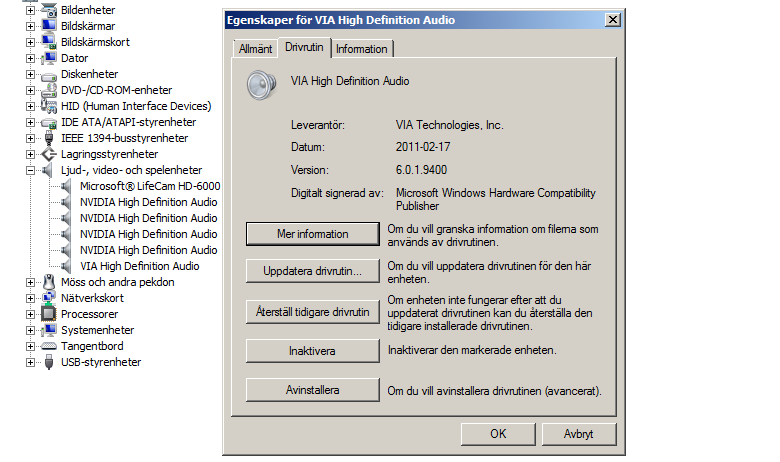
If you do not know, do you mind snapshotting the audio card details under "device manager".
I cannot read or understand the language in the systeminfo.nfo file. If you can find the card device number download the right version here : VIA Drivers Download - VIA Technologies, Inc.

Also if you can go to your manufacturer site see if they have a driver automatic updating type of thing.
 

My Computer My Computer

At a glance

Microsoft Windows 7 Ultimate 64-bit 7601 Mult...Intel(R) Core(TM) i7 CPU Q [email protected] (Turbo...4.00 GBATI Mobility Radeon HD 5730
Computer type
Laptop
Computer Manufacturer/Model Number
Lenovo Y560 Laptop
OS
Microsoft Windows 7 Ultimate 64-bit 7601 Multiprocessor Free Service Pack 1
CPU
Intel(R) Core(TM) i7 CPU Q [email protected] (Turbo boost 2.93ghz)
Motherboard
Lenovo KL3
Memory
4.00 GB
Graphics Card(s)
ATI Mobility Radeon HD 5730
Sound Card
(1) ATI HDMI Audio (2) Realtek High Definition Audio
Monitor(s) Displays
1024 x 768 x 32 bits (4294967296 colors) @ 60 Hz
Screen Resolution
1366 x 768 x 32 bits (4294967296 colors) @ 60 Hz
Hard Drives
WDC WD5000BEVT-24A0RT0
Mouse
Logitech M305
Internet Speed
10 Mbps
Antivirus
My brain
Browser
Google Chrome
Other Info
Trying my best to learn.
00LSjWE.png

This comp has a few years running so I wouldn't be surprised if stuff is out of date, here's (what i think) you're asking for driver wise.
I am however unsure what to pick from the site you linked. Worst case i wouldn't mind at all translating any unreadable text >_>

EDIT:
Looking up my motherboard specs it appears that I have the VIA VT2020, I will download this from your link now.
EDIT 2:
Only one I can find is 2020S, i cannot seem to find the 2020.
 

My Computer My Computer

At a glance

Windows 7 Professional x64AMD Phenom(tm) II X6 1100T Processor 3.30GHz16,0 GB Kingston 4x4GBNvidia GTX 580
Computer type
PC/Desktop
Computer Manufacturer/Model Number
Custom Build
OS
Windows 7 Professional x64
CPU
AMD Phenom(tm) II X6 1100T Processor 3.30GHz
Motherboard
Asus Crosshair IV Formula
Memory
16,0 GB Kingston 4x4GB
Graphics Card(s)
Nvidia GTX 580
Hard Drives
one 596GB HD
one 931GB HD
Antivirus
Panda Global Protection 2013
Browser
20.1 Firefox
under device manager click details, and on the drop down list select device instance path
you should get a string looking kinda like this
HDAUDIO\FUNC_01&VEN_14F1&DEV_5051&SUBSYS_10250292&REV_1000\4&6F8187B&0&0001
Copy and paste it here.


Oh and ! if u wanna learn a thing or two:) you can do this for about any driver and even unknown drivers this can be really helpful. Here is the break down
Once u get that funky looking string like this
HDAUDIO\FUNC_01&VEN_14F1&DEV_5051&SUBSYS_10250292&REV_1000\4&6F8187B&0&0001
The red = The device and vendor id codes, and the pink ish color will tell u if its vendor or device. normally they are small digits like that, and what you do with these is plug em in at a website like this PCI Vendor and Device Lists
From here you can find usually what exact device it is by simply inputting a digit group.!
 

My Computer My Computer

At a glance

Microsoft Windows 7 Ultimate 64-bit 7601 Mult...Intel(R) Core(TM) i7 CPU Q [email protected] (Turbo...4.00 GBATI Mobility Radeon HD 5730
Computer type
Laptop
Computer Manufacturer/Model Number
Lenovo Y560 Laptop
OS
Microsoft Windows 7 Ultimate 64-bit 7601 Multiprocessor Free Service Pack 1
CPU
Intel(R) Core(TM) i7 CPU Q [email protected] (Turbo boost 2.93ghz)
Motherboard
Lenovo KL3
Memory
4.00 GB
Graphics Card(s)
ATI Mobility Radeon HD 5730
Sound Card
(1) ATI HDMI Audio (2) Realtek High Definition Audio
Monitor(s) Displays
1024 x 768 x 32 bits (4294967296 colors) @ 60 Hz
Screen Resolution
1366 x 768 x 32 bits (4294967296 colors) @ 60 Hz
Hard Drives
WDC WD5000BEVT-24A0RT0
Mouse
Logitech M305
Internet Speed
10 Mbps
Antivirus
My brain
Browser
Google Chrome
Other Info
Trying my best to learn.
I think i found it:
HDAUDIO\FUNC_01&VEN_1106&DEV_0441&SUBSYS_104383E4&REV_1001
HDAUDIO\FUNC_01&VEN_1106&DEV_0441&SUBSYS_104383E4


oh and thanks for the driver identification crash course :D
 

My Computer My Computer

At a glance

Windows 7 Professional x64AMD Phenom(tm) II X6 1100T Processor 3.30GHz16,0 GB Kingston 4x4GBNvidia GTX 580
Computer type
PC/Desktop
Computer Manufacturer/Model Number
Custom Build
OS
Windows 7 Professional x64
CPU
AMD Phenom(tm) II X6 1100T Processor 3.30GHz
Motherboard
Asus Crosshair IV Formula
Memory
16,0 GB Kingston 4x4GB
Graphics Card(s)
Nvidia GTX 580
Hard Drives
one 596GB HD
one 931GB HD
Antivirus
Panda Global Protection 2013
Browser
20.1 Firefox
Try using the s version, i don't think it will effect much. If u can though try to see if you can find it at the mobo or manufacturers site.
Usually this works fine, but like it heeds in the warning here :
System manufacturers and motherboard vendors customize audio hardware and software and therefore, to ensure optimal sound quality and compatibility, we strongly recommend you to obtain the system-validated and certified audio drivers directly from your system manufacturer or motherboard manufacturer. If you use audio drivers provided on this website and you experience a difficulty, we recommend that you uninstall them and instead use the latest drivers supplied by your motherboard or system manufacturer.
 

My Computer My Computer

At a glance

Microsoft Windows 7 Ultimate 64-bit 7601 Mult...Intel(R) Core(TM) i7 CPU Q [email protected] (Turbo...4.00 GBATI Mobility Radeon HD 5730
Computer type
Laptop
Computer Manufacturer/Model Number
Lenovo Y560 Laptop
OS
Microsoft Windows 7 Ultimate 64-bit 7601 Multiprocessor Free Service Pack 1
CPU
Intel(R) Core(TM) i7 CPU Q [email protected] (Turbo boost 2.93ghz)
Motherboard
Lenovo KL3
Memory
4.00 GB
Graphics Card(s)
ATI Mobility Radeon HD 5730
Sound Card
(1) ATI HDMI Audio (2) Realtek High Definition Audio
Monitor(s) Displays
1024 x 768 x 32 bits (4294967296 colors) @ 60 Hz
Screen Resolution
1366 x 768 x 32 bits (4294967296 colors) @ 60 Hz
Hard Drives
WDC WD5000BEVT-24A0RT0
Mouse
Logitech M305
Internet Speed
10 Mbps
Antivirus
My brain
Browser
Google Chrome
Other Info
Trying my best to learn.
Try using the s version, i don't think it will effect much. If u can though try to see if you can find it at the mobo or manufacturers site.
Usually this works fine, but like it heeds in the warning here :
System manufacturers and motherboard vendors customize audio hardware and software and therefore, to ensure optimal sound quality and compatibility, we strongly recommend you to obtain the system-validated and certified audio drivers directly from your system manufacturer or motherboard manufacturer. If you use audio drivers provided on this website and you experience a difficulty, we recommend that you uninstall them and instead use the latest drivers supplied by your motherboard or system manufacturer.
I went to my MOBOs manufacturer site (ASUS Crosshair IV Formula) and found out there is a newer driver than the one I am using for my specific card, I will download this one and use it. What should be my next step after updating my audio driver?
 

My Computer My Computer

At a glance

Windows 7 Professional x64AMD Phenom(tm) II X6 1100T Processor 3.30GHz16,0 GB Kingston 4x4GBNvidia GTX 580
Computer type
PC/Desktop
Computer Manufacturer/Model Number
Custom Build
OS
Windows 7 Professional x64
CPU
AMD Phenom(tm) II X6 1100T Processor 3.30GHz
Motherboard
Asus Crosshair IV Formula
Memory
16,0 GB Kingston 4x4GB
Graphics Card(s)
Nvidia GTX 580
Hard Drives
one 596GB HD
one 931GB HD
Antivirus
Panda Global Protection 2013
Browser
20.1 Firefox
Your next step is to restart the computer with driver verifier still enabled to check for anymore bsod
 

My Computer My Computer

At a glance

Microsoft Windows 7 Ultimate 64-bit 7601 Mult...Intel(R) Core(TM) i7 CPU Q [email protected] (Turbo...4.00 GBATI Mobility Radeon HD 5730
Computer type
Laptop
Computer Manufacturer/Model Number
Lenovo Y560 Laptop
OS
Microsoft Windows 7 Ultimate 64-bit 7601 Multiprocessor Free Service Pack 1
CPU
Intel(R) Core(TM) i7 CPU Q [email protected] (Turbo boost 2.93ghz)
Motherboard
Lenovo KL3
Memory
4.00 GB
Graphics Card(s)
ATI Mobility Radeon HD 5730
Sound Card
(1) ATI HDMI Audio (2) Realtek High Definition Audio
Monitor(s) Displays
1024 x 768 x 32 bits (4294967296 colors) @ 60 Hz
Screen Resolution
1366 x 768 x 32 bits (4294967296 colors) @ 60 Hz
Hard Drives
WDC WD5000BEVT-24A0RT0
Mouse
Logitech M305
Internet Speed
10 Mbps
Antivirus
My brain
Browser
Google Chrome
Other Info
Trying my best to learn.
Back
Top