Multiple Disc Images ?

I renamed my previous image. When I went to create a new image the system searched & came back & said my last image was 6-3-2011, which is correct. But since it was renamed, how did the system find & recognize it?

Is this normal behavior? My concern is that since this image was found that it will get deleted when I create a new one.
Will you provide a screenshot showing the message.
 

My Computer

Computer type
PC/Desktop
Computer Manufacturer/Model Number
Own build
OS
Windows 7x64 Home Premium SP1
CPU
Intel i7 2600k
Motherboard
ASUS P8Z68 Deluxe
Memory
G.Skill Ripjaws (DDR3-1600) 2x4GB
Graphics Card(s)
Nvidia GeForce GTS 450; Intel HD Graphics 3000(GT2+)
Monitor(s) Displays
Dell Ultrasharp IPS panel U2311H, Samsung SyncMaster P2350
Screen Resolution
1920x1080
Hard Drives
Samsung 850 Pro SSD 256GB, Samsung SSD 840 120GB, Seagates 1TB Barracuda ST31000528AS x2
PSU
Seasonic M12II 520W
Case
Lian Li Lancool PC-K60
Cooling
Case: 1x120mm, 3x140mm CPU: Hyper 212+
Keyboard
Logitech MK520 (wireless)
Mouse
Logitech MK520
Internet Speed
6-7 Mbps
Antivirus
Norton Security Premium, Malwarebytes on 2 (MSE on 3rd PC)
Browser
FireFox
Other Info
Audio: Logitech Z523 2.1
I renamed my previous image. When I went to create a new image the system searched & came back & said my last image was 6-3-2011, which is correct. But since it was renamed, how did the system find & recognize it?

Is this normal behavior? My concern is that since this image was found that it will get deleted when I create a new one.

If you followed the renaming approach, most recently nicely explained by Marsimar, then you will not overwrite the previous system image with a new system image.

At this point, I would suggest just doing it and being amazed when it works. I learned how to use the Win 7 Backup and Restore by ignoring all writeups and just doing it. I made some mistakes on the way, but now making, and restoring, are like taking candy from a baby.
 

My Computer

Computer Manufacturer/Model Number
Toshiba Satellite S875D-S7239 laptop
OS
MS Windows 7 Ultimate SP1 64-bit
CPU
AMD A10-4600M
Motherboard
AMD Pumori (Socket FT1)
Memory
6.00 GB Dual-Channel DDR3 @ 798MHz (11-11-12-28)
Graphics Card(s)
AMD Radeon HD 7660G
Sound Card
High Definition Audio Device
Monitor(s) Displays
Generic PnP Monitor (1600x900@60Hz)
Screen Resolution
1600x900@60Hz
Hard Drives
SSD 119GB Corsair CSSD-V128GB2 ATA Device
Keyboard
Standard PS/2 Keyboard
Mouse
HP Wireless Optical Mobile Mouse Model FHA-3410
Internet Speed
What the local pub, local coffee shop offers.
Other Info
Optical Drive:MATSHITA BD-CMB UJ160B ATA Device


Also have an Asus ha1002xp netbook with Win 7 Ultimate installed.
I renamed my previous image. When I went to create a new image the system searched & came back & said my last image was 6-3-2011, which is correct. But since it was renamed, how did the system find & recognize it?

Is this normal behavior? My concern is that since this image was found that it will get deleted when I create a new one.
Will you provide a screenshot showing the message.

I was not mixing the two multiple imaging strategies. I did the renaming method as suggested. It was j:\WindowsImageBackup. I changed it to j:\WIB 06032011. I did not rename any subfolders.

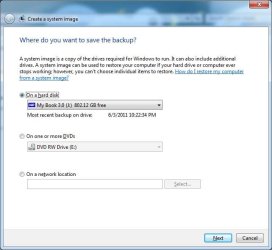
Obviously I was surprised when the system found it. Here's a screenshot as requested.
 

Attachments

  • image 1.jpg
    image 1.jpg
    53 KB · Views: 26

My Computer

Computer type
PC/Desktop
Computer Manufacturer/Model Number
HP
OS
Windows 7 Ultimate x64
CPU
AMD Athlon x4
Motherboard
HP / Foxconn
Memory
8.00 GB
Graphics Card(s)
GTX 750Ti SC
Monitor(s) Displays
ACER
Hard Drives
1TB Seagate
PSU
380W
Cooling
Stock
Internet Speed
3 Mbps
Not real sure, but the main thing is that all works fine.
 

My Computer

Computer Manufacturer/Model Number
Toshiba Satellite S875D-S7239 laptop
OS
MS Windows 7 Ultimate SP1 64-bit
CPU
AMD A10-4600M
Motherboard
AMD Pumori (Socket FT1)
Memory
6.00 GB Dual-Channel DDR3 @ 798MHz (11-11-12-28)
Graphics Card(s)
AMD Radeon HD 7660G
Sound Card
High Definition Audio Device
Monitor(s) Displays
Generic PnP Monitor (1600x900@60Hz)
Screen Resolution
1600x900@60Hz
Hard Drives
SSD 119GB Corsair CSSD-V128GB2 ATA Device
Keyboard
Standard PS/2 Keyboard
Mouse
HP Wireless Optical Mobile Mouse Model FHA-3410
Internet Speed
What the local pub, local coffee shop offers.
Other Info
Optical Drive:MATSHITA BD-CMB UJ160B ATA Device


Also have an Asus ha1002xp netbook with Win 7 Ultimate installed.
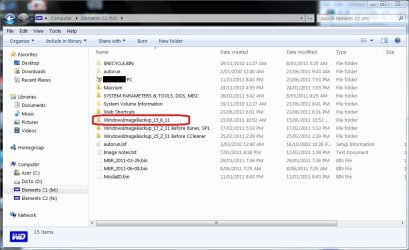
Here is an a partition of one of my ext HDDs. Note the renamed image dated 15/6/11.
C1-folders.jpg
If I rename any of the obvious Windows images to WindowsImageBackup it will be recognized and restored if I choose.
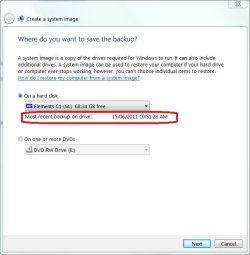
If I try to make a new image I get this
c1-image.JPG
Windows recalls the date of the last image made to this partition. It will create a new WindowsImageBackup and ignore WindowsImageBackup_15_6_11.
 

My Computer

Computer type
PC/Desktop
Computer Manufacturer/Model Number
Own build
OS
Windows 7x64 Home Premium SP1
CPU
Intel i7 2600k
Motherboard
ASUS P8Z68 Deluxe
Memory
G.Skill Ripjaws (DDR3-1600) 2x4GB
Graphics Card(s)
Nvidia GeForce GTS 450; Intel HD Graphics 3000(GT2+)
Monitor(s) Displays
Dell Ultrasharp IPS panel U2311H, Samsung SyncMaster P2350
Screen Resolution
1920x1080
Hard Drives
Samsung 850 Pro SSD 256GB, Samsung SSD 840 120GB, Seagates 1TB Barracuda ST31000528AS x2
PSU
Seasonic M12II 520W
Case
Lian Li Lancool PC-K60
Cooling
Case: 1x120mm, 3x140mm CPU: Hyper 212+
Keyboard
Logitech MK520 (wireless)
Mouse
Logitech MK520
Internet Speed
6-7 Mbps
Antivirus
Norton Security Premium, Malwarebytes on 2 (MSE on 3rd PC)
Browser
FireFox
Other Info
Audio: Logitech Z523 2.1
Thank you everyone for all your help.

I just did another image and everything looks good. My system shows both WindowsImageBackup and my re-named folder.

On my old PC I backed up data by copying it to the external HDD. And I had all the original discs to load programs if needed. However I never created an image. But now I have a larger HDD, both internal & external, and actually have room to make an image.

I read some tutorials before making images but do not recall seeing the one about renaming old images. Or maybe just forgot about it. But when I could not find my original image I became quite concerned.

During the last couple days I did read the sticky threads on imaging & on Macrium. I've previously heard about Macrium & others. In fact I have Norton Ghost but did not install it because there was a warning message when I started to install that it would disable a file's last date accessed property, or something similar to that. So I decided to use Windows 7 built in imaging. Since I thought about using Macrium at one time, is there any consensus of opinion if it is better/faster/more reliable than Windows 7?

Thanks again,
Mike
 

My Computer

Computer type
PC/Desktop
Computer Manufacturer/Model Number
HP
OS
Windows 7 Ultimate x64
CPU
AMD Athlon x4
Motherboard
HP / Foxconn
Memory
8.00 GB
Graphics Card(s)
GTX 750Ti SC
Monitor(s) Displays
ACER
Hard Drives
1TB Seagate
PSU
380W
Cooling
Stock
Internet Speed
3 Mbps
Free Macrium has a number of advantages over the Windows backup.

1. It is faster but the limitation on speed is likely to be the speed of your drive if it is USB connected.
2. It produces slightly smaller images but not enough to get it for that.
3. The image is easily mounted to recover individual files if required.
4. You don't have the difficulty of having to rename the image. Macrium generates its own name. It can also be in any folder not just the drive root.
5. You can chose the partitions to backup more freely than with Windows.

There are a couple of disadvantages also.

1. You need to create a Linux recover disk which some people have problems with.
2. The free version of Macrium does not do incremental or differential images.
3. I don't think the free Macrium lets you schedule backups.

The full version of Macrium get around these problems and adds other features but costs around $40 + tax.
 

My Computer

Computer type
Laptop
Computer Manufacturer/Model Number
Hewlett-Packard/G62-107SA Notebook
OS
Microsoft Windows 7 Home Premium 64-bit Service Pack 1
CPU
Intel(R) Core(TM) i3 CPU M 330 @ 2.13GHz
Motherboard
Hewlett-Packard 1425
Memory
8 GB DDR3
Graphics Card(s)
Intel(R) HD Graphics
Sound Card
Realtek High Definition Audio
Monitor(s) Displays
Builtin
Screen Resolution
1366 x 768 x 32 bits (4294967296 colors) @ 60 Hz
Hard Drives
250 GB SATA Hard Disk Drive 7200 rpm
2TB Seagate GoFlex USB 2 Drive
1TB Iomega Prestige USB 2 Drive
1.5TB Iomega Prestige USB 2 Drive (Samsung)
2TB WD MyBook Live NAS.
Mouse
Logitech Anywhere MX
Internet Speed
152 Mbs download 10 Mbs upload
Antivirus
Norton 360
Browser
Chrome
Now that you are confident that Windows 7 imaging tool works, and you have a couple of system images to fall back on, I'd say give Macrium free a try and learn what it can do. It's also not a bad idea to keep separate images using 2 (or more) imaging tools. The logic (or paranoia :)) being if the Win 7 image fails it's unlikely that the Macrium image will fail at the same time. And another free product that has received good reviews is Paragon.

http://www.sevenforums.com/tutorials/73828-imaging-free-macrium.html

Free Backup Software: Paragon Backup & Recovery (Advanced) Free Edition - Overview
 

My Computer

Computer type
Laptop
Computer Manufacturer/Model Number
Sony Vaio VPCEB47GM Laptop
OS
Win 7 Pro 64-bit
CPU
Intel i5 2.4 Ghz
Memory
8GB DDR3
Graphics Card(s)
Intel HD 3000
Sound Card
IDT High Definition
Monitor(s) Displays
15.6 WGXA Anti-Glare LED
Screen Resolution
1280x800
Hard Drives
640Gb 7200rpm
Antivirus
MSE
Browser
Opera (primary) with IE9 backup
Let's suppose your external hard drive is empty. The first system image you create with the built in Windows 7 imaging tool will automatically be called WindowsImageBackup. If you want to store multiple images you can simply rename this first WindowsImageBackup to something distinctive like WIB-011511-InstalledAdobe. The second image will now be called WindowsImageBackup. On your external hard drive you will see two entries:

WIB-012511-InstalledAdobe
WindowsImageBackup

If you create a 3rd system image and leave the external hard drive exactly as above, the 3rd system image will over-write WindowsImageBackup. If you want to save the second image it too must be renamed to something like WIB-062611-InstalledJava. Then you can create the third image and your external drive would look like this:

WIB-011511-InstalledAdobe
WIB-062611-InstalledJava
WindowsImageBackup

Now let's say you want to restore your computer back to the very first system image. You would have to rename WIB-011511-InstalledAdobe back to WindowsImageBackup. Since the third image is also name WindowsImageBackup you can either rename it to something distinctive or, during the restore process you can select which one of the WindowsImageBackup files you want to use. Personally, as soon as I create a system image I immediately rename it so I can remember what prompted me to make the image in the first place. Hope this helps.

marsmimar,
My question is can you move the created image files from the partition from which they were created dto a different one? I did such a thing & experienced a restore image failure. I did not write down the error code.

jeff
 

My Computer

Computer Manufacturer/Model Number
DELL OPTIPLEX GX620
OS
dual boot 7 & XP
CPU
INTEL P4 NT
Memory
2 Gb
My 2 cents worth...
I caution against moving images (be they Windows, Macrium or whatever) across partition boundaries. Different partitions have different filesystems and the move or copy is actually a physical move of GBs of data. Renaming or moving within a partition is just a filesystem/directory entry change. In this situation I have never experienced problems with Windows imaging provide you:
1) Make one image at a time only using "Create a System Image". Do not "over write" WindowsImageBackup before renaming, moving or deleting it. This way you are not relying on shadow storage.
2) Rename the image in a partition root to WindowsImageBackup prior to restore.

Over to Marsmimar.
 
Last edited:

My Computer

Computer type
PC/Desktop
Computer Manufacturer/Model Number
Own build
OS
Windows 7x64 Home Premium SP1
CPU
Intel i7 2600k
Motherboard
ASUS P8Z68 Deluxe
Memory
G.Skill Ripjaws (DDR3-1600) 2x4GB
Graphics Card(s)
Nvidia GeForce GTS 450; Intel HD Graphics 3000(GT2+)
Monitor(s) Displays
Dell Ultrasharp IPS panel U2311H, Samsung SyncMaster P2350
Screen Resolution
1920x1080
Hard Drives
Samsung 850 Pro SSD 256GB, Samsung SSD 840 120GB, Seagates 1TB Barracuda ST31000528AS x2
PSU
Seasonic M12II 520W
Case
Lian Li Lancool PC-K60
Cooling
Case: 1x120mm, 3x140mm CPU: Hyper 212+
Keyboard
Logitech MK520 (wireless)
Mouse
Logitech MK520
Internet Speed
6-7 Mbps
Antivirus
Norton Security Premium, Malwarebytes on 2 (MSE on 3rd PC)
Browser
FireFox
Other Info
Audio: Logitech Z523 2.1
Back
Top