multiple display problem

raza1179

New member
Local time
6:40 PM
Messages
1
Dear All I got a really strange problem. I tried few days ago to connect a multimeida projector to my laptop that was wokring on Win7 but it showed the display on only the projecor and not on my laptop. All attempts to detect external monitor or projector filed. Then I boot the pc again with the projector being pluged out and first tried to detect the projector/external monitor. But it reulted inb a very strange thing. Now I cant see on my laptop if I run win 7 normally but under safe mode (and win XP) it shows display. I can see win 7 display only (not on my laptop) if some external monitor or projector is connected. I tried to select the multiple display option but for me it results in nothing. Help me please and tell what exactly to do I really like this win 7 miss to use it on my laptop....... Waiting for a solution
 

My Computer

Computer Manufacturer/Model Number
Acer Extensa 3000
OS
windows 7
CPU
1.4 GHz
Memory
2GB RAM
Graphics Card(s)
ATI mobility radeon 9700
Monitor(s) Displays
15.6
Hard Drives
WD03200 320 GB
Does Windows key + P combination help at all?

I don't understand completely, though. You say that it only displays now on the projecter, but all attempts to detect it fail. It can't be both lol. Can you please clarify this for us?

If the combo doesn't offer you a solution, boot to normal mode and use the device manager to manually uninstall the graphics driver. Power off. Remove any external display. Power on to Windows and it should reinstall the driver automatically by finding it. If not, install yourself.
 

My Computer

Computer Manufacturer/Model Number
self built
OS
7600.20510 x86
CPU
P4 550 3.4 GHz HT running at 3.5 GHz
Motherboard
MSI PM8M3-V (MS-7211 v1.x) Micro-ATX mainboard
Memory
OCZ 2 GB(2x1GB) DDR400mHz running @ 414 mHz
Graphics Card(s)
HIS Radeon HD 3850 IceQ 3 Turbo HDMI Dual DL-DVI AGP
Sound Card
MOTU Traveler firewire studio interface 192 kHz 24 bit
Monitor(s) Displays
22" widescreen Acer X223W LCD, 17" Compaq P75 CRT
Screen Resolution
1680x1050 and 1280x1024
Hard Drives
SATA I x2 WD, 400 GB and 120 GB, SATA 2 WD Caviar Black 1 TB
PSU
350W generic
Case
Cybertronpc, it glows blue
Cooling
stock cpu fan, Ice-Q 3 gpu and system, many case fans
Keyboard
Logitch Classical Keyboard 200
Mouse
Logitech Mediaplay cordless
Internet Speed
1792/448 kbits/sec
Other Info
SATA II PCI fake RAID adapter, 1 GB Readyboost, original ATI Remote Wonder (even works with WMC perfectly), Logitech Rumblepad 2 game controller x2
Okay, so here's what seems to be the issue here..

I have the same problem when I connected an external display on my laptop. (I think its an old crappy Epson projector) After a few days Win7 does not seem to recognize my laptop display (Im pretty sure its not hardware cause it works perfectly in WinXP)

All you see is black screen (this is from the time you turn on the power button so you cannot even see your bios / post options) but the activity lights are all active. Then you'll hear the Windows 7 startup sound which means that it succesfully booted the system up but of course with no display.

I tried an external LCD and it works perfectly. You can see the display from post up to Windows itself.

When i checked on the "screen resolution" option and clicked on "detect" it showed 3 displays present:

1. HP LCD - currently using
2. Laptop Display
3. Available Display on Nvidia 7000m

What I did is I disconnected HP LCD and Available Display on Nvidia 7000m (selecting disconnect this display in the options) and made Laptop Display as the primary display and this somehow temporarily fixed the problem...

It brought my laptop display back but it randomly reverts back to the original problem where it doesn't detect the laptop display at all.

I tried the bios upgrade just to take away the fact that this is an "internal" problem and also tried to upgrade Graphics drivers but again let me reiterate that this issue doesn't happen with XP as I have it set as Dual Boot on my system. and I guess this is also not an issue with the laptop LCD itself..

Thanks and I appreciate the help in advance
 

My Computer

Computer Manufacturer/Model Number
Acer Aspire 4520
OS
win7
CPU
AMD Turion X2 TL60
Motherboard
Nvidia
Memory
2 GB
Graphics Card(s)
Nvidia 7000m
Sound Card
Realtek
Hard Drives
120 Gb Samsung
so, if you press the "windows key"+P does it alternate between the different displays? (it should cycle back to your laptop display.)

Your right its not a "hardware issue" its a windows setting or a messed up driver.
 

My Computer

Computer Manufacturer/Model Number
Black_Box (homebuilt)
OS
windows 7 RTM x64
CPU
Phenom II 965 Quad Core 3.4Ghz
Motherboard
Asus M4A79T Deluxe
Memory
Mushkin Blackline 8GB (4x2gb)
Graphics Card(s)
XFX Radeon 5970 Black Edition
Sound Card
onboard
Monitor(s) Displays
Dell 2408WPF-main Dell E248WFP-secondary
Screen Resolution
1920x1200-main 1920x1200-secondary
Hard Drives
OCZ Vertex Limited Edition 100GB (OS)
x1 WD Black Edition 500GB drive (Storage)
PSU
XFX 850w Black Edition (Modular)
Case
Mountian Mods H2go
Cooling
CoolITSystems ECO A.L.C.
Keyboard
Logitech MX 5500 wireless keyboard
Mouse
Razor Copperhead
Internet Speed
16Mb down/2Mb up Wowway Cable Internet
Hi there
often ALT + F5 is a combination that switches / resets external monitors with a lot of laptops.

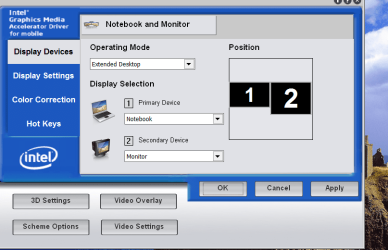
Other than that have you got a video app on your laptop like this where you can re-set which is primary / secondary or even switch off 2nd output completely.

Cheers
jimbo
 

Attachments

  • monitor.png
    monitor.png
    43.5 KB · Views: 243

My Computer

Computer type
PC/Desktop
Computer Manufacturer/Model Number
Custom built, several laptops HP/ASUS
OS
Linux CENTOS 7 / various Windows OS'es and servers
CPU
Intel i7 Intel i5
Memory
8GB, 16GB
Graphics Card(s)
On Motherboard
Sound Card
Realtek HD audio
Monitor(s) Displays
Apple Cinema display, Samsung LCD
Screen Resolution
1920 X 1080
Hard Drives
4 X 1TB SATA
Mouse
Toshiba wireless laser
Internet Speed
> 20MB up
Hi there
often ALT + F5 is a combination that switches / resets external monitors with a lot of laptops.

Other than that have you got a video app on your laptop like this where you can re-set which is primary / secondary or even switch off 2nd output completely.

Cheers
jimbo

so, if you press the "windows key"+P does it alternate between the different displays? (it should cycle back to your laptop display.)

Your right its not a "hardware issue" its a windows setting or a messed up driver.


Yeah, unfortunately I tried both. I guess for my laptop, its FN+F5. Still same issue though, randomly happens.
 

My Computer

Computer Manufacturer/Model Number
Acer Aspire 4520
OS
win7
CPU
AMD Turion X2 TL60
Motherboard
Nvidia
Memory
2 GB
Graphics Card(s)
Nvidia 7000m
Sound Card
Realtek
Hard Drives
120 Gb Samsung
Back
Top