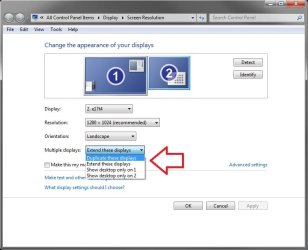
I have a desktop set up with 2 displays, at the moment they are next to each other and i have an extended desktop.
I now want to clone or Duplicate these displays, i can do this but the resolutions have to be the same. One Display is 1600*1024 and the other is 1920*1080.
Is there any way i can have the same image on both screens, but with different resolutions? any third party software??
Charlie
My Computer
Computer Manufacturer/Model Number
Dell Inspiron 546 & Asus EEE PC 1005HAG & Home Build
OS
Windows 7 Home Premium x64 & Ultimate x64
CPU
2.8GHZ & 1.66GHZ & Intel i5-2500k @3.3
Motherboard
Asus p8p67
Memory
4GB & 1GB & 4GB
Graphics Card(s)
ATI Radeon 3200, Intel intregrated, gtx 570
Sound Card
all intregrated
Monitor(s) Displays
22" Samsung PP227HD & Dell 20" & sony bravia 32 inch tv
It shouldn't matter what the screen resolutions are on each monitor. I have one at 1920x1200 and one at 1280x1024 that I set to Duplicate these displays.
Hope this helps,
Shawn
My Computer
Computer type
PC/Desktop
Computer Manufacturer/Model Number
Self built custom
OS
64-bit Windows 11 Pro for Workstations
CPU
Intel i7-8700K OC'd to 5 GHz
Motherboard
ASUS ROG Maximus XI Formula Z390
Memory
64 GB (4x16GB) G.SKILL TridentZ RGB DDR4 3600 MHz
Graphics Card(s)
ASUS ROG-STRIX-GTX1080TI-O11G-GAMING
Sound Card
Integrated
Monitor(s) Displays
2 x Samsung Odyssey G7 27"
Screen Resolution
2560x1440
Hard Drives
1TB Samsung 990 PRO M.2,
4TB Samsung 990 PRO PRO M.2,
TerraMaster F8 SSD Plus NAS
PSU
Seasonic Prime Titanium 850W
Case
Thermaltake Core P3
Cooling
Corsair Hydro H115i
Keyboard
Logitech wireless K800
Mouse
Logitech MX Master 4
Internet Speed
2 Gb/s Download and 100 Mb/s Upload
Antivirus
Malwarebyte Anti-Malware Premium
Browser
Google Chrome
Other Info
Logitech Z625 speaker system,
Logitech BRIO 4K Pro webcam,
HP Color LaserJet Pro MFP M477fdn,
APC SMART-UPS RT 1000 XL - SURT1000XLI,
Galaxy S23 Plus phone
Something to try if you haven't done this. Install or update the drivers for both monitors.
Some info please:
One is HDMI, one is VGA, are both connected to the Graphics card?
What Graphics card do you have?
Have you tried DVI instead of VGA? or is DVI not available?
The resolution is dropping to a safe resolution that both monitors can work with. Have you tried adjusting the resolution for each monitor after setting them to duplicate?
My Computer
Computer type
Laptop
Computer Manufacturer/Model Number
ASUS G60-RBBX05
OS
Win7 Home Premium 64x
CPU
Intel Core 2 Duo P7450 / 2.13 GHz (2.29 with Extreme Turbo)
Memory
4 GB PC-6400 Hyundai (2X2) at 800Mhz
Graphics Card(s)
NVIDIA GeForce GTX 260M 1GB DDR3 VRAM
Monitor(s) Displays
16" LED Backlit
Screen Resolution
1366 x 768 on laptop 1600x1050 max res on 22" external mon
Do you have to Catalyst Control Center on you computer? it should be at top of list whe right-clicking on desktop. You might be able to change it in there
My Computer
Computer type
Laptop
Computer Manufacturer/Model Number
ASUS G60-RBBX05
OS
Win7 Home Premium 64x
CPU
Intel Core 2 Duo P7450 / 2.13 GHz (2.29 with Extreme Turbo)
Memory
4 GB PC-6400 Hyundai (2X2) at 800Mhz
Graphics Card(s)
NVIDIA GeForce GTX 260M 1GB DDR3 VRAM
Monitor(s) Displays
16" LED Backlit
Screen Resolution
1366 x 768 on laptop 1600x1050 max res on 22" external mon
ATI SurroundView™ Technology
Provides support for four or more monitors when you combine an integrated graphics processor (AMD 780 chipset-based motherboard) with a discrete graphics processor (ATI Radeon™ HD 2400 Series2 or ATI Radeon™ HD 3000 Series). Each additional discrete graphics processor can provide support for two or more independent monitors. The integrated graphics processor and the discrete graphics processor work in parallel to drive multiple displays.
I think this chipset doesn't provide support for multiple monitors until a dedicated graphics card is added.
My Computer
Computer type
Laptop
Computer Manufacturer/Model Number
ASUS G60-RBBX05
OS
Win7 Home Premium 64x
CPU
Intel Core 2 Duo P7450 / 2.13 GHz (2.29 with Extreme Turbo)
Memory
4 GB PC-6400 Hyundai (2X2) at 800Mhz
Graphics Card(s)
NVIDIA GeForce GTX 260M 1GB DDR3 VRAM
Monitor(s) Displays
16" LED Backlit
Screen Resolution
1366 x 768 on laptop 1600x1050 max res on 22" external mon
no i can get multiple monitors i have setup an extended and cloned desktops but its just the resolution that is the problem. yes i have tried changeing it from the ccc, same problem.
My Computer
Computer Manufacturer/Model Number
Dell Inspiron 546 & Asus EEE PC 1005HAG & Home Build
OS
Windows 7 Home Premium x64 & Ultimate x64
CPU
2.8GHZ & 1.66GHZ & Intel i5-2500k @3.3
Motherboard
Asus p8p67
Memory
4GB & 1GB & 4GB
Graphics Card(s)
ATI Radeon 3200, Intel intregrated, gtx 570
Sound Card
all intregrated
Monitor(s) Displays
22" Samsung PP227HD & Dell 20" & sony bravia 32 inch tv
Maybe when the ATI Radeon 3200 detects multiple monitors it drops the max resolution of both devices to something that it can manage? A memory limitation perhaps?
My Computer
Computer type
PC/Desktop
Computer Manufacturer/Model Number
Scan 3XS P55 liteDAW
OS
Windows Home Premium (64)
CPU
Intel Core i7 860
Motherboard
Gigabyte GA-P55A-UD4
Memory
8GB (4x2GB) Corsair TwinX XMS3
Graphics Card(s)
1GB Gainward 9500 GT
Sound Card
M-Audio Delta 66
Monitor(s) Displays
Acer v223wBBd
Screen Resolution
1680 x 1050
Hard Drives
1 x 500 GB WD Barracuda (OS+Docs)
2 x 1TB Samsung Spinpoint F3 (Data)
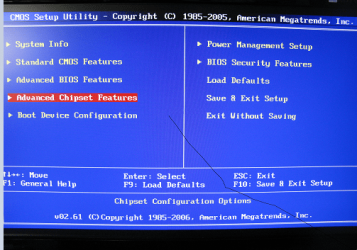
There is a place in the BIOS usually in Advanced>Integrated Chipset that allows you to select how much RAM the Integrated Graphics uses. It is probably set to 1G based on the Specs you listed for your computer. you might be able to increase it to see if that allows the graphics chip to use more and thus allow a higher screen resolution.
Note: the Graphics Chip shares RAM with the total you have on your comp so if you have 4G of Ram and you set the graphics to use 2G then you will only have 2G left.
Edit: Be very careful with BIOS settings and if you are worried about something or if something looks different than I described, post here first for help
My Computer
Computer type
Laptop
Computer Manufacturer/Model Number
ASUS G60-RBBX05
OS
Win7 Home Premium 64x
CPU
Intel Core 2 Duo P7450 / 2.13 GHz (2.29 with Extreme Turbo)
Memory
4 GB PC-6400 Hyundai (2X2) at 800Mhz
Graphics Card(s)
NVIDIA GeForce GTX 260M 1GB DDR3 VRAM
Monitor(s) Displays
16" LED Backlit
Screen Resolution
1366 x 768 on laptop 1600x1050 max res on 22" external mon
Maybe when the ATI Radeon 3200 detects multiple monitors it drops the max resolution of both devices to something that it can manage? A memory limitation perhaps? <--DarkStar had posted this. I was just furthering a possible fix proposed by a fellow sfer
My Computer
Computer type
Laptop
Computer Manufacturer/Model Number
ASUS G60-RBBX05
OS
Win7 Home Premium 64x
CPU
Intel Core 2 Duo P7450 / 2.13 GHz (2.29 with Extreme Turbo)
Memory
4 GB PC-6400 Hyundai (2X2) at 800Mhz
Graphics Card(s)
NVIDIA GeForce GTX 260M 1GB DDR3 VRAM
Monitor(s) Displays
16" LED Backlit
Screen Resolution
1366 x 768 on laptop 1600x1050 max res on 22" external mon
It's the graphics card's memory, not your system wide memory. You need to upgrade to a better gfx card if you want to run dual monitors without them being mirrored. If you don't want to break the bank, an ATI Radeon 4000 series or a GeForce 9000 series should do the trick.
I'm currently running a 9600 GT and it can handle an extended display of two monitors just fine.
I would also suggest getting a dedicated graphics card. All BIOS's are different and your BIOS might not have the ability to change how much RAM your card uses.
My Computer
Computer type
Laptop
Computer Manufacturer/Model Number
ASUS G60-RBBX05
OS
Win7 Home Premium 64x
CPU
Intel Core 2 Duo P7450 / 2.13 GHz (2.29 with Extreme Turbo)
Memory
4 GB PC-6400 Hyundai (2X2) at 800Mhz
Graphics Card(s)
NVIDIA GeForce GTX 260M 1GB DDR3 VRAM
Monitor(s) Displays
16" LED Backlit
Screen Resolution
1366 x 768 on laptop 1600x1050 max res on 22" external mon