ePeen
Banned
Multiple errors & warnings in Event Viewer, what do you guys think?
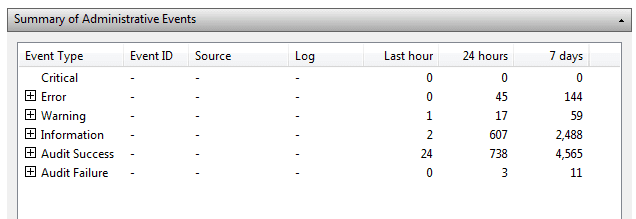
Ever since I got my replacement drive I've been getting frequent errors and warnings that have to do with indexing, searching, application errors, and SideBySide here's a few examples:
SideBySide:

Search:
Is my new Hard Drive dying / bad? I ran an /sfc scannow and it came back clean. Should I run chkdsk?
Ever since I got my replacement drive I've been getting frequent errors and warnings that have to do with indexing, searching, application errors, and SideBySide here's a few examples:
SideBySide:
Application Errors:Activation context generation failed for "C:\Program Files\ATI\CIM\Bin64\SetACL64.exe". Dependent Assembly Microsoft.VC80.MFC,processorArchitecture="amd64",publicKeyToken="1fc8b3b9a1e18e3b",type="win32",version="8.0.50608.0" could not be found. Please use sxstrace.exe for detailed diagnosis.
^^^Not sure if the Intel Rapid Storage Technology is causing all of thisFaulting application name: IAStorDataMgrSvc.exe, version: 10.1.0.1008, time stamp: 0x4cd508b6
Faulting module name: unknown, version: 0.0.0.0, time stamp: 0x00000000
Exception code: 0xc0000005
Fault offset: 0x74726a34
Faulting process id: 0xcd8
Faulting application start time: 0x01ccd57a3e24ce59
Faulting application path: C:\Program Files (x86)\Intel\Intel(R) Rapid Storage Technology\IAStorDataMgrSvc.exe
Faulting module path: unknown
Report Id: c6572977-416f-11e1-b027-14dae90f657c
Search:
The gatherer object cannot be initialized.
Context: Windows Application, SystemIndex Catalog
Details:
The content index catalog is corrupt. (HRESULT : 0xc0041801) (0xc0041801)
The plug-in in <Search.TripoliIndexer> cannot be initialized.
Context: Windows Application, SystemIndex Catalog
Details:
Element not found. (HRESULT : 0x80070490) (0x80070490)
Warnings:The plug-in in <Search.JetPropStore> cannot be initialized.
Context: Windows Application, SystemIndex Catalog
Details:
The content index catalog is corrupt. (HRESULT : 0xc0041801) (0xc0041801)
The Windows Search Service is starting up and attempting to remove the old search index {Reason: Full Index Reset}.
The Windows Search Service is starting up and attempting to remove the old search index {Reason: Index Corruption}.
Is my new Hard Drive dying / bad? I ran an /sfc scannow and it came back clean. Should I run chkdsk?
My Computer
- OS
- Windows 7 Ultimate x64
- CPU
- i7-2600K
- Motherboard
- Asus P8P67 Pro B3 (Rev 3.1)
- Memory
- Corsair Vengeance 8GB DDR3 @ 1600Mhz (9-9-9-24)
- Graphics Card(s)
- Asus Radeon HD 5850 (Crossfire)
- Sound Card
- X-Fi Titanium Fata1ity Professional
- Monitor(s) Displays
- Acer Eyefinity
- Screen Resolution
- 5040x1050
- Hard Drives
- Samsung Spinpoint F3 1TB
- PSU
- Corsair CMPSU-750TX 750W
- Case
- LIAN LI Lancool PC-K56
- Cooling
- Corsair H70
- Keyboard
- Ducky Shine / Das Ultimate Blank
- Mouse
- Razer Lachesis