Multiple Explorer Instances And Firefox Going Berserk

starbearer

New member
Local time
11:59 AM
Messages
8
I have multiple instances of explorer.exe running on my Windows 7 Ultimate,sometimes reaching 6 in number,all of whom consume considerable resources,even when nothing else(Like torrent clients etc.)are running.
It can't be a virus problem,as the system is constantly monitored by Norton 360.So what could it be,and how do I stop such a large drain.
Also,the browser firefox has become quite a memory hog of late,sometimes consuming upto 800 Mb of RAM,even with just 2-3 tabs and just a single window open.There might a download or 2 going on,but I've never had such a big memory hog by firefox before.
What could be the problem?
 

My Computer My Computer

OS
Windows Vista
Your info is not sufficient to judge whether there is a problem or not. I suggest you post a snip of Task Manager > Processes tab. Make sure you click "Show processes for all users" and sort it by the Memory column.
 

My Computer My Computer

Computer Manufacturer/Model Number
HP, Dell, Gateway, Toshiba - 4 laptops and 2 desktops
OS
Vista, Windows7, Mint Mate, Zorin, Windows 8
CPU
from 1.6GHz Duo to i7
Monitor(s) Displays
2x HP w2207
Hard Drives
5x HDD, 7x SSD, 12x Externals
Keyboard
with trackball - no mices
Mouse
Trackball mice
Internet Speed
DSL 6000
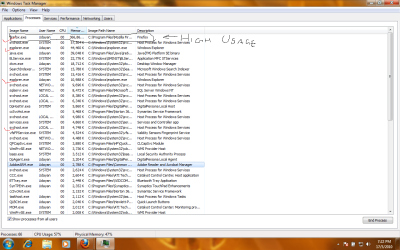
Well,have attached a snip of my task manager.
There were 2 other explorer tasks open but they just winked out.
As you can see,FF Takes a lot of memory,but it goes up to 700MB As Well.
 

Attachments

  • neopost.png
    neopost.png
    65.8 KB · Views: 50

My Computer My Computer

OS
Windows Vista
1) Multiple explorer instances can be launched by applications that call on it improperly. One notorious example is uTorrent, which launches +1 explorer no matter what, when you click 'open containing folder'.

2) In Folder Options, do you have "Launch Folder windows in separate process" checked? Although this should not result in more than 2 explorer.exe processes.

3) You can use Process Explorer to check the start time of each instance, as well as the parent process.

4) Sometimes, explorer.exe will be crashed or created by third party software conflicts. So try testing the issue in Clean Boot.
 

My Computer My Computer

Computer Manufacturer/Model Number
Too many to describe...
OS
Windows 7 x64 pro/ Windows 7 x86 Pro/ XP SP3 x86
No Torrent Program Running.
The Relevant Folder Option Is Unchecked.
This issue Crops Up And Then I Have to manually shut down each of the processes bar one.It's tedious and very irritating.Is there a solution to this.
also,what about the FF Problem?
 

My Computer My Computer

OS
Windows Vista
I see 1 IE.exe most likely active (the 44MB instance) and a second one cached (the 10MB instance). That is not unusual. Regarding FF I cannot comment. Never used it.
 

My Computer My Computer

Computer Manufacturer/Model Number
HP, Dell, Gateway, Toshiba - 4 laptops and 2 desktops
OS
Vista, Windows7, Mint Mate, Zorin, Windows 8
CPU
from 1.6GHz Duo to i7
Monitor(s) Displays
2x HP w2207
Hard Drives
5x HDD, 7x SSD, 12x Externals
Keyboard
with trackball - no mices
Mouse
Trackball mice
Internet Speed
DSL 6000
Back
Top