Multiple IPs on 1 NIC-How do I forse them to use the same gateway?

tripodkid

New member
Local time
10:43 PM
Messages
6
Hi there!

I would really appreciate some help using Windows 7 to route some IPs.

I need to use and move a wireless device, that is a part of a larger system, from one area of a large establishment to another and back again using two different networks. The device has a static IP of xxx.xxx.200.119. This address can't change or be dynamically assigned.

In the main area of a large building the device has to communicate with IPs xxx.xxx.200.100 to xxx.xxx.100.118. This is the only wireless device and it connects to the other IPs through an access point, that's not a router, with a wired IP of xxx.xxx.200.113 and the SSID is Room1. The subnet mask is 255.255.255.0 and the gateway is xxx.xxx.200.1.

The device can and will be re-registered, using a docking station, to operate in a completely different area of the building. In the second area it has to communicate with IPs xxx.xxx.200.119, .120 and .121. Here the access point has a wired IP of xxx.xxx.200.120 and SSID of Room2, again it is not a router. When the device is re-registered only the SSID of the access point, to which it needs to connect, is changed.

xxx.xxx.200.119 is a laptop which is connected to the second AP with IP of .120 . All of the above functionality is configured and works fine but here is my problem...

In the second area of the building the IP address that the IT dept has given me is xxx.xxx.242.211. Subnet mask is still 255.255.255.0 and the gateway is, you guessed it, xxx.xxx.242.1. So I figured no problem I'll just assign both the xxx.xxx.200.119 and xxx.xxx.242.211 to the NIC in the laptop. But this does not work because the laptop then thinks that the IP's xxx.xxx.200.100 to .118 are local and therefore does not use a gateway so I loose communication with them. Therefore, what I think I need to do is find a way to route those IP's through the .242.1 gateway.

Sorry for the long winded description!!! Many thanks in advance for any help given!!!
 

My Computer My Computer

At a glance

Windows 7
Computer type
PC/Desktop
OS
Windows 7
Your department has to configure the correct router settings on their router.
 

My Computer My Computer

At a glance

Microsoft Windows 7 Home Premium 64-bits 7601...Intel(R) Core(TM) i3 CPU M 370 @ 2.40GHz4,00 GBATI Mobility Radeon HD 5400 Series
Computer type
Laptop
Computer Manufacturer/Model Number
ACER ASPIRE 5742G
OS
Microsoft Windows 7 Home Premium 64-bits 7601 Multiprocessor Free Service Pack 1
CPU
Intel(R) Core(TM) i3 CPU M 370 @ 2.40GHz
Motherboard
Acer Aspire 5742G
Memory
4,00 GB
Graphics Card(s)
ATI Mobility Radeon HD 5400 Series
Sound Card
(1) AMD High Definition Audio Device (2) Realtek High Defi
Screen Resolution
1366 x 768 x 32 bits (4294967296 colors) @ 60 Hz
Hard Drives
WDC WD5000BEVT-22ZAT0
Hi there!

I would really appreciate some help using Windows 7 to route some IPs.

I need to use and move a wireless device, that is a part of a larger system, from one area of a large establishment to another and back again using two different networks. The device has a static IP of xxx.xxx.200.119. This address can't change or be dynamically assigned.

In the main area of a large building the device has to communicate with IPs xxx.xxx.200.100 to xxx.xxx.100.118. This is the only wireless device and it connects to the other IPs through an access point, that's not a router, with a wired IP of xxx.xxx.200.113 and the SSID is Room1. The subnet mask is 255.255.255.0 and the gateway is xxx.xxx.200.1.

The device can and will be re-registered, using a docking station, to operate in a completely different area of the building. In the second area it has to communicate with IPs xxx.xxx.200.119, .120 and .121. Here the access point has a wired IP of xxx.xxx.200.120 and SSID of Room2, again it is not a router. When the device is re-registered only the SSID of the access point, to which it needs to connect, is changed.

xxx.xxx.200.119 is a laptop which is connected to the second AP with IP of .120 . All of the above functionality is configured and works fine but here is my problem...

In the second area of the building the IP address that the IT dept has given me is xxx.xxx.242.211. Subnet mask is still 255.255.255.0 and the gateway is, you guessed it, xxx.xxx.242.1. So I figured no problem I'll just assign both the xxx.xxx.200.119 and xxx.xxx.242.211 to the NIC in the laptop. But this does not work because the laptop then thinks that the IP's xxx.xxx.200.100 to .118 are local and therefore does not use a gateway so I loose communication with them. Therefore, what I think I need to do is find a way to route those IP's through the .242.1 gateway.

Sorry for the long winded description!!! Many thanks in advance for any help given!!!


It would seem that you need variable subnet masks in order to complete this action. Are you able to produce a network topology to better understand your configuration? What subnet masks are you currently using?

Josh
 

My Computer My Computer

At a glance

Windows 7 Professional x64 SP1 ; Windows Serv...Intel Core i5 2400 @ 3.10GHz8.0GB DDR3 @ 665MHz (2GBx4)AMD Radeon HD 6870
Computer type
PC/Desktop
Computer Manufacturer/Model Number
Custom Built
OS
Windows 7 Professional x64 SP1 ; Windows Server 2012 R2 Standard
CPU
Intel Core i5 2400 @ 3.10GHz
Motherboard
Foxconn H67MP-S/-V/H67MP
Memory
8.0GB DDR3 @ 665MHz (2GBx4)
Graphics Card(s)
AMD Radeon HD 6870
Sound Card
Realtek High Definition Audio
Monitor(s) Displays
AOC 2243W & SMB1930NW
Screen Resolution
1440x900 & 1920x1080
Hard Drives
977GB Seagate ST31000524AS ATA Drive (SATA)
250GB WD iSCSI attached Drive
PSU
750W Gaming PSU
Case
Novatech Night
Cooling
Fan
Keyboard
Dell Standard PS/2 Keyboard
Mouse
R.A.T 07 Gaming Mouse
Internet Speed
Download: 10 Mbps Ping: 30ms Upload: 0.81 Mbps
Browser
Google Chrome
Other Info
Optiarc DVD RW AD-5260S ATA Device
Unfortunately I have no control over the network or the IT dept. All subnet masks are 255.255.255.0
 

My Computer My Computer

At a glance

Windows 7
Computer type
PC/Desktop
OS
Windows 7
Unless you can change it you can't set the device (xxx.xxx.200.119) to communicate with xxx.xxx.200.100 to xxx.xxx.200.118 unless you set a custom subnet mask.

255.255.255.0 means the computer will check the IP address it wants to communicate to with the 255 octet. If it is a match then it will move to the next. If that is a match then it will move to the next octet. If all 3 octets are the same then the devices IP address will send out a broadcast since it thinks the device is on its LAN. 0 = Host

A variable length subnet mask will tell the machine that xxx.xxx.200.100 to 118 is not on its LAN therfore it will contact it's default gateway to route the packets to its appropriate destination.

Are you using public or private IP addresses for these devices? In other words is the first octet one of the following?

192.168.xxx.xxx
10.xxx.xxx.xxx
172.16.xxx.xxx - 172.31.xxx.xxx
169.254.xxx.xxx

Josh
 

My Computer My Computer

At a glance

Windows 7 Professional x64 SP1 ; Windows Serv...Intel Core i5 2400 @ 3.10GHz8.0GB DDR3 @ 665MHz (2GBx4)AMD Radeon HD 6870
Computer type
PC/Desktop
Computer Manufacturer/Model Number
Custom Built
OS
Windows 7 Professional x64 SP1 ; Windows Server 2012 R2 Standard
CPU
Intel Core i5 2400 @ 3.10GHz
Motherboard
Foxconn H67MP-S/-V/H67MP
Memory
8.0GB DDR3 @ 665MHz (2GBx4)
Graphics Card(s)
AMD Radeon HD 6870
Sound Card
Realtek High Definition Audio
Monitor(s) Displays
AOC 2243W & SMB1930NW
Screen Resolution
1440x900 & 1920x1080
Hard Drives
977GB Seagate ST31000524AS ATA Drive (SATA)
250GB WD iSCSI attached Drive
PSU
750W Gaming PSU
Case
Novatech Night
Cooling
Fan
Keyboard
Dell Standard PS/2 Keyboard
Mouse
R.A.T 07 Gaming Mouse
Internet Speed
Download: 10 Mbps Ping: 30ms Upload: 0.81 Mbps
Browser
Google Chrome
Other Info
Optiarc DVD RW AD-5260S ATA Device
In addition if you do change the subnet mask then you will need to change it on all routers and devices which need access to xxx.xxx.200.100 to xxx.xxx.200.118
 

My Computer My Computer

At a glance

Windows 7 Professional x64 SP1 ; Windows Serv...Intel Core i5 2400 @ 3.10GHz8.0GB DDR3 @ 665MHz (2GBx4)AMD Radeon HD 6870
Computer type
PC/Desktop
Computer Manufacturer/Model Number
Custom Built
OS
Windows 7 Professional x64 SP1 ; Windows Server 2012 R2 Standard
CPU
Intel Core i5 2400 @ 3.10GHz
Motherboard
Foxconn H67MP-S/-V/H67MP
Memory
8.0GB DDR3 @ 665MHz (2GBx4)
Graphics Card(s)
AMD Radeon HD 6870
Sound Card
Realtek High Definition Audio
Monitor(s) Displays
AOC 2243W & SMB1930NW
Screen Resolution
1440x900 & 1920x1080
Hard Drives
977GB Seagate ST31000524AS ATA Drive (SATA)
250GB WD iSCSI attached Drive
PSU
750W Gaming PSU
Case
Novatech Night
Cooling
Fan
Keyboard
Dell Standard PS/2 Keyboard
Mouse
R.A.T 07 Gaming Mouse
Internet Speed
Download: 10 Mbps Ping: 30ms Upload: 0.81 Mbps
Browser
Google Chrome
Other Info
Optiarc DVD RW AD-5260S ATA Device
Unfortunately I have no control over the network or the IT dept. All subnet masks are 255.255.255.0
How will you find the other subnet? Answer: through a router. Tell me what router knows where to find it (or kknows the route to find it)
 

My Computer My Computer

At a glance

Microsoft Windows 7 Home Premium 64-bits 7601...Intel(R) Core(TM) i3 CPU M 370 @ 2.40GHz4,00 GBATI Mobility Radeon HD 5400 Series
Computer type
Laptop
Computer Manufacturer/Model Number
ACER ASPIRE 5742G
OS
Microsoft Windows 7 Home Premium 64-bits 7601 Multiprocessor Free Service Pack 1
CPU
Intel(R) Core(TM) i3 CPU M 370 @ 2.40GHz
Motherboard
Acer Aspire 5742G
Memory
4,00 GB
Graphics Card(s)
ATI Mobility Radeon HD 5400 Series
Sound Card
(1) AMD High Definition Audio Device (2) Realtek High Defi
Screen Resolution
1366 x 768 x 32 bits (4294967296 colors) @ 60 Hz
Hard Drives
WDC WD5000BEVT-22ZAT0
Unfortunately I have no control over the network or the IT dept. All subnet masks are 255.255.255.0
How will you find the other subnet? Answer: through a router. Tell me what router knows where to find it (or kknows the route to find it)

I think the issue is that the computer itself isn't contacting the router to find it since the subnet mask tells the computer that it is on it's LAN therefore it sends out a broadcast to try and find it which of course is failing.
 

My Computer My Computer

At a glance

Windows 7 Professional x64 SP1 ; Windows Serv...Intel Core i5 2400 @ 3.10GHz8.0GB DDR3 @ 665MHz (2GBx4)AMD Radeon HD 6870
Computer type
PC/Desktop
Computer Manufacturer/Model Number
Custom Built
OS
Windows 7 Professional x64 SP1 ; Windows Server 2012 R2 Standard
CPU
Intel Core i5 2400 @ 3.10GHz
Motherboard
Foxconn H67MP-S/-V/H67MP
Memory
8.0GB DDR3 @ 665MHz (2GBx4)
Graphics Card(s)
AMD Radeon HD 6870
Sound Card
Realtek High Definition Audio
Monitor(s) Displays
AOC 2243W & SMB1930NW
Screen Resolution
1440x900 & 1920x1080
Hard Drives
977GB Seagate ST31000524AS ATA Drive (SATA)
250GB WD iSCSI attached Drive
PSU
750W Gaming PSU
Case
Novatech Night
Cooling
Fan
Keyboard
Dell Standard PS/2 Keyboard
Mouse
R.A.T 07 Gaming Mouse
Internet Speed
Download: 10 Mbps Ping: 30ms Upload: 0.81 Mbps
Browser
Google Chrome
Other Info
Optiarc DVD RW AD-5260S ATA Device
Your computer has an ip address and defaultgateway... either by dhcp or static. All ip addresses in subnet are found directly. Other addresses are transfered to default gateway. Unless you define static routes
 

My Computer My Computer

At a glance

Microsoft Windows 7 Home Premium 64-bits 7601...Intel(R) Core(TM) i3 CPU M 370 @ 2.40GHz4,00 GBATI Mobility Radeon HD 5400 Series
Computer type
Laptop
Computer Manufacturer/Model Number
ACER ASPIRE 5742G
OS
Microsoft Windows 7 Home Premium 64-bits 7601 Multiprocessor Free Service Pack 1
CPU
Intel(R) Core(TM) i3 CPU M 370 @ 2.40GHz
Motherboard
Acer Aspire 5742G
Memory
4,00 GB
Graphics Card(s)
ATI Mobility Radeon HD 5400 Series
Sound Card
(1) AMD High Definition Audio Device (2) Realtek High Defi
Screen Resolution
1366 x 768 x 32 bits (4294967296 colors) @ 60 Hz
Hard Drives
WDC WD5000BEVT-22ZAT0
Unfortunately, as I mentioned earlier, I have no control over the network or the IT dept so making changes to routers etc is just not going to happen. That is why I am looking for a way to manually configure the routing of those IPs within W7 on the laptop. I did try using a class B 255.255.0.0 subnet mask but that did not work.

Thanks!
 

My Computer My Computer

At a glance

Windows 7
Computer type
PC/Desktop
OS
Windows 7
Correct but only if the computer deems that the destination IP is not on its LAN. This would be defined by the subnet mask. Static routes are set on the router/gateway and from the machines perspective it has no knowledge of the routers routing table. If the static route has the subnet mask of 255.255.255.0 or wildcard of 0.0.0.255 then the packet will simply be returned to the LAN at which it came since destination IP address will appear to the router as the same subnet as the source IP address.
 

My Computer My Computer

At a glance

Windows 7 Professional x64 SP1 ; Windows Serv...Intel Core i5 2400 @ 3.10GHz8.0GB DDR3 @ 665MHz (2GBx4)AMD Radeon HD 6870
Computer type
PC/Desktop
Computer Manufacturer/Model Number
Custom Built
OS
Windows 7 Professional x64 SP1 ; Windows Server 2012 R2 Standard
CPU
Intel Core i5 2400 @ 3.10GHz
Motherboard
Foxconn H67MP-S/-V/H67MP
Memory
8.0GB DDR3 @ 665MHz (2GBx4)
Graphics Card(s)
AMD Radeon HD 6870
Sound Card
Realtek High Definition Audio
Monitor(s) Displays
AOC 2243W & SMB1930NW
Screen Resolution
1440x900 & 1920x1080
Hard Drives
977GB Seagate ST31000524AS ATA Drive (SATA)
250GB WD iSCSI attached Drive
PSU
750W Gaming PSU
Case
Novatech Night
Cooling
Fan
Keyboard
Dell Standard PS/2 Keyboard
Mouse
R.A.T 07 Gaming Mouse
Internet Speed
Download: 10 Mbps Ping: 30ms Upload: 0.81 Mbps
Browser
Google Chrome
Other Info
Optiarc DVD RW AD-5260S ATA Device
Unfortunately, as I mentioned earlier, I have no control over the network or the IT dept so making changes to routers etc is just not going to happen. That is why I am looking for a way to manually configure the routing of those IPs within W7 on the laptop. I did try using a class B 255.255.0.0 subnet mask but that did not work.

Thanks!

255.255.0.0 will not work if xxx.xxx is the same across all subnets. When I mean variable length subnet in your case I mean a subnet like the following: 255.255.255.145

THIS IS AN EXAMPLE

You need to have access to the router and other devices on the network in order to apply a new subnet mask. Have contacted your IT department as to what you wish to accomplish? If they knew then they would understand that the subnet mask of 255.255.255.0 will not work

:(

Josh
 

My Computer My Computer

At a glance

Windows 7 Professional x64 SP1 ; Windows Serv...Intel Core i5 2400 @ 3.10GHz8.0GB DDR3 @ 665MHz (2GBx4)AMD Radeon HD 6870
Computer type
PC/Desktop
Computer Manufacturer/Model Number
Custom Built
OS
Windows 7 Professional x64 SP1 ; Windows Server 2012 R2 Standard
CPU
Intel Core i5 2400 @ 3.10GHz
Motherboard
Foxconn H67MP-S/-V/H67MP
Memory
8.0GB DDR3 @ 665MHz (2GBx4)
Graphics Card(s)
AMD Radeon HD 6870
Sound Card
Realtek High Definition Audio
Monitor(s) Displays
AOC 2243W & SMB1930NW
Screen Resolution
1440x900 & 1920x1080
Hard Drives
977GB Seagate ST31000524AS ATA Drive (SATA)
250GB WD iSCSI attached Drive
PSU
750W Gaming PSU
Case
Novatech Night
Cooling
Fan
Keyboard
Dell Standard PS/2 Keyboard
Mouse
R.A.T 07 Gaming Mouse
Internet Speed
Download: 10 Mbps Ping: 30ms Upload: 0.81 Mbps
Browser
Google Chrome
Other Info
Optiarc DVD RW AD-5260S ATA Device
Unfortunately, as I mentioned earlier, I have no control over the network or the IT dept so making changes to routers etc is just not going to happen. That is why I am looking for a way to manually configure the routing of those IPs within W7 on the laptop. I did try using a class B 255.255.0.0 subnet mask but that did not work.

Thanks!
If you change subnet to 255.255.0.0 ... it thinks ven more ip address are locally (reachable without a router).

If you keep subnet 255.255.0.0 it's fine. All local ip's are found. All other addresses go to defualt gateway.

What router can you reach, and what same router can reach the ip addrress you want?
It's all a routing problem!
 

My Computer My Computer

At a glance

Microsoft Windows 7 Home Premium 64-bits 7601...Intel(R) Core(TM) i3 CPU M 370 @ 2.40GHz4,00 GBATI Mobility Radeon HD 5400 Series
Computer type
Laptop
Computer Manufacturer/Model Number
ACER ASPIRE 5742G
OS
Microsoft Windows 7 Home Premium 64-bits 7601 Multiprocessor Free Service Pack 1
CPU
Intel(R) Core(TM) i3 CPU M 370 @ 2.40GHz
Motherboard
Acer Aspire 5742G
Memory
4,00 GB
Graphics Card(s)
ATI Mobility Radeon HD 5400 Series
Sound Card
(1) AMD High Definition Audio Device (2) Realtek High Defi
Screen Resolution
1366 x 768 x 32 bits (4294967296 colors) @ 60 Hz
Hard Drives
WDC WD5000BEVT-22ZAT0
Oh and BTW if I remove the xxx.xxx.200.119 IP from the NIC in the laptop I can communicate with the xxx.xxx.200.100 to 118 IPs. Obviously this is because of the subnet mask seeing that the 3rd octet does not match therefore uses the .242.1 gateway. But without the .200.119 address in the NIC the laptop cant talk to .200.120 and .121 which are local.

The first octet is 170.
 

My Computer My Computer

At a glance

Windows 7
Computer type
PC/Desktop
OS
Windows 7
The first 2 octets are the same for all addresses. This is not my IT dept if it were then this would be easy! It was a real hassle just getting IPs from them!
 

My Computer My Computer

At a glance

Windows 7
Computer type
PC/Desktop
OS
Windows 7
xxx.xxx.200.y can access xxx.xxx.200.z directly (assuming subnet = 255.255.255.0 and all connected to same switch)
Other addresses got to default gateway, or through another router if some sort of static routing is defined.

The defualt gateway SHOULD know all other subnets, so should find all other ip adresses.

Normally only the default gateway should be defined. Also the ip address and subnet (to find local ip addresses). Normally done using dhcp.
 

My Computer My Computer

At a glance

Microsoft Windows 7 Home Premium 64-bits 7601...Intel(R) Core(TM) i3 CPU M 370 @ 2.40GHz4,00 GBATI Mobility Radeon HD 5400 Series
Computer type
Laptop
Computer Manufacturer/Model Number
ACER ASPIRE 5742G
OS
Microsoft Windows 7 Home Premium 64-bits 7601 Multiprocessor Free Service Pack 1
CPU
Intel(R) Core(TM) i3 CPU M 370 @ 2.40GHz
Motherboard
Acer Aspire 5742G
Memory
4,00 GB
Graphics Card(s)
ATI Mobility Radeon HD 5400 Series
Sound Card
(1) AMD High Definition Audio Device (2) Realtek High Defi
Screen Resolution
1366 x 768 x 32 bits (4294967296 colors) @ 60 Hz
Hard Drives
WDC WD5000BEVT-22ZAT0
This issue is the subnet mask applied. You could change the subnet mask on your NIC but unless the router has the same subnet mask the routing will fail. The only way I can see this being solved without access to the router would be to change the address of xxx.xxx.200.120 and xxx.xxx.200.121 to the following:

xxx.xxx.242.120 & xxx.xxx.242.121

Josh
 

My Computer My Computer

At a glance

Windows 7 Professional x64 SP1 ; Windows Serv...Intel Core i5 2400 @ 3.10GHz8.0GB DDR3 @ 665MHz (2GBx4)AMD Radeon HD 6870
Computer type
PC/Desktop
Computer Manufacturer/Model Number
Custom Built
OS
Windows 7 Professional x64 SP1 ; Windows Server 2012 R2 Standard
CPU
Intel Core i5 2400 @ 3.10GHz
Motherboard
Foxconn H67MP-S/-V/H67MP
Memory
8.0GB DDR3 @ 665MHz (2GBx4)
Graphics Card(s)
AMD Radeon HD 6870
Sound Card
Realtek High Definition Audio
Monitor(s) Displays
AOC 2243W & SMB1930NW
Screen Resolution
1440x900 & 1920x1080
Hard Drives
977GB Seagate ST31000524AS ATA Drive (SATA)
250GB WD iSCSI attached Drive
PSU
750W Gaming PSU
Case
Novatech Night
Cooling
Fan
Keyboard
Dell Standard PS/2 Keyboard
Mouse
R.A.T 07 Gaming Mouse
Internet Speed
Download: 10 Mbps Ping: 30ms Upload: 0.81 Mbps
Browser
Google Chrome
Other Info
Optiarc DVD RW AD-5260S ATA Device
You want to acceess xxx.xxx.200.a from xxx.xxx.242.y (subnet 255.255.255.0). Do you know one router that you can access and that can access xxx.xxx.200.a ?
 

My Computer My Computer

At a glance

Microsoft Windows 7 Home Premium 64-bits 7601...Intel(R) Core(TM) i3 CPU M 370 @ 2.40GHz4,00 GBATI Mobility Radeon HD 5400 Series
Computer type
Laptop
Computer Manufacturer/Model Number
ACER ASPIRE 5742G
OS
Microsoft Windows 7 Home Premium 64-bits 7601 Multiprocessor Free Service Pack 1
CPU
Intel(R) Core(TM) i3 CPU M 370 @ 2.40GHz
Motherboard
Acer Aspire 5742G
Memory
4,00 GB
Graphics Card(s)
ATI Mobility Radeon HD 5400 Series
Sound Card
(1) AMD High Definition Audio Device (2) Realtek High Defi
Screen Resolution
1366 x 768 x 32 bits (4294967296 colors) @ 60 Hz
Hard Drives
WDC WD5000BEVT-22ZAT0
The defualt gateway SHOULD know all other subnets, so should find all other ip adresses.

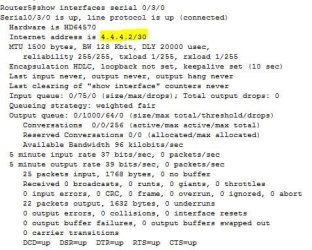
Only if defined by an Administrator. For example I have a route in my routing table with a subnet mask of 255.255.255.252 also known as /30. This was only known because I statically assigned the ip address and subnet mask to that interface. Even if the OP changed the subnet mask on their NIC the router would not know where to route it the packets to since the subnet mask set for that interface will not be the same as the one set on the NIC.

ip route.JPG

ip address.JPG

If you don't have access to the router then all I can suggest is to change the IP address of the two local .200 machines as listed in my previous post :( I wish there was another way but this is how TCP/IP works

Hope This Helps,
Josh :)
 

My Computer My Computer

At a glance

Windows 7 Professional x64 SP1 ; Windows Serv...Intel Core i5 2400 @ 3.10GHz8.0GB DDR3 @ 665MHz (2GBx4)AMD Radeon HD 6870
Computer type
PC/Desktop
Computer Manufacturer/Model Number
Custom Built
OS
Windows 7 Professional x64 SP1 ; Windows Server 2012 R2 Standard
CPU
Intel Core i5 2400 @ 3.10GHz
Motherboard
Foxconn H67MP-S/-V/H67MP
Memory
8.0GB DDR3 @ 665MHz (2GBx4)
Graphics Card(s)
AMD Radeon HD 6870
Sound Card
Realtek High Definition Audio
Monitor(s) Displays
AOC 2243W & SMB1930NW
Screen Resolution
1440x900 & 1920x1080
Hard Drives
977GB Seagate ST31000524AS ATA Drive (SATA)
250GB WD iSCSI attached Drive
PSU
750W Gaming PSU
Case
Novatech Night
Cooling
Fan
Keyboard
Dell Standard PS/2 Keyboard
Mouse
R.A.T 07 Gaming Mouse
Internet Speed
Download: 10 Mbps Ping: 30ms Upload: 0.81 Mbps
Browser
Google Chrome
Other Info
Optiarc DVD RW AD-5260S ATA Device
Both source and destination (xxx.xxx.200.y and xxx.xxx.242.z) (both subnet 255.255.255.0) are on another subnet. So it MUST be routed through a router!
 

My Computer My Computer

At a glance

Microsoft Windows 7 Home Premium 64-bits 7601...Intel(R) Core(TM) i3 CPU M 370 @ 2.40GHz4,00 GBATI Mobility Radeon HD 5400 Series
Computer type
Laptop
Computer Manufacturer/Model Number
ACER ASPIRE 5742G
OS
Microsoft Windows 7 Home Premium 64-bits 7601 Multiprocessor Free Service Pack 1
CPU
Intel(R) Core(TM) i3 CPU M 370 @ 2.40GHz
Motherboard
Acer Aspire 5742G
Memory
4,00 GB
Graphics Card(s)
ATI Mobility Radeon HD 5400 Series
Sound Card
(1) AMD High Definition Audio Device (2) Realtek High Defi
Screen Resolution
1366 x 768 x 32 bits (4294967296 colors) @ 60 Hz
Hard Drives
WDC WD5000BEVT-22ZAT0
Back
Top