Multiple Language Use

ronhoch

New member
Local time
5:00 PM
Messages
7
Location
US Citizen living in Germany
I want to have 2 different language options on my PC; German for the wife and English for me. I know one option is to have 2 Win 7 OS (dual boot capable) but I would prefer 1 OS, with the option to choose which language to come up in. Research tells me that Win 7 Ultimate offers me the dual language option but is there a way to set the default language? Let's say I have Win 7 operating in English when I shut down. Does the next boot up happen in English? Can I tell it to automatically boot in German? I can change it back to English when I use the PC but my wife's command of the English language is such that I want the PC to always boot up in German for her. Alternately, is it possible set up her User Account to boot up in German and mine in English?

Many Thanks in advance!
Hock
 

My Computer

Computer Manufacturer/Model Number
Dell/M1530
OS
Windows 7
Hello Hock, welcome to the Seven Forums.

I am from Finland, my wife from Germany, doing my work in English and Swedish so I have quite a lot experience in multilingual Windows. As you already know, you need the Ultimate version to use language packs. You find them as optional updates in Windows Update. Just pick the languages you need and install.

After installing the languages, create a user account for every new language you are going to use. Log in to account you want to change the display language, go to Control Panel :ar: Region and Language :ar: Keyboards and Languages :ar: Choose a display language, and choose the language from drop down menu.

In your case open your wife's account and do as told above. Windows remembers these language settings for every account, so when your wife logs in to her account, it is completely German, your account remains English.

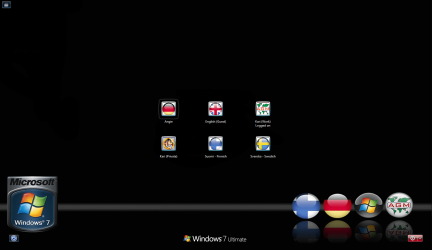
Here's a screenshot of my logon screen to explain it more:

Logon.PNG

Good luck!

Kari
 

My Computer

Computer type
Laptop
Computer Manufacturer/Model Number
HP ENVY 17-1150eg
OS
Windows 10 Pro x64 EN-GB
CPU
1.6 GHz Intel Core i7-720QM Processor
Memory
6 GB
Graphics Card(s)
ATI Mobility Radeon HD 5850 Graphics
Sound Card
Beats sound system with integrated subwoofer
Monitor(s) Displays
17" laptop display, 22" LED and 32" Full HD TV through HDMI
Screen Resolution
1600*900 (1), 1920*1080 (2&3)
Hard Drives
Internal: 2 x 500 GB SATA Hard Disk Drive 7200 rpm
External: 2TB for backups, 3TB USB3 network drive for media
Cooling
As Envy runs a bit warm, I have it on a Cooler Master pad
Keyboard
Logitech diNovo Media Desktop Laser (bluetooth)
Mouse
Logitech Performance Mouse MX
Internet Speed
50/10 Mbps VDSL
Antivirus
Windows Defender 4.3.9431.0
Browser
Maxthon 3.5.2., IE11
Hello Hock, welcome to the Seven Forums.

I am from Finland, my wife from Germany, doing my work in English and Swedish so I have quite a lot experience in multilingual Windows. As you already know, you need the Ultimate version to use language packs. You find them as optional updates in Windows Update. Just pick the languages you need and install.

After installing the languages, create a user account for every new language you are going to use. Log in to account you want to change the display language, go to Control Panel :ar: Region and Language :ar: Keyboards and Languages :ar: Choose a display language, and choose the language from drop down menu.

In your case open your wife's account and do as told above. Windows
remembers these language settings for every account, so when your wife logs in to her account, it is completely German, your account remains English.

Here's a screenshot of my logon screen to explain it more:

View attachment 35781

Good luck!

Kari

Related question: I have Office 2007 Enterprise. Do I have the same options on multiple languages with it?
 

My Computer

Computer Manufacturer/Model Number
Dell/M1530
OS
Windows 7
Related question: I have Office 2007 Enterprise. Do I have the same options on multiple languages with it?
Microsoft makes and sells MUI (Multilingual User Interface) packs for Office 2003 and Office 2007. I'm sorry but Office MUI is not free, in fact it is quite expensive ($160-180).

I have used Office MUI only to get Finnish and German grammar and spell checking to my English Office; I have no more first hand experience or knowledge how it works.

Kari
 

My Computer

Computer type
Laptop
Computer Manufacturer/Model Number
HP ENVY 17-1150eg
OS
Windows 10 Pro x64 EN-GB
CPU
1.6 GHz Intel Core i7-720QM Processor
Memory
6 GB
Graphics Card(s)
ATI Mobility Radeon HD 5850 Graphics
Sound Card
Beats sound system with integrated subwoofer
Monitor(s) Displays
17" laptop display, 22" LED and 32" Full HD TV through HDMI
Screen Resolution
1600*900 (1), 1920*1080 (2&3)
Hard Drives
Internal: 2 x 500 GB SATA Hard Disk Drive 7200 rpm
External: 2TB for backups, 3TB USB3 network drive for media
Cooling
As Envy runs a bit warm, I have it on a Cooler Master pad
Keyboard
Logitech diNovo Media Desktop Laser (bluetooth)
Mouse
Logitech Performance Mouse MX
Internet Speed
50/10 Mbps VDSL
Antivirus
Windows Defender 4.3.9431.0
Browser
Maxthon 3.5.2., IE11
Back
Top