
Solved Multiple networks problem

pamela

New member
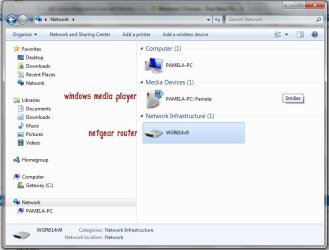
I've been haunting various forums for weeks trying to figure out my problem with windows 7 multiple networks issue blocking my internet connection and I'm at my wits end. I've seen the widest range of answers and I've tried them all, but nothing stops this from happening. The most frustrating part is I don't even know what questions to ask anymore. Right now I just opened my network and sharing center and I still have multiple networks, but for some reason I'm connected to the internet and posting here.

Whenever this happens I open up the network and sharing center and try clicking around with stuff but even the options don't seem to make much sense. If I disable the "unknown network" that doesn't fix the problem when I restart. I've just fiddled with so many settings I have no idea what I did to achieve internet access.

Something new, anyone? Screen shot attached
 

Attachments
  • multnet2.jpg
    multnet2.jpg
    58.2 KB · Views: 258

My Computer

Computer Manufacturer/Model Number
Gateway
OS
windows 7

My Computer

Computer type
PC/Desktop
Computer Manufacturer/Model Number
Home built
OS
Windows 7 Ult, Windows 8.1 Pro,
CPU
Q9650-4.275GHz, E8600 4.5GHz, E6750-3.8GHz
Motherboard
Evga 780i FTW
Memory
G.Skill PC2 9600 1200Mhz 5 5 5 15 2T
Graphics Card(s)
GTX480
Sound Card
Asus Xonar D2
Monitor(s) Displays
HannsG
Screen Resolution
1680X1050
Hard Drives
GSkill Phoenix Pro 120GB SSD
PSU
ThermalTake Toughpower 1000Watt modular
Case
ThermalTake XaserV
Cooling
Xigmatek S1283
Keyboard
Logitech G15
Mouse
Logitech G9
Internet Speed
T1
Thank you Chev65, but no fix.

I followed those instructions and it did not work. When I edited the IPv4 properties as instructed, the changes would not stay. When I selected "Use the following IP address" and entered it manually, I got (no internet) an error message stating there were problems, and when my troubleshooter fixed the problem, there were no changes to any properties settings, but my internet came on.

So I'm still where I started: no idea what changed but magically I have internet...for the moment.
 

My Computer

Computer Manufacturer/Model Number
Gateway
OS
windows 7
This worked for me

I know this is a very late post - but this worked for me and I thought I would reply here so that someone else can benefit from it. If you have multiple network adapters disable all but the one you are using to connect to the internet. Go to control panel and in the search box type Network Connections, then click on view network collections and right click and disable everything but your main network connection.

If your main network connection in the Network and Sharing Center is stuck in the unidentified network group uninstall it in the device manager and then scan for new hardware. Since your already have drivers installed for the device it will not ask your for new drivers and just install the existing ones.

Hope this helps!
 

My Computer

OS
Windows 7 x64
I know this is a very late post - but this worked for me and I thought I would reply here so that someone else can benefit from it. If you have multiple network adapters disable all but the one you are using to connect to the internet. Go to control panel and in the search box type Network Connections, then click on view network collections and right click and disable everything but your main network connection.

If your main network connection in the Network and Sharing Center is stuck in the unidentified network group uninstall it in the device manager and then scan for new hardware. Since your already have drivers installed for the device it will not ask your for new drivers and just install the existing ones.

Hope this helps!

That's good to know LordWabbit, this problem is also sometimes caused by Apple's famous Bonjour service which needs to be disabled in order to get rid of the Unidentified Network problem.

As you also found out disabling unused network adaptors and VPN's can also fix problems like this.
 

My Computer

Computer type
PC/Desktop
Computer Manufacturer/Model Number
Home built
OS
Windows 7 Ult, Windows 8.1 Pro,
CPU
Q9650-4.275GHz, E8600 4.5GHz, E6750-3.8GHz
Motherboard
Evga 780i FTW
Memory
G.Skill PC2 9600 1200Mhz 5 5 5 15 2T
Graphics Card(s)
GTX480
Sound Card
Asus Xonar D2
Monitor(s) Displays
HannsG
Screen Resolution
1680X1050
Hard Drives
GSkill Phoenix Pro 120GB SSD
PSU
ThermalTake Toughpower 1000Watt modular
Case
ThermalTake XaserV
Cooling
Xigmatek S1283
Keyboard
Logitech G15
Mouse
Logitech G9
Internet Speed
T1
Back
Top