multiple partitions on usb harddisk

WinfriedG

New member
Local time
10:35 PM
Messages
6
I aim used from linux to partition my external harddisk in three or more parts. Now I learned that windows is only recognising the first partition on the external harddisk.
Any idea how to get around it?
I want to use the external harddisk to do my data backup and to do a system backup; both I want to have in different partitions for security reasons. the system backup should not be accessed by anybody except me.
 

My Computer

Computer Manufacturer/Model Number
acer 8950G
OS
windows 7 home premium
CPU
intel
Here are the screen shots

Can you post a screen shot of Disk management?
Well I try here.
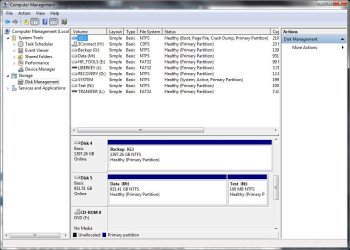
I want to use the unallocated part for the backup
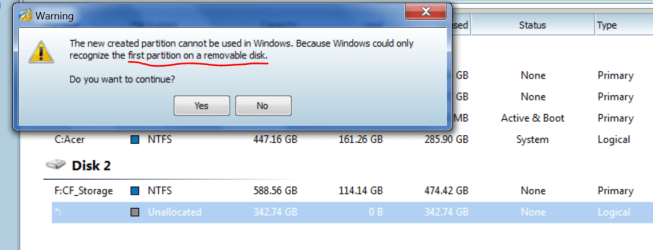
The Partitioner "Minitool" says that windows recognises only the first partition
I hope it helps for an explanation
 

Attachments

  • Partitions on USB drive.PNG
    Partitions on USB drive.PNG
    5.3 KB · Views: 29
  • Partitions 2.PNG
    Partitions 2.PNG
    44.1 KB · Views: 158
  • partitioner.PNG
    partitioner.PNG
    6.4 KB · Views: 27

My Computer

Computer Manufacturer/Model Number
acer 8950G
OS
windows 7 home premium
CPU
intel
Unallocated is quite normal for a partition that has not been formatted. I don't know your partition tool but in windows disk management right click and chose format.

You beat me to it theog.
 
Last edited:

My Computer

Computer type
Laptop
Computer Manufacturer/Model Number
Hewlett-Packard/G62-107SA Notebook
OS
Microsoft Windows 7 Home Premium 64-bit Service Pack 1
CPU
Intel(R) Core(TM) i3 CPU M 330 @ 2.13GHz
Motherboard
Hewlett-Packard 1425
Memory
8 GB DDR3
Graphics Card(s)
Intel(R) HD Graphics
Sound Card
Realtek High Definition Audio
Monitor(s) Displays
Builtin
Screen Resolution
1366 x 768 x 32 bits (4294967296 colors) @ 60 Hz
Hard Drives
250 GB SATA Hard Disk Drive 7200 rpm
2TB Seagate GoFlex USB 2 Drive
1TB Iomega Prestige USB 2 Drive
1.5TB Iomega Prestige USB 2 Drive (Samsung)
2TB WD MyBook Live NAS.
Mouse
Logitech Anywhere MX
Internet Speed
152 Mbs download 10 Mbs upload
Antivirus
Norton 360
Browser
Chrome
the problem is the position on the disk

Sorry, formatting and creating the second partition is not the problem; however, it seems that windows7 is not recognising the partition and does not give her a mounting siince it is the second on the usb harddisk; my partition programme says so and the fact as well; when I created the partition it did not appear in file manager.
I will show you in the next thread.
 

My Computer

Computer Manufacturer/Model Number
acer 8950G
OS
windows 7 home premium
CPU
intel
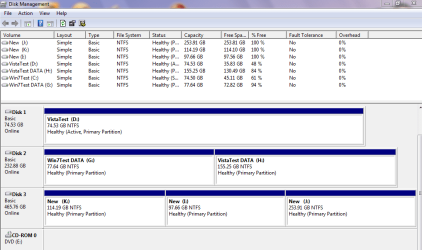
There is no problem with multiple partitions on a USB attached HDD. The attached image of disk management disk 5 is a USB HDD with two partitions.

Capture.JPG

What can cause problems is if windows thinks it is a removable device like a USB stick. I'm not sure what you can do if that is the case.
 

My Computer

Computer type
Laptop
Computer Manufacturer/Model Number
Hewlett-Packard/G62-107SA Notebook
OS
Microsoft Windows 7 Home Premium 64-bit Service Pack 1
CPU
Intel(R) Core(TM) i3 CPU M 330 @ 2.13GHz
Motherboard
Hewlett-Packard 1425
Memory
8 GB DDR3
Graphics Card(s)
Intel(R) HD Graphics
Sound Card
Realtek High Definition Audio
Monitor(s) Displays
Builtin
Screen Resolution
1366 x 768 x 32 bits (4294967296 colors) @ 60 Hz
Hard Drives
250 GB SATA Hard Disk Drive 7200 rpm
2TB Seagate GoFlex USB 2 Drive
1TB Iomega Prestige USB 2 Drive
1.5TB Iomega Prestige USB 2 Drive (Samsung)
2TB WD MyBook Live NAS.
Mouse
Logitech Anywhere MX
Internet Speed
152 Mbs download 10 Mbs upload
Antivirus
Norton 360
Browser
Chrome
Well it seems that my system is considering my USB HD as removable storage at least my partioner programm says so (see my thread above) it is listed in the windows disk management programme as CF (Compact Flash); I never heard that there exist Compact Flash storage devices of 1 Terrabyte. bullshit; I just saw in wikipedia the following paragraph:
"in November 2010, Sandisk, Sony and Nikon proposed a next generation card format targeted at high-definition camcorders and high-resolution digital photo cameras; not backward compatible, the proposed format would come in a similar form factor as CF/CFast but be based on PCI Express instead of ATA and would offer read speed of 500 Mbyte/s and storage capabilities beyond 2 TiB.[7] It remains unclear, if the CFA will adopt this proposal, as CF 5.0 already supports media up to 128 PiB and CF 6.0 adds speeds up to 167 Mbyte/s, while the SATA-based CFast already defines speeds up to 300 Mbyte/s. so windows has to do something ."

By the way my HD is not a card but has the form of a HDD.
Anyway, windows is recognising it as CF and so as removable.I consider that as a bug; and a big size of 1TB is in small private systems ohnly handable if partioned.
I aim not used to the windows system; is there any contact point where one can report such a bug?
 
Last edited:

My Computer

Computer Manufacturer/Model Number
acer 8950G
OS
windows 7 home premium
CPU
intel
I'm not sure what determines whether a USB device is determined as removable or not. I believe it is a setting supplied by the device manufacturer not windows. I will see if I can rustle up someone with greater knowledge on this than me.
 

My Computer

Computer type
Laptop
Computer Manufacturer/Model Number
Hewlett-Packard/G62-107SA Notebook
OS
Microsoft Windows 7 Home Premium 64-bit Service Pack 1
CPU
Intel(R) Core(TM) i3 CPU M 330 @ 2.13GHz
Motherboard
Hewlett-Packard 1425
Memory
8 GB DDR3
Graphics Card(s)
Intel(R) HD Graphics
Sound Card
Realtek High Definition Audio
Monitor(s) Displays
Builtin
Screen Resolution
1366 x 768 x 32 bits (4294967296 colors) @ 60 Hz
Hard Drives
250 GB SATA Hard Disk Drive 7200 rpm
2TB Seagate GoFlex USB 2 Drive
1TB Iomega Prestige USB 2 Drive
1.5TB Iomega Prestige USB 2 Drive (Samsung)
2TB WD MyBook Live NAS.
Mouse
Logitech Anywhere MX
Internet Speed
152 Mbs download 10 Mbs upload
Antivirus
Norton 360
Browser
Chrome
Download psrtition wizard bootable CD from this link : Free Download Magic Partition Manager Software - Partition Wizard Online , follow the steps described in Partition Wizard Bootable CD allows user to boot computer directly to manage partition. and try partitioning .

If still not worked, you may try another complicated thing ... remove the case of the removable disk, and attach it with a sata port to be used as an internal hdd , and then partition it using partition wizard boot cd. After completion, remove the disk and put the cover on .

But before doing everything, listen what Bare Foot Kid says .
 

My Computer

Computer type
PC/Desktop
Computer Manufacturer/Model Number
Self Assembled
OS
Microsoft Windows 10 Pro Insider Preview 64-bit
CPU
Intel(R) Core(TM) i3-4130 CPU @ 3.40GHz
Motherboard
Gigabyte Technology Co., Ltd. B85M-D3H
Memory
Corsair Vengence 4GB x2 (8.00GB Dual-Channel DDR3 @ 798MHz)
Graphics Card(s)
2047MB GeForce GTS 450 (ZOTAC International)
Sound Card
Onboard (Realtek High Definition Audio)
Monitor(s) Displays
LG Flatron E2040T
Screen Resolution
1600x900
Hard Drives
Western Digital 1 TB
Seagate 500 GB
PSU
Corsair VS550
Case
Cooler Master K380
Cooling
Cooler Master Seidon 120V Plus
Keyboard
Logitech MK260r
Mouse
Logitech MK260r
Internet Speed
PMPL Broadband
Antivirus
Windows Defender + MBAM
Browser
Firefox
Other Info
Dell Studio 15" Laptop
Another piece of information I forgot: the device, which is defintely a HDD - click free C2N Portable - is a USB 3.0 device. By the way I wrote to click free and once I get a reply I will report here. I hope its helpful.
 

My Computer

Computer Manufacturer/Model Number
acer 8950G
OS
windows 7 home premium
CPU
intel
Thank's that may help others in the same situation.
 

My Computer

Computer type
Laptop
Computer Manufacturer/Model Number
Hewlett-Packard/G62-107SA Notebook
OS
Microsoft Windows 7 Home Premium 64-bit Service Pack 1
CPU
Intel(R) Core(TM) i3 CPU M 330 @ 2.13GHz
Motherboard
Hewlett-Packard 1425
Memory
8 GB DDR3
Graphics Card(s)
Intel(R) HD Graphics
Sound Card
Realtek High Definition Audio
Monitor(s) Displays
Builtin
Screen Resolution
1366 x 768 x 32 bits (4294967296 colors) @ 60 Hz
Hard Drives
250 GB SATA Hard Disk Drive 7200 rpm
2TB Seagate GoFlex USB 2 Drive
1TB Iomega Prestige USB 2 Drive
1.5TB Iomega Prestige USB 2 Drive (Samsung)
2TB WD MyBook Live NAS.
Mouse
Logitech Anywhere MX
Internet Speed
152 Mbs download 10 Mbs upload
Antivirus
Norton 360
Browser
Chrome
.......

If still not worked, you may try another complicated thing ... remove the case of the removable disk, and attach it with a sata port to be used as an internal hdd , and then partition it using partition wizard boot cd. After completion, remove the disk and put the cover on .

But before doing everything, listen what Bare Foot Kid says .
Thank you for this advice. This goes definitely beyond my capabilities. I want simply that windows recognises my device as what it is a simple USB connected HDD. Then I assume that I can do all what I want to do.
 

My Computer

Computer Manufacturer/Model Number
acer 8950G
OS
windows 7 home premium
CPU
intel
Back
Top