
nicxclusive
New member
- Local time
- 5:26 PM
- Messages
- 3
I have an issue when I started to run NetDrive - basically, it's a program to create a "virtual drive" for an FTP server client setup for online storage websites on my computer. I can go on to this "HDD" and access what is located on the server - for those whom may not be familiar with this specific program.
Not until I had first originally restarted my PC - which wasn't for sever hours after I had the program installed, had I noticed that there were several, random phantom Local Disk Drives in my 'Computer'. I had no idea what it was from, but could only have imagined it was from the NetDrive program - since that was the last program I can remember having installed.
Then, I had decided to uninstall NetDrive - hoping the problem would go away. It Did. I had tried other programs to use, instead of NetDrive - for multiple reasons; prices and difficulties setting them up, I did not use them.
I had Re-installed NetDrive, once again, the issue had occurred again - though, they showed up (the phantom HDDs, then disappeared and showed up again - I have no idea what caused this).I had searched around for some information on this particular issue, but no such luck. I had even searched within the NetDrive support forum - again, no luck.
These HDDs only show up within my 'Computer' Explorer and not within my Disk Management, nor within DISKPART within Command Prompt. Though, they seem to stick around even when I use my email client to attach a file, for example - Hotmail.
Does anyone know how I can resolve this issue that I'm currently having - I would much rather not have to give up NetDrive, if that is even what is causing this situation to occur - unless someone could recommend me a program just a easy and as "inexpensive" as NetDrive..?
Picture Attached with Description.
Not until I had first originally restarted my PC - which wasn't for sever hours after I had the program installed, had I noticed that there were several, random phantom Local Disk Drives in my 'Computer'. I had no idea what it was from, but could only have imagined it was from the NetDrive program - since that was the last program I can remember having installed.
Then, I had decided to uninstall NetDrive - hoping the problem would go away. It Did. I had tried other programs to use, instead of NetDrive - for multiple reasons; prices and difficulties setting them up, I did not use them.
I had Re-installed NetDrive, once again, the issue had occurred again - though, they showed up (the phantom HDDs, then disappeared and showed up again - I have no idea what caused this).I had searched around for some information on this particular issue, but no such luck. I had even searched within the NetDrive support forum - again, no luck.
These HDDs only show up within my 'Computer' Explorer and not within my Disk Management, nor within DISKPART within Command Prompt. Though, they seem to stick around even when I use my email client to attach a file, for example - Hotmail.
Does anyone know how I can resolve this issue that I'm currently having - I would much rather not have to give up NetDrive, if that is even what is causing this situation to occur - unless someone could recommend me a program just a easy and as "inexpensive" as NetDrive..?
Picture Attached with Description.
Attachments
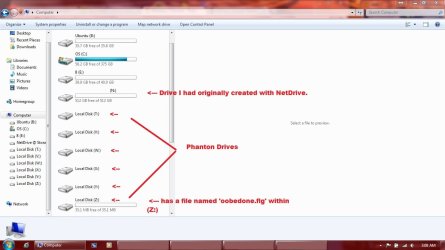
My Computer
- OS
- Windows 7 Home Premium

