Multiple problems/questions from a Seven newbie

boweasel

New member
Power User
Local time
8:32 PM
Messages
678
First problem - somehow the 'pictures' and 'documents' items that show up when you click the start button do not take me to where we have the pictures and documents stored. We have them stored in c:\users\<user name>\my pictures and
c:\users\<user name>\my documents.

I have no idea where those 2 itms off the start menu are taking me. Clicking on either does nothing, and as I've found out, right clicking to see where they are trying to take me does not work.

Secondly, I can't get Abode Reader 9.3 to work. I dowloaded the exec file for 9.3.4, but when I run it I get "error 1606: could not access network location
%appdata%. When I try to uninstall 9.3 via the control panel, I get the exact same message. I have even tried to use killbox to simply remove the abode folder, but I ultimately get a msg - this file could not be deleted.

Third, we use the AOL software here, and when we start our PC we get a msg that the main.idx file is damaged. Same msg when we click on the AOL icon. We CAN, however start aol when we use safe mode with networking.

Never had these problems with XP.
 

My Computer

Computer type
Laptop
OS
Windows 7 home premium 64 bit
CPU
AMD K10
Motherboard
Hewlett-Packard 1444 (Socket S1G4)
Memory
3.00GB Dual-Channel DDR3 @ 532MHz
Graphics Card(s)
ATI AMD M880G with ATI Mobility Radeon HD 4250 (HP)
Sound Card
Realtek
Screen Resolution
1366 x 768
Hard Drives
465GB Western Digital
Antivirus
MSE
They take you to your Library "Documents" and "Pictures"
 

My Computer

Computer type
PC/Desktop
Computer Manufacturer/Model Number
Alienware Aurora ALX R4
OS
Windows 10 Pro (x64)
CPU
Intel Core i7-3930K (3.2GHz - 4.5GHz)
Motherboard
Alienware Aurora-R4 x79
Memory
4x Samsung 4GB PC3-12800 DDR3 (16GB 1600MHz)
Graphics Card(s)
Nvidia Geforce GTX 690
Sound Card
SteelSeries Siberia Elite
Monitor(s) Displays
Dell UltraSharp U3011
Screen Resolution
2560x1600
Hard Drives
Samsung 850 Pro 256 GB, Seagate 1TB Desktop Hybrid HDD, 2x Western Digital 4TB Green HDD
PSU
875W Some Dell PSU <.<
Case
Alienware Aurora ALX
Cooling
Custom Liquid Cooling (EK CPU & GPU blocks) dual EK 480RAD
Keyboard
Logitech G710+ Mechanical
Mouse
Logitech G700s
Internet Speed
Verizon Fios (50 mbps average)
Other Info
Server: Intel NUC D54250WYK: i5-4250U, 16GB, 256 GB mSATA, Windows Server 2012 R2

My Computer

Computer type
Laptop
OS
Windows 7 home premium 64 bit
CPU
AMD K10
Motherboard
Hewlett-Packard 1444 (Socket S1G4)
Memory
3.00GB Dual-Channel DDR3 @ 532MHz
Graphics Card(s)
ATI AMD M880G with ATI Mobility Radeon HD 4250 (HP)
Sound Card
Realtek
Screen Resolution
1366 x 768
Hard Drives
465GB Western Digital
Antivirus
MSE

My Computer

Computer type
PC/Desktop
Computer Manufacturer/Model Number
Alienware Aurora ALX R4
OS
Windows 10 Pro (x64)
CPU
Intel Core i7-3930K (3.2GHz - 4.5GHz)
Motherboard
Alienware Aurora-R4 x79
Memory
4x Samsung 4GB PC3-12800 DDR3 (16GB 1600MHz)
Graphics Card(s)
Nvidia Geforce GTX 690
Sound Card
SteelSeries Siberia Elite
Monitor(s) Displays
Dell UltraSharp U3011
Screen Resolution
2560x1600
Hard Drives
Samsung 850 Pro 256 GB, Seagate 1TB Desktop Hybrid HDD, 2x Western Digital 4TB Green HDD
PSU
875W Some Dell PSU <.<
Case
Alienware Aurora ALX
Cooling
Custom Liquid Cooling (EK CPU & GPU blocks) dual EK 480RAD
Keyboard
Logitech G710+ Mechanical
Mouse
Logitech G700s
Internet Speed
Verizon Fios (50 mbps average)
Other Info
Server: Intel NUC D54250WYK: i5-4250U, 16GB, 256 GB mSATA, Windows Server 2012 R2
And is that NOT where I said our pictures and documents were located in my original post?
 

My Computer

Computer type
Laptop
OS
Windows 7 home premium 64 bit
CPU
AMD K10
Motherboard
Hewlett-Packard 1444 (Socket S1G4)
Memory
3.00GB Dual-Channel DDR3 @ 532MHz
Graphics Card(s)
ATI AMD M880G with ATI Mobility Radeon HD 4250 (HP)
Sound Card
Realtek
Screen Resolution
1366 x 768
Hard Drives
465GB Western Digital
Antivirus
MSE
I have both Documents and Picures 'displayed as a link' on the Start Menu properties. When I right click on my user name I DO NOT get a Libraries window. I get a screen that displays all the folders under my user name - among them 'My Pictures' and 'My Documents'.
 

My Computer

Computer type
Laptop
OS
Windows 7 home premium 64 bit
CPU
AMD K10
Motherboard
Hewlett-Packard 1444 (Socket S1G4)
Memory
3.00GB Dual-Channel DDR3 @ 532MHz
Graphics Card(s)
ATI AMD M880G with ATI Mobility Radeon HD 4250 (HP)
Sound Card
Realtek
Screen Resolution
1366 x 768
Hard Drives
465GB Western Digital
Antivirus
MSE

My Computer

Computer Manufacturer/Model Number
Dell and Custom
OS
Systems 1 and 2: Windows 7 Enterprise x64, Win 8 Developer
CPU
System 1: i7 [email protected], System 2: AMD FX-4100 Zambezi 3.6G
Motherboard
System 1:Dell 06NWYK System 2: ASUS M5A97 AM3+
Memory
System 1: 8GB System 2: 8GB
Graphics Card(s)
System 1: ATI FirePro V4800 System 2: Radeon HD 6850
Sound Card
System 1: onboard System 2: onboard
Monitor(s) Displays
System1: Viewsonic HDMI 24"
Screen Resolution
System 1: 1920x1080 System 2: 1920x1080
Hard Drives
System 1: Mirrored .5B drives System 2: Seagate Barracuda ST1000DM003 1TB 7200 RPM 64MB Cache SATA 6.0Gb/s
Case
System 1: Dell System 2: Cooler Master
Internet Speed
10 MBPS
I'm just telling you where those buttons (Document and Pictures) in the start menu go.
I have no idea what it is you are seeing on your computer, I'm not psychic.
 

My Computer

Computer type
PC/Desktop
Computer Manufacturer/Model Number
Alienware Aurora ALX R4
OS
Windows 10 Pro (x64)
CPU
Intel Core i7-3930K (3.2GHz - 4.5GHz)
Motherboard
Alienware Aurora-R4 x79
Memory
4x Samsung 4GB PC3-12800 DDR3 (16GB 1600MHz)
Graphics Card(s)
Nvidia Geforce GTX 690
Sound Card
SteelSeries Siberia Elite
Monitor(s) Displays
Dell UltraSharp U3011
Screen Resolution
2560x1600
Hard Drives
Samsung 850 Pro 256 GB, Seagate 1TB Desktop Hybrid HDD, 2x Western Digital 4TB Green HDD
PSU
875W Some Dell PSU <.<
Case
Alienware Aurora ALX
Cooling
Custom Liquid Cooling (EK CPU & GPU blocks) dual EK 480RAD
Keyboard
Logitech G710+ Mechanical
Mouse
Logitech G700s
Internet Speed
Verizon Fios (50 mbps average)
Other Info
Server: Intel NUC D54250WYK: i5-4250U, 16GB, 256 GB mSATA, Windows Server 2012 R2
I'm just telling you where those buttons in the start menu go.
I have no idea what it is you are seeing on your computer, I'm not psychic.

Somehow I KNEW you were gonna say that. LOL. :cool:
 

My Computer

Computer Manufacturer/Model Number
Dell and Custom
OS
Systems 1 and 2: Windows 7 Enterprise x64, Win 8 Developer
CPU
System 1: i7 [email protected], System 2: AMD FX-4100 Zambezi 3.6G
Motherboard
System 1:Dell 06NWYK System 2: ASUS M5A97 AM3+
Memory
System 1: 8GB System 2: 8GB
Graphics Card(s)
System 1: ATI FirePro V4800 System 2: Radeon HD 6850
Sound Card
System 1: onboard System 2: onboard
Monitor(s) Displays
System1: Viewsonic HDMI 24"
Screen Resolution
System 1: 1920x1080 System 2: 1920x1080
Hard Drives
System 1: Mirrored .5B drives System 2: Seagate Barracuda ST1000DM003 1TB 7200 RPM 64MB Cache SATA 6.0Gb/s
Case
System 1: Dell System 2: Cooler Master
Internet Speed
10 MBPS

My Computer

Computer type
Laptop
OS
Windows 7 home premium 64 bit
CPU
AMD K10
Motherboard
Hewlett-Packard 1444 (Socket S1G4)
Memory
3.00GB Dual-Channel DDR3 @ 532MHz
Graphics Card(s)
ATI AMD M880G with ATI Mobility Radeon HD 4250 (HP)
Sound Card
Realtek
Screen Resolution
1366 x 768
Hard Drives
465GB Western Digital
Antivirus
MSE
You cannot change them. And Windows 7 is not Windows XP, so throw out any Windows XP did that and did this.
 

My Computer

Computer type
PC/Desktop
Computer Manufacturer/Model Number
Alienware Aurora ALX R4
OS
Windows 10 Pro (x64)
CPU
Intel Core i7-3930K (3.2GHz - 4.5GHz)
Motherboard
Alienware Aurora-R4 x79
Memory
4x Samsung 4GB PC3-12800 DDR3 (16GB 1600MHz)
Graphics Card(s)
Nvidia Geforce GTX 690
Sound Card
SteelSeries Siberia Elite
Monitor(s) Displays
Dell UltraSharp U3011
Screen Resolution
2560x1600
Hard Drives
Samsung 850 Pro 256 GB, Seagate 1TB Desktop Hybrid HDD, 2x Western Digital 4TB Green HDD
PSU
875W Some Dell PSU <.<
Case
Alienware Aurora ALX
Cooling
Custom Liquid Cooling (EK CPU & GPU blocks) dual EK 480RAD
Keyboard
Logitech G710+ Mechanical
Mouse
Logitech G700s
Internet Speed
Verizon Fios (50 mbps average)
Other Info
Server: Intel NUC D54250WYK: i5-4250U, 16GB, 256 GB mSATA, Windows Server 2012 R2
Pictures, Documents, Music Etc from the Start Menu are actually Library Shortcuts.

A Library is a collection of Folders, and includes all of thier content in that library.

For example, clicking the Pictures library may open 3 folders :
My Pictures, Christams '09, Halloween 2007 etc.

It is not neccasarily just the "Pictures" folder.
Although it should be included by default.


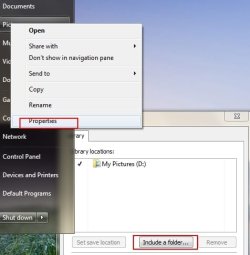
If you right click a library from the Start menu, such as Pictures, and choose Properties, you can set that library up.

Include or Exclude whatever Folders you wish as seen in the snip below.


Have you moved your entire User Folder? The fact the Pictures are not showing up by default (If indeed in the My Pictures Fodler) and Adobe can not find the App data folder seems odd.
 

Attachments

  • 3.jpg
    3.jpg
    23.3 KB · Views: 2

My Computer

Computer Manufacturer/Model Number
Custom (Self Build)
OS
Windows 7 Home Premium 64bit
CPU
Intel Core i7 2700k
Motherboard
eVGA P67 SLI
Memory
8GB Mushkin Redline Ridgebacks @1866
Graphics Card(s)
EVGA GTX570 SC
Sound Card
XiFi Titanium HD
Monitor(s) Displays
LG W2453V
Screen Resolution
1920x1080
Hard Drives
Intel 320 80GB -- Intel X25-V 40GB --WD Black 1TB x2 -- WD Blue 640GB
PSU
Seasonic x750
Case
Corsair 600T SE White
Cooling
eVGA Superclocked CPU Cooler
Keyboard
Saitek Cyborg
Antivirus
Kaspersky
Browser
IE
Other Info
LG BD/DVD
They do already. The files you save in Library Documents will save it to C:\users\<username>\My Documents. Same For pictures.

Or simply do this : create shortcuts on your desktop!
 

My Computer

Computer type
PC/Desktop
Computer Manufacturer/Model Number
Custom build
OS
Windows 10 Professional 64-bit
CPU
Ryzen 9 5900X
Motherboard
Gigabyte X570 Aorus Master
Memory
G.Skill 3600Mhz CL16 16GB × 4
Graphics Card(s)
EVGA GeForce RTX 3070 Ti FTW3 Ultra Gaming
Sound Card
On-board
Monitor(s) Displays
Dell Alienware AW3418DW
Screen Resolution
3440x1440
Hard Drives
1×Sabrent Rocket 4 Plus 2TB nvme SSD (System, internal)
2x4TB Western Digital Blue (Internal)
1x4TB HDST 7200RPM (Internal)
PSU
Seasonic Focus Plus 850W Platinum
Case
Corsair 680X
Cooling
Stock fans + 3× Corsair QL120, Corsair H100i Platinum
Keyboard
Logitech K350
Mouse
Logitech M510
Internet Speed
120Mbits dl - 20Mbits up
Antivirus
ESET NOD32 Antivirus
Browser
Firefox (latest version)
Other Info
Headphones : Audio-Technica ATH-M50x
Scanner : Canon Canoscan LiDE 220 + Plustek OptiBook 4800
It likely has to do with the way you copied your pictures and document into the corresponding folders. This is why I only copy the contents of the Documents (for example) into the empty folder on new install.

I think you can fix this easily enough by rightclicking on the folder and adding it to the library. If not, you'll need to highlight all of the contents of the folder and paste them as a group into the Pictures, Documents, etc folder. You probably have a Pictures folder within the Pictures folder. Happens a lot.
 
When I click on the start menu it opens up the familiar double pane. The right side of that pane is headed with my user name. Under that are Documents, Music, Pictures, Games, Computer, etc.

If I right click on any of those first three items (in red), I am presented with only 2 choices - Open and Send to.

If I use explorer to navigate to the folder on my PC that actually contains my pictures (c:\users\<user name>\my pictures) and right click on it I have an option Include in library. Clicking on that opens one option - Create new library. Clicking on that does nothing that I can discern.

I do not seem to have any libraries.
 

My Computer

Computer type
Laptop
OS
Windows 7 home premium 64 bit
CPU
AMD K10
Motherboard
Hewlett-Packard 1444 (Socket S1G4)
Memory
3.00GB Dual-Channel DDR3 @ 532MHz
Graphics Card(s)
ATI AMD M880G with ATI Mobility Radeon HD 4250 (HP)
Sound Card
Realtek
Screen Resolution
1366 x 768
Hard Drives
465GB Western Digital
Antivirus
MSE
There are much more serious problems than the missing folder links to Start Menu. Connecting via Team Viewer, we discovered that an %appdata% folder had been put onto the desktop before a SysRestore point exists thus generating errors for any attempt to install MSE, AOL, etc.

OP is trying to fix a family member's factory install which is an unsalvageable mess.

SFC found no integrity violations. He is going to try a Repair Install next. HP Recovery disks and files are being backed up with possibility of running Recovery as a last resort. Clean Reinstall is a distant option.

http://www.sevenforums.com/tutorials/3413-repair-install.html?ltr=R
http://www.sevenforums.com/installa...are-after-clean-win-7-install.html#post488270
http://www.sevenforums.com/tutorials/1649-clean-install-windows-7-a.html
http://www.sevenforums.com/tutorials/91339-ssd-hdd-optimize-windows-reinstallation.html
 
Got a late start today, and. prior to a repair install, have copied a mess of pictures to a new disk in the DVD drive. Only problem - I have no idea (with 7) how to actually BURN it...

Right clicking the E: drive fails to give me the option (as it did in XP) to burn these files to a DVD.

Meanwhile, I have the X15yadda yadda yadda iso file on my desktop. When I'm done w/ the pictures do I right click and send to the E: drive.

If so, once again, how would I burn from there using the windows software?
 

My Computer

Computer type
Laptop
OS
Windows 7 home premium 64 bit
CPU
AMD K10
Motherboard
Hewlett-Packard 1444 (Socket S1G4)
Memory
3.00GB Dual-Channel DDR3 @ 532MHz
Graphics Card(s)
ATI AMD M880G with ATI Mobility Radeon HD 4250 (HP)
Sound Card
Realtek
Screen Resolution
1366 x 768
Hard Drives
465GB Western Digital
Antivirus
MSE
You won't burn DVD as it is formatted by Win7 to use just like a flash stick, by simply dragging files to DVD.

The only difference with flash stick is files are not deletable if only a DVD-R.
 
Problem Solved With Help from Gregrocker

While I was getting sarcastic responses from other posters, gregrocker took a significant amount of his time to actually LISTEN to my problems, and to help me.

He had me install Team Viewer so he could check out the problems for himself, and when he realized that there was no easy fix for what seemed on the surface to be trivialities, we talked on the phone for at least an hour.

He suggested I download an ISO image of 64 bit Windows 7, helped me to back up documents and pictures, and led me to an extremely helpful Windows 7 Forum step by step guide for performing a Repair Install (http://www.sevenforums.com/tutorials/3413-repair-install.html)

Armed with his invaluable advice, I created a Windows 7 disk, and, with help from the tutorial, used it to perform a successful repair install.

The pictures, documents and music all display as they should from the Start Menu, Abode Reader is working perfectly, and even my sister's beloved AOL software, which she refuses to abandon is performing at it's normal degree of sluggishness.

He also helped me to rid the PC of a lot of HP installed bloat-ware that served no essential purpose.

I have since found out from my brother-in-law that the pictures, et al, were NEVER accessible from the Start Menu, which goes along with Greg's theory that this 7 install was originally botched at the factory level.

My sister is delighted. She's promised my wife and I a gourmet dinner this weekend, and I got an education along with a Windows 7 disk, so I'm happy, too.

Thank you Greg.
 
Last edited:

My Computer

Computer type
Laptop
OS
Windows 7 home premium 64 bit
CPU
AMD K10
Motherboard
Hewlett-Packard 1444 (Socket S1G4)
Memory
3.00GB Dual-Channel DDR3 @ 532MHz
Graphics Card(s)
ATI AMD M880G with ATI Mobility Radeon HD 4250 (HP)
Sound Card
Realtek
Screen Resolution
1366 x 768
Hard Drives
465GB Western Digital
Antivirus
MSE
Nice job Rock.
Altho I myself would not have been able to help the threader, I must comment, based on the posting, that you were the only one that caught what the threader was asking for. And then went above and beyond with free help.
Salute
 

My Computer

Computer Manufacturer/Model Number
DIY #3, #2
OS
W7 Ulti/64, XP Pro/32
CPU
INTEL i7 920 DO, Core2 Duo 6400
Motherboard
GIGABYTE EX58 UD3R-SLI, EP45-UD3R
Memory
KINGSTON DDR3 1333MHz, CORSAIR DDR2 800MHz
Graphics Card(s)
EVGA GTX 260 x2, 8800 GTX
Sound Card
REALTEK HD onboard, ditto
Monitor(s) Displays
SONY 40" BRAVIA LCD
Screen Resolution
1360 X 768
Hard Drives
OCZ VERTEX/RAID0 -3, Vertex 30GB
PSU
COOLERMASTER 900W, ENERMAX 850W
Case
COOLERMASTER HAF 932 x2
Cooling
stock
Keyboard
MS
Mouse
MS
Internet Speed
ADSL 3MB/768KBs
Other Info
amateur enthusiast
Back
Top