Solved Multiple shared folders under one network drive?

daydr3am3r

New member
Power User
Local time
2:45 AM
Messages
96
Location
Bucharest, Romania
Hi
I was wondering if it is possible to make multiple shared folders to appear under one network drive. Also, other new shared folders should automatically appear under the same network drive.
Any ideas?
 

My Computer

Computer type
PC/Desktop
OS
Windows 7 Professional x64 SP1
CPU
Intel Quad Core q9300
Motherboard
ASUS Striker II Formula
Memory
4*2Gb A-Data Extreme 800 Mhz
Graphics Card(s)
ASUS GeForce GTX285 1Gb DDR 3
Sound Card
Supreme FX II
Monitor(s) Displays
Philips LCD 220VW
Screen Resolution
1680 x 1050
Hard Drives
1 x 1TB WD Caviar Black 64 Mb 7200RPM SATA 3
Case
Antec P190B
Keyboard
Microsoft Natural Ergonomic Keyboard 4000
Mouse
Logitech G5 Refresh
Antivirus
Norton 360
Browser
Opera
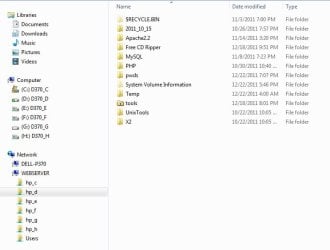
Not sure I understand. Do you mean like this?

NetworkShares.jpg
 

My Computer

Computer type
PC/Desktop
Computer Manufacturer/Model Number
Lenovo IdeaCenter 450
OS
Windows 10 Pro X64
CPU
Intel Quad Core i7-4770 @ 3.4Ghz
Memory
16.0GB PC3-12800 DDR3 SDRAM 1600 MHz
Graphics Card(s)
Intel Integrated HD Graphics
Sound Card
Realtek HD Audio
Monitor(s) Displays
HP 22" LCD
Screen Resolution
1680 x 1050
Hard Drives
250GB Samsung EVO SATA-3 SSD
2TB Seagate ST2000DM001 SATA-2
1.5TB Seagate ST3150041AS SATA
Keyboard
Dell USB
Mouse
Lenovo USB
Internet Speed
Cable via Road Runner 3MB Upload, 30MB Download
Antivirus
Windows Defender, MBAM Pro, MBAE
Browser
Seamonkey
Other Info
UEFI/GPT
PLDS DVD-RW DH16AERSH
More or less. The idea is that I wanna have only one network drive and if I access it to be able to see everything shared on my network even if I have 2 PCs or 10. Lets say I have 3 PCs. On PC A I wanna share 2 folders on drive C and 3 on drive D and on PC B I wanna share 4 folders on drive E and 5 on drive F. On PC C I want to see all those folders under a single network drive in My Computer rather that going to Network -> Shared PC -> Shared Folder. Now I use 2 network drives(one on each PC) but every network drive is in fact a shared folder so it's not very efficient.
 

My Computer

Computer type
PC/Desktop
OS
Windows 7 Professional x64 SP1
CPU
Intel Quad Core q9300
Motherboard
ASUS Striker II Formula
Memory
4*2Gb A-Data Extreme 800 Mhz
Graphics Card(s)
ASUS GeForce GTX285 1Gb DDR 3
Sound Card
Supreme FX II
Monitor(s) Displays
Philips LCD 220VW
Screen Resolution
1680 x 1050
Hard Drives
1 x 1TB WD Caviar Black 64 Mb 7200RPM SATA 3
Case
Antec P190B
Keyboard
Microsoft Natural Ergonomic Keyboard 4000
Mouse
Logitech G5 Refresh
Antivirus
Norton 360
Browser
Opera
You need the function of Windows 7 Libraries but across networks. I have not seen anything like that. Maybe there is a 3rd party program that will do this. Hopefully someone else will have an idea.

Edit: If you could share a mapped network drive that would do it but I can't make that work either.
 

My Computer

Computer type
PC/Desktop
Computer Manufacturer/Model Number
Lenovo IdeaCenter 450
OS
Windows 10 Pro X64
CPU
Intel Quad Core i7-4770 @ 3.4Ghz
Memory
16.0GB PC3-12800 DDR3 SDRAM 1600 MHz
Graphics Card(s)
Intel Integrated HD Graphics
Sound Card
Realtek HD Audio
Monitor(s) Displays
HP 22" LCD
Screen Resolution
1680 x 1050
Hard Drives
250GB Samsung EVO SATA-3 SSD
2TB Seagate ST2000DM001 SATA-2
1.5TB Seagate ST3150041AS SATA
Keyboard
Dell USB
Mouse
Lenovo USB
Internet Speed
Cable via Road Runner 3MB Upload, 30MB Download
Antivirus
Windows Defender, MBAM Pro, MBAE
Browser
Seamonkey
Other Info
UEFI/GPT
PLDS DVD-RW DH16AERSH
Both network drives are shared but I have one network drive on each system and I could map only one folder on each system.
 

My Computer

Computer type
PC/Desktop
OS
Windows 7 Professional x64 SP1
CPU
Intel Quad Core q9300
Motherboard
ASUS Striker II Formula
Memory
4*2Gb A-Data Extreme 800 Mhz
Graphics Card(s)
ASUS GeForce GTX285 1Gb DDR 3
Sound Card
Supreme FX II
Monitor(s) Displays
Philips LCD 220VW
Screen Resolution
1680 x 1050
Hard Drives
1 x 1TB WD Caviar Black 64 Mb 7200RPM SATA 3
Case
Antec P190B
Keyboard
Microsoft Natural Ergonomic Keyboard 4000
Mouse
Logitech G5 Refresh
Antivirus
Norton 360
Browser
Opera
What I meant was to map the drive so everything you want is accessible from one system then share the mapped drive along with whatever else you want from that system. Windows does not support this.

I don't know of any way to do what you want.

Curious, why do you want to do this? May there is another way to accomplish it?
 

My Computer

Computer type
PC/Desktop
Computer Manufacturer/Model Number
Lenovo IdeaCenter 450
OS
Windows 10 Pro X64
CPU
Intel Quad Core i7-4770 @ 3.4Ghz
Memory
16.0GB PC3-12800 DDR3 SDRAM 1600 MHz
Graphics Card(s)
Intel Integrated HD Graphics
Sound Card
Realtek HD Audio
Monitor(s) Displays
HP 22" LCD
Screen Resolution
1680 x 1050
Hard Drives
250GB Samsung EVO SATA-3 SSD
2TB Seagate ST2000DM001 SATA-2
1.5TB Seagate ST3150041AS SATA
Keyboard
Dell USB
Mouse
Lenovo USB
Internet Speed
Cable via Road Runner 3MB Upload, 30MB Download
Antivirus
Windows Defender, MBAM Pro, MBAE
Browser
Seamonkey
Other Info
UEFI/GPT
PLDS DVD-RW DH16AERSH
Sorry for the late reply. Well I was thinking this will make it easier to access all shared data in one place. But I'm opened to other solutions.
 

My Computer

Computer type
PC/Desktop
OS
Windows 7 Professional x64 SP1
CPU
Intel Quad Core q9300
Motherboard
ASUS Striker II Formula
Memory
4*2Gb A-Data Extreme 800 Mhz
Graphics Card(s)
ASUS GeForce GTX285 1Gb DDR 3
Sound Card
Supreme FX II
Monitor(s) Displays
Philips LCD 220VW
Screen Resolution
1680 x 1050
Hard Drives
1 x 1TB WD Caviar Black 64 Mb 7200RPM SATA 3
Case
Antec P190B
Keyboard
Microsoft Natural Ergonomic Keyboard 4000
Mouse
Logitech G5 Refresh
Antivirus
Norton 360
Browser
Opera
Libraries are the easiest and fastest way to approximate this. Create a new library and add all your network shares to it.

If Windows won't let you add a network share to a library because it's not indexed, install Windows Desktop Search on the server that provides the share.
 

My Computer

OS
Win7Ultimate x64 + x32, Win7Pro x64, XP x32, Win 2003, Ubuntu and OpenIndiana
Back
Top