
Multiple spyware programs

ellenc

New member
Member
VIP
Local time
4:00 PM
Messages
147
Re: multiple spyware programs: It's my understanding that while only one antivirus program can run, having more than one spyware program is OK. Before I installed Norton Internet Security 2011, I used to run Malwarebyes and Superspyware, plus Win Security Essentials.
I've read that it's OK to run "nonresident" additional spyware besides the primary program (NIS). I don't know how to run a nonresident program and would appreciate any information you can give me as to what are "nonresident" programs and how I can run Malwarebyes or Superspyware in addition to NIS without there being a conflict. Thanks.
 

My Computer

Computer Manufacturer/Model Number
Dell Inspiron 546
OS
Windows 7 Professional
CPU
2.70gigahertz AMD Athlon 7750 Dual-Core
Motherboard
Dell, Inc. 0F896N A02
Memory
3328 Megabytes Usable Installed Memory
Graphics Card(s)
ATI Radcon HD 3200 Graphics
Monitor(s) Displays
Dell E1709W 17,2" monitor
Hard Drives
309.54G usable hard drive capacity
161.25G hard drive free space
Seagate FreeAgent Go 500G external drive
Seagate FreeAgent Go 160G external drive
Maxtor One Touch 250G external drive
NIS can be picky with anything that has a "active"scanner.
If you are running NIS, many times active scanners can cause more harm than good as they interfere.


Anything that is 'On Demand" is usually OK.
Generally speaking, this is the case with many other AV suites as well.

Norton also has a active Anti-Spyware built in, which works quite well.
So you really do not need much in terms of extra layers of protection.


If you wish to run extras:
The free version of Malwarebytes is just fine. Since it only scans by manually starting it. I would also highly recommend it.

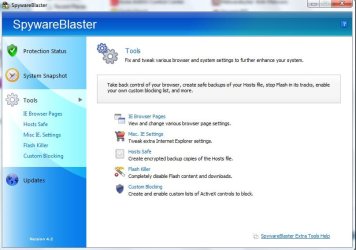
One other I found that works perfectly fine with NIS, is SpywareBlaster.
It does not scan or have any extra processes to interfer with what NIS already does.
Basically, all it really does is add items to your Internet browsers blacklist. So it blocks many known bad sites etc from within the browser.

I found that NIS + Spyware Blaster is a good combination as well as run a weekly scan with Malwarebytes just as a extra layer of protection. Even though it never finds anything, still worthwhile IMHO.

Dont forget, MB and SpywareBlaster must be updated periodically.
These 2 will not hinder performance either.

Super Anti-Spyware is good as well, but I honestly do not think its needed if you have MB. I would just choose 1 or the other.
Im sure you will get some other good advice, but just my opionion on it.
 

My Computer

Computer Manufacturer/Model Number
Custom (Self Build)
OS
Windows 7 Home Premium 64bit
CPU
Intel Core i7 2700k
Motherboard
eVGA P67 SLI
Memory
8GB Mushkin Redline Ridgebacks @1866
Graphics Card(s)
EVGA GTX570 SC
Sound Card
XiFi Titanium HD
Monitor(s) Displays
LG W2453V
Screen Resolution
1920x1080
Hard Drives
Intel 320 80GB -- Intel X25-V 40GB --WD Black 1TB x2 -- WD Blue 640GB
PSU
Seasonic x750
Case
Corsair 600T SE White
Cooling
eVGA Superclocked CPU Cooler
Keyboard
Saitek Cyborg
Antivirus
Kaspersky
Browser
IE
Other Info
LG BD/DVD
Hi, ellenc.

Welcome to Seven Forums.

The non-resident is generally in reference to a second A/V software, which some people like to keep on hand. With the NIS, you have all the features of the suite in one program, which includes what we refer to as "real-time protection". Just as with two antivirus software programs, having two active real-time protection programs can cause conflicts.

You can keep both Malwarebytes' Anti-Malware and SUPERAntispyware installed and updated on your computer for occasional scanning. However, if you have paid/licensed versions, you may run into problems if you have the real-time protection activated. If they are in start-up, it is easy to manage start-up programs with my favorite WinPatrol.

Edit Note: Wishmaster beat me to the punch, while I was off looking for my husband's boots. :) I agree with his recommendation to consider SpywareBlaster.
 

My Computer

OS
Windows 7 & Windows Vista Ultimate
Javacool Software
Be sure to keep it updated (manually), then click on "enable all protection".
 

Attachments

  • SpywareBlaster tools.jpg
    SpywareBlaster tools.jpg
    51.1 KB · Views: 13
Last edited:

My Computer

Computer type
PC/Desktop
Computer Manufacturer/Model Number
Bruce ... somewhere in his 40's
OS
Windows 7 Ultimate 32bit SP1
CPU
Intel(R) Core(TM)2 Quad CPU @ 2.40GHz, 2400 MHz
Motherboard
INTEL/D975XBX2
Memory
4 GB
Graphics Card(s)
ATI Radeon HD 2600 Pro
Monitor(s) Displays
Samsung SyncMaster 914v
Screen Resolution
1280 x 1024
Hard Drives
2/500GB each ... ST3500630AS ATA Device.
One is not connected
PSU
Rocketfish 700 W
Case
G.Skill Gigabyte Chassis
Keyboard
Standard PS/2 Keyboard
Mouse
Microsoft PS/2 Mouse
Internet Speed
DSL
Antivirus
Avira Internet Security
Browser
IE 11
Other Info
ATI HDMI Audio
Correct picture ... couldn't edit the other on out :confused:
 

Attachments

  • spywareblaster.jpg
    spywareblaster.jpg
    48.4 KB · Views: 14

My Computer

Computer type
PC/Desktop
Computer Manufacturer/Model Number
Bruce ... somewhere in his 40's
OS
Windows 7 Ultimate 32bit SP1
CPU
Intel(R) Core(TM)2 Quad CPU @ 2.40GHz, 2400 MHz
Motherboard
INTEL/D975XBX2
Memory
4 GB
Graphics Card(s)
ATI Radeon HD 2600 Pro
Monitor(s) Displays
Samsung SyncMaster 914v
Screen Resolution
1280 x 1024
Hard Drives
2/500GB each ... ST3500630AS ATA Device.
One is not connected
PSU
Rocketfish 700 W
Case
G.Skill Gigabyte Chassis
Keyboard
Standard PS/2 Keyboard
Mouse
Microsoft PS/2 Mouse
Internet Speed
DSL
Antivirus
Avira Internet Security
Browser
IE 11
Other Info
ATI HDMI Audio
Hi, ellenc.

Welcome to Seven Forums.

The non-resident is generally in reference to a second A/V software, which some people like to keep on hand. With the NIS, you have all the features of the suite in one program, which includes what we refer to as "real-time protection". Just as with two antivirus software programs, having two active real-time protection programs can cause conflicts.

You can keep both Malwarebytes' Anti-Malware and SUPERAntispyware installed and updated on your computer for occasional scanning. However, if you have paid/licensed versions, you may run into problems if you have the real-time protection activated. If they are in start-up, it is easy to manage start-up programs with my favorite WinPatrol.

Edit Note: Wishmaster beat me to the punch, while I was off looking for my husband's boots. :) I agree with his recommendation to consider SpywareBlaster.
Wont winpatrol conflict with other hipps?
 

My Computer

OS
7 premium 64
You only need one main app and a backup. You can also run a portable app like SuperAntiSpyware occassionally too. WinPatrol won't conflict but you don't really need it. You can check msconfig yourself or use HiJackThis to inspect sections of your system. Also, why did you buy Norton when your previous security setup was more than adequate?
 

My Computer

Computer Manufacturer/Model Number
Self-Built
OS
Windows 7 Ultimate x64
CPU
AMD Phenom 965 @ 3.4GHz w/ Thermaltake Contac 29 (updraft)
Motherboard
Gigabyte 790GPT-UD3H w/ F3 BIOS & IGP disabled
Memory
Kingston 8GB DDR3 1333MHz 9-9-9-24 (2 x 4GB kits)
Graphics Card(s)
Sapphire 6870 1GB GDDR5 (reference model)
Sound Card
Onboard Realtek 889A codec
Monitor(s) Displays
BenQ 22" M2200HD
Screen Resolution
1920x1080
Hard Drives
1 x Seagate Barracuda 7200.12 1TB 7200RPM w/32MB cache
PSU
Xigmatek NRP-MC651 650w 80+ bronze certified
Case
Antec Two Hundred
Cooling
1 x 140mm exhaust top, 1 x 120mm exhaust rear
Keyboard
Stock PS/2 model
Mouse
Razer Salmosa
Internet Speed
ADSL2+/ 2MB/s
WinPatrol is much safer than using MSconfig (System Configuration Utility). It is a troubleshooting tool, not a solution. See Run Selective Startup using System Configuration

System Configuration is intended to find and isolate problems, but it is not meant as a startup management program. To permanently remove or turn off programs or services that run at startup, see Uninstall or change a program.
Important: Do not use MSConfig to force Safeboot if the system is infected with malware. Some types of malware can delete or alter the Safeboot key in the registry. This results in the inability to reboot into safe mode or back to normal mode. Using the /Safeboot option on the Boot.ini tab to force safe mode when the F8 key does not work, could have disastrous results. The Safeboot option modifies the Boot.ini file and can result in being locked in a continuous reboot loop, unable to return to MSConfig to undo the selection.

Note also that HijackThis cannot see entries that have been disabled with MSconfig.
 

My Computer

OS
Windows 7 & Windows Vista Ultimate
Back
Top