
Multiple USB Controllers

PaulVdB

New member
Member
Local time
1:55 AM
Messages
93
Location
Antwerp
- My computer's (*) startup got very slow.
- Windows Explorer is very slow. (sometimes "Not Responding)
- When I put it to sleep (or it when it goes to sleep from its own) I get the BSOD saying
BUGCODE_USB_DRIVER
- When I open the Device Manager I see ALOT of USB drivers (See pic)
my USB devices are : mouse, keyboard and 1 USB hub. An external eSata HD is connected to the eSata port of my Router, (Windows sees it as an USB drive and is working just fine

Can I just delete the doubles ? or what is the problem and how do I solve it ?

Thanks in advance !


(*)
Windows 7 Professional
System
Manufacturer Gigabyte Technology Co., Ltd.
Model GA-990FXA-UD3
Total amount of system memory 32,0 GB RAM
System type 64-bit operating system
Number of processor cores 8
 

Attachments
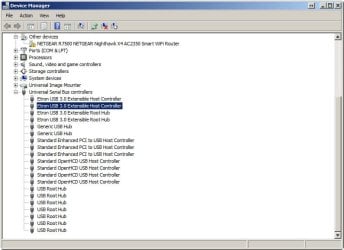
  • Device Manager.jpg
    Device Manager.jpg
    51.7 KB · Views: 0
Last edited:

My Computer

Computer type
PC/Desktop
Computer Manufacturer/Model Number
Custom
OS
Windows 7 Pro x64
CPU
AMD 8-core FX 8150
Motherboard
GYGABYTE GA 990FXA-UD3
Memory
32MB
Graphics Card(s)
on mobo
Sound Card
on mobo
Hard Drives
SSD(120G) + 1 TB + 2TB + SSD(60G)
PSU
Cooler Master 750W
Case
Cooler Master
Cooling
original AMD cpu fan, + HDfan + 2x Sys fan + PSU fan
Keyboard
yes
Mouse
yes
Internet Speed
ADSL +/-40Down, +/-20Up
Antivirus
AVAST (+ZoneAlarm)
Browser
FIREFOX
Other Info
Started with Sinclair Spectrum 48KB with MASS storage : 2x microdrive 100KB
Then to ATARI : 520ST, 1040ST/4MB (with 30MB HDD), MegaSTe, TT (with 2GB HDD), Falcon
Then PC : win98, win98², winXP, win7
Those may be perfectly valid and you will find out if you uninstall one and then Scan for Hardware changes again--the driver will simply reinstall itself.

Is this a new problem with an existing PC, or a new build? If you've been merrily humming along to this point and just recently experienced these problems, maybe a System Restore is the easiest thing to try first.

You should consider to post instead in the BSOD subforum, which needs prerequisite scans.
 

My Computer

Computer type
Laptop
Computer Manufacturer/Model Number
Dell Latitude E6540 Laptop
OS
Windows 7 Professional 64bit
CPU
Intel Core i7 4600M @ 2.90GHz
Motherboard
Dell Inc. 0CYT5F (SOCKET 0)
Memory
16.0GB Dual-Channel DDR3 @ 797MHz (11-11-11-28)
Graphics Card(s)
Intel HD Graphics 4600 (Dell) 2048MB ATI AMD Radeon HD 8790M
Sound Card
Realtek High Definition Audio
Monitor(s) Displays
HP ZR30w (2560x1600@60Hz)
Hard Drives
256GB LITEONIT LMT-256M6M-41 mm SATA (SSD)
1TB Samsung SSD 860 EVO mSATA SATA (SSD)
2TB USB 3.0 USB Device
115GB SanDisk Ultra Fit USB
Other Info
Multiple Dell E-Port Plus II Port Replicator/Docking Stations 0Y72NH USB 3.0 + 130W AC Adapters
Thanks for your fast reply, Max7 !
This error happens on an existing PC. It worked for about 2 yrs without "major" problems. The problem started a couple of days ago after I manipulated large amounts of files (+20,000) several times from and to USB hub > Card reader. (PS : my mouse and keyboard are connected straight on the Mobo.) To speed things up, I used a program "Fastcopy", but this didn't speed up the copying and started to do weird stuff. So I uninstalled it with RevoUninstaller. Then I tried "Ultracopier". I think that this triggered the USB BUG CODE (not 100% sure...) So I also uninstalled it with Revo. But the USB BUG CODE did not stop.

I did a system restore to a previous point. Although the Restore operation changed a few things, it came up with the message that it could not restore. (???)

I was doubting where to post (BSOD or Drivers). But because I got a clear message that there's something wrong with the USB Drivers, I came here :).

Nevertheless, let me thank you again for your response. If you think that reposting in the BSOD section might give me more help, lemme know.

Tomorrow I'll try to uninstall the drivers one by one, and see what happens and let you know. I just hope that nothing happens with the drivers for my Netgear Router (R7500), because this Netgear is the worst router I ever encountered. It took 6 (SIX!!) months dealing with Netgear Support to get my eSata drive working properly and finally it works, but nobody seems to know why it works, and why it didn't work. For this reason I hope that you understand that I don't want to change anything in the router section because I'm affraid I'll have to go through the same hassle again...

Of course : any more info about this USB error will be a "feast" ... :)
 

My Computer

Computer type
PC/Desktop
Computer Manufacturer/Model Number
Custom
OS
Windows 7 Pro x64
CPU
AMD 8-core FX 8150
Motherboard
GYGABYTE GA 990FXA-UD3
Memory
32MB
Graphics Card(s)
on mobo
Sound Card
on mobo
Hard Drives
SSD(120G) + 1 TB + 2TB + SSD(60G)
PSU
Cooler Master 750W
Case
Cooler Master
Cooling
original AMD cpu fan, + HDfan + 2x Sys fan + PSU fan
Keyboard
yes
Mouse
yes
Internet Speed
ADSL +/-40Down, +/-20Up
Antivirus
AVAST (+ZoneAlarm)
Browser
FIREFOX
Other Info
Started with Sinclair Spectrum 48KB with MASS storage : 2x microdrive 100KB
Then to ATARI : 520ST, 1040ST/4MB (with 30MB HDD), MegaSTe, TT (with 2GB HDD), Falcon
Then PC : win98, win98², winXP, win7
Well ... I think I found out what was wrong with my slow Windows Explorer.
I started the "What's Running" program, and there in the "Processes"-tab I saw that one of the sub processes of SearchIndexer was set to idle. After setting it to Normal, my explorer runs like a charm !...
I did not get the BSOD with the USB error anymore, because I couldn't get my computer to sleep, not automatic, not manual .... (Maybe some one knows a good lullaby ? :))
If some one has a sollution for this, please lemme know. ;)
Thanks in advance !

PS : problem "half" solved ...
 
Last edited:

My Computer

Computer type
PC/Desktop
Computer Manufacturer/Model Number
Custom
OS
Windows 7 Pro x64
CPU
AMD 8-core FX 8150
Motherboard
GYGABYTE GA 990FXA-UD3
Memory
32MB
Graphics Card(s)
on mobo
Sound Card
on mobo
Hard Drives
SSD(120G) + 1 TB + 2TB + SSD(60G)
PSU
Cooler Master 750W
Case
Cooler Master
Cooling
original AMD cpu fan, + HDfan + 2x Sys fan + PSU fan
Keyboard
yes
Mouse
yes
Internet Speed
ADSL +/-40Down, +/-20Up
Antivirus
AVAST (+ZoneAlarm)
Browser
FIREFOX
Other Info
Started with Sinclair Spectrum 48KB with MASS storage : 2x microdrive 100KB
Then to ATARI : 520ST, 1040ST/4MB (with 30MB HDD), MegaSTe, TT (with 2GB HDD), Falcon
Then PC : win98, win98², winXP, win7
I just hope that nothing happens with the drivers for my Netgear Router (R7500), because this Netgear is the worst router I ever encountered. It took 6 (SIX!!) months dealing with Netgear Support to get my eSata drive working properly and finally it works, but nobody seems to know why it works, and why it didn't work.
I have no idea what this is about i.e. I never heard of a router being installed as a Windows device!!!?!!!

In any case it seems completely unrelated to your issue, for which you might try first Uwe Sieber's DriveCleanup which you will find about halfway down this page:

Drive Tools for Windows

You open a cmd.exe as admin and first type drivecleanup -t to Test to see what it's gonna do, then do it again w/o the -t and it will clean.

If you do this, first make sure you use the 64-bit version of the executable if you have a x64 OS, and save a copy of your session (Select All then Enter which copies to Clipboard, then Paste into a text file). I have used this util for years and it has never caused me any problem.

In that web page paragraph is mentioned also DeviceCleanup which will ease your pain re: uninstalling any leftover drivers. But be careful with DeviceCleanup lest it clean-away the Netgear thing which again I think (hope) is not related to the USB error.

I suppose Fastcopy or Ultracopy is indeed the culprit, and if the above don't clear things up, I might suggest next Autoruns (SysinternalsSuite) then look for entries from either of those two companies/utilities and delete them.

Oh, I should add that you might also try a different System Restore point. Maybe it was only that one you tried that was corrupt in some way.
 

My Computer

Computer type
Laptop
Computer Manufacturer/Model Number
Dell Latitude E6540 Laptop
OS
Windows 7 Professional 64bit
CPU
Intel Core i7 4600M @ 2.90GHz
Motherboard
Dell Inc. 0CYT5F (SOCKET 0)
Memory
16.0GB Dual-Channel DDR3 @ 797MHz (11-11-11-28)
Graphics Card(s)
Intel HD Graphics 4600 (Dell) 2048MB ATI AMD Radeon HD 8790M
Sound Card
Realtek High Definition Audio
Monitor(s) Displays
HP ZR30w (2560x1600@60Hz)
Hard Drives
256GB LITEONIT LMT-256M6M-41 mm SATA (SSD)
1TB Samsung SSD 860 EVO mSATA SATA (SSD)
2TB USB 3.0 USB Device
115GB SanDisk Ultra Fit USB
Other Info
Multiple Dell E-Port Plus II Port Replicator/Docking Stations 0Y72NH USB 3.0 + 130W AC Adapters
Dear Max7,

Thank You again for your fast reply.
The router has an eSata port, so windows needs to know that there's an HD connected.
All my HD's seem to function normally now, but I wil (utmost carefully!) try the program that you mentionned and also will check out what's going on with the sleep function.
I'll post here when the insomnia problem is solved or not. :)

About the Restore point, I have another question : Is there a way to CHECK a restore point after it's made ? It's kinda silly that you make a restore point and weeks/months later (when you really NEED it) you have to find out that it is worthless ? :rolleyes:
 

My Computer

Computer type
PC/Desktop
Computer Manufacturer/Model Number
Custom
OS
Windows 7 Pro x64
CPU
AMD 8-core FX 8150
Motherboard
GYGABYTE GA 990FXA-UD3
Memory
32MB
Graphics Card(s)
on mobo
Sound Card
on mobo
Hard Drives
SSD(120G) + 1 TB + 2TB + SSD(60G)
PSU
Cooler Master 750W
Case
Cooler Master
Cooling
original AMD cpu fan, + HDfan + 2x Sys fan + PSU fan
Keyboard
yes
Mouse
yes
Internet Speed
ADSL +/-40Down, +/-20Up
Antivirus
AVAST (+ZoneAlarm)
Browser
FIREFOX
Other Info
Started with Sinclair Spectrum 48KB with MASS storage : 2x microdrive 100KB
Then to ATARI : 520ST, 1040ST/4MB (with 30MB HDD), MegaSTe, TT (with 2GB HDD), Falcon
Then PC : win98, win98², winXP, win7
Another tool to explore the drivers that lurk in your system is Driver Store Explorer (RAPR).

FWIW I have a USB modem which, when plugged to my laptop, causes Sleep not to work. I can just unplug the modem and Sleep works ok, but I tell you only to confirm that yes a poorly written driver can cause Sleep problems.

I know of no way to verify SR points, and most here will tell you "Don't rely on them! They are flaky!" but I have had SR save my bacon numerous times. Ultimately though SR should not be relied upon IMO beyond a couple weeks. You should instead be making daily file backups and an Image backup of your entire computer on a weekly basis unless you never fiddle with programs or Windows at all.

But I have seen individual SR points fail to restore, and others work, so you might try another as I suggested...

P.S. Have you run a Disk Check? You should always do so after a BSOD/bad shutdown. Maybe a filesystem error from a bad shutdown has messedj-up your SR info. Worth a try, and if it finds/fixes errors then you might try the SR again.
 

My Computer

Computer type
Laptop
Computer Manufacturer/Model Number
Dell Latitude E6540 Laptop
OS
Windows 7 Professional 64bit
CPU
Intel Core i7 4600M @ 2.90GHz
Motherboard
Dell Inc. 0CYT5F (SOCKET 0)
Memory
16.0GB Dual-Channel DDR3 @ 797MHz (11-11-11-28)
Graphics Card(s)
Intel HD Graphics 4600 (Dell) 2048MB ATI AMD Radeon HD 8790M
Sound Card
Realtek High Definition Audio
Monitor(s) Displays
HP ZR30w (2560x1600@60Hz)
Hard Drives
256GB LITEONIT LMT-256M6M-41 mm SATA (SSD)
1TB Samsung SSD 860 EVO mSATA SATA (SSD)
2TB USB 3.0 USB Device
115GB SanDisk Ultra Fit USB
Other Info
Multiple Dell E-Port Plus II Port Replicator/Docking Stations 0Y72NH USB 3.0 + 130W AC Adapters
Again thanks again again, maxseven...:)
Haven't tried your last recommendations yet, but I found why my computer didn't want to go to sleep ! :)
Apparently my network card kept it awake... I checked the device manager, and saw that the network card was enabled to put the computer to sleep and to wake up. I assume that there's ALWAYS some traffic from and to the network ... so ...
Another part of the problem solved !!!
Now just the extremely slow startup... I don't want to try it now 'cause in 2 hrs I have to do my weekly radio show. OK, a startup doesn't take 2 hours, I guess the last time I booted up it took about 7 - 8 mins... Just suppose it doesn't want to start anymore. ... :o
Tomorrow I'll know more ...
 

My Computer

Computer type
PC/Desktop
Computer Manufacturer/Model Number
Custom
OS
Windows 7 Pro x64
CPU
AMD 8-core FX 8150
Motherboard
GYGABYTE GA 990FXA-UD3
Memory
32MB
Graphics Card(s)
on mobo
Sound Card
on mobo
Hard Drives
SSD(120G) + 1 TB + 2TB + SSD(60G)
PSU
Cooler Master 750W
Case
Cooler Master
Cooling
original AMD cpu fan, + HDfan + 2x Sys fan + PSU fan
Keyboard
yes
Mouse
yes
Internet Speed
ADSL +/-40Down, +/-20Up
Antivirus
AVAST (+ZoneAlarm)
Browser
FIREFOX
Other Info
Started with Sinclair Spectrum 48KB with MASS storage : 2x microdrive 100KB
Then to ATARI : 520ST, 1040ST/4MB (with 30MB HDD), MegaSTe, TT (with 2GB HDD), Falcon
Then PC : win98, win98², winXP, win7
Back
Top