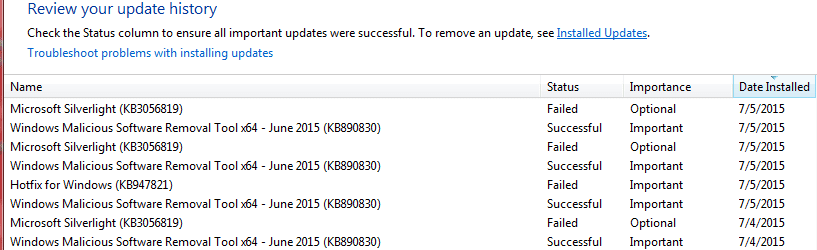
Multiple windows update Errors sfc /scannow shows corrupt

glfngwizkid

New member
Local time
12:49 PM
Messages
22
I have multiple files that will not update with windows update.

1.) .Net framework 4.5.2 is failing in both windows update & I manually downloaded and it will not install.
a.) When I do a manual install it says the windows installer is not installed correctly.
b.) When I researched this I ended up running sfc/ scannow
i.) I get the message windows resource protection found corrupt files but was unable to fix some of them.
ii.) I'm going to attempt to attach my log from sfc /scannow

2.) Microsoft Silverlight will not install from windows update or manually download install.
3.) The Malicious software removal tool says that it installs fine but when I restart the computer is it in windows update again. This is a never ending cycle. I don't seem to be able to find KB890830 in the installed updated either?
 

My Computer

Computer type
Laptop
Computer Manufacturer/Model Number
Dell Vostro 2520
OS
Windows 7 Professional Service pack 1 64 bit
CPU
Intel(R) Core(TM) i3-2348M CPU @ 2.3GHz 2.3 GHz
Motherboard
Not sure
Memory
4 GB
Graphics Card(s)
Not sure
Hard Drives
Computer screen says 279 GB
Antivirus
Symantec Endpoint Protection
Browser
I use IE11, Firefox, and Chrome
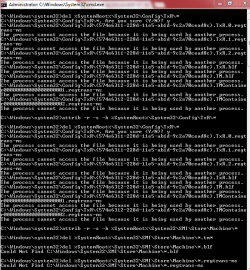
I found another post where sfcfix.exe was able to correct my issues with sfc /scannow. After the fix my sfc /scannow doesn't have any issues. Bad news is it didn't fix any of my windows update errors. Manual or otherwise I cannot install the updates listed in the Original post.
 

My Computer

Computer type
Laptop
Computer Manufacturer/Model Number
Dell Vostro 2520
OS
Windows 7 Professional Service pack 1 64 bit
CPU
Intel(R) Core(TM) i3-2348M CPU @ 2.3GHz 2.3 GHz
Motherboard
Not sure
Memory
4 GB
Graphics Card(s)
Not sure
Hard Drives
Computer screen says 279 GB
Antivirus
Symantec Endpoint Protection
Browser
I use IE11, Firefox, and Chrome
The SFC/CBS errors are negligible...
Code:
 Line 3597: 2015-07-04 10:06:03, Info                  CSI    00000344 [SR] Repairing 1 components
 Line 3598: 2015-07-04 10:06:03, Info                  CSI    00000345 [SR] Beginning Verify and Repair transaction
 Line 3601: 2015-07-04 10:06:03, Info                  CSI    00000347 [SR] Cannot repair member file [l:24{12}]"utc.app.json" of Microsoft-Windows-Unified-Telemetry-Client, Version = 6.1.7601.18869, pA = PROCESSOR_ARCHITECTURE_AMD64 (9), Culture neutral, VersionScope = 1 nonSxS, PublicKeyToken = {l:8 b:31bf3856ad364e35}, Type neutral, TypeName neutral, PublicKey neutral in the store, hash mismatch
 Line 3604: 2015-07-04 10:06:03, Info                  CSI    00000349 [SR] Cannot repair member file [l:66{33}]"telemetry.ASM-WindowsDefault.json" of Microsoft-Windows-Unified-Telemetry-Client, Version = 6.1.7601.18869, pA = PROCESSOR_ARCHITECTURE_AMD64 (9), Culture neutral, VersionScope = 1 nonSxS, PublicKeyToken = {l:8 b:31bf3856ad364e35}, Type neutral, TypeName neutral, PublicKey neutral in the store, hash mismatch
They are the result of a classic MS cock-up - they tagged these two files as static, rather than variable.


We need more data...

Please follow the Windows Update Posting Instructions and post the requested data


If the file is too large (8MB compressed), remove the older CBSPersist cab files until the final file is below the limit - you can always post them separately after zipping them. (the forum doesn't allow the upload of bare CAB files, for a number of reasons)

Please also post the C:\Windows\windowsudpate.log file
 

My Computer

Computer type
Laptop
Computer Manufacturer/Model Number
Asus K52F or Lenovo B51-80
OS
Win 7 x64 Home Premium (and x86 VirtualBox VM)/Win10
CPU
i3 370M/i7 6500U
Motherboard
Asus/Lenovo
Memory
8GB - finally :)/8GB
Graphics Card(s)
it's an i3, dude!/dual Intel&nVidia
Sound Card
onboard
Monitor(s) Displays
15.6" built-in
Screen Resolution
1366x768/1920x1080
Hard Drives
750GB Seagate internal
Sundry external drives attached to other computers on the local network
1TB SSD on the Lenovo
PSU
n/a
Internet Speed
as much as I can get - usually on a dongle/phone, so <1MB/s
Antivirus
MSE/Defender
Browser
IE11/12/Edge/Chrome/FF(if I must)
Update Information - I'm the Original Poster

Thank you NoelDP for helping me get started properly. I have to admit that I have done some other troubleshooting while I was waiting on replies so I wanted to start by giving an update.

1.) I ran a restore from before I uninstalled 4.5.2 framework so I don't need to install it anymore.
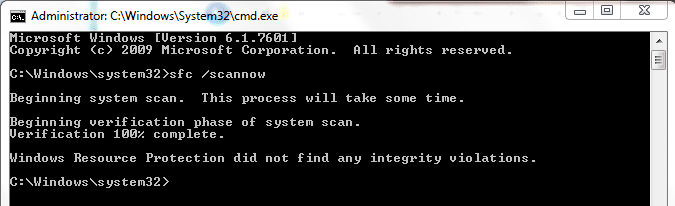
2.) I also got a clean sfc /scannow by using sfcfix.exe that I found in other posts.
3.) I'm back to I think the original problem but it is hard to explain what is happening.

I followed your instructions and this is where I am with the steps you told me to take:

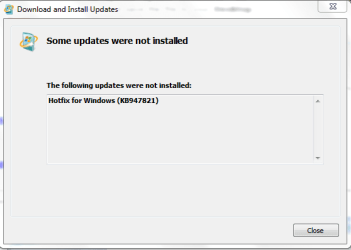
1.) I downloaded SURT and ran it but it failed to install snip 1 attachment is the failure screen.
2.) I did run sfc /scannow and it was clean
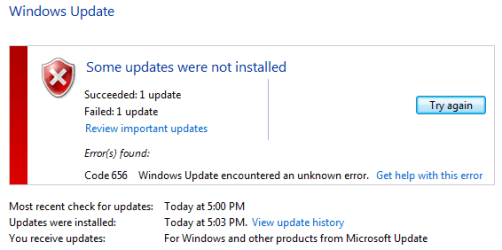
3.) Windows update error is 656 for the failed silverlight install
4.) I cannot attach the windows log CBS zipped folder as it is 110 MB. Not sure what to do with it now?

I also want to try and explain the weird thing that is happening with the windows malicious software removal tool x64. (KB890830)

1.) It shows up in my available updates every time I look for updates. If I run windows update it will install the update and I get the successful install green check mark. I restart my computer and it is still in the available updates.
2.) I cannot seem to locate the update in my installed updates. Also when my computer restarts I think it might not be completely installing it because my computer shows that I need to restart. If I click start and look at the shutdown icon there is a yellow shield with an exclamation point inside. Usually this means the computer need to restart to install update right? No matter how many times I restart I still have the shield by shutdown.
 

Attachments

  • Snip 1.PNG
    Snip 1.PNG
    25.1 KB · Views: 18

My Computer

Computer type
Laptop
Computer Manufacturer/Model Number
Dell Vostro 2520
OS
Windows 7 Professional Service pack 1 64 bit
CPU
Intel(R) Core(TM) i3-2348M CPU @ 2.3GHz 2.3 GHz
Motherboard
Not sure
Memory
4 GB
Graphics Card(s)
Not sure
Hard Drives
Computer screen says 279 GB
Antivirus
Symantec Endpoint Protection
Browser
I use IE11, Firefox, and Chrome
Trying to do what you asked and send them as separate .zip files. Only two would attached. I'll keep trying.
 

My Computer

Computer type
Laptop
Computer Manufacturer/Model Number
Dell Vostro 2520
OS
Windows 7 Professional Service pack 1 64 bit
CPU
Intel(R) Core(TM) i3-2348M CPU @ 2.3GHz 2.3 GHz
Motherboard
Not sure
Memory
4 GB
Graphics Card(s)
Not sure
Hard Drives
Computer screen says 279 GB
Antivirus
Symantec Endpoint Protection
Browser
I use IE11, Firefox, and Chrome
This is the only cabinet file small enough to fit in the posting limit. I posted the other two in a separate post.
 

My Computer

Computer type
Laptop
Computer Manufacturer/Model Number
Dell Vostro 2520
OS
Windows 7 Professional Service pack 1 64 bit
CPU
Intel(R) Core(TM) i3-2348M CPU @ 2.3GHz 2.3 GHz
Motherboard
Not sure
Memory
4 GB
Graphics Card(s)
Not sure
Hard Drives
Computer screen says 279 GB
Antivirus
Symantec Endpoint Protection
Browser
I use IE11, Firefox, and Chrome
Hmm - I see no signs of a SFC scan being run since 19:42:01 yesterday? (~17 hours ago)
Please post the CheckSUR.log and CheckSUR.Persist.log files (from the C:\Windows\Logs\CBS folder) if they exist.
Please also post the latest CBSPersist file (you'll have to zip it first - the forum doesn't accept bare CAB files)
Please also post the SFCFix log if you still have it.
 

My Computer

Computer type
Laptop
Computer Manufacturer/Model Number
Asus K52F or Lenovo B51-80
OS
Win 7 x64 Home Premium (and x86 VirtualBox VM)/Win10
CPU
i3 370M/i7 6500U
Motherboard
Asus/Lenovo
Memory
8GB - finally :)/8GB
Graphics Card(s)
it's an i3, dude!/dual Intel&nVidia
Sound Card
onboard
Monitor(s) Displays
15.6" built-in
Screen Resolution
1366x768/1920x1080
Hard Drives
750GB Seagate internal
Sundry external drives attached to other computers on the local network
1TB SSD on the Lenovo
PSU
n/a
Internet Speed
as much as I can get - usually on a dongle/phone, so <1MB/s
Antivirus
MSE/Defender
Browser
IE11/12/Edge/Chrome/FF(if I must)
I don't have the SFCfix log anymore, sorry about that.
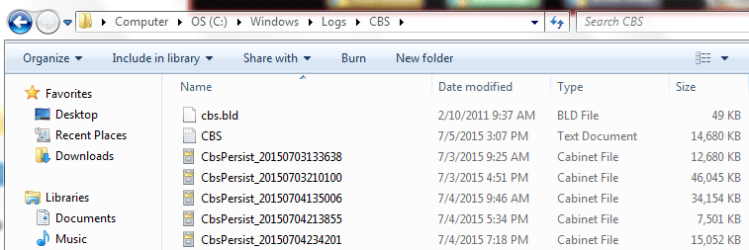
I opened the latest CBSpersist cab file and zipped the txt file inside but it was still over the 8 MB limit. So I decided to run a new sfc /scannow. However I didn't receive a new persist file when I re-ran the scan. It did overwrite the text file.

I decided to attach a snip of my C:\Windows\Logs\CBS folder to see if this would help.
 

Attachments

  • Capture 1.PNG
    Capture 1.PNG
    21.6 KB · Views: 18
  • Capture 2.PNG
    Capture 2.PNG
    51.1 KB · Views: 1

My Computer

Computer type
Laptop
Computer Manufacturer/Model Number
Dell Vostro 2520
OS
Windows 7 Professional Service pack 1 64 bit
CPU
Intel(R) Core(TM) i3-2348M CPU @ 2.3GHz 2.3 GHz
Motherboard
Not sure
Memory
4 GB
Graphics Card(s)
Not sure
Hard Drives
Computer screen says 279 GB
Antivirus
Symantec Endpoint Protection
Browser
I use IE11, Firefox, and Chrome
Good- the SFC scan terminated normally (I do occasionally see apparently successful SFC scans which actually crashed but still managed to apparently produce the above success message!)

There's no errors in the CBS log background either, to give us a clue.

Open Event Viewer

click on theWindows logs entry in the left pane to expand it.

Now click on theApplication entry - wait while it loads.

Click on 'File'in the menu bar and select Save...

Save the file asAppevt.evtx

Repeat for theSystem log

then zip both,and upload them.


My Computer

Computer type
Laptop
Computer Manufacturer/Model Number
Asus K52F or Lenovo B51-80
OS
Win 7 x64 Home Premium (and x86 VirtualBox VM)/Win10
CPU
i3 370M/i7 6500U
Motherboard
Asus/Lenovo
Memory
8GB - finally :)/8GB
Graphics Card(s)
it's an i3, dude!/dual Intel&nVidia
Sound Card
onboard
Monitor(s) Displays
15.6" built-in
Screen Resolution
1366x768/1920x1080
Hard Drives
750GB Seagate internal
Sundry external drives attached to other computers on the local network
1TB SSD on the Lenovo
PSU
n/a
Internet Speed
as much as I can get - usually on a dongle/phone, so <1MB/s
Antivirus
MSE/Defender
Browser
IE11/12/Edge/Chrome/FF(if I must)
You didn't give me a name for the system files so I just named it systemevt.

Thanks for the help and quick replies. Please let me know if there is more I can do on my side.
 

My Computer

Computer type
Laptop
Computer Manufacturer/Model Number
Dell Vostro 2520
OS
Windows 7 Professional Service pack 1 64 bit
CPU
Intel(R) Core(TM) i3-2348M CPU @ 2.3GHz 2.3 GHz
Motherboard
Not sure
Memory
4 GB
Graphics Card(s)
Not sure
Hard Drives
Computer screen says 279 GB
Antivirus
Symantec Endpoint Protection
Browser
I use IE11, Firefox, and Chrome
I can't help wondering if Norton is involved in this problem - It appears to be tagging MBAM as malware, and also what appears to be a core file of an ie update.

Can you turn it off (or even better, uninstall it completely, and run the NRT) and try installing the updates?
Scan type: Tamper Protection Scan
Event:
Security risk detected: C:\PROGRAM FILES (X86)\MALWAREBYTES ANTI-MALWARE\MBAM.EXE
Code:
Scan type: Tamper Protection Scan
Event: 
Security risk detected: C:\WINDOWS\TEMP\IE1F1CD.TMP\IE10-SUPPORT\IENRCORE.EXE
File: C:\Program Files (x86)\Symantec\Symantec Endpoint Protection\12.1.671.4971.105\Bin\ccSvcHst.exe
 

My Computer

Computer type
Laptop
Computer Manufacturer/Model Number
Asus K52F or Lenovo B51-80
OS
Win 7 x64 Home Premium (and x86 VirtualBox VM)/Win10
CPU
i3 370M/i7 6500U
Motherboard
Asus/Lenovo
Memory
8GB - finally :)/8GB
Graphics Card(s)
it's an i3, dude!/dual Intel&nVidia
Sound Card
onboard
Monitor(s) Displays
15.6" built-in
Screen Resolution
1366x768/1920x1080
Hard Drives
750GB Seagate internal
Sundry external drives attached to other computers on the local network
1TB SSD on the Lenovo
PSU
n/a
Internet Speed
as much as I can get - usually on a dongle/phone, so <1MB/s
Antivirus
MSE/Defender
Browser
IE11/12/Edge/Chrome/FF(if I must)
Sorry I didn't notice the forum went to a second page or I would have replied sooner. I already tried turning off symantec endpoint protection so I uninstalled it. I'm not sure what you mean by "run the NRT". I had to restart my computer for the removal of symantec and I attempted to install updates afterwards. I'm getting the same results.
 

Attachments

  • Capture 3.PNG
    Capture 3.PNG
    17.9 KB · Views: 10

My Computer

Computer type
Laptop
Computer Manufacturer/Model Number
Dell Vostro 2520
OS
Windows 7 Professional Service pack 1 64 bit
CPU
Intel(R) Core(TM) i3-2348M CPU @ 2.3GHz 2.3 GHz
Motherboard
Not sure
Memory
4 GB
Graphics Card(s)
Not sure
Hard Drives
Computer screen says 279 GB
Antivirus
Symantec Endpoint Protection
Browser
I use IE11, Firefox, and Chrome
That's actually a different error -the earlier ones were 643 errors ;)
Symantec Endpoint has its own removal tool (the NRT is for retail Norton products) - which is only available on request. https://support.symantec.com/en_US/article.HOWTO74877.html
You'll need your Serial Number Registration to hand.
 

My Computer

Computer type
Laptop
Computer Manufacturer/Model Number
Asus K52F or Lenovo B51-80
OS
Win 7 x64 Home Premium (and x86 VirtualBox VM)/Win10
CPU
i3 370M/i7 6500U
Motherboard
Asus/Lenovo
Memory
8GB - finally :)/8GB
Graphics Card(s)
it's an i3, dude!/dual Intel&nVidia
Sound Card
onboard
Monitor(s) Displays
15.6" built-in
Screen Resolution
1366x768/1920x1080
Hard Drives
750GB Seagate internal
Sundry external drives attached to other computers on the local network
1TB SSD on the Lenovo
PSU
n/a
Internet Speed
as much as I can get - usually on a dongle/phone, so <1MB/s
Antivirus
MSE/Defender
Browser
IE11/12/Edge/Chrome/FF(if I must)
I removed symantec using the windows uninstall. I have the serial number at work, this computer is our sales manager's and I need to get it back to him tomorrow. It functions fine aside from the fact that it will not install silverlight. I really think the problem is with the Malicious software tool not installing correctly. Look at the snap shot it keeps thinking it worked but it didn't. Do I definitely need to run the NRT or can we explore other options? Now that norton is gone I will try to install the SURT again.
 

Attachments

  • Capture 4.PNG
    Capture 4.PNG
    25.8 KB · Views: 1

My Computer

Computer type
Laptop
Computer Manufacturer/Model Number
Dell Vostro 2520
OS
Windows 7 Professional Service pack 1 64 bit
CPU
Intel(R) Core(TM) i3-2348M CPU @ 2.3GHz 2.3 GHz
Motherboard
Not sure
Memory
4 GB
Graphics Card(s)
Not sure
Hard Drives
Computer screen says 279 GB
Antivirus
Symantec Endpoint Protection
Browser
I use IE11, Firefox, and Chrome
Open an elevated comman prompt and copy and paste in the following:


attrib -r -s -h %SystemRoot%\System32\Config\TxR\*
del %SystemRoot%\System32\Config\TxR\*
attrib -r -s -h %SystemRoot%\System32\SMI\Store\Machine\*
del %SystemRoot%\System32\SMI\Store\Machine\*.tm*
del %SystemRoot%\System32\SMI\Store\Machine\*.blf
del %SystemRoot%\System32\SMI\Store\Machine\*.regtrans-ms

Reboot and try windows update again
 

My Computer

Computer type
Laptop
Computer Manufacturer/Model Number
Asus K52F or Lenovo B51-80
OS
Win 7 x64 Home Premium (and x86 VirtualBox VM)/Win10
CPU
i3 370M/i7 6500U
Motherboard
Asus/Lenovo
Memory
8GB - finally :)/8GB
Graphics Card(s)
it's an i3, dude!/dual Intel&nVidia
Sound Card
onboard
Monitor(s) Displays
15.6" built-in
Screen Resolution
1366x768/1920x1080
Hard Drives
750GB Seagate internal
Sundry external drives attached to other computers on the local network
1TB SSD on the Lenovo
PSU
n/a
Internet Speed
as much as I can get - usually on a dongle/phone, so <1MB/s
Antivirus
MSE/Defender
Browser
IE11/12/Edge/Chrome/FF(if I must)
I got the following while I was running the commands. Thought you might need to look at it. I'm restarting now.
 

Attachments

  • Capture 6.PNG
    Capture 6.PNG
    72.5 KB · Views: 0

My Computer

Computer type
Laptop
Computer Manufacturer/Model Number
Dell Vostro 2520
OS
Windows 7 Professional Service pack 1 64 bit
CPU
Intel(R) Core(TM) i3-2348M CPU @ 2.3GHz 2.3 GHz
Motherboard
Not sure
Memory
4 GB
Graphics Card(s)
Not sure
Hard Drives
Computer screen says 279 GB
Antivirus
Symantec Endpoint Protection
Browser
I use IE11, Firefox, and Chrome
the optional update for microsoft security essentials is added to my list of updates. Silverlight still will not install. KB890830 says it installed again but its not in the installed update list.
 

My Computer

Computer type
Laptop
Computer Manufacturer/Model Number
Dell Vostro 2520
OS
Windows 7 Professional Service pack 1 64 bit
CPU
Intel(R) Core(TM) i3-2348M CPU @ 2.3GHz 2.3 GHz
Motherboard
Not sure
Memory
4 GB
Graphics Card(s)
Not sure
Hard Drives
Computer screen says 279 GB
Antivirus
Symantec Endpoint Protection
Browser
I use IE11, Firefox, and Chrome
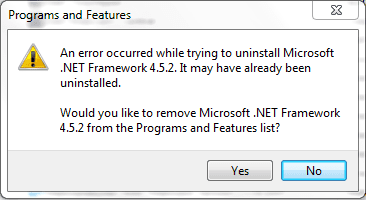
I found another post online that recommended doing the windows uninstall/change on .net framework 4.5.1. I found my .net framework 4.5.2 and clicked on the uninstall/change button and I got the attached image. I think I have a .net framework issue still. I clicked no to the prompt. How can I repair the .net framework? Yesterday I was unable to fix .net framework when I uninstalled it. That is why I did the system restore this morning. Apparently I still have .net issues.
 

Attachments

  • Capture 7.PNG
    Capture 7.PNG
    20.1 KB · Views: 9

My Computer

Computer type
Laptop
Computer Manufacturer/Model Number
Dell Vostro 2520
OS
Windows 7 Professional Service pack 1 64 bit
CPU
Intel(R) Core(TM) i3-2348M CPU @ 2.3GHz 2.3 GHz
Motherboard
Not sure
Memory
4 GB
Graphics Card(s)
Not sure
Hard Drives
Computer screen says 279 GB
Antivirus
Symantec Endpoint Protection
Browser
I use IE11, Firefox, and Chrome
I found this in another post and use it to successfully install silverlight. I still have not fixed the KB890830 issue.

These are the steps I followed to install silverlight:
1) Download installer "Silverligth64.exe"
2) Download the application "universal extractor", install it.
X-UniExtract 1.6.1 [rev5] Portable :: Downloads / Compression/Decompression :: winPenPack - The Portable Software Collection
3) Create a temporary folder eg "c: \ step"
4) run the universal installer extractor and select "Silverlight64.exe" in the first line and the second put the folder you just created "c: \ step"
5) go to the folder "c: \ step" and another file unzip this and more can be with winrar or 7zip or that you like the file is called "silverlight.7z" and should be in the same folder "c: \ step "
6) run the file in this folder "silverlight.msi" and then the "silverlight.msp"
 

My Computer

Computer type
Laptop
Computer Manufacturer/Model Number
Dell Vostro 2520
OS
Windows 7 Professional Service pack 1 64 bit
CPU
Intel(R) Core(TM) i3-2348M CPU @ 2.3GHz 2.3 GHz
Motherboard
Not sure
Memory
4 GB
Graphics Card(s)
Not sure
Hard Drives
Computer screen says 279 GB
Antivirus
Symantec Endpoint Protection
Browser
I use IE11, Firefox, and Chrome
I was able to run a version of KB890830 by extracting the installer using the same program I used to install silverlight above. When I ran it the windows updater stopped asking for KB890830. However now it wants to install .net framework 4.0??? It fails of course. Here is the error.
 

Attachments

  • Capture 8.PNG
    Capture 8.PNG
    18.5 KB · Views: 8

My Computer

Computer type
Laptop
Computer Manufacturer/Model Number
Dell Vostro 2520
OS
Windows 7 Professional Service pack 1 64 bit
CPU
Intel(R) Core(TM) i3-2348M CPU @ 2.3GHz 2.3 GHz
Motherboard
Not sure
Memory
4 GB
Graphics Card(s)
Not sure
Hard Drives
Computer screen says 279 GB
Antivirus
Symantec Endpoint Protection
Browser
I use IE11, Firefox, and Chrome
Back
Top