Solved Music Folder Won't Display By Album Or Artist

GT086

New member
Member
Local time
5:13 AM
Messages
17
In My Music folder when I try to arrange my music by the artist or by the album, all of the songs are grouped into an "Unspecified" tile by Windows. When I arrange them by folder, every song is in the proper folder for the artist and album, every song has the correct tag info entered for it.

Windows simply refuses to organize my songs by their album or artist. I've tried everything, re-edited all the tags, deleted the music from the computer and then transferred it over again. I'm at a loss and now it's just really frustrating me.
 

My Computer My Computer

At a glance

Windows 7 Home Premium x64
Computer Manufacturer/Model Number
Dell Inspiron 1750
OS
Windows 7 Home Premium x64
My Computer My Computer

At a glance

64-bit Windows 11 Pro for WorkstationsIntel i7-8700K OC'd to 5 GHz64 GB (4x16GB) G.SKILL TridentZ RGB DDR4 3600...ASUS ROG-STRIX-GTX1080TI-O11G-GAMING
Computer type
PC/Desktop
Computer Manufacturer/Model Number
Self built custom
OS
64-bit Windows 11 Pro for Workstations
CPU
Intel i7-8700K OC'd to 5 GHz
Motherboard
ASUS ROG Maximus XI Formula Z390
Memory
64 GB (4x16GB) G.SKILL TridentZ RGB DDR4 3600 MHz
Graphics Card(s)
ASUS ROG-STRIX-GTX1080TI-O11G-GAMING
Sound Card
Integrated
Monitor(s) Displays
2 x Samsung Odyssey G7 27"
Screen Resolution
2560x1440
Hard Drives
1TB Samsung 990 PRO M.2,
4TB Samsung 990 PRO PRO M.2,
TerraMaster F8 SSD Plus NAS
PSU
Seasonic Prime Titanium 850W
Case
Thermaltake Core P3
Cooling
Corsair Hydro H115i
Keyboard
Logitech wireless K800
Mouse
Logitech MX Master 4
Internet Speed
2 Gb/s Download and 100 Mb/s Upload
Antivirus
Malwarebyte Anti-Malware Premium
Browser
Google Chrome
Other Info
Logitech Z625 speaker system,
Logitech BRIO 4K Pro webcam,
HP Color LaserJet Pro MFP M477fdn,
APC SMART-UPS RT 1000 XL - SURT1000XLI,
Galaxy S23 Plus phone
Hello GTO86,

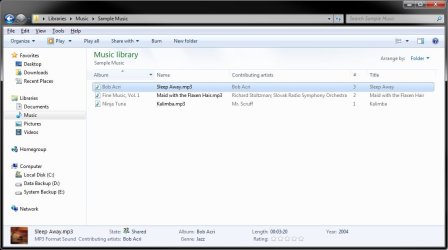
Could you set Music folder with "Arrange by" Folder, and "Sort by" album or artist for this. You could also drag say the "Album" column over to the far right if you like as well. Here's an example.

http://www.sevenforums.com/tutorials/3952-file-folder-arrangement-group-sort-stack.html

View attachment 186830

Hope this helps,
Shawn

When I have the window set up that way, all of the proper information is in there, every song has an album and artist associated with it.

Really, having it arranged by artist is just an aesthetic issue, it looks much better that way than by folders or any of the other views like details.

This is how I want it to look -

ff_libs_05.jpg;pv997ab8d941b621c2


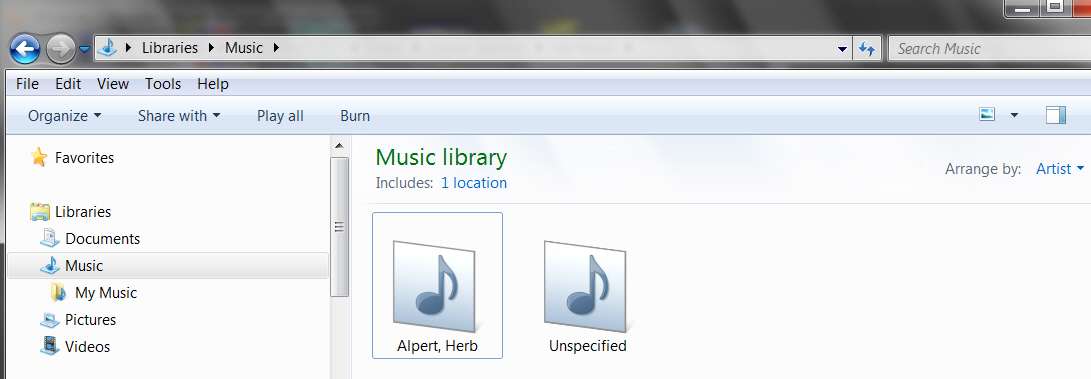
The problem is, there's only one tile and all it says is "Unspecified" even though every single song has all the proper info entered.
 

My Computer My Computer

At a glance

Windows 7 Home Premium x64
Computer Manufacturer/Model Number
Dell Inspiron 1750
OS
Windows 7 Home Premium x64
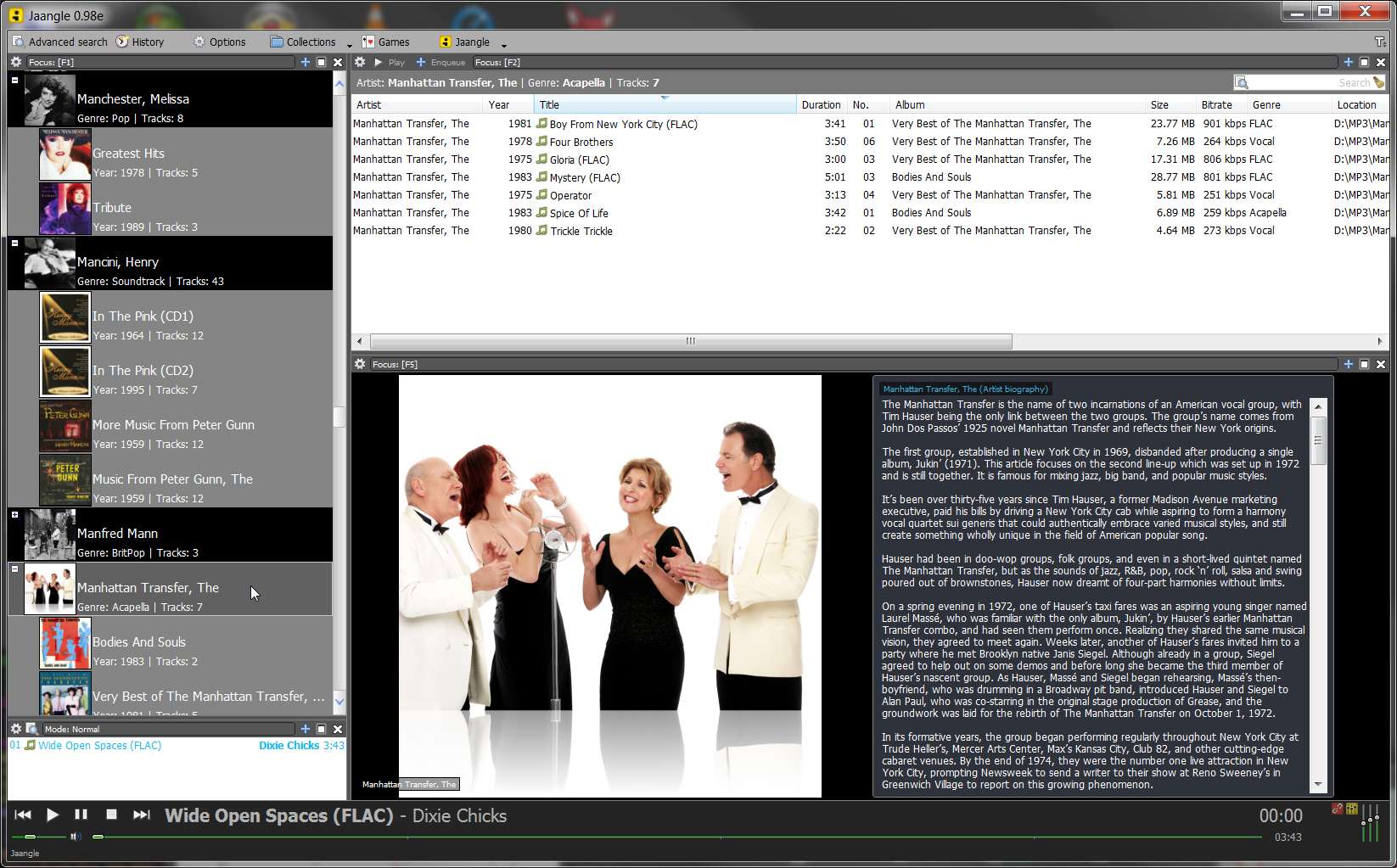
Just in passing... you might consider alternatives to Windows Music Library if you are a serious music collector who gets great joy from multiple "organization" and presentation options, album art, artist bios and pictures, playing MP3 and FLAC, simple and advanced search, etc., etc.

I myself do NOT use Windows' Music Library functionality, nor do I use Windows Media Player for music. I generally use Winamp as my "external player" for playing music (and displaying album my high-quality 500x500 album art in a 500x500 window).

And... I also use Jaangle, as my music collection organizer. It will do EVERYTHING you're asking of Music Library and much much much more. It has a built-in music/video player (which plays MP3, FLAC, and much else) or you can invoke an external player (e.g. Winamp) if you prefer.

But it's Jaangle's organization and presentation options (e.g. 10 different sort sequence arrangements which all music collectors inevitably use at different times, multiple "themes" for display of artist/album/title, etc.), automatic retrieval of album reviews, artist bios and pictures, cover art (if you don't have your own), etc., that make this product such a treat.

I know... you're probably a long-time user of Windows functionality. But you should at least consider other options, and Jaangle is terrific.

jaanglewindow.jpg


jaangle.jpg
 

My Computer My Computer

At a glance

Windows 7 Pro x64 (1), Win7 Pro X64 (2)i5-3350p 3.1Ghz/6MB-cache (1); E8400 3.0Ghz/6...8GB PC3-12800 DDR3 (1); 4GB PC3-10600 DDR3 (2)ATI HD7750 (1), (see TV cards); ATI R7 250 (2)
Computer type
PC/Desktop
Computer Manufacturer/Model Number
Home-built, two systems (1) and (2)
OS
Windows 7 Pro x64 (1), Win7 Pro X64 (2)
CPU
i5-3350p 3.1Ghz/6MB-cache (1); E8400 3.0Ghz/6MB-cache (2)
Motherboard
ASUS P8Z77-V Pro (1); ASUS P5Q3 (2)
Memory
8GB PC3-12800 DDR3 (1); 4GB PC3-10600 DDR3 (2)
Graphics Card(s)
ATI HD7750 (1), (see TV cards); ATI R7 250 (2)
Sound Card
Realtek ALC892 HD Audio (1); Realtek ALC1200 HD Audio (2)
Monitor(s) Displays
Eizo HD2441W LCD, Eizo S2433W (1); Eizo 24" S2433W (2)
Screen Resolution
1920x1200, 1920x1200 (1); 1920x1200 (2)
Hard Drives
(1) 1TB SATA-II (7200RPM), 2x2TB SATA-III (7200RPM), 250GB SATA-III (10000RPM) for OS; 2x2TB external USB 3.0

(2) 320GB SATA-II (7200RPM), 750GB SATA-II (7200RPM), 150GB SATA-II (10000RPM) for OS; 2TB external USB 3.0
PSU
Nesteq ECS-6001 600W (1); Nesteq ECS-5001 500W (2)
Case
Acousti-Case 360 (1) and (2)
Cooling
Noctua NH-U12P SE2 for CPU, 2x120mm case fans (1) and (2)
Keyboard
IBM PS/2 (1) and (2)
Mouse
Logitech MX Revolution wireless (1); Microsoft wired (2)
Internet Speed
100mbps down / 10mbps up
Antivirus
Microsoft Security Essentials; Malwarebyte Anti-Malware Pro
Browser
Firefox
Other Info
Ceton InfiniTV 4-tuner cablecard-enabled TV card as well as Hauppauge HVR-2250 OTA/ATSC 2-tuner TV card in (1), running under Win7 WMC
Hello GTO86,

Could you set Music folder with "Arrange by" Folder, and "Sort by" album or artist for this. You could also drag say the "Album" column over to the far right if you like as well. Here's an example.

http://www.sevenforums.com/tutorials/3952-file-folder-arrangement-group-sort-stack.html

View attachment 186830

Hope this helps,
Shawn

When I have the window set up that way, all of the proper information is in there, every song has an album and artist associated with it.

Really, having it arranged by artist is just an aesthetic issue, it looks much better that way than by folders or any of the other views like details.

This is how I want it to look -

ff_libs_05.jpg;pv997ab8d941b621c2


The problem is, there's only one tile and all it says is "Unspecified" even though every single song has all the proper info entered.

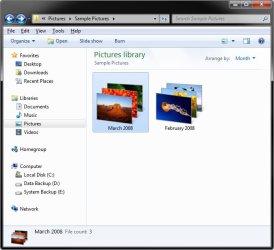
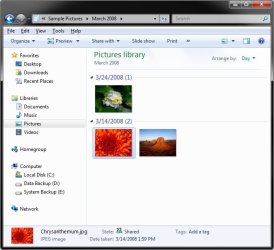
If you click on a group of arranged files by Artists, it will then give you a "Group by" view of those "Arranged by" files in more detail like below.

Arrange-by.jpgGroup-by.jpg
 

My Computer My Computer

At a glance

64-bit Windows 11 Pro for WorkstationsIntel i7-8700K OC'd to 5 GHz64 GB (4x16GB) G.SKILL TridentZ RGB DDR4 3600...ASUS ROG-STRIX-GTX1080TI-O11G-GAMING
Computer type
PC/Desktop
Computer Manufacturer/Model Number
Self built custom
OS
64-bit Windows 11 Pro for Workstations
CPU
Intel i7-8700K OC'd to 5 GHz
Motherboard
ASUS ROG Maximus XI Formula Z390
Memory
64 GB (4x16GB) G.SKILL TridentZ RGB DDR4 3600 MHz
Graphics Card(s)
ASUS ROG-STRIX-GTX1080TI-O11G-GAMING
Sound Card
Integrated
Monitor(s) Displays
2 x Samsung Odyssey G7 27"
Screen Resolution
2560x1440
Hard Drives
1TB Samsung 990 PRO M.2,
4TB Samsung 990 PRO PRO M.2,
TerraMaster F8 SSD Plus NAS
PSU
Seasonic Prime Titanium 850W
Case
Thermaltake Core P3
Cooling
Corsair Hydro H115i
Keyboard
Logitech wireless K800
Mouse
Logitech MX Master 4
Internet Speed
2 Gb/s Download and 100 Mb/s Upload
Antivirus
Malwarebyte Anti-Malware Premium
Browser
Google Chrome
Other Info
Logitech Z625 speaker system,
Logitech BRIO 4K Pro webcam,
HP Color LaserJet Pro MFP M477fdn,
APC SMART-UPS RT 1000 XL - SURT1000XLI,
Galaxy S23 Plus phone
I think I'm doing a poor job trying to explain what's wrong and how I want my music displayed.

Right now, when I try to arrange my music by artist, it simply shows one tile, stating unspecified, even though every song has its full information entered for it. Below is a screenshot showing what it looks like now.

Screenshot.jpg


This is what I want it to look like.

ff_libs_05.jpg;pv997ab8d941b621c2


Notice, each artist has its own tile and has several tiles displayed showing the album covers for their respective albums.

I can not figure out why my music will not display like that, even though all of the appropriate information is entered.
 

My Computer My Computer

At a glance

Windows 7 Home Premium x64
Computer Manufacturer/Model Number
Dell Inspiron 1750
OS
Windows 7 Home Premium x64
Why does the existing music library definition screenshot show "unspecified" for the library definition itself, where as your desired goal screenshot music library shows "2 locations"?

What's different about how you've defined "Music Library" in both situations?

Does "unspecified" mean you have ZERO locations defined for the so-called "music library" situation which is your problem?
 

My Computer My Computer

At a glance

Windows 7 Pro x64 (1), Win7 Pro X64 (2)i5-3350p 3.1Ghz/6MB-cache (1); E8400 3.0Ghz/6...8GB PC3-12800 DDR3 (1); 4GB PC3-10600 DDR3 (2)ATI HD7750 (1), (see TV cards); ATI R7 250 (2)
Computer type
PC/Desktop
Computer Manufacturer/Model Number
Home-built, two systems (1) and (2)
OS
Windows 7 Pro x64 (1), Win7 Pro X64 (2)
CPU
i5-3350p 3.1Ghz/6MB-cache (1); E8400 3.0Ghz/6MB-cache (2)
Motherboard
ASUS P8Z77-V Pro (1); ASUS P5Q3 (2)
Memory
8GB PC3-12800 DDR3 (1); 4GB PC3-10600 DDR3 (2)
Graphics Card(s)
ATI HD7750 (1), (see TV cards); ATI R7 250 (2)
Sound Card
Realtek ALC892 HD Audio (1); Realtek ALC1200 HD Audio (2)
Monitor(s) Displays
Eizo HD2441W LCD, Eizo S2433W (1); Eizo 24" S2433W (2)
Screen Resolution
1920x1200, 1920x1200 (1); 1920x1200 (2)
Hard Drives
(1) 1TB SATA-II (7200RPM), 2x2TB SATA-III (7200RPM), 250GB SATA-III (10000RPM) for OS; 2x2TB external USB 3.0

(2) 320GB SATA-II (7200RPM), 750GB SATA-II (7200RPM), 150GB SATA-II (10000RPM) for OS; 2TB external USB 3.0
PSU
Nesteq ECS-6001 600W (1); Nesteq ECS-5001 500W (2)
Case
Acousti-Case 360 (1) and (2)
Cooling
Noctua NH-U12P SE2 for CPU, 2x120mm case fans (1) and (2)
Keyboard
IBM PS/2 (1) and (2)
Mouse
Logitech MX Revolution wireless (1); Microsoft wired (2)
Internet Speed
100mbps down / 10mbps up
Antivirus
Microsoft Security Essentials; Malwarebyte Anti-Malware Pro
Browser
Firefox
Other Info
Ceton InfiniTV 4-tuner cablecard-enabled TV card as well as Hauppauge HVR-2250 OTA/ATSC 2-tuner TV card in (1), running under Win7 WMC
Good catch Darryl. :)

@GTO86,

You will need to include the folders that you have your images saved at for the library. The defaults are the C:\Users\Public\Music and C:\Users\(user-name)\Music folders, with the C:\Users\(user-name)\Music folder set as the default Save to folder for the library.
 

My Computer My Computer

At a glance

64-bit Windows 11 Pro for WorkstationsIntel i7-8700K OC'd to 5 GHz64 GB (4x16GB) G.SKILL TridentZ RGB DDR4 3600...ASUS ROG-STRIX-GTX1080TI-O11G-GAMING
Computer type
PC/Desktop
Computer Manufacturer/Model Number
Self built custom
OS
64-bit Windows 11 Pro for Workstations
CPU
Intel i7-8700K OC'd to 5 GHz
Motherboard
ASUS ROG Maximus XI Formula Z390
Memory
64 GB (4x16GB) G.SKILL TridentZ RGB DDR4 3600 MHz
Graphics Card(s)
ASUS ROG-STRIX-GTX1080TI-O11G-GAMING
Sound Card
Integrated
Monitor(s) Displays
2 x Samsung Odyssey G7 27"
Screen Resolution
2560x1440
Hard Drives
1TB Samsung 990 PRO M.2,
4TB Samsung 990 PRO PRO M.2,
TerraMaster F8 SSD Plus NAS
PSU
Seasonic Prime Titanium 850W
Case
Thermaltake Core P3
Cooling
Corsair Hydro H115i
Keyboard
Logitech wireless K800
Mouse
Logitech MX Master 4
Internet Speed
2 Gb/s Download and 100 Mb/s Upload
Antivirus
Malwarebyte Anti-Malware Premium
Browser
Google Chrome
Other Info
Logitech Z625 speaker system,
Logitech BRIO 4K Pro webcam,
HP Color LaserJet Pro MFP M477fdn,
APC SMART-UPS RT 1000 XL - SURT1000XLI,
Galaxy S23 Plus phone
Why does the existing music library definition screenshot show "unspecified" for the library definition itself, where as your desired goal screenshot music library shows "2 locations"?

What's different about how you've defined "Music Library" in both situations?

Does "unspecified" mean you have ZERO locations defined for the so-called "music library" situation which is your problem?
No, I have only the "My Music" folder included because that's where all of my music is stored, there is nothing in "Public Music" to display. I did include it though, just to see what happened and its the same thing, still unspecified.

This is such a minor issue but it's just driving me crazy that I can't figure it out.
 

My Computer My Computer

At a glance

Windows 7 Home Premium x64
Computer Manufacturer/Model Number
Dell Inspiron 1750
OS
Windows 7 Home Premium x64
Though I don't normally use Explorer and Music Library and Windows Media Player for my music collection (as I've said before, I use Jaangle and Winamp), my experience trying to duplicate your experience doesn't produce the same results.

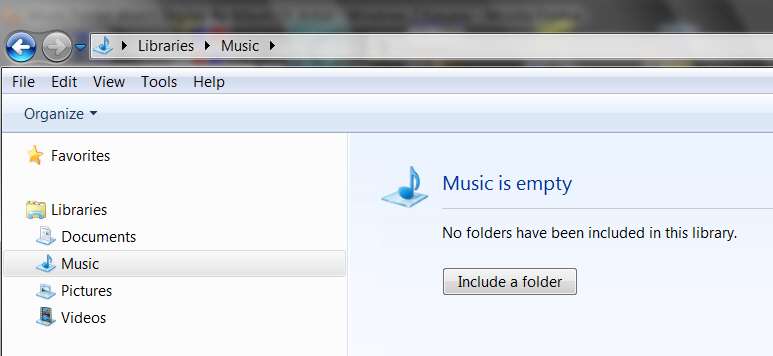
Starting off with NOTHING defined (i.e. deleting the two default folders, i.e. "2 locations", which are there by default when you install Win7), it looks like this:

musiclibraryempty.jpg


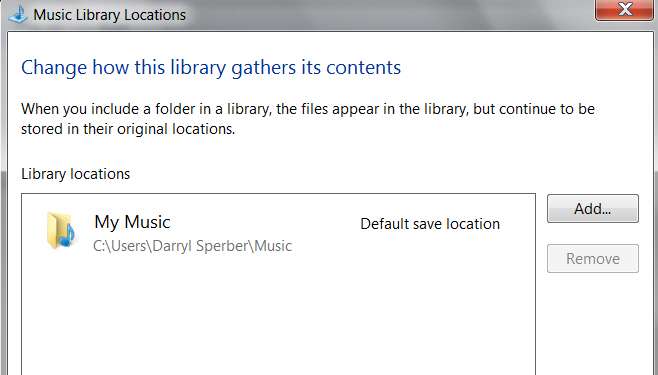
Then I add just the "My Music" folder as the one and only location (shows as "1 location", not "unspecified" as your screenshot shows):

musiclibrarydefinition.jpg


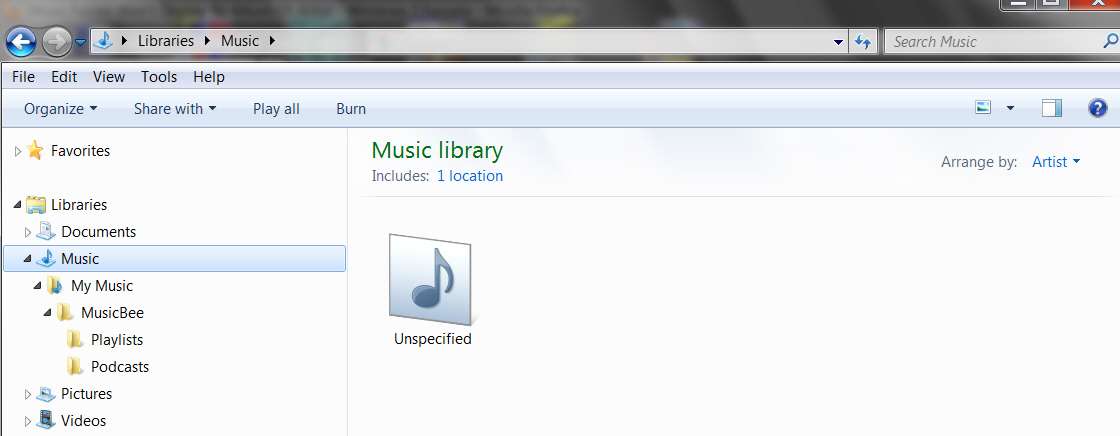
And with that "1 location" defined for Music Library, and with the only contents of the My Music folder being whatever Microsoft places there by default for demonstration purposes, the arrange by "artist" looks like this:

musiclibrary.jpg


Yes, it shows "unspecified" under the generic folder icon... but the entire contents of the My Music folder is from Microsoft, and actually contains no real music.

musiclibrarycontents.jpg


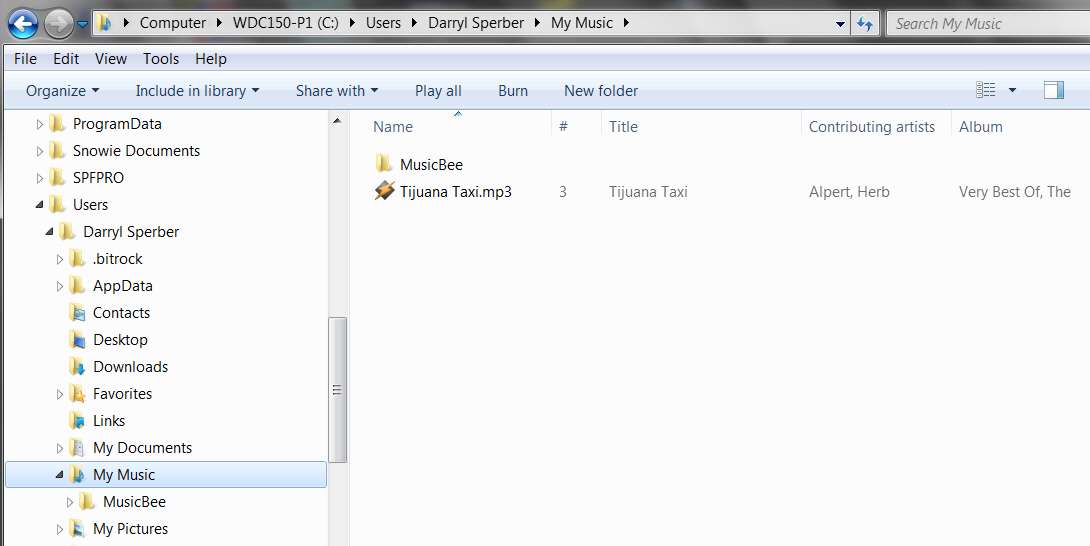
Can you show us what is the content of your My Music folder?

I also tried adding ONE MP3 FILE to the My Music folder:

musiclibraryaddmp3.jpg


And now the Music Library presentation looks different:

musiclibrarywithmp3.jpg
 

My Computer My Computer

At a glance

Windows 7 Pro x64 (1), Win7 Pro X64 (2)i5-3350p 3.1Ghz/6MB-cache (1); E8400 3.0Ghz/6...8GB PC3-12800 DDR3 (1); 4GB PC3-10600 DDR3 (2)ATI HD7750 (1), (see TV cards); ATI R7 250 (2)
Computer type
PC/Desktop
Computer Manufacturer/Model Number
Home-built, two systems (1) and (2)
OS
Windows 7 Pro x64 (1), Win7 Pro X64 (2)
CPU
i5-3350p 3.1Ghz/6MB-cache (1); E8400 3.0Ghz/6MB-cache (2)
Motherboard
ASUS P8Z77-V Pro (1); ASUS P5Q3 (2)
Memory
8GB PC3-12800 DDR3 (1); 4GB PC3-10600 DDR3 (2)
Graphics Card(s)
ATI HD7750 (1), (see TV cards); ATI R7 250 (2)
Sound Card
Realtek ALC892 HD Audio (1); Realtek ALC1200 HD Audio (2)
Monitor(s) Displays
Eizo HD2441W LCD, Eizo S2433W (1); Eizo 24" S2433W (2)
Screen Resolution
1920x1200, 1920x1200 (1); 1920x1200 (2)
Hard Drives
(1) 1TB SATA-II (7200RPM), 2x2TB SATA-III (7200RPM), 250GB SATA-III (10000RPM) for OS; 2x2TB external USB 3.0

(2) 320GB SATA-II (7200RPM), 750GB SATA-II (7200RPM), 150GB SATA-II (10000RPM) for OS; 2TB external USB 3.0
PSU
Nesteq ECS-6001 600W (1); Nesteq ECS-5001 500W (2)
Case
Acousti-Case 360 (1) and (2)
Cooling
Noctua NH-U12P SE2 for CPU, 2x120mm case fans (1) and (2)
Keyboard
IBM PS/2 (1) and (2)
Mouse
Logitech MX Revolution wireless (1); Microsoft wired (2)
Internet Speed
100mbps down / 10mbps up
Antivirus
Microsoft Security Essentials; Malwarebyte Anti-Malware Pro
Browser
Firefox
Other Info
Ceton InfiniTV 4-tuner cablecard-enabled TV card as well as Hauppauge HVR-2250 OTA/ATSC 2-tuner TV card in (1), running under Win7 WMC
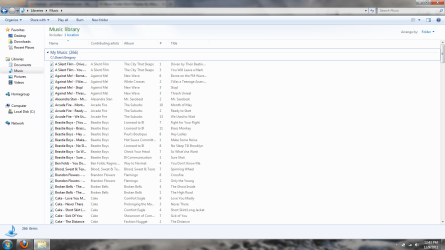
I have 266 songs in "My Music" folder. This is what it looks like when I have it arranged by "Folder" then viewed by "Details". Notice that every song has the artist and album info filled in.

Screenshot 2.png
 

My Computer My Computer

At a glance

Windows 7 Home Premium x64
Computer Manufacturer/Model Number
Dell Inspiron 1750
OS
Windows 7 Home Premium x64
Did your music files come from iTunes?

Can you please use MP3Tag to show the "tag" column for some of these music files. Do you have ID3v1 tags, or ID3v2.3, or both?

Try this (although you may already have the option checked, in which case forget it).


In windows explorer

  1. left click on the "My Music" folder where your music is stored to select it.
  2. Now right click and go to "properties"
  3. Now click "advanced"
  4. Put a check in the "Allow files in this folder to have contents indexed in addition to file properties"
  5. Click "OK"
  6. Click "Apply"
  7. Click "OK" to apply changes to this folder, sub folders and files"
Now go to your music library and see if it works.
 

My Computer My Computer

At a glance

Windows 7 Pro x64 (1), Win7 Pro X64 (2)i5-3350p 3.1Ghz/6MB-cache (1); E8400 3.0Ghz/6...8GB PC3-12800 DDR3 (1); 4GB PC3-10600 DDR3 (2)ATI HD7750 (1), (see TV cards); ATI R7 250 (2)
Computer type
PC/Desktop
Computer Manufacturer/Model Number
Home-built, two systems (1) and (2)
OS
Windows 7 Pro x64 (1), Win7 Pro X64 (2)
CPU
i5-3350p 3.1Ghz/6MB-cache (1); E8400 3.0Ghz/6MB-cache (2)
Motherboard
ASUS P8Z77-V Pro (1); ASUS P5Q3 (2)
Memory
8GB PC3-12800 DDR3 (1); 4GB PC3-10600 DDR3 (2)
Graphics Card(s)
ATI HD7750 (1), (see TV cards); ATI R7 250 (2)
Sound Card
Realtek ALC892 HD Audio (1); Realtek ALC1200 HD Audio (2)
Monitor(s) Displays
Eizo HD2441W LCD, Eizo S2433W (1); Eizo 24" S2433W (2)
Screen Resolution
1920x1200, 1920x1200 (1); 1920x1200 (2)
Hard Drives
(1) 1TB SATA-II (7200RPM), 2x2TB SATA-III (7200RPM), 250GB SATA-III (10000RPM) for OS; 2x2TB external USB 3.0

(2) 320GB SATA-II (7200RPM), 750GB SATA-II (7200RPM), 150GB SATA-II (10000RPM) for OS; 2TB external USB 3.0
PSU
Nesteq ECS-6001 600W (1); Nesteq ECS-5001 500W (2)
Case
Acousti-Case 360 (1) and (2)
Cooling
Noctua NH-U12P SE2 for CPU, 2x120mm case fans (1) and (2)
Keyboard
IBM PS/2 (1) and (2)
Mouse
Logitech MX Revolution wireless (1); Microsoft wired (2)
Internet Speed
100mbps down / 10mbps up
Antivirus
Microsoft Security Essentials; Malwarebyte Anti-Malware Pro
Browser
Firefox
Other Info
Ceton InfiniTV 4-tuner cablecard-enabled TV card as well as Hauppauge HVR-2250 OTA/ATSC 2-tuner TV card in (1), running under Win7 WMC
GTO86,

I have observed some strange issues in library folders involving the index and search. Double check to make sure that you have the C:\Users folder with your C:\Users\(user-name) and C:\Users\Public folder locations added to the index, then rebuild the index. When it's finished rebuilding the index, see if it may have "Arrange by" "Artists" without "unspecified".
 

My Computer My Computer

At a glance

64-bit Windows 11 Pro for WorkstationsIntel i7-8700K OC'd to 5 GHz64 GB (4x16GB) G.SKILL TridentZ RGB DDR4 3600...ASUS ROG-STRIX-GTX1080TI-O11G-GAMING
Computer type
PC/Desktop
Computer Manufacturer/Model Number
Self built custom
OS
64-bit Windows 11 Pro for Workstations
CPU
Intel i7-8700K OC'd to 5 GHz
Motherboard
ASUS ROG Maximus XI Formula Z390
Memory
64 GB (4x16GB) G.SKILL TridentZ RGB DDR4 3600 MHz
Graphics Card(s)
ASUS ROG-STRIX-GTX1080TI-O11G-GAMING
Sound Card
Integrated
Monitor(s) Displays
2 x Samsung Odyssey G7 27"
Screen Resolution
2560x1440
Hard Drives
1TB Samsung 990 PRO M.2,
4TB Samsung 990 PRO PRO M.2,
TerraMaster F8 SSD Plus NAS
PSU
Seasonic Prime Titanium 850W
Case
Thermaltake Core P3
Cooling
Corsair Hydro H115i
Keyboard
Logitech wireless K800
Mouse
Logitech MX Master 4
Internet Speed
2 Gb/s Download and 100 Mb/s Upload
Antivirus
Malwarebyte Anti-Malware Premium
Browser
Google Chrome
Other Info
Logitech Z625 speaker system,
Logitech BRIO 4K Pro webcam,
HP Color LaserJet Pro MFP M477fdn,
APC SMART-UPS RT 1000 XL - SURT1000XLI,
Galaxy S23 Plus phone
GTO86,

I have observed some strange issues in library folders involving the index and search. Double check to make sure that you have the C:\Users folder with your C:\Users\(user-name) and C:\Users\Public folder locations added to the index, then rebuild the index. When it's finished rebuilding the index, see if it may have "Arrange by" "Artists" without "unspecified".

Did your music files come from iTunes?

Can you please use MP3Tag to show the "tag" column for some of these music files. Do you have ID3v1 tags, or ID3v2.3, or both?

Try this (although you may already have the option checked, in which case forget it).


In windows explorer

  1. left click on the "My Music" folder where your music is stored to select it.
  2. Now right click and go to "properties"
  3. Now click "advanced"
  4. Put a check in the "Allow files in this folder to have contents indexed in addition to file properties"
  5. Click "OK"
  6. Click "Apply"
  7. Click "OK" to apply changes to this folder, sub folders and files"
Now go to your music library and see if it works.
GTO86,

I have observed some strange issues in library folders involving the index and search. Double check to make sure that you have the C:\Users folder with your C:\Users\(user-name) and C:\Users\Public folder locations added to the index, then rebuild the index. When it's finished rebuilding the index, see if it may have "Arrange by" "Artists" without "unspecified".

Alright, I did both of these at the same time and it fixed it. It now displays exactly how I want it to. Thank you for the help.
 

My Computer My Computer

At a glance

Windows 7 Home Premium x64
Computer Manufacturer/Model Number
Dell Inspiron 1750
OS
Windows 7 Home Premium x64
LOL, looks like Darryl and I were thinking the same thing. :)

You're most welcome GTO86. I'm happy that we were able to help, and that it's working properly now for you.
 

My Computer My Computer

At a glance

64-bit Windows 11 Pro for WorkstationsIntel i7-8700K OC'd to 5 GHz64 GB (4x16GB) G.SKILL TridentZ RGB DDR4 3600...ASUS ROG-STRIX-GTX1080TI-O11G-GAMING
Computer type
PC/Desktop
Computer Manufacturer/Model Number
Self built custom
OS
64-bit Windows 11 Pro for Workstations
CPU
Intel i7-8700K OC'd to 5 GHz
Motherboard
ASUS ROG Maximus XI Formula Z390
Memory
64 GB (4x16GB) G.SKILL TridentZ RGB DDR4 3600 MHz
Graphics Card(s)
ASUS ROG-STRIX-GTX1080TI-O11G-GAMING
Sound Card
Integrated
Monitor(s) Displays
2 x Samsung Odyssey G7 27"
Screen Resolution
2560x1440
Hard Drives
1TB Samsung 990 PRO M.2,
4TB Samsung 990 PRO PRO M.2,
TerraMaster F8 SSD Plus NAS
PSU
Seasonic Prime Titanium 850W
Case
Thermaltake Core P3
Cooling
Corsair Hydro H115i
Keyboard
Logitech wireless K800
Mouse
Logitech MX Master 4
Internet Speed
2 Gb/s Download and 100 Mb/s Upload
Antivirus
Malwarebyte Anti-Malware Premium
Browser
Google Chrome
Other Info
Logitech Z625 speaker system,
Logitech BRIO 4K Pro webcam,
HP Color LaserJet Pro MFP M477fdn,
APC SMART-UPS RT 1000 XL - SURT1000XLI,
Galaxy S23 Plus phone
Alright, I did both of these at the same time and it fixed it. It now displays exactly how I want it to. Thank you for the help.
Are you saying that the "Allow files in this folder to have contents indexed in addition to file properties" option was NOT checked?

I suspect this was the key to the solution.

And then Brink's suggestion to then re-build the index (for "search") as is also necessary is what completed the job.

Anyway, the results are what really counts, and you have emerged victorious!

Excellent.
 

My Computer My Computer

At a glance

Windows 7 Pro x64 (1), Win7 Pro X64 (2)i5-3350p 3.1Ghz/6MB-cache (1); E8400 3.0Ghz/6...8GB PC3-12800 DDR3 (1); 4GB PC3-10600 DDR3 (2)ATI HD7750 (1), (see TV cards); ATI R7 250 (2)
Computer type
PC/Desktop
Computer Manufacturer/Model Number
Home-built, two systems (1) and (2)
OS
Windows 7 Pro x64 (1), Win7 Pro X64 (2)
CPU
i5-3350p 3.1Ghz/6MB-cache (1); E8400 3.0Ghz/6MB-cache (2)
Motherboard
ASUS P8Z77-V Pro (1); ASUS P5Q3 (2)
Memory
8GB PC3-12800 DDR3 (1); 4GB PC3-10600 DDR3 (2)
Graphics Card(s)
ATI HD7750 (1), (see TV cards); ATI R7 250 (2)
Sound Card
Realtek ALC892 HD Audio (1); Realtek ALC1200 HD Audio (2)
Monitor(s) Displays
Eizo HD2441W LCD, Eizo S2433W (1); Eizo 24" S2433W (2)
Screen Resolution
1920x1200, 1920x1200 (1); 1920x1200 (2)
Hard Drives
(1) 1TB SATA-II (7200RPM), 2x2TB SATA-III (7200RPM), 250GB SATA-III (10000RPM) for OS; 2x2TB external USB 3.0

(2) 320GB SATA-II (7200RPM), 750GB SATA-II (7200RPM), 150GB SATA-II (10000RPM) for OS; 2TB external USB 3.0
PSU
Nesteq ECS-6001 600W (1); Nesteq ECS-5001 500W (2)
Case
Acousti-Case 360 (1) and (2)
Cooling
Noctua NH-U12P SE2 for CPU, 2x120mm case fans (1) and (2)
Keyboard
IBM PS/2 (1) and (2)
Mouse
Logitech MX Revolution wireless (1); Microsoft wired (2)
Internet Speed
100mbps down / 10mbps up
Antivirus
Microsoft Security Essentials; Malwarebyte Anti-Malware Pro
Browser
Firefox
Other Info
Ceton InfiniTV 4-tuner cablecard-enabled TV card as well as Hauppauge HVR-2250 OTA/ATSC 2-tuner TV card in (1), running under Win7 WMC
Alright, I did both of these at the same time and it fixed it. It now displays exactly how I want it to. Thank you for the help.
Are you saying that the "Allow files in this folder to have contents indexed in addition to file properties" option was NOT checked?

I suspect this was the key to the solution.

And then Brink's suggestion to then re-build the index (for "search") as is also necessary is what completed the job.

Anyway, the results are what really counts, and you have emerged victorious!

Excellent.
That is what I'm saying. It was not checked.
 

My Computer My Computer

At a glance

Windows 7 Home Premium x64
Computer Manufacturer/Model Number
Dell Inspiron 1750
OS
Windows 7 Home Premium x64
Back
Top