Music Folder

francocois

New member
Local time
5:34 AM
Messages
17
Location
Sydney
Hey, i know this is a slight issue but it really bugs me >< lol
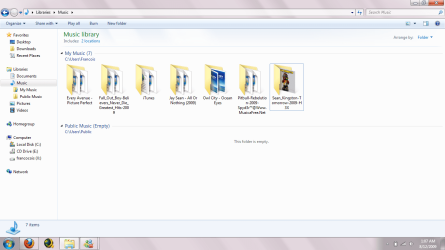
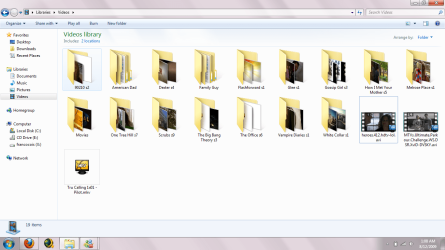
i accidently dragged or did something weird to my Music folder and it has turned out like below, it is different to my videos and pictures. It really bugs me as i'm a pedantic person where i like my folders neat and nice lol.Well yes i was hoping for a solution to this minor issue.

Thanks!
 

Attachments
  • as.png
    as.png
    96.4 KB · Views: 168
  • Untitled.png
    Untitled.png
    57.5 KB · Views: 98

My Computer

OS
Windows 7 Ultimate x86
CPU
AMD Phenom(tm) II X4 965 Processor, 3400 Mhz, 4 Core(s)
Memory
4GB DDR3
Graphics Card(s)
AMD Radeon HD 6900 Series
Sound Card
Realtek High Definition Audio
Monitor(s) Displays
Acer 19"
Screen Resolution
1440x900
Hard Drives
Samsung 320GB Sata Disk
Samsung 500GB Sata Disk
WD Caviar 1TB (BLUE) Sata Disk
Case
Antec
Right click-> Group by-> None
Is that it?
 

My Computer

Computer type
Laptop
Computer Manufacturer/Model Number
Custom
OS
Windows 7 Home Premium x64
CPU
Intel Core i5 2500K
Motherboard
MSI MS-7750
Memory
8GB DDR3
Graphics Card(s)
nVidia GeForce GTX650 Ti BOOST
Sound Card
Realtek
Monitor(s) Displays
21' Philips
Screen Resolution
Full HD
Hard Drives
1TB
PSU
500W
Hey, i know this is a slight issue but it really bugs me >< lol
i accidently dragged or did something weird to my Music folder and it has turned out like below, it is different to my videos and pictures. It really bugs me as i'm a pedantic person where i like my folders neat and nice lol.Well yes i was hoping for a solution to this minor issue.

Thanks!

Hi francocois,
I'm not sure i understand/can see your problem, but i will chuck some suggestions out there in the hope that one of them is right! LOL

If it's the Public Music folder section bugging you, click the "2 Locations" just under the toolbar and remove the Public folder.

If it's the size of the folders grating your cheese, click the first of the small icons on the right of the toolbar.

If i've missed the mark with those two, click on Organize in the toolbar and play around with the settings, otherwise, you can right click in the music folder > arrange by > clear changes.

Brink has written some tutorials also worth a look.

Code:
http://www.sevenforums.com/tutorials/?filter[2]=File%20Folder%20Settings
Hope this has helped. :)
 

My Computer

Computer Manufacturer/Model Number
HP Touchsmart IQ771.uk
OS
Windows 7 Ultimate x64
CPU
AMD Turion(tm) 64 X2 Mobile Technology TL-56
Motherboard
ASUS Pheonix
Memory
3GB Nanya PC2-6400 DDR2-SDRAM SO-DIM (400MHz)
Graphics Card(s)
NVIDIA GeForce Go 7600 256MB GDDR3 SDRAM
Sound Card
High Definition Intergrated NVIDIA MCP51
Monitor(s) Displays
46" Sony Bravia HDTV
Screen Resolution
1600x1200
Hard Drives
1.5TB Samsug
320GB Seagate ST3320820AS - SATA 3Gb/s 8MB
500GB Maxtor Basics STM305003EHD301-RK
Internet Speed
↓6.32 Mb/s ↑0.35 Mb/s ↔26ms
Other Info
BIOS - American Megatrends Inc. 5.07
Ethernet Port - NVIDIA nForce 10/100/1000 Mbps
DVD Drive - TSSTcorp DVDR/RW TS-T632L
Lol Sopolias THANKS! hahaha Sorry rsvr85 xD i guess my question was too ambiguous and vague hahahaha i apologise for that. Now i can live in peace xD

ahaha thanks for your solutions!
 

My Computer

OS
Windows 7 Ultimate x86
CPU
AMD Phenom(tm) II X4 965 Processor, 3400 Mhz, 4 Core(s)
Memory
4GB DDR3
Graphics Card(s)
AMD Radeon HD 6900 Series
Sound Card
Realtek High Definition Audio
Monitor(s) Displays
Acer 19"
Screen Resolution
1440x900
Hard Drives
Samsung 320GB Sata Disk
Samsung 500GB Sata Disk
WD Caviar 1TB (BLUE) Sata Disk
Case
Antec
;) anytime
 

My Computer

Computer type
Laptop
Computer Manufacturer/Model Number
Custom
OS
Windows 7 Home Premium x64
CPU
Intel Core i5 2500K
Motherboard
MSI MS-7750
Memory
8GB DDR3
Graphics Card(s)
nVidia GeForce GTX650 Ti BOOST
Sound Card
Realtek
Monitor(s) Displays
21' Philips
Screen Resolution
Full HD
Hard Drives
1TB
PSU
500W
Back
Top