Music in the 'mymusic' folder does not match the editing done in WMP.

slicey

New member
Local time
6:12 AM
Messages
5
Hello all. Here's the deal-bare with me here. I pulled many albums that I used to own using 'free youtube to mp3 converter' program by DVDVidioSoft. I would download all the tracks to a particular album and output the files to a folder I created for each album. These subfolders were created in the 'MyMusic' folder. Ok, so doing this allowed WMP to find this music and show it in the player.

When I go to syncing these albums or dragging and dropping to my Sansa Clipzip, it puts almost all of the tracks from these album folders under the player's 'unknown' subfolder.

Now, I later learned about right-clicking a song and selecting 'find album info'. Doing this has put all the songs to each album in the correct track order. This has pretty much eliminated having songs show up in my player's 'unknown' folder.

Now, all the tracks from each album are ordered like on the original CD and many edited for capital letters and what not. Everything looks good in WMP and albums sync well to my player.

In WMP, all the albums and their respective songs are all ordered properly, any spelling errors, caps, etc are all corrected and looking just as it should, as if I ripped a purchased hard copy CD to my computer.

The problem I'm faced with, is backing up my music library to an external hard drive or other media, for that matter.

I thought I could drag each album to my burning app, which is Ashampoo Burning Studio 6 Free. It won't work by trying to drag albums from the WMP. I could, however, drag each of the albums from the 'MyMusic' folder to the app. I have learned that my music folders(under 'MyMusic') that I created for the albums that I downloaded are still in their original, unedited/organized form. So, if I were to drag/drop them into my burning app, or transfer them to an external hard drive, I would lose all the hard work I did straightening everyhing out. I guess I mistakenly thought my folders under 'MyMusic' would be updated accordingly.

Is there anyway to resolve this other than actually buying the music?
 

My Computer My Computer

At a glance

win7 home premium x32
OS
win7 home premium x32
You say you want to back up your music library to an external drive.

Why do you need a "burning app" to do that?

Why not just copy the stuff to another drive with the mouse or from a menu, just like you were dealing with pictures, video clips, documents, or anything else?
 

My Computer My Computer

At a glance

Windows 7 Home Premium SP1, 64-bitIntel Skylake i5-6600K, not overclocked8 GB HyperX DDR4-2666 (2 x 4 GB)none; graphics are integrated on CPU
Computer type
PC/Desktop
Computer Manufacturer/Model Number
Ignatz Special; 4 speed manual gearbox; factory air conditioning; one of one
OS
Windows 7 Home Premium SP1, 64-bit
CPU
Intel Skylake i5-6600K, not overclocked
Motherboard
AsRock Z170M Extreme 4, micro ATX
Memory
8 GB HyperX DDR4-2666 (2 x 4 GB)
Graphics Card(s)
none; graphics are integrated on CPU
Sound Card
onboard: Realtek ALC1150; external: USB Behringer UF0-202
Monitor(s) Displays
Dell S2340M 23 inch IPS
Screen Resolution
1600 x 900
Hard Drives
System: Crucial MX100 series SSD, 128 GB;
Data: Samsung Spinpoint 103SJ, 1 TB;
Backup: WD Caviar Green WD30EZRX-00D8PB0, 3 TB
PSU
Rosewill SilentNight 500 watt fanless, semi-modular
Case
Antec Solo II
Cooling
Noctua NH-U12S; Noctua F12 intake, Noctua S12A exhaust
Keyboard
Microsoft 200 6JH-00001 USB
Mouse
Dell or Microsoft optical wired; USB
Antivirus
Microsoft Security Essentials and Malwarebytes Premium
Browser
Pale Moon
Other Info
All fans PWM; speeds at idle: CPU circa 500 rpm; intake circa 600 rpm; exhaust circa 600 rpm; CPU temps 27 idle and 47 C load in a warm room (27 C/81 F) when running Intel Extreme Tuning Utility stress test.
You say you want to back up your music library to an external drive.

Why do you need a "burning app" to do that?

Why not just copy the stuff to another drive with the mouse or from a menu, just like you were dealing with pictures, video clips, documents, or anything else?


Can I left-click on the albums in WMP and drag/drop them to a different hard drive? I'm unable to get to my external hard drive at the moment, that's why I'm asking and not trying it, right now.
 

My Computer My Computer

At a glance

win7 home premium x32
OS
win7 home premium x32
I know absolutely nothing about WMP.

But I have 23,000 songs on my hard drive and I back them up every day, using an automated backup program.

I also back them up manually from time to time by a simple drag and drop to another hard drive.

I don't know why you couldn't do exactly that. The songs are just files like any other file.

Where they reside on your hard drive is another question and up to you to solve. Find them, and try a drag and drop to the external.

Or just try copying them from folder A to folder B on your hard drive. If you can do that, you should certainly be able to copy them from folder A to another drive.
 

My Computer My Computer

At a glance

Windows 7 Home Premium SP1, 64-bitIntel Skylake i5-6600K, not overclocked8 GB HyperX DDR4-2666 (2 x 4 GB)none; graphics are integrated on CPU
Computer type
PC/Desktop
Computer Manufacturer/Model Number
Ignatz Special; 4 speed manual gearbox; factory air conditioning; one of one
OS
Windows 7 Home Premium SP1, 64-bit
CPU
Intel Skylake i5-6600K, not overclocked
Motherboard
AsRock Z170M Extreme 4, micro ATX
Memory
8 GB HyperX DDR4-2666 (2 x 4 GB)
Graphics Card(s)
none; graphics are integrated on CPU
Sound Card
onboard: Realtek ALC1150; external: USB Behringer UF0-202
Monitor(s) Displays
Dell S2340M 23 inch IPS
Screen Resolution
1600 x 900
Hard Drives
System: Crucial MX100 series SSD, 128 GB;
Data: Samsung Spinpoint 103SJ, 1 TB;
Backup: WD Caviar Green WD30EZRX-00D8PB0, 3 TB
PSU
Rosewill SilentNight 500 watt fanless, semi-modular
Case
Antec Solo II
Cooling
Noctua NH-U12S; Noctua F12 intake, Noctua S12A exhaust
Keyboard
Microsoft 200 6JH-00001 USB
Mouse
Dell or Microsoft optical wired; USB
Antivirus
Microsoft Security Essentials and Malwarebytes Premium
Browser
Pale Moon
Other Info
All fans PWM; speeds at idle: CPU circa 500 rpm; intake circa 600 rpm; exhaust circa 600 rpm; CPU temps 27 idle and 47 C load in a warm room (27 C/81 F) when running Intel Extreme Tuning Utility stress test.
Remember, I mentioned that I cleaned up all my downloaded files in WMP, and the same files that were then and still stored in the my 'MyMusic' folder did not get updated.
I will try tomorrow to drag/drop albums from WMP only, to my external drive. I can't get to it now.
 

My Computer My Computer

At a glance

win7 home premium x32
OS
win7 home premium x32
when you change or update the track info in wmp it only shows when you open wmp, in order to change the info on the actual files in your mymusic folder you will have to alter them manually using a third party tag editor,
or you can change the info from explorer, these processes take forever depending on the size of the mymusic folder. there is a quicker easier way that once you get the hang of is simple.
i have installed winamp, i dont add anything to its library i choose a folder /album to play and it opens in winamp as i have set it as a default player.

Download Winamp Media Player - Free MP3, Video, and Music Player - Winamp

when the album shows in winamp i highlight the tracklist / right click and send to/ select auto tag and it will find the info for the tracks selected. it has been 99% accurate in my experience.
once you have the tags (By clicking apply in the tag window) then install mp3tag and open it,

Mp3tag - the universal Tag Editor (ID3v2, MP4, OGG, FLAC, ...)

open the album you have just tagged and select tag to filename (you have to highlight the track list to select them)

tag.png

the filenames will change for you and then click save. it sounds complicated when reading it but once you do it a couple of times its a cakewalk.
if you need further help just ask. there is a way to select how you want the filenames to appear ie track number / track name/artist /date etc. you can alter the order they appear and save it as a default so all the changes you make appear the same.
 

My Computer My Computer

At a glance

Microsoft Windows 7 Home Premium 64-bit 7600IIx4 amd athelon 635 processor2x2gbati radeon HD 5450
Computer Manufacturer/Model Number
Hewlett packard/p6512uk
OS
Microsoft Windows 7 Home Premium 64-bit 7600
CPU
IIx4 amd athelon 635 processor
Motherboard
FOXCONN 2AA9
Memory
2x2gb
Graphics Card(s)
ati radeon HD 5450
Sound Card
(1) Realtek High Definition Audio (2) AMD High Definition
Monitor(s) Displays
samsung lcd tv 32"
Screen Resolution
1360x 768
Hard Drives
(1) WDC WD10 01FAES-60Z2A0 SATA Disk Device (2) Maxtor OneTouch USB Device (3) ST310003 33AS USB Device (4) WD My Book 1111 USB Device
PSU
?
Cooling
air!
Keyboard
wireless hp
Mouse
wireless Hp,optical
Internet Speed
1.10mb/s
Antivirus
MSE
Browser
Firefox
Thanks very much for the info, Boohbah. Would I be able to hook up an external hard drive, then drag/drop albums from WMP to the drive. Wipe out the 'mymusic' folde, then put everything back in the folder from the external hard drive? If I don't hear from u by the end of dinner, Ill actually try it.
 

My Computer My Computer

At a glance

win7 home premium x32
OS
win7 home premium x32
I started doing what you said. I've gotten to the point where I've saved the changes in mp3tag. I don't know how to clear the list of files I just edited/saved. Also, some more great help on how to alter the track order would be much appreciated.
 

My Computer My Computer

At a glance

win7 home premium x32
OS
win7 home premium x32
Hi sorry for the delay in replying,
Ok! to clear the tracklisting in mp3tag either open a new album via mp3tag or right click on an album in your mymusic folder and select mp3tag from the context menu ,this will open the folder in wmp3tag.

if you copy your mymusic folder to your external then go to libraries and right click on the music folder select properties then add a folder and navigate to the mymusic folder you just moved to your external, this will now add your newly moved mymusic folder to the wmp library also.
the reason i suggest "copy " rather than cut is that if anything goes wrong whilst moving the files then you still have the original folder .once it has copied successfully then you can delete the original mymusic folder from your c: drive.(if thats where it is) you can also remove the original mymusic folder from the library using the same method as add a folder to library.

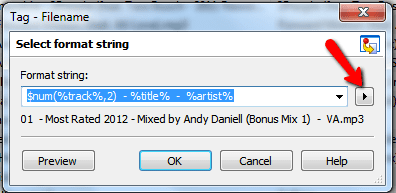
to alter the track title order for showing on your files , then open mp3tag. select your tracks (highlight them) then click tag-filename a small window will open asking you to select a format string,
2012-04-08_0846.png

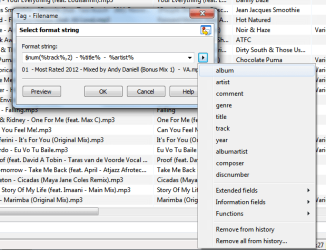
clicking the arrow beside the string box will give a list of elements for your string, ie track ,title and artist or whichever you choose. click each one you want to display on the file title (select them in the order you want them to show on the file)

2012-04-08_0847.png

then when you have done that click OK then save your changes the files in your folder will now display in the way you want. if you make a mistake then just retry changing the elements in the string until you are satisfied,

i also notice you mention moving the files from your mymusic folder to an external then moving them back,
if this is to update the wmp library then dont worry it will update any new changes. if you want to move the location of your mymusic folder completely to the external permanently then follow the method i already mentioned.
hope this helps.
 

My Computer My Computer

At a glance

Microsoft Windows 7 Home Premium 64-bit 7600IIx4 amd athelon 635 processor2x2gbati radeon HD 5450
Computer Manufacturer/Model Number
Hewlett packard/p6512uk
OS
Microsoft Windows 7 Home Premium 64-bit 7600
CPU
IIx4 amd athelon 635 processor
Motherboard
FOXCONN 2AA9
Memory
2x2gb
Graphics Card(s)
ati radeon HD 5450
Sound Card
(1) Realtek High Definition Audio (2) AMD High Definition
Monitor(s) Displays
samsung lcd tv 32"
Screen Resolution
1360x 768
Hard Drives
(1) WDC WD10 01FAES-60Z2A0 SATA Disk Device (2) Maxtor OneTouch USB Device (3) ST310003 33AS USB Device (4) WD My Book 1111 USB Device
PSU
?
Cooling
air!
Keyboard
wireless hp
Mouse
wireless Hp,optical
Internet Speed
1.10mb/s
Antivirus
MSE
Browser
Firefox
Back
Top