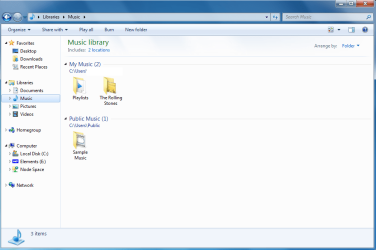
Music Library showing public folder as well?

elbeasto

New member
Member
VIP
Local time
2:02 AM
Messages
127
Location
Sydney Australia
In the default libraries there is a corresponding public folder of each library e.g. Documents/public documents, Pictures/public pictures etc...

But the only library showing the public folder is the music library. Why is this and how can I make it not show without removing the public music folder?


Thanks.
 

Attachments
  • picture library.PNG
    picture library.PNG
    46.3 KB · Views: 145
  • music library edit.png
    music library edit.png
    39.6 KB · Views: 125

My Computer My Computer

At a glance

Windows 7 Home Premium x64i7 5930KCorsair Dominator, DDR4 16GBEVGA GTX 980 SLI
OS
Windows 7 Home Premium x64
CPU
i7 5930K
Motherboard
Asus X99-A
Memory
Corsair Dominator, DDR4 16GB
Graphics Card(s)
EVGA GTX 980 SLI
Sound Card
Onboard Realtek HD
Monitor(s) Displays
Dell U3011
Screen Resolution
2560x1600 (16:10, as god intended)
Hard Drives
Samsung 850 EVO 1TB SSD (Boot OS)
2 x Hitachi 7K3000 2TB (Storage)
PSU
Seasonic 1250W
Case
Corsair 900D
Cooling
Corsair H110 280
Keyboard
Logitech Wireless Illuminated keyboard K800
Mouse
Loigitech M950 Performance
Internet Speed
ADSL 2+
Antivirus
MS SE
Browser
Chrome
underneath where it says music library (the title of the folder) it says 'includes 2 locations'. click that and then remove the public folder from there.
The public folder will still exist, it just wont be included in the music library.
 

My Computer My Computer

At a glance

Windows 7 build 7100 x86Intel Core 2 Duo 2.1GHz3GBIntel(TM) Graphics Media Accelerator X4500HD
Computer Manufacturer/Model Number
Dell Inspiron 1545
OS
Windows 7 build 7100 x86
CPU
Intel Core 2 Duo 2.1GHz
Motherboard
GM45 chipset
Memory
3GB
Graphics Card(s)
Intel(TM) Graphics Media Accelerator X4500HD
Sound Card
Realtek HD
Monitor(s) Displays
15.6" WLED 720p
Screen Resolution
1366x768
Hard Drives
320GB 5400rpm hard drive
No I still wanted it to be on the left hand list but not in the main window.

I fixed it by reseting folders and restoring defaults. All was good after that.
 

My Computer My Computer

At a glance

Windows 7 Home Premium x64i7 5930KCorsair Dominator, DDR4 16GBEVGA GTX 980 SLI
OS
Windows 7 Home Premium x64
CPU
i7 5930K
Motherboard
Asus X99-A
Memory
Corsair Dominator, DDR4 16GB
Graphics Card(s)
EVGA GTX 980 SLI
Sound Card
Onboard Realtek HD
Monitor(s) Displays
Dell U3011
Screen Resolution
2560x1600 (16:10, as god intended)
Hard Drives
Samsung 850 EVO 1TB SSD (Boot OS)
2 x Hitachi 7K3000 2TB (Storage)
PSU
Seasonic 1250W
Case
Corsair 900D
Cooling
Corsair H110 280
Keyboard
Logitech Wireless Illuminated keyboard K800
Mouse
Loigitech M950 Performance
Internet Speed
ADSL 2+
Antivirus
MS SE
Browser
Chrome
In the default libraries there is a corresponding public folder of each library e.g. Documents/public documents, Pictures/public pictures etc...

But the only library showing the public folder is the music library. Why is this and how can I make it not show without removing the public music folder?


Thanks.


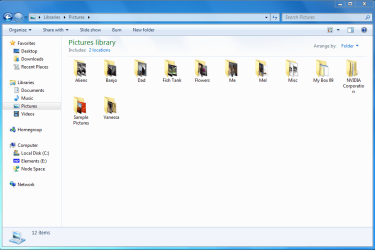
All of my Libraries look like the pic on the right by default.....showing each location separately. You can make it look like the pic on the left by right clicking and changing the Group By to (None). To clear any changes you make, click Arrange by: and select Clear changes.
 

My Computer My Computer

At a glance

Windows 7 Ultimate 64bitIntel Xeon 3110 (Same as Core 2 Duo E8400) 3....8GB G. Skill PC2-8500PALiT GeForce 9600 GT PCI Express 2.0
Computer Manufacturer/Model Number
Self Build
OS
Windows 7 Ultimate 64bit
CPU
Intel Xeon 3110 (Same as Core 2 Duo E8400) 3.0Ghz @ 3.6Ghz
Motherboard
Gigabyte EX38-DS4
Memory
8GB G. Skill PC2-8500
Graphics Card(s)
PALiT GeForce 9600 GT PCI Express 2.0
Sound Card
OnBoard - Realtek ALC889A High Definition Audio
Monitor(s) Displays
Dell 24" LCD
Screen Resolution
1920x1200
Hard Drives
Western Digital VelociRaptor WD3000GLFS - 300GB | Western Digital Caviar SE16 WD7500AAKS - 750GB | LaCie d2Next-Quadra external - 1TB
PSU
Corsair HS620W
Case
Lian Li PC-V1100b Plus II
Cooling
Thermalright Ultra 120 eXtreme
Keyboard
Logitech
Mouse
Logitech MX Laser
Internet Speed
SLOW - HughesNet Satellite Internet - SUCKS!
All of my Libraries look like the pic on the right by default.....showing each location separately. You can make it look like the pic on the left by right clicking and changing the Group By to (None). To clear any changes you make, click Arrange by: and select Clear changes.


Ahh cool, thanks for that. :)
 

My Computer My Computer

At a glance

Windows 7 Home Premium x64i7 5930KCorsair Dominator, DDR4 16GBEVGA GTX 980 SLI
OS
Windows 7 Home Premium x64
CPU
i7 5930K
Motherboard
Asus X99-A
Memory
Corsair Dominator, DDR4 16GB
Graphics Card(s)
EVGA GTX 980 SLI
Sound Card
Onboard Realtek HD
Monitor(s) Displays
Dell U3011
Screen Resolution
2560x1600 (16:10, as god intended)
Hard Drives
Samsung 850 EVO 1TB SSD (Boot OS)
2 x Hitachi 7K3000 2TB (Storage)
PSU
Seasonic 1250W
Case
Corsair 900D
Cooling
Corsair H110 280
Keyboard
Logitech Wireless Illuminated keyboard K800
Mouse
Loigitech M950 Performance
Internet Speed
ADSL 2+
Antivirus
MS SE
Browser
Chrome
You can also drag a folder you choose to the favorite links for quick access.
 

My Computer My Computer

At a glance

Windows 7 Ultimate x86-64[email protected] 1066MHz FSB6GB DDR3 1066MHz9300M GS 256MB Dedicated (Speed) + Intel4500M...
Computer Manufacturer/Model Number
Sony Vaio Z46GDU
OS
Windows 7 Ultimate x86-64
CPU
[email protected] 1066MHz FSB
Motherboard
Sony branded
Memory
6GB DDR3 1066MHz
Graphics Card(s)
9300M GS 256MB Dedicated (Speed) + Intel4500MHD (Stamina)
Sound Card
Realtek HD Audio
Monitor(s) Displays
13.1' WXGA
Screen Resolution
1600x900
Hard Drives
320GB 7200RPM w/ 16MB cache
Internet Speed
1MB/s
Back
Top