Music Library sorting

foreversilent004

New member
Local time
7:20 PM
Messages
111
3N_.jpg


All of my music is properly tagged. I don't know why I can't see everything.
 

My Computer

Computer Manufacturer/Model Number
IBM ThinkPad T61p
OS
Win7 x64 7232
CPU
Intel Core 2 Duo T7500 2.2GHz
Memory
4GB
Graphics Card(s)
NVIDIA Quadro NVS 140M
Hard Drives
WD 320GB
I found that sometimes permissions can cause problems with Windows Search.
 

My Computer

Computer type
PC/Desktop
Computer Manufacturer/Model Number
Alienware Aurora ALX R4
OS
Windows 10 Pro (x64)
CPU
Intel Core i7-3930K (3.2GHz - 4.5GHz)
Motherboard
Alienware Aurora-R4 x79
Memory
4x Samsung 4GB PC3-12800 DDR3 (16GB 1600MHz)
Graphics Card(s)
Nvidia Geforce GTX 690
Sound Card
SteelSeries Siberia Elite
Monitor(s) Displays
Dell UltraSharp U3011
Screen Resolution
2560x1600
Hard Drives
Samsung 850 Pro 256 GB, Seagate 1TB Desktop Hybrid HDD, 2x Western Digital 4TB Green HDD
PSU
875W Some Dell PSU <.<
Case
Alienware Aurora ALX
Cooling
Custom Liquid Cooling (EK CPU & GPU blocks) dual EK 480RAD
Keyboard
Logitech G710+ Mechanical
Mouse
Logitech G700s
Internet Speed
Verizon Fios (50 mbps average)
Other Info
Server: Intel NUC D54250WYK: i5-4250U, 16GB, 256 GB mSATA, Windows Server 2012 R2

My Computer

Computer Manufacturer/Model Number
IBM ThinkPad T61p
OS
Win7 x64 7232
CPU
Intel Core 2 Duo T7500 2.2GHz
Memory
4GB
Graphics Card(s)
NVIDIA Quadro NVS 140M
Hard Drives
WD 320GB
All of my music is properly tagged. I don't know why I can't see everything.

When you say that you can't see everything, do you mean that you see so few artists? Or is it because you don't see any details when in Folder view?

Perhaps if I show a few screenshots of my own music library.

1) Default "Album View"
music_albums.jpg
This is my normal music library view, that shows each individual album.

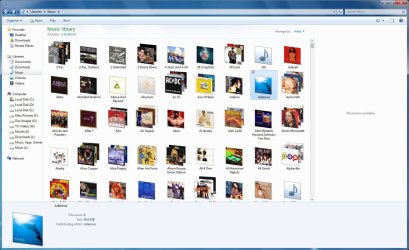
2) Music Library, sorted by "Artists"
music_artists.jpg
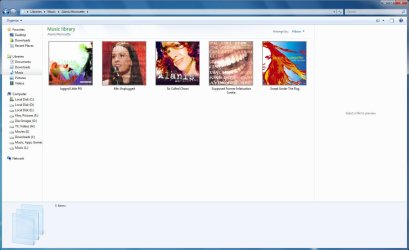
When I sort the library by Artists, this is what I get. I've highlighted "Adiemus" for clarity. It looks as though the is only on icon for that artist, but this is incorrect. Although the name of the icon is for the artist, the icon itself represents an album or albums for the artist. For example, if I go into "Alanis Morissette", I find 4 albums, not 4 songs:
music_artists_single_album2.jpg

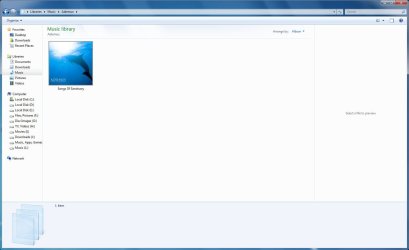
3) Individual "Artist" album view
music_artists_single_album.jpg
If I double-click the "Adiemus" icon in the screenshot from (2) above, then the view changes to show me the albums for only that one artist. If an album is that view is double-clicked, then I get the tracks for that album:

music_album_tracks.jpg
As you can see, all the tags are showing correctly. If in Windows Explorer you DON'T see tags for music that you know you have tagged correctly, then a few things could have happened here:
  • You used Windows Media Player to perform the tagging of the files, but you have done so before the WMP Library was properly initialized, and the tags themselves have not yet been committed to the actual files. I wish Microsoft would do somrthing about this, because in my experience, even if the WMP Library is ok, it can take up to a minute to commit tag changes to the files. What I usualy do is edit the test-based tags first, and leave the album art for last. When I "Paste Album Art", it forces WMP to commit all changes.
  • You edited the meta tags of the files in WMP, but you closed WMP before it had a chance to commit the changes to the files
  • It may very well be a permissions problem that is preventing Windows Explorer from correctly viewing all files. Try this tutorial: Take Ownership
  • You could also have a proble with your indexing options. Perhaps it is incomplete? Try these tutorials: Search Options, Windows Search.
  • Worst-case scenario is that the ID3v2 block (in the case of MP3 files) is corrupt. This will results in the file being played properly, but any tags changes will not be able to be written at all, by WMP, Windows Explorer or even third-party problems. I discovered this myself recently after searching for a song in my library that I KNEW I had, but no amount of searching would find it, except by filename. So I used the LAME MP3 Encoder to re-encode the files, which also rebuilt the ID3v2 tag block in the files. I had to manually re-tag the music, but my problem was solved.
If I have misunderstood the meaning of your post, could you please clarify exactly what is meant by "you don't see everything"...
 

My Computer

Computer type
PC/Desktop
Computer Manufacturer/Model Number
Virtual Machine
OS
Windows 7 Professional 32-bit SP1
CPU
AMD A4/A6
Motherboard
Intel Corporation 440BX Desktop Reference Platform
Memory
3.00GB EDO
Graphics Card(s)
VMware SVGA 3D
Sound Card
High Definition Audio Device
Monitor(s) Displays
Generic Non-PnP Monitor on VMware SVGA 3D
Screen Resolution
1440x900
Hard Drives
1 x 60GB VMware Virtual SATA Hard Drive ATA Device
Antivirus
Kaspersky Total Security
The problem is that I have about 100 GB of music and Explorer won't display them unless I sort by folder. I like your setup, it's what I'm trying to accomplish.

Winamp is my main music player and I use TagScanner to tag everything. Each mp3 of mine is tagged the same way.
 

My Computer

Computer Manufacturer/Model Number
IBM ThinkPad T61p
OS
Win7 x64 7232
CPU
Intel Core 2 Duo T7500 2.2GHz
Memory
4GB
Graphics Card(s)
NVIDIA Quadro NVS 140M
Hard Drives
WD 320GB
The problem is that I have about 100 GB of music and Explorer won't display them unless I sort by folder. I like your setup, it's what I'm trying to accomplish.

Winamp is my main music player and I use TagScanner to tag everything. Each mp3 of mine is tagged the same way.

Question: If you browsr the file using Windows Explorer (directly on the drive, not the Libraries), do you see the Tags displayed there? As I said, if the tags DO NOT show up in Windows Explorer, then the chances are that the ID3v2 part of the file is corrupted, and the only way to fix this is to re-encode the file.

Also, have you tried the taking ownership shortcut?

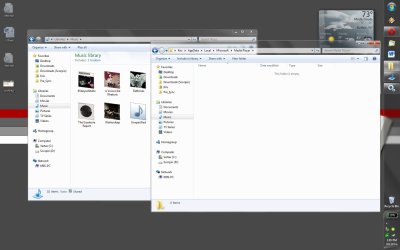
On other thing I've noticed is that you Music library is pointing directly to your "D:\". Did you re-locate your "My Music" folder there, or did you just add "D:\" to your library and remove "C:\User\USERNAME\My Music"? I moved the "My Music" folder to my K:, as shown here:
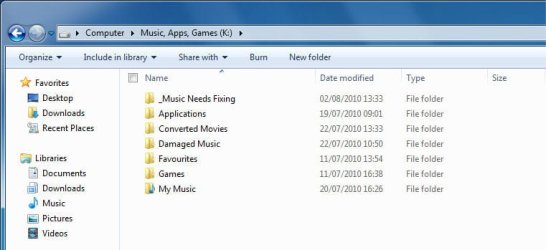
music_folders.jpg

Maybe this has something to do with it?

I'm guessing you use WinAmp because you're old-skool and have grown to dislike WMP. This may come as a shock to you, but Windows MEdia Player 12 does a remarkably good job of managing music libraries and locating missing tag information. With the exception of it being a little slow to commit tags to file, it has taken me about a week to locate the missing information for about 400 or so albums in my library. I have also managed to REMOVE about 200 albums from my library after discovering duplicates.

It is unfortunate that many people are missing the advanced features of WMP simply because previous versions of the product sucked big time. In fact, poor performance of WMP in the past is what prompted me to write my own utility ("MP3 Media Properties Explorer") to manage the tags of my music. Now, with WMP12, MP3 Explorer has been relegated to secondary use for those rare cases where WMP i unable to find the album information, and I need to fallback to the FreeDB.org service.

 

My Computer

Computer type
PC/Desktop
Computer Manufacturer/Model Number
Virtual Machine
OS
Windows 7 Professional 32-bit SP1
CPU
AMD A4/A6
Motherboard
Intel Corporation 440BX Desktop Reference Platform
Memory
3.00GB EDO
Graphics Card(s)
VMware SVGA 3D
Sound Card
High Definition Audio Device
Monitor(s) Displays
Generic Non-PnP Monitor on VMware SVGA 3D
Screen Resolution
1440x900
Hard Drives
1 x 60GB VMware Virtual SATA Hard Drive ATA Device
Antivirus
Kaspersky Total Security
Do you have Windows Search indexing all locations where you have your music?
 

My Computer

Computer type
PC/Desktop
Computer Manufacturer/Model Number
Alienware Aurora ALX R4
OS
Windows 10 Pro (x64)
CPU
Intel Core i7-3930K (3.2GHz - 4.5GHz)
Motherboard
Alienware Aurora-R4 x79
Memory
4x Samsung 4GB PC3-12800 DDR3 (16GB 1600MHz)
Graphics Card(s)
Nvidia Geforce GTX 690
Sound Card
SteelSeries Siberia Elite
Monitor(s) Displays
Dell UltraSharp U3011
Screen Resolution
2560x1600
Hard Drives
Samsung 850 Pro 256 GB, Seagate 1TB Desktop Hybrid HDD, 2x Western Digital 4TB Green HDD
PSU
875W Some Dell PSU <.<
Case
Alienware Aurora ALX
Cooling
Custom Liquid Cooling (EK CPU & GPU blocks) dual EK 480RAD
Keyboard
Logitech G710+ Mechanical
Mouse
Logitech G700s
Internet Speed
Verizon Fios (50 mbps average)
Other Info
Server: Intel NUC D54250WYK: i5-4250U, 16GB, 256 GB mSATA, Windows Server 2012 R2
Using Win Explorer, I can see all tags.

My music is located at 'D:\Music'

Music is indexed, I am rebuilding the index now.


And I do use WMP, but just for it's Play-to feature :)
 

My Computer

Computer Manufacturer/Model Number
IBM ThinkPad T61p
OS
Win7 x64 7232
CPU
Intel Core 2 Duo T7500 2.2GHz
Memory
4GB
Graphics Card(s)
NVIDIA Quadro NVS 140M
Hard Drives
WD 320GB
I find it strange that only a select few albums are showing up when they are tagged all the same way..
 

My Computer

Computer Manufacturer/Model Number
IBM ThinkPad T61p
OS
Win7 x64 7232
CPU
Intel Core 2 Duo T7500 2.2GHz
Memory
4GB
Graphics Card(s)
NVIDIA Quadro NVS 140M
Hard Drives
WD 320GB
I find it strange that only a select few albums are showing up when they are tagged all the same way..

Using Win Explorer, I can see all tags.

My music is located at 'D:\Music'

Music is indexed, I am rebuilding the index now.


And I do use WMP, but just for it's Play-to feature :)

When you say "My Music", do you mean the "My Music" folder, or My Music, and in your music?

Another thing. Is all your music files WMA and/or MP3, or do you have other file types, such as AAC or FLAC?
 

My Computer

Computer type
PC/Desktop
Computer Manufacturer/Model Number
Virtual Machine
OS
Windows 7 Professional 32-bit SP1
CPU
AMD A4/A6
Motherboard
Intel Corporation 440BX Desktop Reference Platform
Memory
3.00GB EDO
Graphics Card(s)
VMware SVGA 3D
Sound Card
High Definition Audio Device
Monitor(s) Displays
Generic Non-PnP Monitor on VMware SVGA 3D
Screen Resolution
1440x900
Hard Drives
1 x 60GB VMware Virtual SATA Hard Drive ATA Device
Antivirus
Kaspersky Total Security
My music is sorted as follows:

D:\Music\Artist\[Year] Album\Artist - Track - Title.mp3

All mp3, nothing else.
 

My Computer

Computer Manufacturer/Model Number
IBM ThinkPad T61p
OS
Win7 x64 7232
CPU
Intel Core 2 Duo T7500 2.2GHz
Memory
4GB
Graphics Card(s)
NVIDIA Quadro NVS 140M
Hard Drives
WD 320GB
My music is sorted as follows:

D:\Music\Artist\[Year] Album\Artist - Track - Title.mp3

All mp3, nothing else.

The filenames don't really matter that much with libraries, as long as the ID3v2 tags are properly set.

You didn't mention if your Libraries/Music problem has been resolved.

So I'm going to try something else now.
  1. Make sure that all meia applications (WMP, WinAmp, etc) are closed
  2. Open Windows Explorer, and turn on the display of both HIDDEN and SYSTEM Files (Click "Organize" then "Folder and Search Options", Click "View", Turn on "Show Hidden...", Turn Off "Hide protected operating system", click OK
  3. Navigate to the "C:\Users\YOU_USER_NAME\AppData\Local\Microsoft\Media Player" folder, then select and delete EVERYTHING there
  4. Open Windows Media Player and go to the Media Library. Allow Windows Media Player to update it's library. Leave WMP running (overnight if you have to) for as long as it say "Updating..." in the lower right corner"
  5. When this is done, go back to Windows Explorer, and see what the Music library does...
 

My Computer

Computer type
PC/Desktop
Computer Manufacturer/Model Number
Virtual Machine
OS
Windows 7 Professional 32-bit SP1
CPU
AMD A4/A6
Motherboard
Intel Corporation 440BX Desktop Reference Platform
Memory
3.00GB EDO
Graphics Card(s)
VMware SVGA 3D
Sound Card
High Definition Audio Device
Monitor(s) Displays
Generic Non-PnP Monitor on VMware SVGA 3D
Screen Resolution
1440x900
Hard Drives
1 x 60GB VMware Virtual SATA Hard Drive ATA Device
Antivirus
Kaspersky Total Security
My music is sorted as follows:

D:\Music\Artist\[Year] Album\Artist - Track - Title.mp3

All mp3, nothing else.

The filenames don't really matter that much with libraries, as long as the ID3v2 tags are properly set.

You didn't mention if your Libraries/Music problem has been resolved.

So I'm going to try something else now.
  1. Make sure that all meia applications (WMP, WinAmp, etc) are closed
  2. Open Windows Explorer, and turn on the display of both HIDDEN and SYSTEM Files (Click "Organize" then "Folder and Search Options", Click "View", Turn on "Show Hidden...", Turn Off "Hide protected operating system", click OK
  3. Navigate to the "C:\Users\YOU_USER_NAME\AppData\Local\Microsoft\Media Player" folder, then select and delete EVERYTHING there
  4. Open Windows Media Player and go to the Media Library. Allow Windows Media Player to update it's library. Leave WMP running (overnight if you have to) for as long as it say "Updating..." in the lower right corner"
  5. When this is done, go back to Windows Explorer, and see what the Music library does...

So you want me to rebuild my WMP library.. Here goes....
 

My Computer

Computer Manufacturer/Model Number
IBM ThinkPad T61p
OS
Win7 x64 7232
CPU
Intel Core 2 Duo T7500 2.2GHz
Memory
4GB
Graphics Card(s)
NVIDIA Quadro NVS 140M
Hard Drives
WD 320GB
So, I made all files visible, deleted the whole WMP folder. But the Music Library remains unchanged.
 

Attachments

  • iuopsd.jpg
    iuopsd.jpg
    211.2 KB · Views: 24

My Computer

Computer Manufacturer/Model Number
IBM ThinkPad T61p
OS
Win7 x64 7232
CPU
Intel Core 2 Duo T7500 2.2GHz
Memory
4GB
Graphics Card(s)
NVIDIA Quadro NVS 140M
Hard Drives
WD 320GB
This has nothing to do with WMP, I feel
 

My Computer

Computer Manufacturer/Model Number
IBM ThinkPad T61p
OS
Win7 x64 7232
CPU
Intel Core 2 Duo T7500 2.2GHz
Memory
4GB
Graphics Card(s)
NVIDIA Quadro NVS 140M
Hard Drives
WD 320GB
I should also note that I use SyncToy to have a 1:1 copy of all of my music on my Windows 7 HTPC. I fired the computer up and loaded the music library and sorted by artist, and it worked as it should.

So I have no idea what's going on
 

My Computer

Computer Manufacturer/Model Number
IBM ThinkPad T61p
OS
Win7 x64 7232
CPU
Intel Core 2 Duo T7500 2.2GHz
Memory
4GB
Graphics Card(s)
NVIDIA Quadro NVS 140M
Hard Drives
WD 320GB
For the life of me, I cannot get rid of those 10 albums in my music library. I went into app data folder and deleted everything associated with WMP, I went into my music folder and deleted all the albumart's and folder.jpg's. Still, those 10 albums in my original post still remain.

Where is the library information stored? I think I have to 'rebuild' the libraries or something.
 

My Computer

Computer Manufacturer/Model Number
IBM ThinkPad T61p
OS
Win7 x64 7232
CPU
Intel Core 2 Duo T7500 2.2GHz
Memory
4GB
Graphics Card(s)
NVIDIA Quadro NVS 140M
Hard Drives
WD 320GB
hey guys ,just wanted to thank you as i didn't even realise that i could display the music library contents by genre ,album or artist etc Doh!
never even noticed the option to change it ,thanks for bringing this to my attention .sorry i cant contribute to helping you solve your issue but i had to mention it.
 

My Computer

Computer Manufacturer/Model Number
Hewlett packard/p6512uk
OS
Microsoft Windows 7 Home Premium 64-bit 7600
CPU
IIx4 amd athelon 635 processor
Motherboard
FOXCONN 2AA9
Memory
2x2gb
Graphics Card(s)
ati radeon HD 5450
Sound Card
(1) Realtek High Definition Audio (2) AMD High Definition
Monitor(s) Displays
samsung lcd tv 32"
Screen Resolution
1360x 768
Hard Drives
(1) WDC WD10 01FAES-60Z2A0 SATA Disk Device (2) Maxtor OneTouch USB Device (3) ST310003 33AS USB Device (4) WD My Book 1111 USB Device
PSU
?
Cooling
air!
Keyboard
wireless hp
Mouse
wireless Hp,optical
Internet Speed
1.10mb/s
Antivirus
MSE
Browser
Firefox
For the life of me, I cannot get rid of those 10 albums in my music library. I went into app data folder and deleted everything associated with WMP, I went into my music folder and deleted all the albumart's and folder.jpg's. Still, those 10 albums in my original post still remain.

Where is the library information stored? I think I have to 'rebuild' the libraries or something.

If you right-click on "Libraries" in Windows Explorer, then select "Restore Default Libraries", does anything change?
 

My Computer

Computer type
PC/Desktop
Computer Manufacturer/Model Number
Virtual Machine
OS
Windows 7 Professional 32-bit SP1
CPU
AMD A4/A6
Motherboard
Intel Corporation 440BX Desktop Reference Platform
Memory
3.00GB EDO
Graphics Card(s)
VMware SVGA 3D
Sound Card
High Definition Audio Device
Monitor(s) Displays
Generic Non-PnP Monitor on VMware SVGA 3D
Screen Resolution
1440x900
Hard Drives
1 x 60GB VMware Virtual SATA Hard Drive ATA Device
Antivirus
Kaspersky Total Security
For the life of me, I cannot get rid of those 10 albums in my music library. I went into app data folder and deleted everything associated with WMP, I went into my music folder and deleted all the albumart's and folder.jpg's. Still, those 10 albums in my original post still remain.

Where is the library information stored? I think I have to 'rebuild' the libraries or something.

If you right-click on "Libraries" in Windows Explorer, then select "Restore Default Libraries", does anything change?

Nothing changes...
 

My Computer

Computer Manufacturer/Model Number
IBM ThinkPad T61p
OS
Win7 x64 7232
CPU
Intel Core 2 Duo T7500 2.2GHz
Memory
4GB
Graphics Card(s)
NVIDIA Quadro NVS 140M
Hard Drives
WD 320GB
Back
Top