Must format disk, but works perfect in different PC

FSBTech

New member
Local time
9:03 AM
Messages
4
I have an Acer laptop that has recently started saying that I have to reformat the disk before it can be used. This happens with any external storage you plug in and I have tried it with multiple types. Even weirder, all the drives work perfectly fine on my desktop. I've scanned for viruses and updated Windows, but still nothing.

Any suggestions?
 

My Computer My Computer

At a glance

Windows 7 Professional x64
Computer type
PC/Desktop
OS
Windows 7 Professional x64
Power cycle your Acer laptop and check whether it resolves your problem.

  1. Shut-down the laptop.
  2. Unplug any accessories.
  3. Unplug the power adaptor.
  4. If the laptop has a user-removable battery, remove the battery.
  5. Press and hold the power button down for 30 seconds.
  6. Install the battery if it was removed and reconnect the laptop power adaptor and accessories.
  7. This completes the power cycle procedure
 

My Computer My Computer

At a glance

Windows 7 Home Premium 32 bit
OS
Windows 7 Home Premium 32 bit
I cycled the power, but still have the same probleml
 

My Computer My Computer

At a glance

Windows 7 Professional x64
Computer type
PC/Desktop
OS
Windows 7 Professional x64
The only other suggestion I could make is try to restore the system to a point before this event occurred.

Wait to see if others could suggest something.
 

My Computer My Computer

At a glance

Windows 7 Home Premium 32 bit
OS
Windows 7 Home Premium 32 bit
Try this:
Go to Device Manager > double click to expand Universal Serial Bus Controllers > right click on the Host Controller > click Uninstall > click OK >
Repeat selecting each item to uninstall all the items listed under Universal Serial Bus Controllers.

Restart your computer and Windows 7 will reinstall all the USB controllers again automatically.


See if that works.
 

My Computer My Computer

At a glance

Windows 7 64 Bit Home Premium SP1i7-3820GSkill F3-14900CL9Q - 16GBEVGA GeForce GTX660 - Driver 352.86
Computer type
PC/Desktop
Computer Manufacturer/Model Number
Home Built - Jan 2013
OS
Windows 7 64 Bit Home Premium SP1
CPU
i7-3820
Motherboard
Asus P9X79-PRO - Bios 4608
Memory
GSkill F3-14900CL9Q - 16GB
Graphics Card(s)
EVGA GeForce GTX660 - Driver 352.86
Sound Card
On board Realtek ALC898
Monitor(s) Displays
Acer S271HL
Screen Resolution
1920 x 1080
Hard Drives
#1- Samsung 840 Pro Series
#2- Western Digital WD1002FAEX Sata3 Black
#3- Western Digital WD1002FAEX Sata3 Black
PSU
Corsair CMPSU-850TX-V2 - 850 watt (by Seasonic)
Case
Corsair Obsidian 550D
Cooling
Standard 3 120mm case fans, Cooler Master Hyper 212 EVO
Keyboard
MS KC-0405
Mouse
Intellimouse 5-button
Internet Speed
56 Mbits/Sec (on a good day)
Antivirus
Avast & Malwarebytes
Browser
Firefox
Other Info
Asus DVD - DRW-24B1ST 24X
No dice on the reinstalling the drivers...and unfortunately, I do not have any previous restore points. :(
 

My Computer My Computer

At a glance

Windows 7 Professional x64
Computer type
PC/Desktop
OS
Windows 7 Professional x64
Can you look into Windows Disk Management with only one external drive plugged in and if it shows up there, post a screenshot?
 

My Computer My Computer

At a glance

Windows 7 Home Premium 32 bit
OS
Windows 7 Home Premium 32 bit

My Computer My Computer

At a glance

Windows 10 Pro. 64/ version 1709 Windows 7 Pr...Intel i7-6800K @ 4.3Corsair Platinum 16 gig @2400EVGA GTX 1070 OC
Computer type
PC/Desktop
Computer Manufacturer/Model Number
Home made Desktop
OS
Windows 10 Pro. 64/ version 1709 Windows 7 Pro/64
CPU
Intel i7-6800K @ 4.3
Motherboard
ASUS X-99 Deluxe II
Memory
Corsair Platinum 16 gig @2400
Graphics Card(s)
EVGA GTX 1070 OC
Monitor(s) Displays
Asus 27" LED LCD/VE278Q
Screen Resolution
1920-1080 or 1280-720 HDMI
Hard Drives
INTEL SSD 730-240 Gb Sata 3.0/
PSU
EVGA Platium 1200W
Case
Phanteks Luxe Tempered Glass 8 fans/ one radiator
Cooling
XSPC/ Water Cooled CPU
Keyboard
Das 4 Professional
Mouse
Logitech M705/MX Anywhere 2-S
Internet Speed
100 mbits
Antivirus
Microsoft Security Essentials/ Malwarebytes Premium 3.0/ SAS
Browser
I.E. 11 default/Firefox/ ISP Time Warner Cable/Spectrum
Other Info
LG BluRay Burner/
Sound system-KLipsch-THX/
Icy Dock ssd Hot Swap bays.
5p2x60.png


Here's the screen cap. See how it says the format is RAW? On my other computers the format is Fat32 and works fine.
 

My Computer My Computer

At a glance

Windows 7 Professional x64
Computer type
PC/Desktop
OS
Windows 7 Professional x64
I recently had a similar problem with USB 3.0 ports on my motherboard. If I plugged a known good external USB 3.0 hard drive in, Windows would tell me it needed formatted. I could plug the same drive into the USB 3.0 port on a different computer and all was well. I had some other problems with the motherboard, which was under warranty, so I sent it back. The returned board, which looks like a different board as there is no sign of any component replacement, works OK with the 3.0 drive and any USB 3.0 port.
 

My Computer My Computer

At a glance

Windows 10 64 bitIntel i7 6700K16GB Corsair DominatorIntel CPU Graphics
Computer type
PC/Desktop
Computer Manufacturer/Model Number
My Own Build
OS
Windows 10 64 bit
CPU
Intel i7 6700K
Motherboard
ASUS ROG Maximus VIII Hero
Memory
16GB Corsair Dominator
Graphics Card(s)
Intel CPU Graphics
Sound Card
RealTek
Monitor(s) Displays
27" Dell S2719dgf
Screen Resolution
2560X1440
Hard Drives
1 TB Samsung 850 EVO SSD for Win 10 Pro
500GB Samsung 850 EVO SSD for Win 10 Insider
2 TB drive for backup
PSU
EVGA Supernova 750G2
Case
BeQuiet Silent Base 600
Cooling
Deepcool Captain 120EX
Keyboard
Microsoft Wireless 2000
Mouse
Microsoft wireless
Internet Speed
100 MB/sec (Cable)
Antivirus
Microsoft Defender and Malwarebytes
Browser
Edge/Firefox
Other Info
Cakewalk (Sonar) by BandLab and Studio One 4.1 Pro recording studio software. MOTU 896Mk3 Hybrid recording interface, Frontier Tranzport wireless control unit, Behringer X-Touch Control Surface.
Five USB connected optical drives for CD Audio production using Nero BurningROM
Yes indeed FSBTech, your pen drive shows as RAW, for what reason still eludes.

Fireberd's personal experience of course is a pointer to be noted. But I shall come to that later.

For now let us see whether removing the active flag in your pen drive matters in any way.

Install and run MiniTools Partition Wizard Home Edition 8.1.1 with this pen drive plugged in. Free download Magic Partition Manager Software, partition magic alternative, free partition magic, partition magic Windows 7 and server partition software - Partition Wizard Online

Rightclick on the Pendrive in PW > Modify > Set inactive > Apply.

Once the action is finished, safely remove and plugin your pen drive again. Has it made any difference?

Reverting to Fireberd, we can try a fresh install of the OS on your laptop and check whether the problem is resolved. In case it does not happen, may be we have to blame a hardware fault. But I would wait to have opinions of other experts here on such a reinstall or any other suggestions to resolve the problem.

Do you have the Recovery Disks for your Acer Laptop?
 

My Computer My Computer

At a glance

Windows 7 Home Premium 32 bit
OS
Windows 7 Home Premium 32 bit
The only other thing I could suggest, only if AFTER removing the Active flag the problem remains, is to use Partition Wizard to rebuild the MBR on the stick.
 

My Computer My Computer

At a glance

Windows 7 64 Bit Home Premium SP1i7-3820GSkill F3-14900CL9Q - 16GBEVGA GeForce GTX660 - Driver 352.86
Computer type
PC/Desktop
Computer Manufacturer/Model Number
Home Built - Jan 2013
OS
Windows 7 64 Bit Home Premium SP1
CPU
i7-3820
Motherboard
Asus P9X79-PRO - Bios 4608
Memory
GSkill F3-14900CL9Q - 16GB
Graphics Card(s)
EVGA GeForce GTX660 - Driver 352.86
Sound Card
On board Realtek ALC898
Monitor(s) Displays
Acer S271HL
Screen Resolution
1920 x 1080
Hard Drives
#1- Samsung 840 Pro Series
#2- Western Digital WD1002FAEX Sata3 Black
#3- Western Digital WD1002FAEX Sata3 Black
PSU
Corsair CMPSU-850TX-V2 - 850 watt (by Seasonic)
Case
Corsair Obsidian 550D
Cooling
Standard 3 120mm case fans, Cooler Master Hyper 212 EVO
Keyboard
MS KC-0405
Mouse
Intellimouse 5-button
Internet Speed
56 Mbits/Sec (on a good day)
Antivirus
Avast & Malwarebytes
Browser
Firefox
Other Info
Asus DVD - DRW-24B1ST 24X
OK, here is something that flashed in my mind.

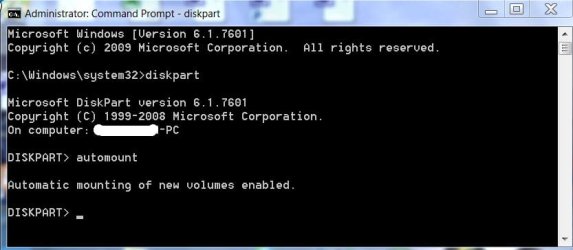
Check whether automount is enabled. ( It is possible that somehow it got disabled)

Run diskpart as administrator. Type automount <enter>.

If it does not say automount is enabled, type auotomount enable <enter>

That should enable automount . Quit diskpart. Plugin your external drives and check whether those get a drive letter and you are able to access the drives.

06-03-2014 14-32-12.jpg
 

My Computer My Computer

At a glance

Windows 7 Home Premium 32 bit
OS
Windows 7 Home Premium 32 bit
Back
Top