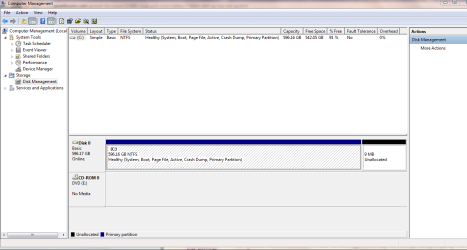
Have working XP on one hard drive. Wished to do a clean install on a 2nd hard drive. After 4 days of trying to install Windows 7 (both 64 and 32 bit upgrade versions)
Reduced the system down to:
Asus M2N-SLI Deluxe motherboard,
2G ram stick
DVD drive
500G HD
processor/fan
non USB keyboard/mouse
Flashed the bios, reinstalled chipboard drivers on the xp, 8 hours or testing the ram stick memory-no errors, and any other thing I could think of during all the attempts (there were too many.) Always the system would freeze and BSOD at Windows starting screen with the splash icon (Was trying to boot the install straight from store bought disks) with various bsods.
On a whim took out the cmos battery and moved the pin over and back. Install starts.. goes through to complete installation and does the normal reboot. BSoD again at windows starting. Do the cmos battery and restart the install from scratch but this time turn the computer off during any restarts and redo battery/pin. Windows 7 64 finally installs with no errors.
Now windows 7 is running beautifully with no problems except when the computer needs to be turned on. Unless the cmos battery is pulled for a few seconds (realised do not need to even move the pin) it will go into a reboot loop during the windows starting screen. I do not have this problem when I load up windows XP (each on it's own drive).
Suggestions?
P.S. Battery voltage checked. It's over 3.1
Edit note: Resetting the bios in the bios window to defaults by pushing F5 and then saving does not do the trick (I do not touch the bios between boots ups either). The battery must be pulled every time.
Last edited:
My Computer
At a glance
windows 7 64bitAMD Athlon 64x2 6400+4Gnvidia 8800GT
I ran the M2N-E board on the last build for seeing XP, Vista, both 7 7000 beta builds, later both 32bit and 64bit RCs, and even had the 32bit retail on a short period of time after 7's launch all across 3 or 4 OSed drives ar one point and never ran into that one!
That had started off with an XP/Vista dual boot across two drives that were later split to each have a beta build installed on a second primary. The additional drives came later.
The 7 installs whether a second OS type or going on as stand alone installs would alway load right up once on suggesting the board may be where the problem is being seen. And the voltage for the Lithium battery should be 3.3v not less suggestin you have a weak battery to start with or the board goes through them faster for some reason.
I had that happen on one old case where everything including cpu temps were way off until a new battery was installed! Once I was into the next build no problems while the time came lately to go with a different make! Asus while offering the extras was suffering from bad boards!
Have a fresh battery onhand? Sometimes the batteries that come with the board simply give out a bit faster then your typical Duracell for example.
W7 Ultimate x64/W10 Pro x64/W11 Pro Triple Bo...AMD Phenom II X4 975 Deneb 3.6ghz - 965 2nd r...Kingston Hyper X DDR3 1600 1.5v 16gb - Hyper ...MSI HD Radeon 5750 1gb - MSI HD Radeon 6450 o...
Computer type
PC/Desktop
Computer Manufacturer/Model Number
Custom builds = 2
OS
W7 Ultimate x64/W10 Pro x64/W11 Pro Triple Boot - Main PC W7 Remote PC Micro ATX W7 Pro x64/W11 Pro
CPU
AMD Phenom II X4 975 Deneb 3.6ghz - 965 2nd remote pc
Motherboard
Gigabyte GA-790XTA-UD4-Gigabyte GA-880GM-D2H remote pc
Memory
Kingston Hyper X DDR3 1600 1.5v 16gb - Hyper X Fury 8gb 2nd
Graphics Card(s)
MSI HD Radeon 5750 1gb - MSI HD Radeon 6450 on mini tower
Sound Card
Creative Labs X-Fi Xtreme Audio P - Realtek onooard 2nd case
Monitor(s) Displays
ASUS VW199T-P 19" HP 2082a Main-HP 2082a 20" remote pc
Screen Resolution
Asus 1440x900 - HP 1600x900
Hard Drives
WD Black 1TB HD per OS W7, W10, and pending W11 presently on 500gb OS Drive - Pending Triple 1TB HDs for Spanned Storage/backup volume
Single 2TB external USB enclosure, single 1TB System 7 Host/Boot drive, Pending 8TB external HD for system image b
PSU
Corsair 750TX - primary / Corsair CX600 - second
Case
Antec 900-2 - SSD compatible / NZXT Vulcan mini tower
4 x 4GB DDR3-1600 Corsair Vengeance CMZ8GX3M2A1600C9B (16GB)
Graphics Card(s)
MSI GeForce GTX770 Gaming OC 2GB
Sound Card
Realtek High Definition on board solution (ALC 898)
Monitor(s) Displays
ViewSonic VA1912w Widescreen (VGA)
Screen Resolution
1440x900
Hard Drives
OCZ Agility 3 SSD 120GB SATA III x2 (RAID 0)
Samsung HD501LJ 500GB SATA II x2
Hitachi HDS721010CLA332 1TB SATA II
Iomega 1.5TB Ext USB 2.0
WD 2.0TB Ext USB 3.0
Nighthawk. Thankyou. For some reason I thought anything over 3 was acceptable for a battery. Will get it replaced in the morning, just to make sure. I am running each OS as a stand alone.
Dwarf: I physically removed everything from my system except what I listed above eventually. (my complete system is listed in my system specs if those are needed). This included removing the hard drive with XP on it. The only hard drive I had connected was the formatted drive to clean install windows 7 on (no partitions)
My Computer
At a glance
windows 7 64bitAMD Athlon 64x2 6400+4Gnvidia 8800GT
With only that drive plugged in and knowing the installation went well a glitchy cmos due to a weak battery or board with a problem are two things to consider. On that old caase I tore it apart for a year and went with a fresh battery a year later and everything ran like new.
It always helps to have a spare battery or two onhand however when buying a new boardsince the original batteries can go on you faster then seen with a few of the name brands. Those also help with older cases being refurbished as well as being spares.
W7 Ultimate x64/W10 Pro x64/W11 Pro Triple Bo...AMD Phenom II X4 975 Deneb 3.6ghz - 965 2nd r...Kingston Hyper X DDR3 1600 1.5v 16gb - Hyper ...MSI HD Radeon 5750 1gb - MSI HD Radeon 6450 o...
Computer type
PC/Desktop
Computer Manufacturer/Model Number
Custom builds = 2
OS
W7 Ultimate x64/W10 Pro x64/W11 Pro Triple Boot - Main PC W7 Remote PC Micro ATX W7 Pro x64/W11 Pro
CPU
AMD Phenom II X4 975 Deneb 3.6ghz - 965 2nd remote pc
Motherboard
Gigabyte GA-790XTA-UD4-Gigabyte GA-880GM-D2H remote pc
Memory
Kingston Hyper X DDR3 1600 1.5v 16gb - Hyper X Fury 8gb 2nd
Graphics Card(s)
MSI HD Radeon 5750 1gb - MSI HD Radeon 6450 on mini tower
Sound Card
Creative Labs X-Fi Xtreme Audio P - Realtek onooard 2nd case
Monitor(s) Displays
ASUS VW199T-P 19" HP 2082a Main-HP 2082a 20" remote pc
Screen Resolution
Asus 1440x900 - HP 1600x900
Hard Drives
WD Black 1TB HD per OS W7, W10, and pending W11 presently on 500gb OS Drive - Pending Triple 1TB HDs for Spanned Storage/backup volume
Single 2TB external USB enclosure, single 1TB System 7 Host/Boot drive, Pending 8TB external HD for system image b
PSU
Corsair 750TX - primary / Corsair CX600 - second
Case
Antec 900-2 - SSD compatible / NZXT Vulcan mini tower
I currently only have the drive with windows 7 plugged in (in an attempt to isolate the problem) If I plug in the drive with xp by itself, boot up fine. If I have both plugged in and choose to boot up the HD with XP on it first, it boots up fine (I never have a problem when XP is the currently running OS). Any configuration i try to do 7 on though as the OS it does not work without pulling the CMOS battery.
I purchased a new CMOS battery and it made no difference.
Now, I have no idea if this has anything to do with the problem. But I checked everything in the bios without pulling the battery and then right after pulling the battery. There is only one difference. The CPU voltage is .12 higher. Have no idea why this would be... or if/why this would make a difference in getting windows 7 to run. (On a side note I DO NOT like this as it's causing the CPU temps to be beyond acceptable range when above 25%)
My Computer
At a glance
windows 7 64bitAMD Athlon 64x2 6400+4Gnvidia 8800GT
Try to catch those and write them down for examination. The drive you have 7 installed could be the most likely problem however. I had one WD Green Power drive with the RC on that where 7 ran well but too many programs suffered.
Once getting a pair of 1tb GP drives and seeing some installs on them all programs seemed to run fine! The new build that went together this spring saw all new drives for the fresh start and not one problem since! The first install was on a Sata III 1tb Black edition until a memory swap called for a fresh install again only on one of the new Sata II drives in use.
Hard drive suspect! You shouldn't have to reset the bios defaults which also restores the auto voltage controls for the cpu and memory just to boot into any OS! The BSODs are likely hardware pointing at the drive itself.
W7 Ultimate x64/W10 Pro x64/W11 Pro Triple Bo...AMD Phenom II X4 975 Deneb 3.6ghz - 965 2nd r...Kingston Hyper X DDR3 1600 1.5v 16gb - Hyper ...MSI HD Radeon 5750 1gb - MSI HD Radeon 6450 o...
Computer type
PC/Desktop
Computer Manufacturer/Model Number
Custom builds = 2
OS
W7 Ultimate x64/W10 Pro x64/W11 Pro Triple Boot - Main PC W7 Remote PC Micro ATX W7 Pro x64/W11 Pro
CPU
AMD Phenom II X4 975 Deneb 3.6ghz - 965 2nd remote pc
Motherboard
Gigabyte GA-790XTA-UD4-Gigabyte GA-880GM-D2H remote pc
Memory
Kingston Hyper X DDR3 1600 1.5v 16gb - Hyper X Fury 8gb 2nd
Graphics Card(s)
MSI HD Radeon 5750 1gb - MSI HD Radeon 6450 on mini tower
Sound Card
Creative Labs X-Fi Xtreme Audio P - Realtek onooard 2nd case
Monitor(s) Displays
ASUS VW199T-P 19" HP 2082a Main-HP 2082a 20" remote pc
Screen Resolution
Asus 1440x900 - HP 1600x900
Hard Drives
WD Black 1TB HD per OS W7, W10, and pending W11 presently on 500gb OS Drive - Pending Triple 1TB HDs for Spanned Storage/backup volume
Single 2TB external USB enclosure, single 1TB System 7 Host/Boot drive, Pending 8TB external HD for system image b
PSU
Corsair 750TX - primary / Corsair CX600 - second
Case
Antec 900-2 - SSD compatible / NZXT Vulcan mini tower
They'll be able to tell you quickly what is causing the crashes.
Are you booting either OS via the BIOS boot menu key or BIOS Boot order, or do you have a Windows Dual Boot menu configured? It might be best to remove the WIndows Dual Boot and use the BIOS to boot. We'll need to see a screenshot with both HD's plugged in to advise the steps to do this.
To grab a good screen from the Disk Management tool use the snipping tool found in the Start>Accessories while having most of the DM displayed on your desktop. Sometimes the information about a drive at the top as well as the main area below can be useful.
You have to disable the automatic restart on system crash option as well in order to hold a blue screen on long enough. That will be found in the Control Panel>System>Advanced Settings>Startup & Recovery section. Once disabled the blue screen will simply hang until you hit the ctrl-alt-del key combo to force a restart. But that will give you the time to jot down what each screen reveals.
W7 Ultimate x64/W10 Pro x64/W11 Pro Triple Bo...AMD Phenom II X4 975 Deneb 3.6ghz - 965 2nd r...Kingston Hyper X DDR3 1600 1.5v 16gb - Hyper ...MSI HD Radeon 5750 1gb - MSI HD Radeon 6450 o...
Computer type
PC/Desktop
Computer Manufacturer/Model Number
Custom builds = 2
OS
W7 Ultimate x64/W10 Pro x64/W11 Pro Triple Boot - Main PC W7 Remote PC Micro ATX W7 Pro x64/W11 Pro
CPU
AMD Phenom II X4 975 Deneb 3.6ghz - 965 2nd remote pc
Motherboard
Gigabyte GA-790XTA-UD4-Gigabyte GA-880GM-D2H remote pc
Memory
Kingston Hyper X DDR3 1600 1.5v 16gb - Hyper X Fury 8gb 2nd
Graphics Card(s)
MSI HD Radeon 5750 1gb - MSI HD Radeon 6450 on mini tower
Sound Card
Creative Labs X-Fi Xtreme Audio P - Realtek onooard 2nd case
Monitor(s) Displays
ASUS VW199T-P 19" HP 2082a Main-HP 2082a 20" remote pc
Screen Resolution
Asus 1440x900 - HP 1600x900
Hard Drives
WD Black 1TB HD per OS W7, W10, and pending W11 presently on 500gb OS Drive - Pending Triple 1TB HDs for Spanned Storage/backup volume
Single 2TB external USB enclosure, single 1TB System 7 Host/Boot drive, Pending 8TB external HD for system image b
PSU
Corsair 750TX - primary / Corsair CX600 - second
Case
Antec 900-2 - SSD compatible / NZXT Vulcan mini tower
Will try putting 7 on a different HD and see what that gets. If that doesn't work, was intending to buy 4 more gigs of ram anyways so will try that too. If none of that gets anywhere will list the logs/screenshot. Will take a few days to do, but will get back either way with what happens.
(basically do not want to replace a pretty expensive MB if I don't have to... last resort considering it works with XP.. I'll ditch the windows 7 before i'm ditching the MB at this time)
My Computer
At a glance
windows 7 64bitAMD Athlon 64x2 6400+4Gnvidia 8800GT
Diskcheck and even the diagnostics tool from the drive manufacturer itself would one step for confirming or ruling the drive out.
One question here would be which drive is 7 on and the make and model? The 500gb is how old? since you pointed to that one. Drive wear over time if that was moved into a new build from another would tend to see that.
W7 Ultimate x64/W10 Pro x64/W11 Pro Triple Bo...AMD Phenom II X4 975 Deneb 3.6ghz - 965 2nd r...Kingston Hyper X DDR3 1600 1.5v 16gb - Hyper ...MSI HD Radeon 5750 1gb - MSI HD Radeon 6450 o...
Computer type
PC/Desktop
Computer Manufacturer/Model Number
Custom builds = 2
OS
W7 Ultimate x64/W10 Pro x64/W11 Pro Triple Boot - Main PC W7 Remote PC Micro ATX W7 Pro x64/W11 Pro
CPU
AMD Phenom II X4 975 Deneb 3.6ghz - 965 2nd remote pc
Motherboard
Gigabyte GA-790XTA-UD4-Gigabyte GA-880GM-D2H remote pc
Memory
Kingston Hyper X DDR3 1600 1.5v 16gb - Hyper X Fury 8gb 2nd
Graphics Card(s)
MSI HD Radeon 5750 1gb - MSI HD Radeon 6450 on mini tower
Sound Card
Creative Labs X-Fi Xtreme Audio P - Realtek onooard 2nd case
Monitor(s) Displays
ASUS VW199T-P 19" HP 2082a Main-HP 2082a 20" remote pc
Screen Resolution
Asus 1440x900 - HP 1600x900
Hard Drives
WD Black 1TB HD per OS W7, W10, and pending W11 presently on 500gb OS Drive - Pending Triple 1TB HDs for Spanned Storage/backup volume
Single 2TB external USB enclosure, single 1TB System 7 Host/Boot drive, Pending 8TB external HD for system image b
PSU
Corsair 750TX - primary / Corsair CX600 - second
Case
Antec 900-2 - SSD compatible / NZXT Vulcan mini tower
W7 Ultimate x64/W10 Pro x64/W11 Pro Triple Bo...AMD Phenom II X4 975 Deneb 3.6ghz - 965 2nd r...Kingston Hyper X DDR3 1600 1.5v 16gb - Hyper ...MSI HD Radeon 5750 1gb - MSI HD Radeon 6450 o...
Computer type
PC/Desktop
Computer Manufacturer/Model Number
Custom builds = 2
OS
W7 Ultimate x64/W10 Pro x64/W11 Pro Triple Boot - Main PC W7 Remote PC Micro ATX W7 Pro x64/W11 Pro
CPU
AMD Phenom II X4 975 Deneb 3.6ghz - 965 2nd remote pc
Motherboard
Gigabyte GA-790XTA-UD4-Gigabyte GA-880GM-D2H remote pc
Memory
Kingston Hyper X DDR3 1600 1.5v 16gb - Hyper X Fury 8gb 2nd
Graphics Card(s)
MSI HD Radeon 5750 1gb - MSI HD Radeon 6450 on mini tower
Sound Card
Creative Labs X-Fi Xtreme Audio P - Realtek onooard 2nd case
Monitor(s) Displays
ASUS VW199T-P 19" HP 2082a Main-HP 2082a 20" remote pc
Screen Resolution
Asus 1440x900 - HP 1600x900
Hard Drives
WD Black 1TB HD per OS W7, W10, and pending W11 presently on 500gb OS Drive - Pending Triple 1TB HDs for Spanned Storage/backup volume
Single 2TB external USB enclosure, single 1TB System 7 Host/Boot drive, Pending 8TB external HD for system image b
PSU
Corsair 750TX - primary / Corsair CX600 - second
Case
Antec 900-2 - SSD compatible / NZXT Vulcan mini tower