So here is something I have always been wondering...
You plug in your headphones...turn the music up really loud...
you forget your wearing them...walk away...the headphones unplug...
computer switches to speaker and scares the shit out of everyone in the house...
Is there a way to "Mute" the Laptop speakers...but allow the HeadPhone devices to remain unchanged...so that when you unplug it...it just goes mute...
Especially while watching porn or something this would be really usefull...LOL
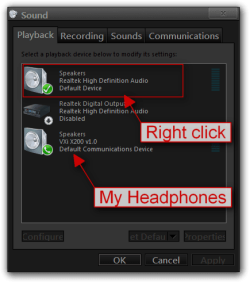
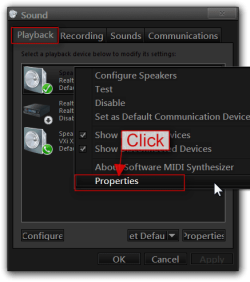
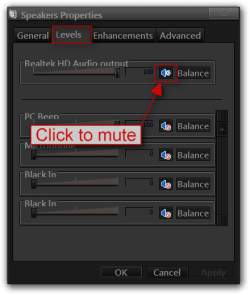
Open Sounds in Control Panel, go to Playback tab, right click on your speakers go to Properties, go to Levels tab and click on the little speaker to mute.
Check your Computer manual you may have some keyboard shortcuts to mute them.
Jerry
My Computer
At a glance
Win 7 Pro x64 / Win 10 ProIntel(R) Core(TM) i7-3630QM CPU @ 2.40GHz12 GB(1) Intel(R) HD Graphics 4000 (2) NVIDIA GeFo...
Computer type
Laptop
Computer Manufacturer/Model Number
Sager NP9170
OS
Win 7 Pro x64 / Win 10 Pro
CPU
Intel(R) Core(TM) i7-3630QM CPU @ 2.40GHz
Motherboard
CLEVO P170EM
Memory
12 GB
Graphics Card(s)
(1) Intel(R) HD Graphics 4000 (2) NVIDIA GeForce GTX 675M
Sound Card
(1) Realtek High Definition Audio (2) Intel(R) Display Aud
Monitor(s) Displays
17.3
Screen Resolution
1920x1080
Hard Drives
(1) Samsung 860 EVO 500GB(OS) (1) Samsung 860 EVO 500GB(Data)
Keyboard
Backlite
Antivirus
MSE, Malwarebytes Pro
Browser
Firefox
Other Info
DESKTOP: Custom-built.
OS: Win 10 Pro x64.
CASE: Rosewill R5.
CPU: Intel I5 4670K CPU @ 3.40GHz.
CPU COOLER: Cool Master Hyper 212 EVO.
MOTHERBOARD: Asus Z87-A.
MEMORY: Kingston HyperX 2x4 GB.
GPU: Nvidia Geforce 650 TI.
PSU: Corsair TX750.
DRIVES: (1) Samsung 840 120 GB SSD (2) Western Digital blue 500 GB 7200 RPM.
K, I did exactly what u said but all it does is mute the little speaker in the taskpane...which seems to be linked to the output speakers...I tried disabling the speakers..but that gave an error every time I played an audio file...so how can I
SEPERATE... the built in speakers from the output audio devices??
Search start menu for Realtek HD Audio manager...Went into Device advanced settings...and selected the "Make Internal and External devices on seperate stream simultaneously"
It will add a third tab... Microphone/Speaker/Headphone ....mute the volume in the speaker tab...save