Mute Speakers when Headphones are connected

Yaron

New member
Member
VIP
Local time
2:07 PM
Messages
122
How can I mute the speakers when headphones are connected?
I couldn’t find this option in Windows Device Manager nor in Realtek 6.0.1.6521 (‘Headphones’ doesn’t appear in both).

Here is My Computer Specs:

***
OS Version: Microsoft Windows 7 Enterprise, Service Pack 1, 32 bit
Processor: Intel(R) Pentium(R) CPU G860 @ 3.00GHz, x64 Family 6 Model 42 Stepping 7
Processor Count: 2
RAM: 3488 Mb
Graphics Card: Intel(R) HD Graphics, 1552 Mb
Hard Drives: C: Total - 476837 MB, Free - 455119 MB;
Motherboard: Intel Corporation, DH61HO
***

Thank you.
 

My Computer My Computer

At a glance

Windows 7 Ultimate x32
OS
Windows 7 Ultimate x32
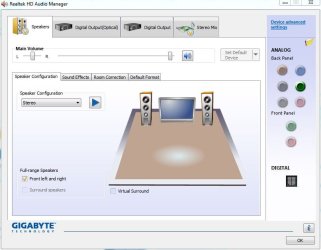
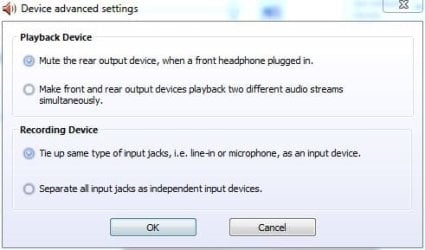
The default, normally is to mute the speakers when headphones are plugged in.

The option is in my RealTek HD Audio Manager, Advanced Settings.

See these two pictures.
 

Attachments

  • Realtek HD Manager.JPG
    Realtek HD Manager.JPG
    51 KB · Views: 10
  • Device Settings.JPG
    Device Settings.JPG
    25.9 KB · Views: 21

My Computer My Computer

At a glance

Windows 10 64 bitIntel i7 6700K16GB Corsair DominatorIntel CPU Graphics
Computer type
PC/Desktop
Computer Manufacturer/Model Number
My Own Build
OS
Windows 10 64 bit
CPU
Intel i7 6700K
Motherboard
ASUS ROG Maximus VIII Hero
Memory
16GB Corsair Dominator
Graphics Card(s)
Intel CPU Graphics
Sound Card
RealTek
Monitor(s) Displays
27" Dell S2719dgf
Screen Resolution
2560X1440
Hard Drives
1 TB Samsung 850 EVO SSD for Win 10 Pro
500GB Samsung 850 EVO SSD for Win 10 Insider
2 TB drive for backup
PSU
EVGA Supernova 750G2
Case
BeQuiet Silent Base 600
Cooling
Deepcool Captain 120EX
Keyboard
Microsoft Wireless 2000
Mouse
Microsoft wireless
Internet Speed
100 MB/sec (Cable)
Antivirus
Microsoft Defender and Malwarebytes
Browser
Edge/Firefox
Other Info
Cakewalk (Sonar) by BandLab and Studio One 4.1 Pro recording studio software. MOTU 896Mk3 Hybrid recording interface, Frontier Tranzport wireless control unit, Behringer X-Touch Control Surface.
Five USB connected optical drives for CD Audio production using Nero BurningROM
Thank you fireberd. I appreciate your time.
Special thanks for the attached screenshots.

In 'Advanced Settings' I only get the second section (Recording Device). What might be the reason?
I'm using a VGA cable.
http://www.sevenforums.com/members/fireberd.html
 

My Computer My Computer

At a glance

Windows 7 Ultimate x32
OS
Windows 7 Ultimate x32
Are you using the RealTek driver supplied by Intel (since you have an Intel motherboard) or are you using RealTek drivers from some other source? In my example, shown, I have a Gigabyte motherboard and using the Gigabyte supplied RealTek drivers.

A VGA cable is video and has nothing to do with audio. However, exactly how are you set up? Do you have the "Speakers" set as the default audio playback device?

Here is the Intel RealTek driver: https://downloadcenter.intel.com/Detail_Desc.aspx?agr=Y&DwnldID=22411&lang=eng&OSVersion=Windows%207%20(32-bit)*&DownloadType=
 

My Computer My Computer

At a glance

Windows 10 64 bitIntel i7 6700K16GB Corsair DominatorIntel CPU Graphics
Computer type
PC/Desktop
Computer Manufacturer/Model Number
My Own Build
OS
Windows 10 64 bit
CPU
Intel i7 6700K
Motherboard
ASUS ROG Maximus VIII Hero
Memory
16GB Corsair Dominator
Graphics Card(s)
Intel CPU Graphics
Sound Card
RealTek
Monitor(s) Displays
27" Dell S2719dgf
Screen Resolution
2560X1440
Hard Drives
1 TB Samsung 850 EVO SSD for Win 10 Pro
500GB Samsung 850 EVO SSD for Win 10 Insider
2 TB drive for backup
PSU
EVGA Supernova 750G2
Case
BeQuiet Silent Base 600
Cooling
Deepcool Captain 120EX
Keyboard
Microsoft Wireless 2000
Mouse
Microsoft wireless
Internet Speed
100 MB/sec (Cable)
Antivirus
Microsoft Defender and Malwarebytes
Browser
Edge/Firefox
Other Info
Cakewalk (Sonar) by BandLab and Studio One 4.1 Pro recording studio software. MOTU 896Mk3 Hybrid recording interface, Frontier Tranzport wireless control unit, Behringer X-Touch Control Surface.
Five USB connected optical drives for CD Audio production using Nero BurningROM
Thanks again. It's kind of you.

I originally installed the RealTek supplied by Intel. Do you think Windows Update may have installed a different version?

"Speakers" are set as the default audio playback device and it's the only item in the list.
 

My Computer My Computer

At a glance

Windows 7 Ultimate x32
OS
Windows 7 Ultimate x32
It may still be the Intel, but download and install the version on the Intel link I provided and see what that does, if it changes anything. I used to have an Intel motherboard and the default configuration was that an analog (not USB) headphone muted the speakers.

Did this ever work correctly? If not, it may be the connection from the case front panel is either not installed correctly? Check the connection on the motherboard. Also, many cases have both HD Audio and AC97 audio connectors, and the HD Audio connector should be used. The HD Audio connection has some additional auto sensing capability (e.g. if a headset is connected).
 

My Computer My Computer

At a glance

Windows 10 64 bitIntel i7 6700K16GB Corsair DominatorIntel CPU Graphics
Computer type
PC/Desktop
Computer Manufacturer/Model Number
My Own Build
OS
Windows 10 64 bit
CPU
Intel i7 6700K
Motherboard
ASUS ROG Maximus VIII Hero
Memory
16GB Corsair Dominator
Graphics Card(s)
Intel CPU Graphics
Sound Card
RealTek
Monitor(s) Displays
27" Dell S2719dgf
Screen Resolution
2560X1440
Hard Drives
1 TB Samsung 850 EVO SSD for Win 10 Pro
500GB Samsung 850 EVO SSD for Win 10 Insider
2 TB drive for backup
PSU
EVGA Supernova 750G2
Case
BeQuiet Silent Base 600
Cooling
Deepcool Captain 120EX
Keyboard
Microsoft Wireless 2000
Mouse
Microsoft wireless
Internet Speed
100 MB/sec (Cable)
Antivirus
Microsoft Defender and Malwarebytes
Browser
Edge/Firefox
Other Info
Cakewalk (Sonar) by BandLab and Studio One 4.1 Pro recording studio software. MOTU 896Mk3 Hybrid recording interface, Frontier Tranzport wireless control unit, Behringer X-Touch Control Surface.
Five USB connected optical drives for CD Audio production using Nero BurningROM
Thank you.

I'm downloading the file. It may take some time.
I bought the computer several months ago and hadan't used the headphons up until a week ago.
My case is basic and I only have blue, green and pink ports.
As to the connection on the motherboard - I'm an amateur. :)
 

My Computer My Computer

At a glance

Windows 7 Ultimate x32
OS
Windows 7 Ultimate x32
Those sound like the audio ports on the rear motherboard I/O panel. Blue - Line In, Green - Speaker and Pink - microphone input. Usually, on the front panel there is only a headphone and microphone ports. The cable runs from the case front panel to the motherboard's audio jack. Check the connection and see if it has the HD Audio connector connected. Power off the PC before opening the case and checking. The connector is "keyed" (one pin missing so it only goes on one way - properly).

Number 21 on the motherboard layout is the front panel audio connection.
 

Attachments

  • layout.JPG
    layout.JPG
    187.2 KB · Views: 5

My Computer My Computer

At a glance

Windows 10 64 bitIntel i7 6700K16GB Corsair DominatorIntel CPU Graphics
Computer type
PC/Desktop
Computer Manufacturer/Model Number
My Own Build
OS
Windows 10 64 bit
CPU
Intel i7 6700K
Motherboard
ASUS ROG Maximus VIII Hero
Memory
16GB Corsair Dominator
Graphics Card(s)
Intel CPU Graphics
Sound Card
RealTek
Monitor(s) Displays
27" Dell S2719dgf
Screen Resolution
2560X1440
Hard Drives
1 TB Samsung 850 EVO SSD for Win 10 Pro
500GB Samsung 850 EVO SSD for Win 10 Insider
2 TB drive for backup
PSU
EVGA Supernova 750G2
Case
BeQuiet Silent Base 600
Cooling
Deepcool Captain 120EX
Keyboard
Microsoft Wireless 2000
Mouse
Microsoft wireless
Internet Speed
100 MB/sec (Cable)
Antivirus
Microsoft Defender and Malwarebytes
Browser
Edge/Firefox
Other Info
Cakewalk (Sonar) by BandLab and Studio One 4.1 Pro recording studio software. MOTU 896Mk3 Hybrid recording interface, Frontier Tranzport wireless control unit, Behringer X-Touch Control Surface.
Five USB connected optical drives for CD Audio production using Nero BurningROM
Thanks again for your patience.

I’ve installed the driver.
I had to reboot twice. Between the first and the second I right-clicked on the sound icon in the taskbar and the option ‘Headphones’ was on the list (some progress!).
After the second reboot that option disappeared again, and in RealTek 'Advanced Settings' I only get the second section (Recording Device).

As for opening the case – I’d rather do that later with a friend.

In the meantime, I’d be very grateful if you could think of another idea.
 

My Computer My Computer

At a glance

Windows 7 Ultimate x32
OS
Windows 7 Ultimate x32
The default is "normally", the PC speakers (connected to the rear GREEN speaker jack) are cut off when the headset is connected to the front panel headphone jack. Next step would be to check the connector to the motherboard.
 

My Computer My Computer

At a glance

Windows 10 64 bitIntel i7 6700K16GB Corsair DominatorIntel CPU Graphics
Computer type
PC/Desktop
Computer Manufacturer/Model Number
My Own Build
OS
Windows 10 64 bit
CPU
Intel i7 6700K
Motherboard
ASUS ROG Maximus VIII Hero
Memory
16GB Corsair Dominator
Graphics Card(s)
Intel CPU Graphics
Sound Card
RealTek
Monitor(s) Displays
27" Dell S2719dgf
Screen Resolution
2560X1440
Hard Drives
1 TB Samsung 850 EVO SSD for Win 10 Pro
500GB Samsung 850 EVO SSD for Win 10 Insider
2 TB drive for backup
PSU
EVGA Supernova 750G2
Case
BeQuiet Silent Base 600
Cooling
Deepcool Captain 120EX
Keyboard
Microsoft Wireless 2000
Mouse
Microsoft wireless
Internet Speed
100 MB/sec (Cable)
Antivirus
Microsoft Defender and Malwarebytes
Browser
Edge/Firefox
Other Info
Cakewalk (Sonar) by BandLab and Studio One 4.1 Pro recording studio software. MOTU 896Mk3 Hybrid recording interface, Frontier Tranzport wireless control unit, Behringer X-Touch Control Surface.
Five USB connected optical drives for CD Audio production using Nero BurningROM
Thank you so much! You have been very kind.

I'll check the connector later and keep you updated.
 

My Computer My Computer

At a glance

Windows 7 Ultimate x32
OS
Windows 7 Ultimate x32
I’ve checked the connector and, as far as I can tell, everything seems to be in the right place.

Thank you.
 

My Computer My Computer

At a glance

Windows 7 Ultimate x32
OS
Windows 7 Ultimate x32
As the standard (default) option is to mute the speakers (connected to the Green speaker jack on the rear) when a headphone is plugged in, either there is a problem with the front panel headphone jack or cabling to the motherboard audio jack, or there is a hardware problem with the sound chip on the motherboard.

However, to completely rule out drivers and motherboard software, download two things. First, the Intel motherboard chipset drivers, from the Intel downloads. The chipset drivers, among other things, identifies and sets up all the devices on the motherboard. Second, download the RealTek drivers direct from RealTek (these are generic drivers and not vendor specific) and give them a try. If the headphones do not cut off the speaker sound after this, its back to some type of hardware problem.

RealTek drivers http://www.realtek.com.tw/downloads...=24&Level=4&Conn=3&DownTypeID=3&GetDown=false

Chipset Drivers https://downloadcenter.intel.com/Detail_Desc.aspx?agr=Y&DwnldID=22586&lang=eng&OSVersion=Windows%207%20(32-bit)*&DownloadType=Drivers

Install the chipset drivers first, then the RealTek drivers.
 

My Computer My Computer

At a glance

Windows 10 64 bitIntel i7 6700K16GB Corsair DominatorIntel CPU Graphics
Computer type
PC/Desktop
Computer Manufacturer/Model Number
My Own Build
OS
Windows 10 64 bit
CPU
Intel i7 6700K
Motherboard
ASUS ROG Maximus VIII Hero
Memory
16GB Corsair Dominator
Graphics Card(s)
Intel CPU Graphics
Sound Card
RealTek
Monitor(s) Displays
27" Dell S2719dgf
Screen Resolution
2560X1440
Hard Drives
1 TB Samsung 850 EVO SSD for Win 10 Pro
500GB Samsung 850 EVO SSD for Win 10 Insider
2 TB drive for backup
PSU
EVGA Supernova 750G2
Case
BeQuiet Silent Base 600
Cooling
Deepcool Captain 120EX
Keyboard
Microsoft Wireless 2000
Mouse
Microsoft wireless
Internet Speed
100 MB/sec (Cable)
Antivirus
Microsoft Defender and Malwarebytes
Browser
Edge/Firefox
Other Info
Cakewalk (Sonar) by BandLab and Studio One 4.1 Pro recording studio software. MOTU 896Mk3 Hybrid recording interface, Frontier Tranzport wireless control unit, Behringer X-Touch Control Surface.
Five USB connected optical drives for CD Audio production using Nero BurningROM
Before installing the drivers, I’d like to mention 2 more specs I saw in my Realtek Info panel:

Audio Controller: HD Audio
Audio Codec: ALC662

Allow me to express again my appreciation and gratitude.
 

My Computer My Computer

At a glance

Windows 7 Ultimate x32
OS
Windows 7 Ultimate x32
The RealTek driver I linked is the correct one to try.
 

My Computer My Computer

At a glance

Windows 10 64 bitIntel i7 6700K16GB Corsair DominatorIntel CPU Graphics
Computer type
PC/Desktop
Computer Manufacturer/Model Number
My Own Build
OS
Windows 10 64 bit
CPU
Intel i7 6700K
Motherboard
ASUS ROG Maximus VIII Hero
Memory
16GB Corsair Dominator
Graphics Card(s)
Intel CPU Graphics
Sound Card
RealTek
Monitor(s) Displays
27" Dell S2719dgf
Screen Resolution
2560X1440
Hard Drives
1 TB Samsung 850 EVO SSD for Win 10 Pro
500GB Samsung 850 EVO SSD for Win 10 Insider
2 TB drive for backup
PSU
EVGA Supernova 750G2
Case
BeQuiet Silent Base 600
Cooling
Deepcool Captain 120EX
Keyboard
Microsoft Wireless 2000
Mouse
Microsoft wireless
Internet Speed
100 MB/sec (Cable)
Antivirus
Microsoft Defender and Malwarebytes
Browser
Edge/Firefox
Other Info
Cakewalk (Sonar) by BandLab and Studio One 4.1 Pro recording studio software. MOTU 896Mk3 Hybrid recording interface, Frontier Tranzport wireless control unit, Behringer X-Touch Control Surface.
Five USB connected optical drives for CD Audio production using Nero BurningROM
I’ve installed both drivers. Alas, no change.
Maybe I should take the computer to a technician.

Anyway, thank you again. I really appreciate your kind help.
 

My Computer My Computer

At a glance

Windows 7 Ultimate x32
OS
Windows 7 Ultimate x32
I guess a tech is the next step to figure out what is going on.
 

My Computer My Computer

At a glance

Windows 10 64 bitIntel i7 6700K16GB Corsair DominatorIntel CPU Graphics
Computer type
PC/Desktop
Computer Manufacturer/Model Number
My Own Build
OS
Windows 10 64 bit
CPU
Intel i7 6700K
Motherboard
ASUS ROG Maximus VIII Hero
Memory
16GB Corsair Dominator
Graphics Card(s)
Intel CPU Graphics
Sound Card
RealTek
Monitor(s) Displays
27" Dell S2719dgf
Screen Resolution
2560X1440
Hard Drives
1 TB Samsung 850 EVO SSD for Win 10 Pro
500GB Samsung 850 EVO SSD for Win 10 Insider
2 TB drive for backup
PSU
EVGA Supernova 750G2
Case
BeQuiet Silent Base 600
Cooling
Deepcool Captain 120EX
Keyboard
Microsoft Wireless 2000
Mouse
Microsoft wireless
Internet Speed
100 MB/sec (Cable)
Antivirus
Microsoft Defender and Malwarebytes
Browser
Edge/Firefox
Other Info
Cakewalk (Sonar) by BandLab and Studio One 4.1 Pro recording studio software. MOTU 896Mk3 Hybrid recording interface, Frontier Tranzport wireless control unit, Behringer X-Touch Control Surface.
Five USB connected optical drives for CD Audio production using Nero BurningROM
Back
Top