Solved My C: is no more system disk, How to back it ?

Trinty

New member
Power User
Local time
12:28 AM
Messages
144
Hi SevenForums!

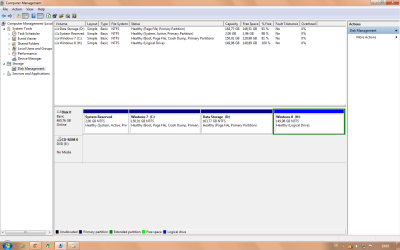
Today, I wanted to make new partitions, to extend Windows 7 C: to 150GB and to make Windows 8 H: with 150GB too. I shirked Data Storage partition and I extended SysReserved partition (I think too much but nevermind).

For this I used EaseUS Partition Master Home (free) Edition. I changed my partitions that was required to restart my PC , and that worked for more than 1h. After that my computer was shuted down (or I dont know how to write it). I turn it on and that rebooted (dont know why). When It booted , my C: is not Windows 7 or system drive anymore.

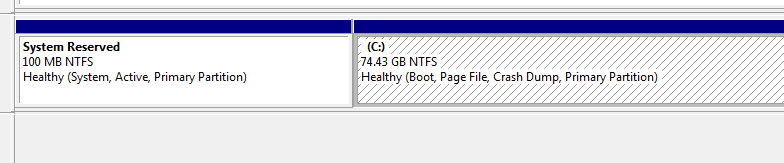
How to fix it (to back my C: to System partition) ?

disk1.png
disk2.png

Thanks in advance.
Trinty.
 

My Computer My Computer

At a glance

Windows 7 Ultimate x64 - Service Pack 1Intel(R) Pentium(R) CPU G620 @ 2.60GHzTranscend Informations - 2*2048GB DDR3 @ 1066MHzATI Radeon HD 5670 - 1024MB DDR5 - Driver : 1...
Computer Manufacturer/Model Number
Trinty Self Build 2011
OS
Windows 7 Ultimate x64 - Service Pack 1
CPU
Intel(R) Pentium(R) CPU G620 @ 2.60GHz
Motherboard
ASUSTeK Computer INC. P8H61-M LX2
Memory
Transcend Informations - 2*2048GB DDR3 @ 1066MHz
Graphics Card(s)
ATI Radeon HD 5670 - 1024MB DDR5 - Driver : 19.04.2011

Sound Card
AMD High Definition Audio Device
Monitor(s) Displays
SAMSUNG SyncMaster 2220LM 22"
Screen Resolution
1680x1050
Hard Drives
SAMSUNG HD503HI ATA Device - 500GB
PSU
Don't know for now !
Case
Case MSI
Cooling
Stock
Keyboard
MS Industrial 2.4GHz Wirelees Keyboard
Mouse
MS Industrial 2.4GHz Wirelees Optical Mouse
Internet Speed
Download speed : 6,5Mbps / Upload speed : 1Mpbs
Other Info
BIOS version : BIOS Date: 02/05/10 19:13:52 Ver: 08.00.10
Prime95 (4h) : max. 65°C
DirectX 11 version.
Logitech G13 Advanced Gaming Keyboard.
I dont understand your problem my c drive does not say system on it only the system reserved partition

Heres mineDisk Part.PNG
 

My Computer My Computer

At a glance

Win7 Ultimate X64Intel i5 3570K8GB DDR3 1600Onboard
Computer type
PC/Desktop
Computer Manufacturer/Model Number
Pauly Special
OS
Win7 Ultimate X64
CPU
Intel i5 3570K
Motherboard
Gigabyte Z77X-DS3H
Memory
8GB DDR3 1600
Graphics Card(s)
Onboard
Sound Card
Onboard
Screen Resolution
1280x1024
Hard Drives
Samsung 840 Evo SSD (OS)
1TB Spinner (Data)
PSU
800W Arctic
Case
Cooler Master
Cooling
3x120mm Fans
Keyboard
MS Wireless
Mouse
MS Wireless
Internet Speed
20M
I dont understand your problem my c drive does not say system on it only the system reserved partition

Heres mineView attachment 215513

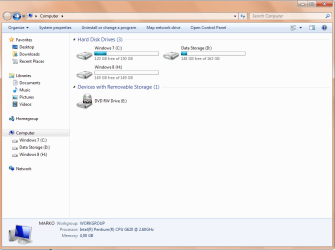
I think about in Computer. Drive C: is like other driver , I dont have that Win 7 image on C: (green icon dont know how to explain it)

Is it problem or no ?

Trinty :)
 

My Computer My Computer

At a glance

Windows 7 Ultimate x64 - Service Pack 1Intel(R) Pentium(R) CPU G620 @ 2.60GHzTranscend Informations - 2*2048GB DDR3 @ 1066MHzATI Radeon HD 5670 - 1024MB DDR5 - Driver : 1...
Computer Manufacturer/Model Number
Trinty Self Build 2011
OS
Windows 7 Ultimate x64 - Service Pack 1
CPU
Intel(R) Pentium(R) CPU G620 @ 2.60GHz
Motherboard
ASUSTeK Computer INC. P8H61-M LX2
Memory
Transcend Informations - 2*2048GB DDR3 @ 1066MHz
Graphics Card(s)
ATI Radeon HD 5670 - 1024MB DDR5 - Driver : 19.04.2011
Sound Card
AMD High Definition Audio Device
Monitor(s) Displays
SAMSUNG SyncMaster 2220LM 22"
Screen Resolution
1680x1050
Hard Drives
SAMSUNG HD503HI ATA Device - 500GB
PSU
Don't know for now !
Case
Case MSI
Cooling
Stock
Keyboard
MS Industrial 2.4GHz Wirelees Keyboard
Mouse
MS Industrial 2.4GHz Wirelees Optical Mouse
Internet Speed
Download speed : 6,5Mbps / Upload speed : 1Mpbs
Other Info
BIOS version : BIOS Date: 02/05/10 19:13:52 Ver: 08.00.10
Prime95 (4h) : max. 65°C
DirectX 11 version.
Logitech G13 Advanced Gaming Keyboard.
I understand now, the icon in my computer has changed for your C drive

As long as everything is working ok i would say it is not a problem
 

My Computer My Computer

At a glance

Win7 Ultimate X64Intel i5 3570K8GB DDR3 1600Onboard
Computer type
PC/Desktop
Computer Manufacturer/Model Number
Pauly Special
OS
Win7 Ultimate X64
CPU
Intel i5 3570K
Motherboard
Gigabyte Z77X-DS3H
Memory
8GB DDR3 1600
Graphics Card(s)
Onboard
Sound Card
Onboard
Screen Resolution
1280x1024
Hard Drives
Samsung 840 Evo SSD (OS)
1TB Spinner (Data)
PSU
800W Arctic
Case
Cooler Master
Cooling
3x120mm Fans
Keyboard
MS Wireless
Mouse
MS Wireless
Internet Speed
20M
First off you should of never extended the System Reserve partition. It only need to be 100MBs in size as only about 72MBs are being used.
 

My Computer My Computer

At a glance

7 x64
OS
7 x64
Be sure to download the Win8 ISO and boot it to install to the partition you made. This will assure you get the new Win8 Metro-style Dual Boot Menu.

The rest looks fine. You don't need more than 200mb for SysReserved but it's not worth changing now.
 
Now... I know for System Reserved partition. I think there is problem with space, because when Im dual-booting it have only 40-60 Free space , and I had a lot of free.......

Second, today when I back from work , I turned on computer and don't know how , but I got that icon back.

So theard solved. Thanks for helping ppl.

Trinty :)
 

My Computer My Computer

At a glance

Windows 7 Ultimate x64 - Service Pack 1Intel(R) Pentium(R) CPU G620 @ 2.60GHzTranscend Informations - 2*2048GB DDR3 @ 1066MHzATI Radeon HD 5670 - 1024MB DDR5 - Driver : 1...
Computer Manufacturer/Model Number
Trinty Self Build 2011
OS
Windows 7 Ultimate x64 - Service Pack 1
CPU
Intel(R) Pentium(R) CPU G620 @ 2.60GHz
Motherboard
ASUSTeK Computer INC. P8H61-M LX2
Memory
Transcend Informations - 2*2048GB DDR3 @ 1066MHz
Graphics Card(s)
ATI Radeon HD 5670 - 1024MB DDR5 - Driver : 19.04.2011
Sound Card
AMD High Definition Audio Device
Monitor(s) Displays
SAMSUNG SyncMaster 2220LM 22"
Screen Resolution
1680x1050
Hard Drives
SAMSUNG HD503HI ATA Device - 500GB
PSU
Don't know for now !
Case
Case MSI
Cooling
Stock
Keyboard
MS Industrial 2.4GHz Wirelees Keyboard
Mouse
MS Industrial 2.4GHz Wirelees Optical Mouse
Internet Speed
Download speed : 6,5Mbps / Upload speed : 1Mpbs
Other Info
BIOS version : BIOS Date: 02/05/10 19:13:52 Ver: 08.00.10
Prime95 (4h) : max. 65°C
DirectX 11 version.
Logitech G13 Advanced Gaming Keyboard.
Back
Top