My computer automatically boots in safe mode without prompt...and more

Jearom

New member
Local time
11:03 AM
Messages
6
Location
USA
First some background.

Last weekend my laptop (Lenovo U460) started overheating and crashing. It has run loud and hot since I bought it, and this model has a known issue with the video adapter that makes it crash if it is set to the highest performing mode. I realized yesterday that one of the vents on the bottom of the laptop was clogged with dust, so I used canned air to blow it out, and blew into the other intake and outlet vents, and got rid of lots of dust. It has run much quieter and cooler today, but has still crashed once, I think from overheating. I don't know if this has anything to do with the problem that cropped up today, but there it is.

Now a little more background.

A few months ago my neighbor reinstalled Windows for me. Last Friday as I was leaving work I shut down my computer and it installed a dozen or so updates.

Today something strange happened: Java ran an update, and then Windows 7 Service Pack 1 was installed, followed by about 140 updates. When I check for updates it now says it is up to date. I don't know why the Service Pack wasn't already installed, but after the service pack installed (and before the other updates installed) my computer started booting up in safe mode -- at least that's what it looks like. The resolution is much rougher, and my second monitor won't work. But I'm able to open Microsoft Office programs and use the internet and everything.

I was hoping that after all of the updates it would boot up in normal mode again, but no such luck. It doesn't give a prompt for me to choose what mode to boot in; it just goes straight to this safe mode. This is killing my productivity at work and I am up against some hard deadlines.

Any help or suggestions would be appreciated. Let me know what other info you need.
 

My Computer My Computer

At a glance

Windows 7 Home Premium 32-bitIntel Core2 Quad Q6600 @ 2.40GHz3GBNVIDIA GeForce 8500 GT
Computer Manufacturer/Model Number
Gateway GT5628
OS
Windows 7 Home Premium 32-bit
CPU
Intel Core2 Quad Q6600 @ 2.40GHz
Memory
3GB
Graphics Card(s)
NVIDIA GeForce 8500 GT
Monitor(s) Displays
2 Monitors
Hi and welcome to SevenForums,
Did anyone remove the back and blow it out,
Blowing dust back and forth really isn't cleaning it's just shifting it around,
if a bunch came out somehow imagine how much is trapped inside ;)
Cheers.
 

My Computer My Computer

At a glance

Win-7-Pro64bit 7-H-Prem-64biti7-5930K 2nd i9-9940x both water blocked VRM'...Trident-z 3200C14 2nd Trident-z 3600C16EVGA 1080ti ftw3 2nd Titan Xp both water blocked
Computer type
PC/Desktop
Computer Manufacturer/Model Number
Custom assembled by me :}
OS
Win-7-Pro64bit 7-H-Prem-64bit
CPU
i7-5930K 2nd i9-9940x both water blocked VRM's too
Motherboard
ASUS SABERTOOTH X99 2nd ASUS x299 Apex
Memory
Trident-z 3200C14 2nd Trident-z 3600C16
Graphics Card(s)
EVGA 1080ti ftw3 2nd Titan Xp both water blocked
Sound Card
Built-in Realtek
Monitor(s) Displays
1-AOC G2460PG 24"G-Sync 144Hz/ 2nd 1-ASUS VG248QE 24" 144Hz
Screen Resolution
1920 x 1080 144Hz
Hard Drives
2-Samsung M.2 Evo & Evo Plus
2-Samsung 850 EVO 500GB SSD's/ 3-2.5 W.D. Black 1tb-&3-1tb/3-3.5 WD Black 1tb hdd's
PSU
EVGA SuperNOVA 1000-P2 2nd 1200-P2
Case
2-Corsair Obsidian Series 450D Black ATX Mid Tower
Cooling
Custom water loops
Keyboard
Logitech G710+/ 2nd Logitech G910
Mouse
2-RedDragon M901 Perdition 16400 dpi Gaming mouse = wired
Internet Speed
Comcast Ping 19ms 89.31mbps download speed 6.12mbps upload
Antivirus
Malwarebytes Pro/ Superantispyware Pro
Browser
FireFox & Pale moon
Other Info
2nd ASUS X299 Apex/Intel i9-9940x with Custom water loop/7H-Prem-x64/Corsair 450D case/Ram Trident-z 3600C16 4x8gb / Samsung970Evo plus 500gb SSD/Dual ssd EZ swap evo/PSU EVGA SuperNova 1200w-P2 80+Platinum/GPU Titan Xp /8-ML-140 on push-pull on 2-280GTX rads
Some Lenovo models in their Power Management software offer both a battery saver mode that only charges the battery to 75% or so when on A/C/ power which extends the battery's life signifcantly, but more importantly for you this also often features a reverse fan speed to blow out dust. I would install that software now from the Lenovo Downloads page for your exact model to see.

Then monitor temps and finish cleaning it out following the related http://www.sevenforums.com/tutorials/220165-troubleshooting-steps-windows-7-a.html

Likewise you may want to import the Display driver for your model too and any missing Drivers in Device manager, but first enable Automatically deliver drivers via Windows Update (Step 3)
to check for Updates to see if any more drivers are delivered.

Looks like the latest official Installer was not used hence the hundreds of Updates. You could have used that installer as well as many tips, tools and methods to get and keep a perfect http://www.sevenforums.com/tutorials/219487-clean-reinstall-factory-oem-windows-7-a.html#post1839164 in the blue link.
 
Thank you for your replies. Just realized I am actually not in safemode. But the resolution is really bad and it's not recognizing my second monitor. I ran dxdiag and in the display tab it's showing the attached image. I know this computer has nvidia, although I don't recall what it is. But it should be showing that, right? Does this mean something is wrong with my video adapter? Also, when i try to open nvidia control panel it says, "NVIDIA Display settings are not available. You are not currently using a display attached to an NVIDIA GPU."
 

Attachments

  • dxdiag.JPG
    dxdiag.JPG
    43.8 KB · Views: 2
Last edited:

My Computer My Computer

At a glance

Windows 7 Home Premium 32-bitIntel Core2 Quad Q6600 @ 2.40GHz3GBNVIDIA GeForce 8500 GT
Computer Manufacturer/Model Number
Gateway GT5628
OS
Windows 7 Home Premium 32-bit
CPU
Intel Core2 Quad Q6600 @ 2.40GHz
Memory
3GB
Graphics Card(s)
NVIDIA GeForce 8500 GT
Monitor(s) Displays
2 Monitors
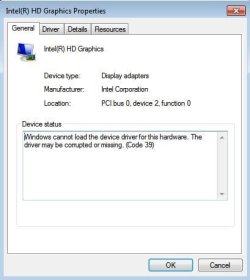
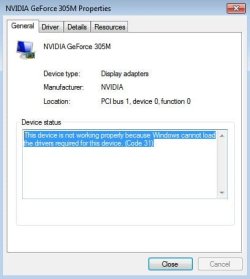
These are screen shots from device manager. When I try to update the drivers for each of the display devices it says the drivers are up to date. So are they corrupted?
 

Attachments

  • Device Manager.JPG
    Device Manager.JPG
    19.3 KB · Views: 12
  • Intel HD Graphics.JPG
    Intel HD Graphics.JPG
    27.4 KB · Views: 12
  • NVIDIA GeForce 305M.JPG
    NVIDIA GeForce 305M.JPG
    26 KB · Views: 12

My Computer My Computer

At a glance

Windows 7 Home Premium 32-bitIntel Core2 Quad Q6600 @ 2.40GHz3GBNVIDIA GeForce 8500 GT
Computer Manufacturer/Model Number
Gateway GT5628
OS
Windows 7 Home Premium 32-bit
CPU
Intel Core2 Quad Q6600 @ 2.40GHz
Memory
3GB
Graphics Card(s)
NVIDIA GeForce 8500 GT
Monitor(s) Displays
2 Monitors
I cannot see what drivers you have installed. Where did these drivers come from, the WIn7 reinstall media? Windows Update? Lenovo Downloads page?

Does the model have switchable graphics between two display chips or card? This may be controlled in BIOS setup.

Uninstall the Display drivers in Control Panel>Programs and then on the Dev Mgr Drivers tabs we cannot see - If prompted uninstall the software as well. Reboot the PC and Check for Updates, see what drivers Windows 7 wants for the devices, install all Important and Optional Updates as there may be critical patches needed as well.

If this is not satisfactory import drivers from the Lenovo Support downloads webpage for your model here: Laptops and netbooks :: IdeaPad U Series laptops :: IdeaPad U460 - Lenovo Support (US).

There's a possibility the wrong driver is installed for the device. You can trace with certainty the device after uninstall by clicking on the driver Details tab, selecting Hardware ID from the dropdown, rightclick to Copy the data into Google to search it. If this doesn't help then trace further the Hardware Identification.
 
I've attached a link below to a PDF from Lenovo that shows the specs for my computer. I guess the NVIDIA graphics adapter only kicks in when needed? https://www.lenovo.com/shop/americas/content/pdf/notebooks/ideapad/u-series/IdeaPad%20U460.pdf

I uninstalled one of the NVIDIA drivers and it said I have to restart to complete the removal. I did so, and when it booted up it was back to the normal resolution I'm used to. But then an automatic update reinstalled the NVIDIA driver and it went back to the new, lower resolution.

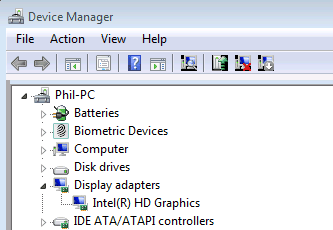
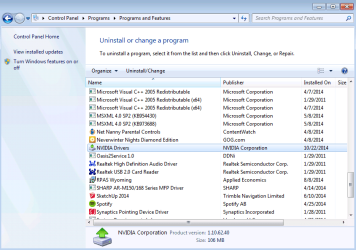
I checked device manager and the same errors showed up as in the screen shots I posted before. So I went in and uninstalled the NVIDIA update driver, then uninstalled the other two NVIDIA drivers that were there, after which it said I have to restart again. After restarting the display was back to normal resolution. But the automatic update reinstalled the drivers again. This time, however, the NVIDIA device is not displayed in device manager (see picture below), and resolution is normal still. But in the uninstall or change a program menu under control panel the drivers are no longer shown. Instead it just shows "NVIDIA Drivers" as shown in the picture

I also cannot find the Intel HD Graphics driver anywhere in the uninstall or change a program menu. I could use the device manager to try to uninstall it, but I wasn't prompted to do so by device manager, so I thought I should hold off on that until I got more feedback on here.

I did check for updates, but there aren't any available. So right now my display is back to normal, but I don't know if the NVIDIA device is functional, since it's not shown in device manager, and the NVIDIA control panel that was on my computer before is no longer there.

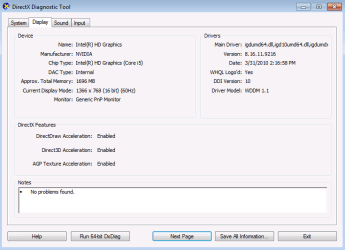
The Intel HD Graphics device is also now shown in the DirectX Diagnostic Tool (see picture below).

Is it just me, or is this getting more and more convoluted? Sorry. Let me know if this is all making sense or not.
 

Attachments

  • IdeaPad U460 Specs.pdf
    IdeaPad U460 Specs.pdf
    58.2 KB · Views: 0
  • Device Manager - No NVIDIA.png
    Device Manager - No NVIDIA.png
    5.9 KB · Views: 7
  • Uninstall Menu - Only NVIDIA Drivers Shown.png
    Uninstall Menu - Only NVIDIA Drivers Shown.png
    32.8 KB · Views: 0
  • DXDiag - Intel HD Graphics Shown.png
    DXDiag - Intel HD Graphics Shown.png
    11 KB · Views: 1

My Computer My Computer

At a glance

Windows 7 Home Premium 32-bitIntel Core2 Quad Q6600 @ 2.40GHz3GBNVIDIA GeForce 8500 GT
Computer Manufacturer/Model Number
Gateway GT5628
OS
Windows 7 Home Premium 32-bit
CPU
Intel Core2 Quad Q6600 @ 2.40GHz
Memory
3GB
Graphics Card(s)
NVIDIA GeForce 8500 GT
Monitor(s) Displays
2 Monitors
Based on your specs, I think you may have had an unneeded Nvidia driver in there - which was my first impression but so rare I didn't mention it, only the way to check this out which you did fine.


It's extremely rare that a device would show under something as important as Display adapter that does not actually exist. Maybe your neighbor installed an Nvidia driver by mistake and it somehow lodged there even though there is no device calling for it?

But it's not there now so unless problems come up just keep an eye on it.

How is overall performance otherwise?

Did you try the Lenovo Power Management software to see if it has on its Control Panel fan reverse to blow out dust? I just did mine outside and it did expel some dust. The setting to preserved battery life also can double the battery life if you set it when you're only plugged into A/C power.

Otherwise follow the steps to monitor and clean up if necessary for overheating in http://www.sevenforums.com/tutorials/220165-troubleshooting-steps-windows-7-a.html
 
Back
Top