
You are using an out of date browser. It may not display this or other websites correctly.
You should upgrade or use an alternative browser.
You should upgrade or use an alternative browser.
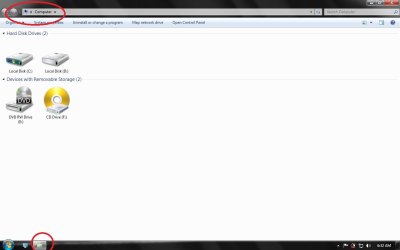
"My Computer" Icon shows as Folder in Taskbar
- Thread starter Vieve
- Start date

- Local time
- 11:48 AM
- Messages
- 1,102
Hi:
Try rebuilding the icon cache:
http://www.sevenforums.com/tutorials/49819-icon-cache-rebuild.html
Try rebuilding the icon cache:
http://www.sevenforums.com/tutorials/49819-icon-cache-rebuild.html
My Computer
- Computer type
- PC/Desktop
- Computer Manufacturer/Model Number
- Dell Studio XPS 8500
- OS
- OEM Windows 7 Ult (x64) SP1
- CPU
- Intel Core-i7 3770 @ 3.4 GHz
- Motherboard
- "Dell" branded
- Memory
- 16 GB DDR3 SDRAM @ 1333 MHz
- Graphics Card(s)
- NVidia GeForce GT620 1 GB
- Sound Card
- THX TruStudio PC
- Monitor(s) Displays
- Dell U2410 Full HD
- Hard Drives
- 2.0 TB SATA2 @ 7200 RPM
- PSU
- 350W
- Keyboard
- MS 4000 Ergon - Wired
- Mouse
- Logitech Anywhere MX
- Internet Speed
- Cable HSI w/Turbo (router)
- Antivirus
- KIS-MBAM Premium-MBAE Premium
- Browser
- Fx (current version); IE
- Other Info
- And a Win7/64 Pro laptop; And a Win10/64 Pro desktop.

- Local time
- 11:48 AM
- Messages
- 1,102
I see the same icon on my system.
It's the Windows Explorer icon.
Are you sure what you report is abnormal?
It's the Windows Explorer icon.
Are you sure what you report is abnormal?
My Computer
- Computer type
- PC/Desktop
- Computer Manufacturer/Model Number
- Dell Studio XPS 8500
- OS
- OEM Windows 7 Ult (x64) SP1
- CPU
- Intel Core-i7 3770 @ 3.4 GHz
- Motherboard
- "Dell" branded
- Memory
- 16 GB DDR3 SDRAM @ 1333 MHz
- Graphics Card(s)
- NVidia GeForce GT620 1 GB
- Sound Card
- THX TruStudio PC
- Monitor(s) Displays
- Dell U2410 Full HD
- Hard Drives
- 2.0 TB SATA2 @ 7200 RPM
- PSU
- 350W
- Keyboard
- MS 4000 Ergon - Wired
- Mouse
- Logitech Anywhere MX
- Internet Speed
- Cable HSI w/Turbo (router)
- Antivirus
- KIS-MBAM Premium-MBAE Premium
- Browser
- Fx (current version); IE
- Other Info
- And a Win7/64 Pro laptop; And a Win10/64 Pro desktop.


My Computer
- Computer type
- PC/Desktop
- Computer Manufacturer/Model Number
- Skylake Special #666
- OS
- Windows 10 Pro x64
- CPU
- Intel Core i7 6700K
- Motherboard
- Asus Sabertooth Z170 Mark 1
- Memory
- GSkill TridentZ RGB 16GB 3600 16-16-16-36
- Graphics Card(s)
- EVGA GTX 980 Ti SC x2
- Sound Card
- Realtek High Definition
- Monitor(s) Displays
- AOC G2460PG
- Screen Resolution
- 1920 x 1080 144Hz
- Hard Drives
- Samsung 860 Pro 256GB, Seagate Barracuda 4TB x2
- PSU
- EVGA 1000 P2, EVGA White Custom Braided Cables
- Case
- Corsair Vengeance C70 Gunmetal Black
- Cooling
- Corsair H100i v2, Corsair ML120 x2, Thermal Grizzly Kryonaut
- Keyboard
- Logitech G910 Orion Spectrum
- Mouse
- Logitech G700s
- Internet Speed
- Verizon Fios Quantum Gateway 75/75
- Antivirus
- Windows Defender, Malwarebytes Free 3.8.3
- Browser
- Chrome
- Other Info
- Corsair SP120 x4, LG Blu-ray Drive, Durabrand HT-395 100 Watt Dolby Digital Amp, Corsair H2100 Wireless 7.1 Headset
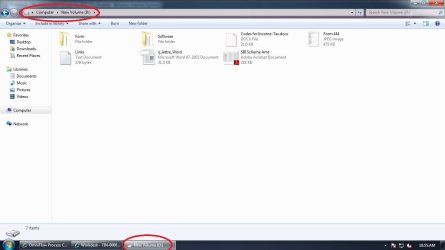


Looking at your screenshots it's not clear exactly what you mean. You've highlighted.
1. Computer
2. New Volume (D)
3. Explorer pinned to taskbar
So which is it?
Anyway I think you need to look at the tutorial here:
Windows 7: Computer - Pin to Taskbar
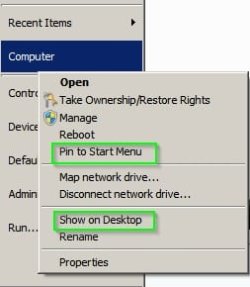
It might be best if you state exactly where you expect to see this missing icon. If you mean that you need it to show on your desktop or start menu - right click "Computer" in Start Menu.
1. Computer
2. New Volume (D)
3. Explorer pinned to taskbar
So which is it?
Anyway I think you need to look at the tutorial here:
Windows 7: Computer - Pin to Taskbar
It might be best if you state exactly where you expect to see this missing icon. If you mean that you need it to show on your desktop or start menu - right click "Computer" in Start Menu.
Last edited:
My Computer
- Computer type
- Laptop
- Computer Manufacturer/Model Number
- ASUS
- OS
- Microsoft Windows 7 Home Premium 64-bit 7601 Multiprocessor Free Service Pack 1
- CPU
- AMD C-60 APU with Radeon(tm) HD Graphics
- Motherboard
- ASUSTeK COMPUTER INC. X501U
- Memory
- 4.00 GB
- Graphics Card(s)
- AMD Radeon HD 6290 Graphics
- Sound Card
- (1) AMD High Definition Audio Device (2) Realtek High Defi
- Screen Resolution
- 1366 x 768 x 32 bits (4294967296 colors) @ 60 Hz
- Hard Drives
- Hitachi HTS545050A7E380 SATA Disk Device
- Antivirus
- Comodo CIS & FW, SecureAplus App Whitelisting, Threatfire
- Browser
- Cyberfox 64bit, Opera 64bit, Airfox
- Other Info
- Spy-The-Spy, HitmanPro.Alert, Norton Connect Safe, MJRegWatcher, BitDefender TrafficLight, Voodoo Shield, Zemana AntiMalware

Can anyone say How to get that Icon .
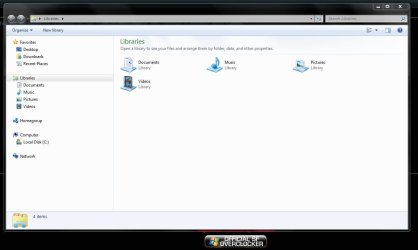
Computer shows the Computer icon, the D: drive shows a hard drive icon. That's what they're supposed to show.
My Computer
- Computer type
- PC/Desktop
- Computer Manufacturer/Model Number
- Custom Build
- OS
- W7 Pro x64 SP1 | W10 Pro IP x64 | W8.1 Pro x64 VM | Linux Mint VM
- CPU
- i7-4790k @ 4GHz (4.4GHz Boost)
- Motherboard
- ASUS Sabertooth Z87 (BIOS Rev 2004)
- Memory
- 16GB DDR3 Kingston HyperX Fury @ 1600MHz CL 9-9-9-27
- Graphics Card(s)
- EVGA GTX 980 Classified
- Sound Card
- Realtek Onboard
- Monitor(s) Displays
- Samsung S27D390
- Screen Resolution
- 1920 x 1080
- Hard Drives
- 240GB Intel 520 Series SSD |
Samsung 850 EVO 120GB SSD |
2TB WD Caviar Black |
2TB WD Caviar Black |
2TB WD Caviar Green
- PSU
- Corsair HX850-80 Gold Modular
- Case
- Cooler Master Silencio 650
- Cooling
- Corsair H80i w/2 x Corsair SP120 | 2 x 120mm Noctua NF-S12B
- Keyboard
- Microsoft Sidewinder X4
- Mouse
- Gigabyte M6900 optical
- Internet Speed
- 152mb
- Antivirus
- F-Secure
- Browser
- Firefox 38.0
- Other Info
- Backup Rig: Win 7 Pro 64-bit | AMD A10-5800k | ASUS F2A85-V Pro | 8GB Samsung DDR3 @1600MHz | 120GB Toshiba SDD | 2TB Seagate HDD | Cooler Master Silencio 550