My computer is taking hours to install updates

nijjhar

New member
Local time
4:08 AM
Messages
8
Location
Reading, United Kingdom
Hi,

I have a laptop from my daughter that has Windows 7 Professional HP Notebook Core i5. It is stuck with the message"Please do not power off or unplug your machine. Installing update 18 of 26".

It has been running for over 5 hours. Shall I leave it to run overnight?

The laptop was not used for a long time. This Laptop is 64 bits.
 
Last edited:

My Computer My Computer

Computer type
PC/Desktop
Computer Manufacturer/Model Number
Acer Aspire X3810
OS
Windows 7 Home Premium 32bit
CPU
E5200 @ 2.5GHz
Memory
5.00GB (2.97GB useable)
Hi nijjhar,

I have a laptop from my daughter that has Windows 7 Professional HP Notebook Core i5. It is stuck with the message"Please do not power off or unplug your machine. Installing update 18 of 26".

It has been running for over 5 hours. Shall I leave it to run overnight?

The laptop was not used for a long time. This Laptop is 64 bits.

Are the updates HP updates or WU [Windows Update] updates?
Do you know what updates they were?
 

My Computer My Computer

Computer type
Laptop
Computer Manufacturer/Model Number
Fujitsu LIFEBOOK
OS
Win 7 HP SP1 64-bit Vista HB SP2 32-bit Linux Mint 18.3
CPU
Intel(R) Pentium(R) CPU P6200 @ 2.13GHz
Motherboard
FUJITSU FJNBB06
Memory
4.00 GB
Graphics Card(s)
Intel(R) Graphics Media Accelerator HD
Sound Card
[1] Realtek High Definition Audio [2] Intel(R) Display Audio
Screen Resolution
1366 x 768 x 32 bits (4294967296 colors) @ 59 Hz
Hard Drives
TOSHIBA MK5076GSX
Antivirus
AVG FREE

My Computer My Computer

Computer type
PC/Desktop
Computer Manufacturer/Model Number
HP (HP-P6212F)
OS
Microsoft Windows 7 Home Premium 64-bit 7601 Multiprocessor Free Service Pack 1
CPU
Pentium(R) Dual-Core CPU E5300 @ 2.60GHz
Motherboard
PEGATRON CORPORATION Benicia
Memory
6.00 GB
Graphics Card(s)
Intel(R) G33/G31 Express Chipset Family
Sound Card
Realtek High Definition Audio
Monitor(s) Displays
24'' HP WS LCD
Screen Resolution
1920 x 1080 x 32 bits (4294967296 colors) @ 60 Hz
Hard Drives
(1) ATA Hitachi HDT72106 SCSI Disk Device (2) Generic- Compact Flash USB Device (3) Generic- MS/MS-Pro USB Device (4) Generic- SD/MMC USB Device (5) Generic- SM/xD-Picture USB Device (6) Verbatim STORE N GO USB Device
Keyboard
Logitech G510s
Mouse
Logitech Trackball M570
Antivirus
Microsoft Security Essentials / Malwarebytes
Browser
IE / Firefox / Chrome
I recently had to reinstall my OS. Some minutes after starting I received the same message that you did. Thinking there was a problem, I restarted the reinstall. Same thing happened. So after restarting the third time I just let it sit with the "Please do not power off..." A few hours later I noticed that the installation had indeed progressed.


So... it takes a long time (several hours in my case) to reinstall the MS Windows 7 OS (and I used new DVDs from the manufacturer (HP). Just thought you'd like to know.
 

My Computer My Computer

Computer type
Laptop
Computer Manufacturer/Model Number
Toshiba
OS
Windows 7 Home Premium, 64 bit
Memory
6 GB
Hard Drives
500 GB
Mouse
Wireless mouse
Browser
Firefox
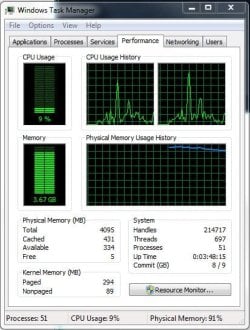
My computer eats too much resources like Memory RAM and processor, processor less and lasts three hours to do all updates.
Good luck is I have a good internet connection.

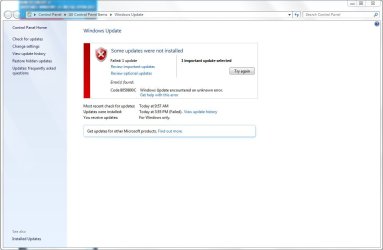
The problem is for me when I run updates doesn't install "Windows Defender", everytime when I do that update doesn't start.
How about you?

Can be reported this to Microsoft?
 

Attachments

  • error.JPG
    error.JPG
    27.9 KB · Views: 0
  • memory.JPG
    memory.JPG
    53.3 KB · Views: 18
  • failed.JPG
    failed.JPG
    59.9 KB · Views: 0

My Computer My Computer

Computer type
PC/Desktop
OS
Windows 7 Ultimate x64
CPU
AMD Athlon(tm) II X2 240 Processor
Motherboard
ASRock N68PV-GS
Memory
4.00 GB / 4.00 GB
Graphics Card(s)
ATI Radeon HD 4600 Series
Sound Card
(1) AMD High Definition Audio Device (2) Realtek High Defi
Hard Drives
SAMSUNG HD103SJ ATA Device
PSU
Segotep SG-600B, 80+ Bronze, 500W

My Computer My Computer

Computer type
PC/Desktop
Computer Manufacturer/Model Number
HP Desktop & Compaq Laptop
OS
Win 10 x64, Linux Lite, Win 7 x64, BlackArch, & Kali
Hard Drives
Samsung 850 Pro 256Gb,
Hitachi HDD 1Tb,
Crucial MX SSD 250Gb
Segate 3Tb USB 3.0 Ext. Backup HDD
Internet Speed
150Mbps dn, 20Mbps up
Antivirus
Avast Free, Malwarebytes Anti-Exploit & Anti-Ransomware
Browser
Firefox, Chrome, Opera, & VPN
Hi nijjhar,

Out of the 2 options given above, I would recommend DISM++.

DISM++ - Basic Overview

DISM++ is a FREE implementation tool that has the ability to perform Windows Updates [WU]. Some of the advantages [but not all] are:

[1] The GUI is very easy to understand and use.
[2] It is much faster than M$’s WU because it uses a different engine.
[3] It downloads the latest WU DB from the M$ servers, scans your OS, and then lists the updates available.
[4] It doesn’t install superseded updates like M$ does.
[5] It gives you the option of what you want to install.
[6] The pre-ticked updates are what is recommended and are similar to the WU critical and recommended updates. The un-ticked updates are similar to the WU optional updates.

[7] It warns you if an update:
  • Includes telemetry.
  • Has known issues with certain hardware.
  • Needs exclusive access.
  • Is suspect.
  • Your OS doesn't need it.
  • Has any other known issues.
[8] It doesn’t require re-booting between updates.
[9] It can be used to either update an install.wim image OFFLINE, or to update the LIVE OS.

I hope this helps!
 

My Computer My Computer

Computer type
Laptop
Computer Manufacturer/Model Number
Fujitsu LIFEBOOK
OS
Win 7 HP SP1 64-bit Vista HB SP2 32-bit Linux Mint 18.3
CPU
Intel(R) Pentium(R) CPU P6200 @ 2.13GHz
Motherboard
FUJITSU FJNBB06
Memory
4.00 GB
Graphics Card(s)
Intel(R) Graphics Media Accelerator HD
Sound Card
[1] Realtek High Definition Audio [2] Intel(R) Display Audio
Screen Resolution
1366 x 768 x 32 bits (4294967296 colors) @ 59 Hz
Hard Drives
TOSHIBA MK5076GSX
Antivirus
AVG FREE
Back
Top