My computer isn't detecting any audio device help please

etD

New member
Local time
4:09 PM
Messages
11
Drivers are all up to date, it's all plugged in fine and in the correct places. I have speakers plugged into the back and headphones plugged into the front, yet my computer still says no speakers or headphones are plugged in. I have even gone to the effort of reinstalling windows completely but to no avail. I am using on-board audio by the way and it is enabled in the BIOS, please help I've literally tried everything I can think of, looked online on all the forums but still nothing has helped and I am officially lost.
 

My Computer

Computer type
PC/Desktop
Computer Manufacturer/Model Number
Custom
OS
Windows 7 64 bit
CPU
AMD Athlon 64 X2 Dual Core Processor 2.19 GHz
Motherboard
AsRock 939N68PV-GLAN
Memory
4GB
Graphics Card(s)
Radeon HD 5670
Internet Speed
100MB d/l 30MB u/l
According to the ASRock site, this has RealTek HD Audio. Do you have the correct RealTek driver or do you have the generic Windows installed "High Definition Audio Codec"? If you only have the Windows installed High Definition Audio Codec, the first step is to get the correct RealTek Driver. ASRock only has Vista drivers but they are applicable to Windows 7. However, the most current RealTek driver can be downloaded direct from RealTek.

Your system has the RealTek ALC888 hardware. The RealTek High Definition Codecs are the correct drivers.
Realtek

Also, please post a screen shot of the Device Manager, Sounds section.
http://www.sevenforums.com/tutorials/9733-screenshots-files-upload-post-seven-forums.html
 

My Computer

Computer type
PC/Desktop
Computer Manufacturer/Model Number
My Own Build
OS
Windows 10 64 bit
CPU
Intel i7 6700K
Motherboard
ASUS ROG Maximus VIII Hero
Memory
16GB Corsair Dominator
Graphics Card(s)
Intel CPU Graphics
Sound Card
RealTek
Monitor(s) Displays
27" Dell S2719dgf
Screen Resolution
2560X1440
Hard Drives
1 TB Samsung 850 EVO SSD for Win 10 Pro
500GB Samsung 850 EVO SSD for Win 10 Insider
2 TB drive for backup
PSU
EVGA Supernova 750G2
Case
BeQuiet Silent Base 600
Cooling
Deepcool Captain 120EX
Keyboard
Microsoft Wireless 2000
Mouse
Microsoft wireless
Internet Speed
100 MB/sec (Cable)
Antivirus
Microsoft Defender and Malwarebytes
Browser
Edge/Firefox
Other Info
Cakewalk (Sonar) by BandLab and Studio One 4.1 Pro recording studio software. MOTU 896Mk3 Hybrid recording interface, Frontier Tranzport wireless control unit, Behringer X-Touch Control Surface.
Five USB connected optical drives for CD Audio production using Nero BurningROM
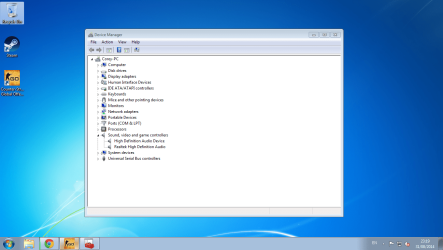
Thanks for the reply, yes i have all the correct drivers. Is this what you meant:
 

Attachments

  • Untitled.png
    Untitled.png
    642.8 KB · Views: 4

My Computer

Computer type
PC/Desktop
Computer Manufacturer/Model Number
Custom
OS
Windows 7 64 bit
CPU
AMD Athlon 64 X2 Dual Core Processor 2.19 GHz
Motherboard
AsRock 939N68PV-GLAN
Memory
4GB
Graphics Card(s)
Radeon HD 5670
Internet Speed
100MB d/l 30MB u/l
I see "High Definition Audio Device" listed in the Device Manager. If that is not for the HDMI audio then it could be conflicting and needs to be uninstalled. If it is for the HDMI audio then its the incorrect driver and you should have the correct AMD Radeon Video driver installed.
 

My Computer

Computer type
PC/Desktop
Computer Manufacturer/Model Number
My Own Build
OS
Windows 10 64 bit
CPU
Intel i7 6700K
Motherboard
ASUS ROG Maximus VIII Hero
Memory
16GB Corsair Dominator
Graphics Card(s)
Intel CPU Graphics
Sound Card
RealTek
Monitor(s) Displays
27" Dell S2719dgf
Screen Resolution
2560X1440
Hard Drives
1 TB Samsung 850 EVO SSD for Win 10 Pro
500GB Samsung 850 EVO SSD for Win 10 Insider
2 TB drive for backup
PSU
EVGA Supernova 750G2
Case
BeQuiet Silent Base 600
Cooling
Deepcool Captain 120EX
Keyboard
Microsoft Wireless 2000
Mouse
Microsoft wireless
Internet Speed
100 MB/sec (Cable)
Antivirus
Microsoft Defender and Malwarebytes
Browser
Edge/Firefox
Other Info
Cakewalk (Sonar) by BandLab and Studio One 4.1 Pro recording studio software. MOTU 896Mk3 Hybrid recording interface, Frontier Tranzport wireless control unit, Behringer X-Touch Control Surface.
Five USB connected optical drives for CD Audio production using Nero BurningROM
I have tried uninstalling, but it re-installs itself whenever i reboot. I also have the correct Radeon driver installed. Like I said I have tried everything including a fresh reboot of windows, nothing seems to be working.
 

My Computer

Computer type
PC/Desktop
Computer Manufacturer/Model Number
Custom
OS
Windows 7 64 bit
CPU
AMD Athlon 64 X2 Dual Core Processor 2.19 GHz
Motherboard
AsRock 939N68PV-GLAN
Memory
4GB
Graphics Card(s)
Radeon HD 5670
Internet Speed
100MB d/l 30MB u/l
I see from your screen shot that you are a gamer. Do you have a web cam? Web cam's have been known to conflict with sound cards and cause problems.

Did you install the correct Video driver direct from AMD? or did you let Windows install it? Direct from AMD would have been the best option.

Go to the Device Manager/Hardware and Sound and finally the Sound panel, playback section. What do you show in that panel? (post a screen shot). If the RealTek is not being shown, RIGHT click in a blank area in that panel then LEFT click to show disabled and disconnected devices. Does RealTek (Speakers) now show up? and can you enable it and make it the default playback device?

On an unrelated note, I see you have Win 7 64 bit, but only 4GB of RAM. With 4 GB of RAM the 64 bit OS is not doing you any good, and in fact the 64 bit uses more RAM than a 32 bit.
 

My Computer

Computer type
PC/Desktop
Computer Manufacturer/Model Number
My Own Build
OS
Windows 10 64 bit
CPU
Intel i7 6700K
Motherboard
ASUS ROG Maximus VIII Hero
Memory
16GB Corsair Dominator
Graphics Card(s)
Intel CPU Graphics
Sound Card
RealTek
Monitor(s) Displays
27" Dell S2719dgf
Screen Resolution
2560X1440
Hard Drives
1 TB Samsung 850 EVO SSD for Win 10 Pro
500GB Samsung 850 EVO SSD for Win 10 Insider
2 TB drive for backup
PSU
EVGA Supernova 750G2
Case
BeQuiet Silent Base 600
Cooling
Deepcool Captain 120EX
Keyboard
Microsoft Wireless 2000
Mouse
Microsoft wireless
Internet Speed
100 MB/sec (Cable)
Antivirus
Microsoft Defender and Malwarebytes
Browser
Edge/Firefox
Other Info
Cakewalk (Sonar) by BandLab and Studio One 4.1 Pro recording studio software. MOTU 896Mk3 Hybrid recording interface, Frontier Tranzport wireless control unit, Behringer X-Touch Control Surface.
Five USB connected optical drives for CD Audio production using Nero BurningROM
No i don't have a webcam.

I downloaded the drivers direct from the AMD website.

I am at work right now but i can tell you, RealTek is being shown as disabled and so are my headphones that are plugged into the front of my computer. I shall post a screen shot when i get home.

Yeah i know about the RAM, this is due to one of my slots failing on the motherboard, which i am quite unhappy about.
 

My Computer

Computer type
PC/Desktop
Computer Manufacturer/Model Number
Custom
OS
Windows 7 64 bit
CPU
AMD Athlon 64 X2 Dual Core Processor 2.19 GHz
Motherboard
AsRock 939N68PV-GLAN
Memory
4GB
Graphics Card(s)
Radeon HD 5670
Internet Speed
100MB d/l 30MB u/l
try to look into manage audio devices, also right click in that window and see if options show disabled/disconnected devices are checked are not?
 

My Computer

Computer type
Laptop
Computer Manufacturer/Model Number
Dell Vostro 2520
OS
Windows 10 Tech Preview
CPU
Intel i5 (3rd Gen)
Motherboard
Intel® Mobile HM75 Express chipset
Memory
4GB
Graphics Card(s)
Intel HD Graphics 4000
Hard Drives
500GB
Keyboard
onboard keypad, USB keyboard
Mouse
touchpad, USB mouse, wireless muse
Internet Speed
4 Mbps
Antivirus
No
Browser
IE, chrome, firefox
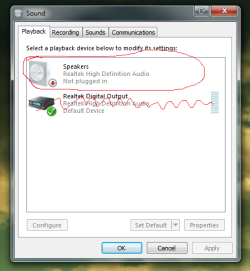
So this is a screenshot from my works computer, the circled part is exactly what shows up on my computer at home & headphones, yet speakers/headphones are actually plugged in, when i right click in that box both options are checked also.
 

Attachments

  • Untitled.png
    Untitled.png
    91.4 KB · Views: 15
Last edited:

My Computer

Computer type
PC/Desktop
Computer Manufacturer/Model Number
Custom
OS
Windows 7 64 bit
CPU
AMD Athlon 64 X2 Dual Core Processor 2.19 GHz
Motherboard
AsRock 939N68PV-GLAN
Memory
4GB
Graphics Card(s)
Radeon HD 5670
Internet Speed
100MB d/l 30MB u/l
In the Device Manager, RIGHT click on the entry for the RealTek and then LEFT click "uninstall". DO NOT uninstall the drivers. Restart the PC and when Windows starts it will detect and reinstall the RealTek sound. If there were any Windows corruptions with RealTek this will fix it.

Another thought, there could be a hardware problem with the sound. I'm currently using an ASRock motherboard but the first one I got had two bad memory slots. After "some correspondence" ASRock reluctantly replaced the defective motherboard. I won't be buying any more ASRock's.
 

My Computer

Computer type
PC/Desktop
Computer Manufacturer/Model Number
My Own Build
OS
Windows 10 64 bit
CPU
Intel i7 6700K
Motherboard
ASUS ROG Maximus VIII Hero
Memory
16GB Corsair Dominator
Graphics Card(s)
Intel CPU Graphics
Sound Card
RealTek
Monitor(s) Displays
27" Dell S2719dgf
Screen Resolution
2560X1440
Hard Drives
1 TB Samsung 850 EVO SSD for Win 10 Pro
500GB Samsung 850 EVO SSD for Win 10 Insider
2 TB drive for backup
PSU
EVGA Supernova 750G2
Case
BeQuiet Silent Base 600
Cooling
Deepcool Captain 120EX
Keyboard
Microsoft Wireless 2000
Mouse
Microsoft wireless
Internet Speed
100 MB/sec (Cable)
Antivirus
Microsoft Defender and Malwarebytes
Browser
Edge/Firefox
Other Info
Cakewalk (Sonar) by BandLab and Studio One 4.1 Pro recording studio software. MOTU 896Mk3 Hybrid recording interface, Frontier Tranzport wireless control unit, Behringer X-Touch Control Surface.
Five USB connected optical drives for CD Audio production using Nero BurningROM
Yes I have done that numerous times but to no avail.

I've only recently had problems since downgrading my PC, i used to have a top of the range custom gaming computer so i know quite a bit about them, but this really has me stumped. Maybe it is a problem with the motherboard itself? I'm not sure anymore.
 

My Computer

Computer type
PC/Desktop
Computer Manufacturer/Model Number
Custom
OS
Windows 7 64 bit
CPU
AMD Athlon 64 X2 Dual Core Processor 2.19 GHz
Motherboard
AsRock 939N68PV-GLAN
Memory
4GB
Graphics Card(s)
Radeon HD 5670
Internet Speed
100MB d/l 30MB u/l
Considering what has been done, it does point to a potential hardware problem.
 

My Computer

Computer type
PC/Desktop
Computer Manufacturer/Model Number
My Own Build
OS
Windows 10 64 bit
CPU
Intel i7 6700K
Motherboard
ASUS ROG Maximus VIII Hero
Memory
16GB Corsair Dominator
Graphics Card(s)
Intel CPU Graphics
Sound Card
RealTek
Monitor(s) Displays
27" Dell S2719dgf
Screen Resolution
2560X1440
Hard Drives
1 TB Samsung 850 EVO SSD for Win 10 Pro
500GB Samsung 850 EVO SSD for Win 10 Insider
2 TB drive for backup
PSU
EVGA Supernova 750G2
Case
BeQuiet Silent Base 600
Cooling
Deepcool Captain 120EX
Keyboard
Microsoft Wireless 2000
Mouse
Microsoft wireless
Internet Speed
100 MB/sec (Cable)
Antivirus
Microsoft Defender and Malwarebytes
Browser
Edge/Firefox
Other Info
Cakewalk (Sonar) by BandLab and Studio One 4.1 Pro recording studio software. MOTU 896Mk3 Hybrid recording interface, Frontier Tranzport wireless control unit, Behringer X-Touch Control Surface.
Five USB connected optical drives for CD Audio production using Nero BurningROM
Well what a nightmare, thanks anyway. Think i will just scrap the thing and rebuild a new one.
 

My Computer

Computer type
PC/Desktop
Computer Manufacturer/Model Number
Custom
OS
Windows 7 64 bit
CPU
AMD Athlon 64 X2 Dual Core Processor 2.19 GHz
Motherboard
AsRock 939N68PV-GLAN
Memory
4GB
Graphics Card(s)
Radeon HD 5670
Internet Speed
100MB d/l 30MB u/l
If you have a separate sound card (or can borrow one from another PC), I would try that. Disable the on-board in the BIOS if you do so there are no conflicts.

Components fail. I recently had my i7 3770 Intel CPU fail. Its rare to have a CPU fail, but I was getting WHEA errors and BCC 124 blue screens. I swapped everything else (motherboard, memory, power supply, video card) and still had the problem, the only thing left was the CPU. Replaced the CPU and no more problems.

The likelihood of a CPU or sound chip failing is remote, but it can happen.
 

My Computer

Computer type
PC/Desktop
Computer Manufacturer/Model Number
My Own Build
OS
Windows 10 64 bit
CPU
Intel i7 6700K
Motherboard
ASUS ROG Maximus VIII Hero
Memory
16GB Corsair Dominator
Graphics Card(s)
Intel CPU Graphics
Sound Card
RealTek
Monitor(s) Displays
27" Dell S2719dgf
Screen Resolution
2560X1440
Hard Drives
1 TB Samsung 850 EVO SSD for Win 10 Pro
500GB Samsung 850 EVO SSD for Win 10 Insider
2 TB drive for backup
PSU
EVGA Supernova 750G2
Case
BeQuiet Silent Base 600
Cooling
Deepcool Captain 120EX
Keyboard
Microsoft Wireless 2000
Mouse
Microsoft wireless
Internet Speed
100 MB/sec (Cable)
Antivirus
Microsoft Defender and Malwarebytes
Browser
Edge/Firefox
Other Info
Cakewalk (Sonar) by BandLab and Studio One 4.1 Pro recording studio software. MOTU 896Mk3 Hybrid recording interface, Frontier Tranzport wireless control unit, Behringer X-Touch Control Surface.
Five USB connected optical drives for CD Audio production using Nero BurningROM
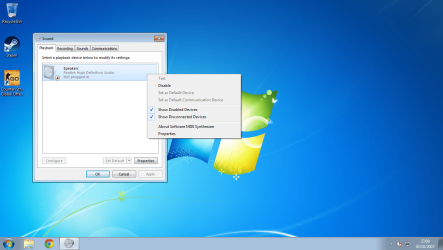
So I'm now home turned my PC on and this is all I'm getting now:
 

Attachments

  • Untitled.png
    Untitled.png
    924.4 KB · Views: 3

My Computer

Computer type
PC/Desktop
Computer Manufacturer/Model Number
Custom
OS
Windows 7 64 bit
CPU
AMD Athlon 64 X2 Dual Core Processor 2.19 GHz
Motherboard
AsRock 939N68PV-GLAN
Memory
4GB
Graphics Card(s)
Radeon HD 5670
Internet Speed
100MB d/l 30MB u/l
There are several items, that I see, or don't see that should be showing.

1. If you have the correct AMD Radeon drivers (14.4 Catalyst drivers) you should have the AMD HDMI Audio drivers listed in the Device Manager and listed in the Playback panel.

2. There is the "High Definition Audio Codec" shown in the Device Manager. Unknown what that is for, and it is not listed in the Playback Panel.

3. You have the RealTek drivers installed (R2.75) but nothing is being connected.

Could Steam or some game have installed a software sound capture device? which has "taken over"?

Before you buy a new motherboard and build a new PC, I would do a clean install of Windows (reformat the hard drive) and ONLY install Windows and hardware drivers. No other software and see if both the RealTek and AMD Radeon audio appears. I realize this is a hassle, but will prove whether there is a corrupted install or a motherboard/BIOS problem.
 

My Computer

Computer type
PC/Desktop
Computer Manufacturer/Model Number
My Own Build
OS
Windows 10 64 bit
CPU
Intel i7 6700K
Motherboard
ASUS ROG Maximus VIII Hero
Memory
16GB Corsair Dominator
Graphics Card(s)
Intel CPU Graphics
Sound Card
RealTek
Monitor(s) Displays
27" Dell S2719dgf
Screen Resolution
2560X1440
Hard Drives
1 TB Samsung 850 EVO SSD for Win 10 Pro
500GB Samsung 850 EVO SSD for Win 10 Insider
2 TB drive for backup
PSU
EVGA Supernova 750G2
Case
BeQuiet Silent Base 600
Cooling
Deepcool Captain 120EX
Keyboard
Microsoft Wireless 2000
Mouse
Microsoft wireless
Internet Speed
100 MB/sec (Cable)
Antivirus
Microsoft Defender and Malwarebytes
Browser
Edge/Firefox
Other Info
Cakewalk (Sonar) by BandLab and Studio One 4.1 Pro recording studio software. MOTU 896Mk3 Hybrid recording interface, Frontier Tranzport wireless control unit, Behringer X-Touch Control Surface.
Five USB connected optical drives for CD Audio production using Nero BurningROM
I am going to re-install the AMD Catalyst 14.4, will post the outcome
 

My Computer

Computer type
PC/Desktop
Computer Manufacturer/Model Number
Custom
OS
Windows 7 64 bit
CPU
AMD Athlon 64 X2 Dual Core Processor 2.19 GHz
Motherboard
AsRock 939N68PV-GLAN
Memory
4GB
Graphics Card(s)
Radeon HD 5670
Internet Speed
100MB d/l 30MB u/l
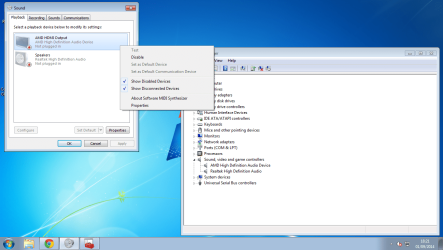
Okay so after re-installing and rebooting this is what shows:
 

Attachments

  • Untitled.png
    Untitled.png
    493.9 KB · Views: 2

My Computer

Computer type
PC/Desktop
Computer Manufacturer/Model Number
Custom
OS
Windows 7 64 bit
CPU
AMD Athlon 64 X2 Dual Core Processor 2.19 GHz
Motherboard
AsRock 939N68PV-GLAN
Memory
4GB
Graphics Card(s)
Radeon HD 5670
Internet Speed
100MB d/l 30MB u/l
Progress!!

Reinstall (or install) the RealTek R2.75 drivers. The install procedure will first uninstall what RealTek is presently installed, have you reboot the PC and then install the R2.75 drivers.
 

My Computer

Computer type
PC/Desktop
Computer Manufacturer/Model Number
My Own Build
OS
Windows 10 64 bit
CPU
Intel i7 6700K
Motherboard
ASUS ROG Maximus VIII Hero
Memory
16GB Corsair Dominator
Graphics Card(s)
Intel CPU Graphics
Sound Card
RealTek
Monitor(s) Displays
27" Dell S2719dgf
Screen Resolution
2560X1440
Hard Drives
1 TB Samsung 850 EVO SSD for Win 10 Pro
500GB Samsung 850 EVO SSD for Win 10 Insider
2 TB drive for backup
PSU
EVGA Supernova 750G2
Case
BeQuiet Silent Base 600
Cooling
Deepcool Captain 120EX
Keyboard
Microsoft Wireless 2000
Mouse
Microsoft wireless
Internet Speed
100 MB/sec (Cable)
Antivirus
Microsoft Defender and Malwarebytes
Browser
Edge/Firefox
Other Info
Cakewalk (Sonar) by BandLab and Studio One 4.1 Pro recording studio software. MOTU 896Mk3 Hybrid recording interface, Frontier Tranzport wireless control unit, Behringer X-Touch Control Surface.
Five USB connected optical drives for CD Audio production using Nero BurningROM
I have reinstalled the RealTek drivers, and everything has stayed the same, still saying 'No speakers or headphones are plugged in'
 

My Computer

Computer type
PC/Desktop
Computer Manufacturer/Model Number
Custom
OS
Windows 7 64 bit
CPU
AMD Athlon 64 X2 Dual Core Processor 2.19 GHz
Motherboard
AsRock 939N68PV-GLAN
Memory
4GB
Graphics Card(s)
Radeon HD 5670
Internet Speed
100MB d/l 30MB u/l
Back
Top