Solved My Computer right mouse click menu - explore function

fANAT1C

New member
Power User
Local time
4:45 PM
Messages
83
Location
Belgium
hey guys

first of all I want to wish any of you a merry christmas and a happy new year, may luck be brought to you for the year 2011 (and all the years that might follow).

Anyway, what I was wondering is if there is any possibility to add the "Explore"-function when browsing the menu that is popping-up when clicking on your CD/DVD/BluRay-ROM station. Something like in the good old Windows XP, because I'm missing that function alot. I do now have a shortcut on my desktop which is pointed to D:\ (my DVD rom station), but it would be alot more handsome if it was just added onto the "right mouse click-menu". Is there any option or ability to do this?

EDIT: screenshot of what I mean

2cfv6ms.png


thanks alot
 
Last edited by a moderator:

My Computer

Computer Manufacturer/Model Number
Acer Aspire 8735g
OS
Windows 7 Home Premium 64-bit
CPU
Intel Core 2 Duo T6600 @2.2 GHz
Motherboard
/
Memory
4GB RAM DDR3 so-DIMM
Graphics Card(s)
NVIDIA GeForce GT 240m 1GB
Sound Card
Realtek High Definition Audio
Monitor(s) Displays
18,4 HD+ LCD
Hard Drives
2 x 500 GB @5400 RPM
PSU
/
Case
Acer Aspire 8735g (laptop)
Cooling
/
Keyboard
Logitech Media Keyboard 600
Mouse
Logitech G3
You don't have Open in new window option... ??
 

My Computer

Computer type
PC/Desktop
Computer Manufacturer/Model Number
Custom Build
OS
Windows 10 Pro x64
CPU
Intel Core i5 4440 @Stock
Motherboard
Gigabyte Z97 D3H
Memory
4 x 4GB HyperX Fury DDR3
Graphics Card(s)
Gigabyte GTX 1050Ti O4G
Sound Card
Integrated
Monitor(s) Displays
Dell P2417H
Screen Resolution
1920 x 1080
Hard Drives
Samsung EVO 850 120GB / Toshiba DT01ACA050 1TB 7200prm 32MB
PSU
Riotoro Onyx 750W
Case
NZXT H500 Black-Red
Cooling
Stock CPU + NZXT 120mm + 2x120mm red fans
Keyboard
Modecom Volcano Lanparty
Mouse
Asus ROG Gladius / DeepCool E-Pad Plus
Internet Speed
DOCSIS 50/3 Mbit
Browser
Google Chrome
Other Info
Asus K55VJ(i5 3210M, GT635M / 2GB, 8GB DDR3, 500GB HDD)
In Windows Vista, Open and Explore became the same thing. In Windows 7 they removed Explore because Open does the same exact thing. So what you are looking for is Open.

Just to clarify. In Windows XP, the Explore option opened Explorer with the folder pane instead of the task pane like open. In Windows Vista, there no longer was a task pane or folder pane, it was just one pane all together. So having two options that do the same was superfluous thus removed in Windows 7.
 

My Computer

Computer type
PC/Desktop
Computer Manufacturer/Model Number
Alienware Aurora ALX R4
OS
Windows 10 Pro (x64)
CPU
Intel Core i7-3930K (3.2GHz - 4.5GHz)
Motherboard
Alienware Aurora-R4 x79
Memory
4x Samsung 4GB PC3-12800 DDR3 (16GB 1600MHz)
Graphics Card(s)
Nvidia Geforce GTX 690
Sound Card
SteelSeries Siberia Elite
Monitor(s) Displays
Dell UltraSharp U3011
Screen Resolution
2560x1600
Hard Drives
Samsung 850 Pro 256 GB, Seagate 1TB Desktop Hybrid HDD, 2x Western Digital 4TB Green HDD
PSU
875W Some Dell PSU <.<
Case
Alienware Aurora ALX
Cooling
Custom Liquid Cooling (EK CPU & GPU blocks) dual EK 480RAD
Keyboard
Logitech G710+ Mechanical
Mouse
Logitech G700s
Internet Speed
Verizon Fios (50 mbps average)
Other Info
Server: Intel NUC D54250WYK: i5-4250U, 16GB, 256 GB mSATA, Windows Server 2012 R2

My Computer

Computer type
PC/Desktop
Computer Manufacturer/Model Number
Self built custom
OS
64-bit Windows 11 Pro for Workstations
CPU
Intel i7-8700K OC'd to 5 GHz
Motherboard
ASUS ROG Maximus XI Formula Z390
Memory
64 GB (4x16GB) G.SKILL TridentZ RGB DDR4 3600 MHz
Graphics Card(s)
ASUS ROG-STRIX-GTX1080TI-O11G-GAMING
Sound Card
Integrated
Monitor(s) Displays
2 x Samsung Odyssey G7 27"
Screen Resolution
2560x1440
Hard Drives
1TB Samsung 990 PRO M.2,
4TB Samsung 990 PRO PRO M.2,
TerraMaster F8 SSD Plus NAS
PSU
Seasonic Prime Titanium 850W
Case
Thermaltake Core P3
Cooling
Corsair Hydro H115i
Keyboard
Logitech wireless K800
Mouse
Logitech MX Master 4
Internet Speed
2 Gb/s Download and 100 Mb/s Upload
Antivirus
Malwarebyte Anti-Malware Premium
Browser
Google Chrome
Other Info
Logitech Z625 speaker system,
Logitech BRIO 4K Pro webcam,
HP Color LaserJet Pro MFP M477fdn,
APC SMART-UPS RT 1000 XL - SURT1000XLI,
Galaxy S23 Plus phone
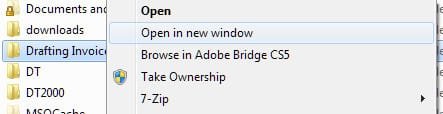
As Brink, logicearth and StalkeR said, you should have the option to "Open in new window". Sorry for being redundant, I just wanted to present a screenshot (a similar one is also seen in the link Brink provided):

ScreenShot00306.jpg

Note: the other options shown will vary depending on the programs you have installed but the top two should be there.
 

My Computer

Computer Manufacturer/Model Number
Toshiba L355D
OS
Windows 7 Ultimate x64 SP1
CPU
Core2 Duo
Motherboard
Intel
Memory
4 GB
Graphics Card(s)
GM965 on-board
Sound Card
RealTek on-board
Monitor(s) Displays
19"+17"(laptop)
Screen Resolution
1440x900 (x 2)
Hard Drives
500GB Ext. 200GB Internal
PSU
N/A
Case
N/A
Cooling
N/A
lol... wow guys

how retarded am I, I didn't notice it the open in new window/open message
thanks all!
 

My Computer

Computer Manufacturer/Model Number
Acer Aspire 8735g
OS
Windows 7 Home Premium 64-bit
CPU
Intel Core 2 Duo T6600 @2.2 GHz
Motherboard
/
Memory
4GB RAM DDR3 so-DIMM
Graphics Card(s)
NVIDIA GeForce GT 240m 1GB
Sound Card
Realtek High Definition Audio
Monitor(s) Displays
18,4 HD+ LCD
Hard Drives
2 x 500 GB @5400 RPM
PSU
/
Case
Acer Aspire 8735g (laptop)
Cooling
/
Keyboard
Logitech Media Keyboard 600
Mouse
Logitech G3
Glad to noticed that. The problem is solved now? :)
 

My Computer

Computer type
PC/Desktop
Computer Manufacturer/Model Number
Custom Build
OS
Windows 10 Pro x64
CPU
Intel Core i5 4440 @Stock
Motherboard
Gigabyte Z97 D3H
Memory
4 x 4GB HyperX Fury DDR3
Graphics Card(s)
Gigabyte GTX 1050Ti O4G
Sound Card
Integrated
Monitor(s) Displays
Dell P2417H
Screen Resolution
1920 x 1080
Hard Drives
Samsung EVO 850 120GB / Toshiba DT01ACA050 1TB 7200prm 32MB
PSU
Riotoro Onyx 750W
Case
NZXT H500 Black-Red
Cooling
Stock CPU + NZXT 120mm + 2x120mm red fans
Keyboard
Modecom Volcano Lanparty
Mouse
Asus ROG Gladius / DeepCool E-Pad Plus
Internet Speed
DOCSIS 50/3 Mbit
Browser
Google Chrome
Other Info
Asus K55VJ(i5 3210M, GT635M / 2GB, 8GB DDR3, 500GB HDD)
lol... wow guys

how retarded am I, I didn't notice it the open in new window/open message
thanks all!

LOL, no problem. I'm glad that we could help. :)
 

My Computer

Computer type
PC/Desktop
Computer Manufacturer/Model Number
Self built custom
OS
64-bit Windows 11 Pro for Workstations
CPU
Intel i7-8700K OC'd to 5 GHz
Motherboard
ASUS ROG Maximus XI Formula Z390
Memory
64 GB (4x16GB) G.SKILL TridentZ RGB DDR4 3600 MHz
Graphics Card(s)
ASUS ROG-STRIX-GTX1080TI-O11G-GAMING
Sound Card
Integrated
Monitor(s) Displays
2 x Samsung Odyssey G7 27"
Screen Resolution
2560x1440
Hard Drives
1TB Samsung 990 PRO M.2,
4TB Samsung 990 PRO PRO M.2,
TerraMaster F8 SSD Plus NAS
PSU
Seasonic Prime Titanium 850W
Case
Thermaltake Core P3
Cooling
Corsair Hydro H115i
Keyboard
Logitech wireless K800
Mouse
Logitech MX Master 4
Internet Speed
2 Gb/s Download and 100 Mb/s Upload
Antivirus
Malwarebyte Anti-Malware Premium
Browser
Google Chrome
Other Info
Logitech Z625 speaker system,
Logitech BRIO 4K Pro webcam,
HP Color LaserJet Pro MFP M477fdn,
APC SMART-UPS RT 1000 XL - SURT1000XLI,
Galaxy S23 Plus phone
Back
Top