JavaScript is disabled. For a better experience, please enable JavaScript in your browser before proceeding.
You are using an out of date browser. It may not display this or other websites correctly.
You should upgrade or use an
alternative browser .
Solved "My Computer" section does not refresh
Hi,
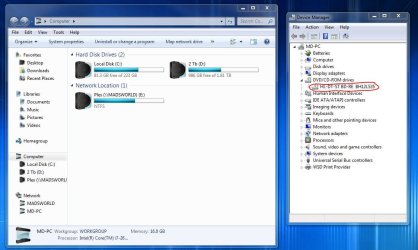
Weird bug here , when i go in "My Computer" i cannot see my BD rom anymore, it's installed and it's there in device manager: working properly. Also, if I put a usb drive, i see in the bottom right corner that it is installed but i don't have access to it via "My Computer".
I did try to uninstall and reinstall BD drive with no results.
Thanks for helping out
Mart
Capture.JPG
90.8 KB
· Views: 6
Last edited: Oct 7, 2012
Computer type PC/Desktop Computer Manufacturer/Model Number Custom OS Windows Seven Ultimate x64 CPU Intel i7 4770K @ 4.5 @1.36v Motherboard Asus Maximus VI Formula Memory G-Skill TirentX 16Gb @ 2400mhz Graphics Card(s) (SLI) 2 x Asus ENGTX 770 Direct CUII OC Sound Card Onboard Monitor(s) Displays Dell Wfp27 & Asus 27' Screen Resolution 1920x1080 Hard Drives 1 x SSD Corsair Force GT 240Gb PSU Corsair AX1200i Case NZXT Phantom 820 (Mate Black) Cooling Corsair H100i push/pull Keyboard Logitech G510 Mouse Logitech G500S Internet Speed Videotron Extreme 20MB Other Info BOSE 2.1-
New member
Member
Thread Starter
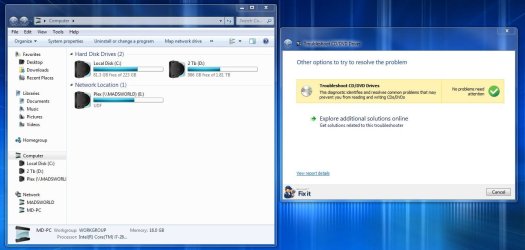
Fix it says there is no problem.
Capture2.JPG
96.2 KB
· Views: 4
Computer type PC/Desktop Computer Manufacturer/Model Number Custom OS Windows Seven Ultimate x64 CPU Intel i7 4770K @ 4.5 @1.36v Motherboard Asus Maximus VI Formula Memory G-Skill TirentX 16Gb @ 2400mhz Graphics Card(s) (SLI) 2 x Asus ENGTX 770 Direct CUII OC Sound Card Onboard Monitor(s) Displays Dell Wfp27 & Asus 27' Screen Resolution 1920x1080 Hard Drives 1 x SSD Corsair Force GT 240Gb PSU Corsair AX1200i Case NZXT Phantom 820 (Mate Black) Cooling Corsair H100i push/pull Keyboard Logitech G510 Mouse Logitech G500S Internet Speed Videotron Extreme 20MB Other Info BOSE 2.1-
New member
Member
Thread Starter
Computer type PC/Desktop Computer Manufacturer/Model Number Custom OS Windows Seven Ultimate x64 CPU Intel i7 4770K @ 4.5 @1.36v Motherboard Asus Maximus VI Formula Memory G-Skill TirentX 16Gb @ 2400mhz Graphics Card(s) (SLI) 2 x Asus ENGTX 770 Direct CUII OC Sound Card Onboard Monitor(s) Displays Dell Wfp27 & Asus 27' Screen Resolution 1920x1080 Hard Drives 1 x SSD Corsair Force GT 240Gb PSU Corsair AX1200i Case NZXT Phantom 820 (Mate Black) Cooling Corsair H100i push/pull Keyboard Logitech G510 Mouse Logitech G500S Internet Speed Videotron Extreme 20MB Other Info BOSE 2.1-
New member
Member
Thread Starter
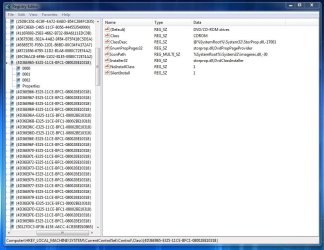
Weird thing is that I have no Lower or Upper filters in the registry.
Capture.JPG
115.1 KB
· Views: 6
Computer type PC/Desktop Computer Manufacturer/Model Number Custom OS Windows Seven Ultimate x64 CPU Intel i7 4770K @ 4.5 @1.36v Motherboard Asus Maximus VI Formula Memory G-Skill TirentX 16Gb @ 2400mhz Graphics Card(s) (SLI) 2 x Asus ENGTX 770 Direct CUII OC Sound Card Onboard Monitor(s) Displays Dell Wfp27 & Asus 27' Screen Resolution 1920x1080 Hard Drives 1 x SSD Corsair Force GT 240Gb PSU Corsair AX1200i Case NZXT Phantom 820 (Mate Black) Cooling Corsair H100i push/pull Keyboard Logitech G510 Mouse Logitech G500S Internet Speed Videotron Extreme 20MB Other Info BOSE 2.1-
New member
Member
Thread Starter
Haaaa fixed it !
Computer type PC/Desktop Computer Manufacturer/Model Number Custom OS Windows Seven Ultimate x64 CPU Intel i7 4770K @ 4.5 @1.36v Motherboard Asus Maximus VI Formula Memory G-Skill TirentX 16Gb @ 2400mhz Graphics Card(s) (SLI) 2 x Asus ENGTX 770 Direct CUII OC Sound Card Onboard Monitor(s) Displays Dell Wfp27 & Asus 27' Screen Resolution 1920x1080 Hard Drives 1 x SSD Corsair Force GT 240Gb PSU Corsair AX1200i Case NZXT Phantom 820 (Mate Black) Cooling Corsair H100i push/pull Keyboard Logitech G510 Mouse Logitech G500S Internet Speed Videotron Extreme 20MB Other Info BOSE 2.1-
are you able to play any BD or a DVD using the drive?