My computer won't open .exe or install most things downloaded.

kousetsu

New member
Local time
7:38 AM
Messages
7
Hello everyone.

I've been googling and googling ang googling about this issue since I got this computer, I cannot for the life of me fix it, and I am about to go pay a man down the road to fix it because to me, it is a hardware issue, but I am exhausting all options before I have to go and spend even more money.

I bought a computer online, I wont say the store as the owner is literally insane, but he insists what I am experiencing is a software issue, and therefore won't help (I've had the computer two weeks at time of writing) so please can someone help me! I'm incredibly frustrated.

When I first got the computer I went and did what anyone would do - I installed chrome and went off to look for anti viruses.
Download AVG - click install - nothing happens. No error. Just nothing.
Same with Avast.

Obviously, I have managed to install chrome, but nothing else will install.
Updates will install, but only after a lot of restarting and errors.

I have done a recovery when I first uncounted these problems, and then two clean installs since to see if it would help.
I am still having the same issues and I would appreciate any troubleshooting people can offer.

I have checked my router firmware is up to date, I have reinstalled registry files even though I know this will make no difference. I've enabled and then disabled every windows firewall I can find & UAC.
Any help will be greatly appreciated!
It seems to be trouble with .exe files. Do I need to go out and buy a new harddrive? Someone please tell me I dont!
 

My Computer My Computer

Computer type
PC/Desktop
Computer Manufacturer/Model Number
Dell
OS
Windows 7 64 bit
CPU
Pentium(R) Dual-Core CPU E5500 @ 2.80GHz
Motherboard
Phoenix ROM BIOS PLUS
Memory
4mb ram,
Graphics Card(s)
nvidia gforce gtx 750
Antivirus
none!!
Browser
Chrome
Hi and welcome to the Forum.
I am assuming this is a second hand computer? That being so have you got the Windows installation disc? What do you mean when you say you have reinstalled registry files . What files ?
 

My Computer My Computer

Computer type
PC/Desktop
OS
Microsoft Windows 7 Home Premium 64-bit 7601 Multiprocessor Free Service Pack 1
CPU
Intel(R) Core(TM) i7-3770 CPU @ 3.40GHz
Motherboard
ASUSTeK COMPUTER INC. P8H77-M
Memory
8.00 GB
Graphics Card(s)
Intel(R) HD Graphics 4000
Sound Card
On Board
Monitor(s) Displays
Dell 24"
Screen Resolution
1920 x 1080
Hard Drives
(1) INTEL SSDSC2CT180A3 ATA Device (2) ST500DM002-1BD142 ATA Device (3) WDC WD3200AAKS-75L9A0 ATA Device (4) Generic- Compact Flash USB Device (5) Generic- MS/MS-Pro USB Device (6) Generic- SD/MMC USB Device (7) Generic- SM/xD-Picture USB
PSU
500w Corsair
Case
Cooler Master
Cooling
3 Fans
Keyboard
Logitech MK300
Mouse
Logitech WOM
Internet Speed
75Mb
Antivirus
Norton 360
Browser
Firefox, Opera, IE
Everything is here to get and keep a perfect Clean Reinstall Windows 7 based on tens of thousands of installs we've directly helped with here, and which has been used by 1.5+ million consumers without a single complaint.

Be sure to read the steps printed in red about drivers in a driver-complete OS so you don't use XPired methods. Not one of the 1.5 million has complained about using the drivers Win7 provides first.

I would also use the recommended AV and other tools and methods to exclude potential problems at the outset.
 
Hi guys, thanks for the advice, but I have already done a clean install, twice. Before I did the clean install I followed some guides on here about my .exe file-path being incorrect, so I installed registry files for .exe filepath to see if it helped. It didnt, so I did another clean install. This bit about registry files is probably irrelevant because of the clean install after, I'm just trying to outline all the things I've tried.
After a clean install the problems persist, and I cannot install a new antivirus because I cannot install anything I Download!
I checked my router has the latest firmware update too, so I know that is not the issue, on top of that my other computer has no issues with downloading.
I have all drivers & driver updates.
Ive tried downloading through both chrome and internet explorer, still can't install.
Tried downloading AV from the AV actual website, and CNET, still have the same problems with install.
I get no error that I can tell anyone - I double click, or click as administrator, I get the blue loading wheel next to the mouse, and then just nothing happens.
 

My Computer My Computer

Computer type
PC/Desktop
Computer Manufacturer/Model Number
Dell
OS
Windows 7 64 bit
CPU
Pentium(R) Dual-Core CPU E5500 @ 2.80GHz
Motherboard
Phoenix ROM BIOS PLUS
Memory
4mb ram,
Graphics Card(s)
nvidia gforce gtx 750
Antivirus
none!!
Browser
Chrome
This is a refurbished computer, I didn't get a disk but I downloaded the windows 7 64bit ISO onto a USB and have been doing my clean install that way.
The computer came preloaded with windows 7 and ive had this problem since I turned it on.
Another weird thing it does is if I turn the power plug on at the wall, the computer will come on for a second and then switch off. Pretty weird and I don't know if its related, just desperate for help now. Cannot find anyone else with this issue and a solution on the internet (that I haven't tried already!)
 

My Computer My Computer

Computer type
PC/Desktop
Computer Manufacturer/Model Number
Dell
OS
Windows 7 64 bit
CPU
Pentium(R) Dual-Core CPU E5500 @ 2.80GHz
Motherboard
Phoenix ROM BIOS PLUS
Memory
4mb ram,
Graphics Card(s)
nvidia gforce gtx 750
Antivirus
none!!
Browser
Chrome
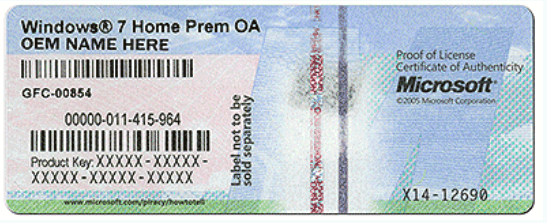
Have you got an OEM label on the back of the PC like this:

OEM.PNG
 

My Computer My Computer

Computer type
PC/Desktop
OS
Microsoft Windows 7 Home Premium 64-bit 7601 Multiprocessor Free Service Pack 1
CPU
Intel(R) Core(TM) i7-3770 CPU @ 3.40GHz
Motherboard
ASUSTeK COMPUTER INC. P8H77-M
Memory
8.00 GB
Graphics Card(s)
Intel(R) HD Graphics 4000
Sound Card
On Board
Monitor(s) Displays
Dell 24"
Screen Resolution
1920 x 1080
Hard Drives
(1) INTEL SSDSC2CT180A3 ATA Device (2) ST500DM002-1BD142 ATA Device (3) WDC WD3200AAKS-75L9A0 ATA Device (4) Generic- Compact Flash USB Device (5) Generic- MS/MS-Pro USB Device (6) Generic- SD/MMC USB Device (7) Generic- SM/xD-Picture USB
PSU
500w Corsair
Case
Cooler Master
Cooling
3 Fans
Keyboard
Logitech MK300
Mouse
Logitech WOM
Internet Speed
75Mb
Antivirus
Norton 360
Browser
Firefox, Opera, IE
I asked if you followed the steps in Clean Reinstall Windows 7 which assure you will have a perfect install - not whether you did what you think is a Clean Reinstall.

When you selected where to install Win7, did you delete all partitions to create and format new ones, or just delete all partitions and click Next to let installer do it for you? If you left partitions on the drive then it wasn't clean.

If all partitions were deleted then there's nothing left that can interfere and it points to the media. Here once again you need to follow Step 1 to confirm the media and that it is burned or written correctly.

If so then do the reinstall in phases to pinpoint which update, program or setting is causing the issue. After install get online to install all Important and Optional Updates in small group, testing performance after each group. Then install any drivers missing in Device Manager once all Updates are installed. Test performance again. Then install programs testing performance after each one. Same with settings changes.

If a group of Updates causes the problems, Uninstall each one in the group to find the problem update testing after each uninstall. You can alternatively System Restore before any group to reinstall them singly testing after each.

Same with programs and settings.

Keep us posted as you go.
 
I removed all my partitions except my recovery (should I have removed that too? I felt like I should keep that.) I didn't create any partitions, again, should I?
Yes, I have a sticker, my version of windows is legit so that's not the issue.
 

My Computer My Computer

Computer type
PC/Desktop
Computer Manufacturer/Model Number
Dell
OS
Windows 7 64 bit
CPU
Pentium(R) Dual-Core CPU E5500 @ 2.80GHz
Motherboard
Phoenix ROM BIOS PLUS
Memory
4mb ram,
Graphics Card(s)
nvidia gforce gtx 750
Antivirus
none!!
Browser
Chrome
Also I didn't test after each group of updates, I did try before any updates and still had a problem. But I kinda expected that without any updates or drivers installed properly.
 

My Computer My Computer

Computer type
PC/Desktop
Computer Manufacturer/Model Number
Dell
OS
Windows 7 64 bit
CPU
Pentium(R) Dual-Core CPU E5500 @ 2.80GHz
Motherboard
Phoenix ROM BIOS PLUS
Memory
4mb ram,
Graphics Card(s)
nvidia gforce gtx 750
Antivirus
none!!
Browser
Chrome
Back
Top