
And still, they are on another computer. I can't figure what the **** is this shit. I've search on google for a long time and I haven't found any similar problems as mine.
So, here's the situation : I do have two computers who had run WLM 2011 beta version. On of them, my laptop, wasn't able to connect at all, I wierd error code showed up. This error code was related to the internet explorer settings, wich I tried to change, but without any result.
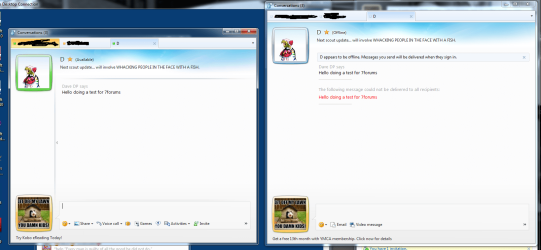
Right now, the final version of WLM 2011 is installed, both seams to working, except then... I've just figured out that no contacts are online on my laptop and when I try to send a message to one of them, the following error is printed : The following message could not be delivered to all recipients: My message. On the other machine, everything is cool, I can talk to all my contacts, even my facebook contacts, that's cool.
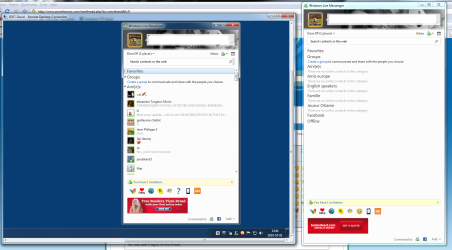
Please see 1 and 2 dot png to see what it does exactly. On each pictures, we see in our left the WLM from one of my computer, where it's working. On our right, it is the version installed on my laptop, wich doesn't work. As you can see, I STILL can receive messages from my contacts, but I can't send them a message or see them online on my laptop.
Well guys, thank for the upcoming help!
Dave
Oh BTW, as you can see, I'm a french from Quebec, if there's something you don't understand, please let me know!
So, here's the situation : I do have two computers who had run WLM 2011 beta version. On of them, my laptop, wasn't able to connect at all, I wierd error code showed up. This error code was related to the internet explorer settings, wich I tried to change, but without any result.
Right now, the final version of WLM 2011 is installed, both seams to working, except then... I've just figured out that no contacts are online on my laptop and when I try to send a message to one of them, the following error is printed : The following message could not be delivered to all recipients: My message. On the other machine, everything is cool, I can talk to all my contacts, even my facebook contacts, that's cool.
Please see 1 and 2 dot png to see what it does exactly. On each pictures, we see in our left the WLM from one of my computer, where it's working. On our right, it is the version installed on my laptop, wich doesn't work. As you can see, I STILL can receive messages from my contacts, but I can't send them a message or see them online on my laptop.
Well guys, thank for the upcoming help!
Dave
Oh BTW, as you can see, I'm a french from Quebec, if there's something you don't understand, please let me know!
Attachments
My Computer
At a glance
Windows 7 Pro RTM x64Intel Core 2 Quad @2.4GHz6 GBGeForce 9800 GTX+
- Computer Manufacturer/Model Number
- Intel
- OS
- Windows 7 Pro RTM x64
- CPU
- Intel Core 2 Quad @2.4GHz
- Motherboard
- Intel DP965LT
- Memory
- 6 GB
- Graphics Card(s)
- GeForce 9800 GTX+
- Sound Card
- Audigy Sound Blaster
- Monitor(s) Displays
- Dual screens - 19' Acer monitor 24' Samsung SyncMaster T240
- Screen Resolution
- 1920 * 1200 and 1280 * 1024
- Hard Drives
- 250 GB - System drive
1 TB - Backup drive
1 TB - Stockage drive
120 GB - Other
