My Documents always open on Desktop when users log

alastair56

New member
Local time
1:03 AM
Messages
7
My Documents is always open on the Desktop when users log on.
This just started a few days ago. It is coincident with some issues we had with FSecure not running properly that was discovered to be caused by a missing Base Filter Engine. That was repaired,I now have a new antivirus package(bitdefender) on tryout. I have looked in msconfig and cannot see anything there. I have looked in All Programs/Startup as well.
 

My Computer My Computer

OS
Microsoft Windows 7 Professional 64-bit 7601 Multiprocessor Free Service Pack 1
CPU
AMD Phenom(tm) II X4 965 Processor
Motherboard
ASRock 890GX Pro3
Memory
8.00 GB
Graphics Card(s)
(1) Air Display Mirror Adapter (2) AMD Radeon HD 6800 Seri
Sound Card
(1) HD Webcam C310 (2) AMD High Definition Audio Device
Screen Resolution
1280 x 1024 x 32 bits (4294967296 colors) @ 60 Hz
Hard Drives
(1) Hitachi HDS723020BLA642 ATA Device (2) M4-CT064M4SSD2 ATA Device (3) ST31500341AS ATA Device (4) Apple iPod USB Device (5) HP USB Device
Hello and welcome to the forums alastair56!

(Taken from the answers.microsoft.com website)

It happens if there is a registry change in the Userinit value.

Follow the instructions below which will help you in resolving the issue.


1. Start > Run > Regedit > Ok.

2. Now navigate to the following key:-
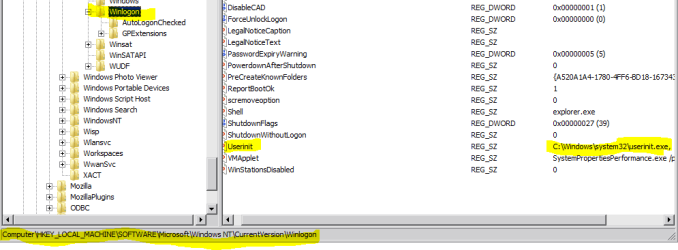
HKEY_ LOCAL_ MACHINE\SOFTWARE\Microsoft\Windows NT\CurrentVersion\Winlogon

3. Look down the list in the Right Hand pane, scroll down to the value Userinit This value should read: C:\WINDOWS\system32\userinit.exe, (The comma at the end must also be there)

4. If the value is different from that mentioned above then Right Click on the Userinit value and, from the drop down menu, select Modify. Type in the value C:\WINDOWS\system32\userinit.exe, in the Modify dialogue box click OK.

5. Exit the Registry.

6. Restart your computer.

Click on the links below for more information.

The "My Documents" folder automatically opens every time that you log on to a Windows XP Service Pack 2-based computer

My Documents open at startup

Please post back and let us know if this has helped to resolve your issue.

Hope that helps.. it applies to windows vista and 7 systems too
 
Last edited:

My Computer My Computer

Computer Manufacturer/Model Number
DELL SXPS 1640
OS
Windows 7 x64 Professional SP1
CPU
Intel C2D T9550 2.66 GHz @ 2.793 GHz (Thanks ThrottleStop!!)
Motherboard
Intel PM45
Memory
8 GB DDR3
Graphics Card(s)
ATI MOBILITY RADEON 4670
Sound Card
CREATIVE XFI AUDIO NOTEBOOK
Monitor(s) Displays
16.1 WLED
Screen Resolution
1920x1080
Hard Drives
Seagate ST9500420AS 500GB (465GiBi) 7200 RPM Drive

External Drives:-
2 TB WD Essentials x 3
1 TB WD Mybook Gen 1
1 TB WD Mybook Gen 2
1 TB Seagate
1 TB Seagate
320 GB WD Scorpio Black (enclosed)
PSU
90W Dell Power Brick
Case
Dell Chassis
Cooling
Coolermaster Cooling Pad
Keyboard
Built-in backlighted Keyboard
Mouse
Logitech Wireless Mini Mouse
Internet Speed
4/0.5
Hi Solarmystic;
Thanks for the help. I checked out the registry as you suggested. HKEY_ LOCAL_ MACHINE\SOFTWARE\Microsoft\Win*dows NT\CurrentVersion\Winlogon on my system I could not find this key except without the *, likewise for the value for Userinit, there was no * in that . Apart from the asterisk everything else was as you stated it should be, is the lack of the asterisk an issue?
 

My Computer My Computer

OS
Microsoft Windows 7 Professional 64-bit 7601 Multiprocessor Free Service Pack 1
CPU
AMD Phenom(tm) II X4 965 Processor
Motherboard
ASRock 890GX Pro3
Memory
8.00 GB
Graphics Card(s)
(1) Air Display Mirror Adapter (2) AMD Radeon HD 6800 Seri
Sound Card
(1) HD Webcam C310 (2) AMD High Definition Audio Device
Screen Resolution
1280 x 1024 x 32 bits (4294967296 colors) @ 60 Hz
Hard Drives
(1) Hitachi HDS723020BLA642 ATA Device (2) M4-CT064M4SSD2 ATA Device (3) ST31500341AS ATA Device (4) Apple iPod USB Device (5) HP USB Device
Good catch!

That's absolutely correct, the asterisks are not supposed to be there, I'm sorry for the confusion... I'll edit my instructions so that the next person with the same problem won't get confused too..

Everything else is correct though, including the comma placements (,) and so on..

Thanks for replying!
 

My Computer My Computer

Computer Manufacturer/Model Number
DELL SXPS 1640
OS
Windows 7 x64 Professional SP1
CPU
Intel C2D T9550 2.66 GHz @ 2.793 GHz (Thanks ThrottleStop!!)
Motherboard
Intel PM45
Memory
8 GB DDR3
Graphics Card(s)
ATI MOBILITY RADEON 4670
Sound Card
CREATIVE XFI AUDIO NOTEBOOK
Monitor(s) Displays
16.1 WLED
Screen Resolution
1920x1080
Hard Drives
Seagate ST9500420AS 500GB (465GiBi) 7200 RPM Drive

External Drives:-
2 TB WD Essentials x 3
1 TB WD Mybook Gen 1
1 TB WD Mybook Gen 2
1 TB Seagate
1 TB Seagate
320 GB WD Scorpio Black (enclosed)
PSU
90W Dell Power Brick
Case
Dell Chassis
Cooling
Coolermaster Cooling Pad
Keyboard
Built-in backlighted Keyboard
Mouse
Logitech Wireless Mini Mouse
Internet Speed
4/0.5
No problem, the help is appreciated.
I followed up with the first link you provided and entered and began to edit the registry as instructed. I modified the value data for userinit as spec'd without the comma.
then went to look for persistbrowser in hkeycurrent user... no persistbrowser. now what?

eg. " Locate and then click the following registry subkey:
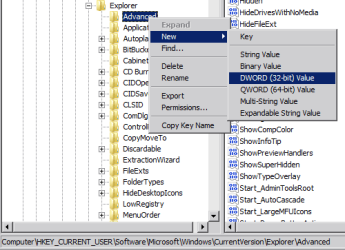
HKEY_CURRENT_USER\Software\Microsoft\Windows\CurrentVersion\Explorer\Advanced
In the right pane, right-click PersistBrowsers, and then click Modify.
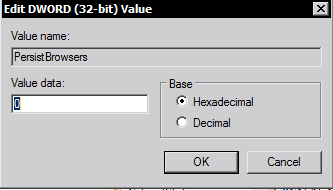
In the Edit DWORD Value dialog box, type 0 under Value data, and then click OK.
Quit Registry Editor, and then restart the computer.
 

My Computer My Computer

OS
Microsoft Windows 7 Professional 64-bit 7601 Multiprocessor Free Service Pack 1
CPU
AMD Phenom(tm) II X4 965 Processor
Motherboard
ASRock 890GX Pro3
Memory
8.00 GB
Graphics Card(s)
(1) Air Display Mirror Adapter (2) AMD Radeon HD 6800 Seri
Sound Card
(1) HD Webcam C310 (2) AMD High Definition Audio Device
Screen Resolution
1280 x 1024 x 32 bits (4294967296 colors) @ 60 Hz
Hard Drives
(1) Hitachi HDS723020BLA642 ATA Device (2) M4-CT064M4SSD2 ATA Device (3) ST31500341AS ATA Device (4) Apple iPod USB Device (5) HP USB Device
of course... now other issues have arisen:) Having restarted the computer; when I log in to a user the log on takes much longer than normal and results in a black screen but a usable cursor.; I brought up task manager ,have tried system restore twice but no joy. System restore informed me as part of process that "Programs that may be affected by system restore" would be ATI catalyst driver blah blah:(
Ironically or suspiciously as it may be, I had just set that previously deferred installation update to install this morning whilst I was in the process of carrying out instructions you provided. any thoughts? should this be a new thread?
 

My Computer My Computer

OS
Microsoft Windows 7 Professional 64-bit 7601 Multiprocessor Free Service Pack 1
CPU
AMD Phenom(tm) II X4 965 Processor
Motherboard
ASRock 890GX Pro3
Memory
8.00 GB
Graphics Card(s)
(1) Air Display Mirror Adapter (2) AMD Radeon HD 6800 Seri
Sound Card
(1) HD Webcam C310 (2) AMD High Definition Audio Device
Screen Resolution
1280 x 1024 x 32 bits (4294967296 colors) @ 60 Hz
Hard Drives
(1) Hitachi HDS723020BLA642 ATA Device (2) M4-CT064M4SSD2 ATA Device (3) ST31500341AS ATA Device (4) Apple iPod USB Device (5) HP USB Device
No problem, the help is appreciated.
I followed up with the first link you provided and entered and began to edit the registry as instructed. I modified the value data for userinit as spec'd without the comma.
then went to look for persistbrowser in hkeycurrent user... no persistbrowser. now what?

eg. " Locate and then click the following registry subkey:
HKEY_CURRENT_USER\Software\Microsoft\Windows\CurrentVersion\Explorer\Advanced
In the right pane, right-click PersistBrowsers, and then click Modify.
In the Edit DWORD Value dialog box, type 0 under Value data, and then click OK.
Quit Registry Editor, and then restart the computer.

Oh dear me.

You were supposed to leave the comma at the end in that userinit value.

C:\WINDOWS\system32\userinit.exe,
Capture5.PNG

As for the second bit, if there isn't a PersistBrowsers entry you can create it by right clicking on the Advanced folder --->New ---->DWORD (32 bit value) ----> type in PersistBrowsers for the new key----> Double click on the entry and make sure the Value = 0

Capture4.PNG Capture3.PNG

But now since your system may be borked due to the userinit , try that System Restore instead.. just make sure it's a restore point that's set before you made the changes and before that update was installed..

Don't worry about the ATI Catalyst Driver thingy, just make a note of the drivers it claims will be affected (write a list down somewhere), and we can re-update it back later...
 

My Computer My Computer

Computer Manufacturer/Model Number
DELL SXPS 1640
OS
Windows 7 x64 Professional SP1
CPU
Intel C2D T9550 2.66 GHz @ 2.793 GHz (Thanks ThrottleStop!!)
Motherboard
Intel PM45
Memory
8 GB DDR3
Graphics Card(s)
ATI MOBILITY RADEON 4670
Sound Card
CREATIVE XFI AUDIO NOTEBOOK
Monitor(s) Displays
16.1 WLED
Screen Resolution
1920x1080
Hard Drives
Seagate ST9500420AS 500GB (465GiBi) 7200 RPM Drive

External Drives:-
2 TB WD Essentials x 3
1 TB WD Mybook Gen 1
1 TB WD Mybook Gen 2
1 TB Seagate
1 TB Seagate
320 GB WD Scorpio Black (enclosed)
PSU
90W Dell Power Brick
Case
Dell Chassis
Cooling
Coolermaster Cooling Pad
Keyboard
Built-in backlighted Keyboard
Mouse
Logitech Wireless Mini Mouse
Internet Speed
4/0.5
I did try the system restore . It didnt fix it.The most recent point prior to my registry twiddling was last night. Before that back in 2011(I have a small drive and dispensed with a number of restore points at one stage in my quest for leaning up my small SS C drive.) I tried System restore twice and no luck.
,noticed that explorer.exe wasnt running when looking at Task manager, so I ran it from Task Manager and that brought back a functional desktop for this user. No other user can log on however, it begins to log on, seemingly logs on and then logs you off again. When I log back on to this user i must use taskmanager to start up explorer.
I went and added the comma to userinit. But to no avail.
I will try system restore from the same point,last night, for a third time(lucky?),if that doesnt do it, then next option if System restore is best way, is to use system restore point from 2011. I will get back and let u know how it goes.
 

My Computer My Computer

OS
Microsoft Windows 7 Professional 64-bit 7601 Multiprocessor Free Service Pack 1
CPU
AMD Phenom(tm) II X4 965 Processor
Motherboard
ASRock 890GX Pro3
Memory
8.00 GB
Graphics Card(s)
(1) Air Display Mirror Adapter (2) AMD Radeon HD 6800 Seri
Sound Card
(1) HD Webcam C310 (2) AMD High Definition Audio Device
Screen Resolution
1280 x 1024 x 32 bits (4294967296 colors) @ 60 Hz
Hard Drives
(1) Hitachi HDS723020BLA642 ATA Device (2) M4-CT064M4SSD2 ATA Device (3) ST31500341AS ATA Device (4) Apple iPod USB Device (5) HP USB Device
Before we continue, can you please add you system specs to your My system specs area by following the tutorial below?

http://www.sevenforums.com/tutorials/180324-system-info-see-your-system-specs.html

Also if you don't mind could you also perform the following steps?

1. Download and Save to desktop from this link:
http://go.microsoft.com/fwlink/?linkid=52012

2. Once saved, run the tool. Click on the Continue button, which will produce the report.

3. Click on the Copy button in the tool (ignore any error messages), and then paste into your next reply.

Thanks in advance!
 

My Computer My Computer

Computer Manufacturer/Model Number
DELL SXPS 1640
OS
Windows 7 x64 Professional SP1
CPU
Intel C2D T9550 2.66 GHz @ 2.793 GHz (Thanks ThrottleStop!!)
Motherboard
Intel PM45
Memory
8 GB DDR3
Graphics Card(s)
ATI MOBILITY RADEON 4670
Sound Card
CREATIVE XFI AUDIO NOTEBOOK
Monitor(s) Displays
16.1 WLED
Screen Resolution
1920x1080
Hard Drives
Seagate ST9500420AS 500GB (465GiBi) 7200 RPM Drive

External Drives:-
2 TB WD Essentials x 3
1 TB WD Mybook Gen 1
1 TB WD Mybook Gen 2
1 TB Seagate
1 TB Seagate
320 GB WD Scorpio Black (enclosed)
PSU
90W Dell Power Brick
Case
Dell Chassis
Cooling
Coolermaster Cooling Pad
Keyboard
Built-in backlighted Keyboard
Mouse
Logitech Wireless Mini Mouse
Internet Speed
4/0.5
Diagnostic Report (1.9.0027.0):
-----------------------------------------
Windows Validation Data-->
Validation Code: 0
Cached Online Validation Code: 0x0
Windows Product Key: *****-*****-GK4PY-FDWYH-7TP9F
Windows Product Key Hash: u3xU6PnmumgYLgUpnmbqEw9Q2OA=
Windows Product ID: 00371-OEM-8992671-00004
Windows Product ID Type: 2
Windows License Type: OEM SLP
Windows OS version: 6.1.7601.2.00010100.1.0.048
ID: {CAD4BD85-1CCE-4E97-8951-52D8086429BB}(3)
Is Admin: Yes
TestCab: 0x0
LegitcheckControl ActiveX: N/A, hr = 0x80070002
Signed By: N/A, hr = 0x80070002
Product Name: Windows 7 Professional
Architecture: 0x00000009
Build lab: 7601.win7sp1_gdr.120503-2030
TTS Error:
Validation Diagnostic:
Resolution Status: N/A
Vista WgaER Data-->
ThreatID(s): N/A, hr = 0x80070002
Version: N/A, hr = 0x80070002
Windows XP Notifications Data-->
Cached Result: N/A, hr = 0x80070002
File Exists: No
Version: N/A, hr = 0x80070002
WgaTray.exe Signed By: N/A, hr = 0x80070002
WgaLogon.dll Signed By: N/A, hr = 0x80070002
OGA Notifications Data-->
Cached Result: N/A, hr = 0x80070002
Version: N/A, hr = 0x80070002
OGAExec.exe Signed By: N/A, hr = 0x80070002
OGAAddin.dll Signed By: N/A, hr = 0x80070002
OGA Data-->
Office Status: 109 N/A
OGA Version: N/A, 0x80070002
Signed By: N/A, hr = 0x80070002
Office Diagnostics: 025D1FF3-364-80041010_025D1FF3-229-80041010_025D1FF3-230-1_025D1FF3-517-80040154_025D1FF3-237-80040154_025D1FF3-238-2_025D1FF3-244-80070002_025D1FF3-258-3
Browser Data-->
Proxy settings: N/A
User Agent: Mozilla/4.0 (compatible; MSIE 8.0; Win32)
Default Browser: C:\Users\Alastair\AppData\Local\Google\Chrome\Application\chrome.exe
Download signed ActiveX controls: Prompt
Download unsigned ActiveX controls: Disabled
Run ActiveX controls and plug-ins: Allowed
Initialize and script ActiveX controls not marked as safe: Disabled
Allow scripting of Internet Explorer Webbrowser control: Disabled
Active scripting: Allowed
Script ActiveX controls marked as safe for scripting: Allowed
File Scan Data-->
Other data-->
Office Details: <GenuineResults><MachineData><UGUID>{CAD4BD85-1CCE-4E97-8951-52D8086429BB}</UGUID><Version>1.9.0027.0</Version><OS>6.1.7601.2.00010100.1.0.048</OS><Architecture>x64</Architecture><PKey>*****-*****-*****-*****-7TP9F</PKey><PID>00371-OEM-8992671-00004</PID><PIDType>2</PIDType><SID>S-1-5-21-3019097636-1332029945-1847314219</SID><SYSTEM><Manufacturer>To Be Filled By O.E.M.</Manufacturer><Model>To Be Filled By O.E.M.</Model></SYSTEM><BIOS><Manufacturer>American Megatrends Inc.</Manufacturer><Version>L1.33B</Version><SMBIOSVersion major="2" minor="6"/><Date>20110622000000.000000+000</Date></BIOS><HWID>A4B03607018400FA</HWID><UserLCID>1009</UserLCID><SystemLCID>0409</SystemLCID><TimeZone>Pacific Standard Time(GMT-08:00)</TimeZone><iJoin>0</iJoin><SBID><stat>3</stat><msppid></msppid><name></name><model></model></SBID><OEM><OEMID>ACRSYS</OEMID><OEMTableID>ACRPRDCT</OEMTableID></OEM><GANotification/></MachineData><Software><Office><Result>109</Result><Products/><Applications/></Office></Software></GenuineResults>
Spsys.log Content: 0x80070002
Licensing Data-->
Software licensing service version: 6.1.7601.17514
Name: Windows(R) 7, Professional edition
Description: Windows Operating System - Windows(R) 7, OEM_SLP channel
Activation ID: 50e329f7-a5fa-46b2-85fd-f224e5da7764
Application ID: 55c92734-d682-4d71-983e-d6ec3f16059f
Extended PID: 00371-00178-926-700004-02-4105-7601.0000-2732011
Installation ID: 016676977783477074859791845974729262591084928150662240
Processor Certificate URL: http://go.microsoft.com/fwlink/?LinkID=88338
Machine Certificate URL: http://go.microsoft.com/fwlink/?LinkID=88339
Use License URL: http://go.microsoft.com/fwlink/?LinkID=88341
Product Key Certificate URL: http://go.microsoft.com/fwlink/?LinkID=88340
Partial Product Key: 7TP9F
License Status: Licensed
Remaining Windows rearm count: 3
Trusted time: 08/07/2012 12:49:31 AM
Windows Activation Technologies-->
HrOffline: 0x00000000
HrOnline: 0x00000000
HealthStatus: 0x0000000000000000
Event Time Stamp: 6:29:2012 23:06
ActiveX: Registered, Version: 7.1.7600.16395
Admin Service: Registered, Version: 7.1.7600.16395
HealthStatus Bitmask Output:

HWID Data-->
HWID Hash Current: NgAAAAEABAABAAIAAAADAAAAAQABAAEAln0mUZgOwAgaSFTyEDMKrcT1jqJiPaoO7V/KY44u
OEM Activation 1.0 Data-->
N/A
OEM Activation 2.0 Data-->
BIOS valid for OA 2.0: yes
Windows marker version: 0x20001
OEMID and OEMTableID Consistent: yes
BIOS Information:
ACPI Table Name OEMID Value OEMTableID Value
APIC ALASKA A M I
FACP ALASKA A M I
HPET ALASKA A M I
MCFG ALASKA A M I
AAFT ALASKA OEMAAFT
MCFG ALASKA A M I
SSDT AMD POWERNOW
SLIC ACRSYS ACRPRDCT

I posted my specs as well

 

My Computer My Computer

OS
Microsoft Windows 7 Professional 64-bit 7601 Multiprocessor Free Service Pack 1
CPU
AMD Phenom(tm) II X4 965 Processor
Motherboard
ASRock 890GX Pro3
Memory
8.00 GB
Graphics Card(s)
(1) Air Display Mirror Adapter (2) AMD Radeon HD 6800 Seri
Sound Card
(1) HD Webcam C310 (2) AMD High Definition Audio Device
Screen Resolution
1280 x 1024 x 32 bits (4294967296 colors) @ 60 Hz
Hard Drives
(1) Hitachi HDS723020BLA642 ATA Device (2) M4-CT064M4SSD2 ATA Device (3) ST31500341AS ATA Device (4) Apple iPod USB Device (5) HP USB Device
Just one more question before we proceed, did you build the computer yourself?
 

My Computer My Computer

Computer Manufacturer/Model Number
DELL SXPS 1640
OS
Windows 7 x64 Professional SP1
CPU
Intel C2D T9550 2.66 GHz @ 2.793 GHz (Thanks ThrottleStop!!)
Motherboard
Intel PM45
Memory
8 GB DDR3
Graphics Card(s)
ATI MOBILITY RADEON 4670
Sound Card
CREATIVE XFI AUDIO NOTEBOOK
Monitor(s) Displays
16.1 WLED
Screen Resolution
1920x1080
Hard Drives
Seagate ST9500420AS 500GB (465GiBi) 7200 RPM Drive

External Drives:-
2 TB WD Essentials x 3
1 TB WD Mybook Gen 1
1 TB WD Mybook Gen 2
1 TB Seagate
1 TB Seagate
320 GB WD Scorpio Black (enclosed)
PSU
90W Dell Power Brick
Case
Dell Chassis
Cooling
Coolermaster Cooling Pad
Keyboard
Built-in backlighted Keyboard
Mouse
Logitech Wireless Mini Mouse
Internet Speed
4/0.5
Code:
Diagnostic Report (1.9.0027.0):
-----------------------------------------
Windows Validation Data-->
Validation Code: 0
Cached Online Validation Code: 0x0
Windows Product Key: *****-*****-GK4PY-FDWYH-7TP9F
Windows Product Key Hash: u3xU6PnmumgYLgUpnmbqEw9Q2OA=
Windows Product ID: 00371-OEM-8992671-00004
Windows Product ID Type: 2
Windows License Type: OEM SLP
Windows OS version: 6.1.7601.2.00010100.1.0.048
ID: {CAD4BD85-1CCE-4E97-8951-52D8086429BB}(3)
Is Admin: Yes
TestCab: 0x0
LegitcheckControl ActiveX: N/A, hr = 0x80070002
Signed By: N/A, hr = 0x80070002
Product Name: Windows 7 Professional
Architecture: 0x00000009
Build lab: 7601.win7sp1_gdr.120503-2030
TTS Error: 
Validation Diagnostic: 
Resolution Status: N/A
Vista WgaER Data-->
ThreatID(s): N/A, hr = 0x80070002
Version: N/A, hr = 0x80070002
Windows XP Notifications Data-->
Cached Result: N/A, hr = 0x80070002
File Exists: No
Version: N/A, hr = 0x80070002
WgaTray.exe Signed By: N/A, hr = 0x80070002
WgaLogon.dll Signed By: N/A, hr = 0x80070002
OGA Notifications Data-->
Cached Result: N/A, hr = 0x80070002
Version: N/A, hr = 0x80070002
OGAExec.exe Signed By: N/A, hr = 0x80070002
OGAAddin.dll Signed By: N/A, hr = 0x80070002
OGA Data-->
Office Status: 109 N/A
OGA Version: N/A, 0x80070002
Signed By: N/A, hr = 0x80070002
Office Diagnostics: 025D1FF3-364-80041010_025D1FF3-229-80041010_025D1FF3-230-1_025D1FF3-517-80040154_025D1FF3-237-80040154_025D1FF3-238-2_025D1FF3-244-80070002_025D1FF3-258-3
Browser Data-->
Proxy settings: N/A
User Agent: Mozilla/4.0 (compatible; MSIE 8.0; Win32)
Default Browser: C:\Users\Alastair\AppData\Local\Google\Chrome\Application\chrome.exe
Download signed ActiveX controls: Prompt
Download unsigned ActiveX controls: Disabled
Run ActiveX controls and plug-ins: Allowed
Initialize and script ActiveX controls not marked as safe: Disabled
Allow scripting of Internet Explorer Webbrowser control: Disabled
Active scripting: Allowed
Script ActiveX controls marked as safe for scripting: Allowed
File Scan Data-->
Other data-->
Office Details: <GenuineResults><MachineData><UGUID>{CAD4BD85-1CCE-4E97-8951-52D8086429BB}</UGUID><Version>1.9.0027.0</Version><OS>6.1.7601.2.00010100.1.0.048</OS><Architecture>x64</Architecture><PKey>*****-*****-*****-*****-7TP9F</PKey><PID>00371-OEM-8992671-00004</PID><PIDType>2</PIDType><SID>S-1-5-21-3019097636-1332029945-1847314219</SID><SYSTEM><Manufacturer>To Be Filled By O.E.M.</Manufacturer><Model>To Be Filled By O.E.M.</Model></SYSTEM><BIOS><Manufacturer>American Megatrends Inc.</Manufacturer><Version>L1.33B</Version><SMBIOSVersion major="2" minor="6"/><Date>20110622000000.000000+000</Date></BIOS><HWID>A4B03607018400FA</HWID><UserLCID>1009</UserLCID><SystemLCID>0409</SystemLCID><TimeZone>Pacific Standard Time(GMT-08:00)</TimeZone><iJoin>0</iJoin><SBID><stat>3</stat><msppid></msppid><name></name><model></model></SBID><OEM><OEMID>ACRSYS</OEMID><OEMTableID>ACRPRDCT</OEMTableID></OEM><GANotification/></MachineData><Software><Office><Result>109</Result><Products/><Applications/></Office></Software></GenuineResults>  
Spsys.log Content: 0x80070002
Licensing Data-->
Software licensing service version: 6.1.7601.17514
Name: Windows(R) 7, Professional edition
Description: Windows Operating System - Windows(R) 7, OEM_SLP channel
Activation ID: 50e329f7-a5fa-46b2-85fd-f224e5da7764
Application ID: 55c92734-d682-4d71-983e-d6ec3f16059f
Extended PID: 00371-00178-926-700004-02-4105-7601.0000-2732011
Installation ID: 016676977783477074859791845974729262591084928150662240
Processor Certificate URL: [URL]http://go.microsoft.com/fwlink/?LinkID=88338[/URL]
Machine Certificate URL: [URL]http://go.microsoft.com/fwlink/?LinkID=88339[/URL]
Use License URL: [URL]http://go.microsoft.com/fwlink/?LinkID=88341[/URL]
Product Key Certificate URL: [URL]http://go.microsoft.com/fwlink/?LinkID=88340[/URL]
Partial Product Key: 7TP9F
License Status: Licensed
Remaining Windows rearm count: 3
Trusted time: 08/07/2012 12:49:31 AM
Windows Activation Technologies-->
HrOffline: 0x00000000
HrOnline: 0x00000000
HealthStatus: 0x0000000000000000
Event Time Stamp: 6:29:2012 23:06
ActiveX: Registered, Version: 7.1.7600.16395
Admin Service: Registered, Version: 7.1.7600.16395
HealthStatus Bitmask Output:

HWID Data-->
HWID Hash Current: NgAAAAEABAABAAIAAAADAAAAAQABAAEAln0mUZgOwAgaSFTyEDMKrcT1jqJiPaoO7V/KY44u
OEM Activation 1.0 Data-->
N/A
OEM Activation 2.0 Data-->
BIOS valid for OA 2.0: yes
Windows marker version: 0x20001
OEMID and OEMTableID Consistent: yes
BIOS Information: 
  ACPI Table Name OEMID Value OEMTableID Value
  APIC   ALASKA  A M I
  FACP   ALASKA  A M I
  HPET   ALASKA  A M I
  MCFG   ALASKA  A M I
  AAFT   ALASKA  OEMAAFT 
  MCFG   ALASKA  A M I
  SSDT   AMD     POWERNOW
  SLIC   ACRSYS  ACRPRDCT
I posted my specs as well
OS Microsoft Windows 7 Professional 64-bit 7601 Multiprocessor Free Service Pack 1
CPU AMD Phenom(tm) II X4 965 Processor
Motherboard ASRock 890GX Pro3
Memory 8.00 GB
Graphics Card (1) Air Display Mirror Adapter (2) AMD Radeon HD 6800 Seri
Sound Card (1) HD Webcam C310 (2) AMD High Definition Audio Device
Screen Resolution 1280 x 1024 x 32 bits (4294967296 colors) @ 60 Hz
Hard Drives (1) Hitachi HDS723020BLA642 ATA Device (2) M4-CT064M4SSD2 ATA Device (3) ST31500341AS ATA Device (4) Apple iPod USB Device (5) HP USB Device

You have an acer OEM SLP license installed on an ASRock retail motherboard. To do so requires an exploit that leaves your system open to any number of problems including those you are experiencing.

I am afraid your installation is not genuine. Non-Genuine Windows contains security leaks and also cannot be properly updated which may result in instabilities and blue screen crashes. If you were not aware that your Windows was Non-Genuine, contact your seller or the company that provided the seller and file a complaint. Also let Microsoft know of the problem.

I am sorry, but due to forum rules, we may not assist you further until you have installed a genuine version of Windows. Once you install a genuine version:
Please follow the Windows Genuine and Activation Issue Posting Instructions. Post the results in your next post; do not start a new thread.
Brink said:
NOTE: The MGADIAG report does not contain any sensitive or personal information, and is best posted un-edited for us to be able to help.

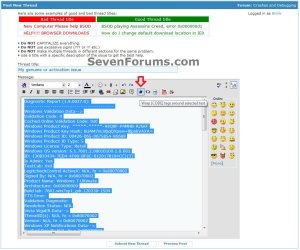
7. Select (highlight) all of the MGADiag report that you just pasted, and click on the code box # toolbar icon to wrap the report in a code box when posted. (see screenshot below)

MGADiagCode.jpg
 

My Computer My Computer

Computer Manufacturer/Model Number
HP Pavilion e9110t
OS
Windows 7 Home Premium 64 Bit
CPU
Intel(R) Core(TM)2 Quad CPU Q9550 @ 2.83GHz
Motherboard
Pegatron IPIEL-LA3
Memory
6.00 GB Hundai HMT125U6BFR8C-H9
Graphics Card(s)
ATI Radeon HD 4850
Sound Card
Realtek High Definition Audio/ATI High Definition Audio
Monitor(s) Displays
Acer AL2216W
Screen Resolution
1680x1050
Hard Drives
Hitachi HDP725050GLA360 ATA Device 500 GB
PSU
Unknown/installed by HP
Case
HP generic case
Cooling
Intel Stock Cooling
Keyboard
HP Keyboard
Mouse
HP Mouse
Internet Speed
Download: 19.15 Mbps Upload: 1.67 Mbps
Other Info
Network Adapter Realtek RTL8168D/8111D Family PCI-E Gigabit Ethernet NIC (NDIS 6.20)
Network Adapter 802.11n Wireless PCI Express Card LAN Adapter
Nice one - I was waiting until the OP canme back to hang himself before I posted this....

COUNTERFEIT!

There is an Acer OEM_SLP Key installed, on a Retail motherboard, using a hacker's Activation Exploit to simulate the the SLIC table.


The OP needs to reformat and reinstal with a legitimate copy of Windows.
 

My Computer My Computer

Computer type
Laptop
Computer Manufacturer/Model Number
Asus K52F or Lenovo B51-80
OS
Win 7 x64 Home Premium (and x86 VirtualBox VM)/Win10
CPU
i3 370M/i7 6500U
Motherboard
Asus/Lenovo
Memory
8GB - finally :)/8GB
Graphics Card(s)
it's an i3, dude!/dual Intel&nVidia
Sound Card
onboard
Monitor(s) Displays
15.6" built-in
Screen Resolution
1366x768/1920x1080
Hard Drives
750GB Seagate internal
Sundry external drives attached to other computers on the local network
1TB SSD on the Lenovo
PSU
n/a
Internet Speed
as much as I can get - usually on a dongle/phone, so <1MB/s
Antivirus
MSE/Defender
Browser
IE11/12/Edge/Chrome/FF(if I must)
I understand. Thank you for all your help nevertheless.
 

My Computer My Computer

OS
Microsoft Windows 7 Professional 64-bit 7601 Multiprocessor Free Service Pack 1
CPU
AMD Phenom(tm) II X4 965 Processor
Motherboard
ASRock 890GX Pro3
Memory
8.00 GB
Graphics Card(s)
(1) Air Display Mirror Adapter (2) AMD Radeon HD 6800 Seri
Sound Card
(1) HD Webcam C310 (2) AMD High Definition Audio Device
Screen Resolution
1280 x 1024 x 32 bits (4294967296 colors) @ 60 Hz
Hard Drives
(1) Hitachi HDS723020BLA642 ATA Device (2) M4-CT064M4SSD2 ATA Device (3) ST31500341AS ATA Device (4) Apple iPod USB Device (5) HP USB Device
Back
Top