"My Documents" folder is locked

siamoose

New member
Local time
1:03 PM
Messages
12
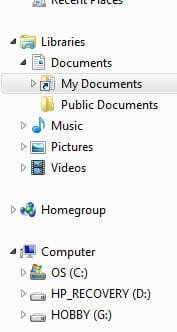
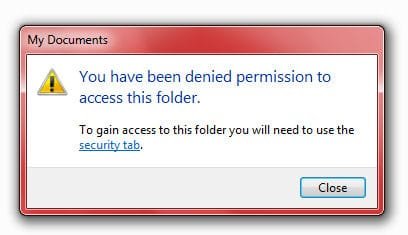
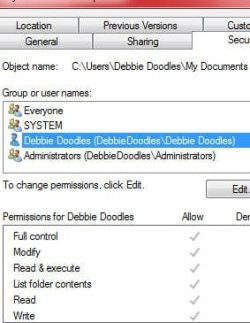
Yesterday I upgraded to WIN 7 Professional after having to do a reformat. Everything was fine after the upgrade, until this afternoon I noticed my "My Documents" folder is locked :cry: I am the owner and have full rights but yet can't get in! I am attaching, in order, of the messages I am getting. Any suggestions? I have no idea if I pushed a button I wasn't suppose to or what happened, yesterday was fine! I haven't installed anything after the reformat except for Firefox, PSPX2 and Incredimail. Any help will be appreciated! Thank you so much, debbie
 

Attachments

  • Image1.jpg
    Image1.jpg
    9.3 KB · Views: 14
  • Image2.jpg
    Image2.jpg
    13.9 KB · Views: 13
  • Image3.jpg
    Image3.jpg
    13 KB · Views: 13
  • Image4.jpg
    Image4.jpg
    19.5 KB · Views: 13

My Computer

OS
Windows 7 Professional 64bit
You are trying to get into the wrong folder. That is a junction!
You need "C:\Users\Debbie Doodles\Documents"
 

My Computer

Computer type
PC/Desktop
Computer Manufacturer/Model Number
Alienware Aurora ALX R4
OS
Windows 10 Pro (x64)
CPU
Intel Core i7-3930K (3.2GHz - 4.5GHz)
Motherboard
Alienware Aurora-R4 x79
Memory
4x Samsung 4GB PC3-12800 DDR3 (16GB 1600MHz)
Graphics Card(s)
Nvidia Geforce GTX 690
Sound Card
SteelSeries Siberia Elite
Monitor(s) Displays
Dell UltraSharp U3011
Screen Resolution
2560x1600
Hard Drives
Samsung 850 Pro 256 GB, Seagate 1TB Desktop Hybrid HDD, 2x Western Digital 4TB Green HDD
PSU
875W Some Dell PSU <.<
Case
Alienware Aurora ALX
Cooling
Custom Liquid Cooling (EK CPU & GPU blocks) dual EK 480RAD
Keyboard
Logitech G710+ Mechanical
Mouse
Logitech G700s
Internet Speed
Verizon Fios (50 mbps average)
Other Info
Server: Intel NUC D54250WYK: i5-4250U, 16GB, 256 GB mSATA, Windows Server 2012 R2
Thank you for your response, but that does not make any sense to me! I have never had to go to the C:\Users\Debbie Doodles\Documents to get to my "My Documents" folder! Never! It has always been under "Libraries", something I did today changed that and locked that folder! I can see my folder by following your path you gave, but I shouldn't have to go through all that to get to it!

This just isn't making sense to me, I'm sorry. Could I move the C:\Users\Debbie Doodles\Documents folder to the Libraries without causing problems?


I do appreciate you taking time to answer my question!
debbie
 
Last edited:

My Computer

OS
Windows 7 Professional 64bit
Have you installed all necessary Windows Updates? This is a common problem before all updates are installed.
 

My Computer

Computer type
PC/Desktop
Computer Manufacturer/Model Number
Dell XPS8700
OS
Windows 7 Professional x64
CPU
Intel Core i7-4790 CPU @ 3.60GHz (Haswell)
Motherboard
Dell Lynx Point Z87 Chipset motherboard
Memory
16 GB
Graphics Card(s)
NVIDIA GeForce GTX 745 4GB DDR 3
Sound Card
NVIDIA High Definition Audio
Monitor(s) Displays
HP Pavilion 27bw 27"
Screen Resolution
1920 x 1080 @ 60 Hz
Hard Drives
Seagate ST2000DM001 2 TB
Internet Speed
150 mb/s
Antivirus
Microsoft Security Essentials
Browser
Google Chrome
Yes, all updates were done at the time of upgrading, took about 45 minutes, there were 54 of them. Please understand this is NOT the first time I have had Win7 Professional, I had to reformat and thus the upgrading last night. I didn't have this problem until today.

Thanks for your suggestion.
debbie
 

My Computer

OS
Windows 7 Professional 64bit
Right-click on the "Documents" library, properties. Select and remove "My Documents" from the list. Then click on "Include a folder..." use the path I gave you in the address bar. Press "Include folder at the bottom.
What you should do is go into Folder Properties and make sure "Hide Protected System files" is checked. If not check it.
 

My Computer

Computer type
PC/Desktop
Computer Manufacturer/Model Number
Alienware Aurora ALX R4
OS
Windows 10 Pro (x64)
CPU
Intel Core i7-3930K (3.2GHz - 4.5GHz)
Motherboard
Alienware Aurora-R4 x79
Memory
4x Samsung 4GB PC3-12800 DDR3 (16GB 1600MHz)
Graphics Card(s)
Nvidia Geforce GTX 690
Sound Card
SteelSeries Siberia Elite
Monitor(s) Displays
Dell UltraSharp U3011
Screen Resolution
2560x1600
Hard Drives
Samsung 850 Pro 256 GB, Seagate 1TB Desktop Hybrid HDD, 2x Western Digital 4TB Green HDD
PSU
875W Some Dell PSU <.<
Case
Alienware Aurora ALX
Cooling
Custom Liquid Cooling (EK CPU & GPU blocks) dual EK 480RAD
Keyboard
Logitech G710+ Mechanical
Mouse
Logitech G700s
Internet Speed
Verizon Fios (50 mbps average)
Other Info
Server: Intel NUC D54250WYK: i5-4250U, 16GB, 256 GB mSATA, Windows Server 2012 R2
Thank you so much for your help! "My Docuements" folder is now where it should be!
I am a tad OCD :D. Appreciate your help so much!
debbie
 

My Computer

OS
Windows 7 Professional 64bit
Back
Top