Solved My Documents Library Won't Open

Adrianx

New member
Local time
12:25 PM
Messages
4
So Yesterday I Tried To Open My Document Library To Access A School Report I Double Clicked On The Library And It Wouldn't Open So I Went To The Navagation Pane And Clicked And Nothing, Luckily MY Doucuments Still Open So I Was Still Able To Access My Report But It Bothers Me That The Library Dosn't Open
 

My Computer

Computer Manufacturer/Model Number
Dell Inc. Dimension e510
OS
Windows 7 Home Premium 32bit
PSU
Antec
Keyboard
Logitech MK300
Mouse
Logitech MK300
So Yesterday I Tried To Open My Document Library To Access A School Report I Double Clicked On The Library And It Wouldn't Open So I Went To The Navagation Pane And Clicked And Nothing, Luckily MY Doucuments Still Open So I Was Still Able To Access My Report But It Bothers Me That The Library Dosn't Open

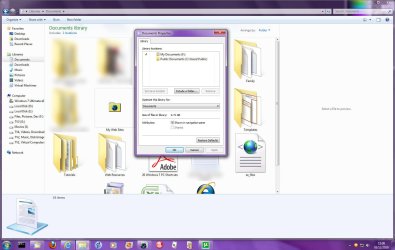
Right-click on "Documents" in "Libraries" section of Windows Explorer, then select "Properties". Does you normal "My Documents" folder show in the list?
Image1.jpg

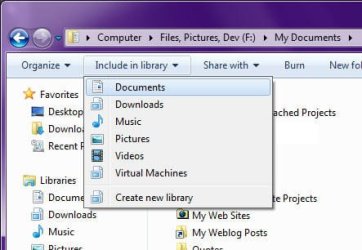
If not, then use Windows Explorer to navigate to your "My Documents" folder, and go into it. Then click Include in library and select "Documents" from the drop-down menu:
Image2.jpg
 
Last edited by a moderator:

My Computer

Computer type
PC/Desktop
Computer Manufacturer/Model Number
Virtual Machine
OS
Windows 7 Professional 32-bit SP1
CPU
AMD A4/A6
Motherboard
Intel Corporation 440BX Desktop Reference Platform
Memory
3.00GB EDO
Graphics Card(s)
VMware SVGA 3D
Sound Card
High Definition Audio Device
Monitor(s) Displays
Generic Non-PnP Monitor on VMware SVGA 3D
Screen Resolution
1440x900
Hard Drives
1 x 60GB VMware Virtual SATA Hard Drive ATA Device
Antivirus
Kaspersky Total Security
thnx but i opened document properties and clicked restore defaults and it fixed the problem :D
 

My Computer

Computer Manufacturer/Model Number
Dell Inc. Dimension e510
OS
Windows 7 Home Premium 32bit
PSU
Antec
Keyboard
Logitech MK300
Mouse
Logitech MK300
thnx but i opened document properties and clicked restore defaults and it fixed the problem :D

Great. At least the advice I gave can at least still be useful, right? You can add other forther to the libraries too.

And welcome to the forums!:D
 

My Computer

Computer type
PC/Desktop
Computer Manufacturer/Model Number
Virtual Machine
OS
Windows 7 Professional 32-bit SP1
CPU
AMD A4/A6
Motherboard
Intel Corporation 440BX Desktop Reference Platform
Memory
3.00GB EDO
Graphics Card(s)
VMware SVGA 3D
Sound Card
High Definition Audio Device
Monitor(s) Displays
Generic Non-PnP Monitor on VMware SVGA 3D
Screen Resolution
1440x900
Hard Drives
1 x 60GB VMware Virtual SATA Hard Drive ATA Device
Antivirus
Kaspersky Total Security
I'm having the same problem, but doing what you suggested didn't help. None of my libraries will open, not just my documents. My properties for each one shows that the normal folders are all included. I can still access the folders going into my hard drive, but not at all through the libraries folder.
 

My Computer

Computer Manufacturer/Model Number
Toshiba Satellite L455D-S5976
OS
Windows 7 Home Premium 32bit
Back
Top