My DVD Rom does not read content on discs

countryboynaija

New member
Local time
6:47 AM
Messages
5
I own a Toshiba satellite C660- 14H (Windows 7). Recently I just discovered my dvd rom sees all inserted discs as blank. I thought it was a problem with my DVD ROM’s optical lenses so I got an external dvd rom but it also reads all discs as blank when they are not. Can anyone help?
 

My Computer My Computer

At a glance

Windows 7 ultimate x32Intel Pentium P6100 @ 2.00GHz2.00GB single channel DDR3 @532MHzIntel HD Graphics
Computer Manufacturer/Model Number
toshiba satellite C660 - 14H laptop
OS
Windows 7 ultimate x32
CPU
Intel Pentium P6100 @ 2.00GHz
Motherboard
Toshiba PWWAA (CPU)
Memory
2.00GB single channel DDR3 @532MHz
Graphics Card(s)
Intel HD Graphics
Sound Card
Realtek High Definition Audio
Monitor(s) Displays
Generic PnP monitor (1366x768 @ 60Hz)
Screen Resolution
(1366x768 @ 60Hz)
Hard Drives
313GB Toshiba Toshiba MK3265GSXN (SATA)
Keyboard
Toshiba Flash cards
Mouse
synaptics PS/2 Port Touchpad
Other Info
Optical Drive: HL-DT-ST DVDRAM GT30N
Do you have any kind of disc burning software installed? How about any virtual drive software?
 

My Computer My Computer

At a glance

Windows 7 Ultimate x64 SP1Intel Core i7-260012 GB Patriot Extreme DDR3-1333Nvidia GTX 470
OS
Windows 7 Ultimate x64 SP1
CPU
Intel Core i7-2600
Motherboard
Gigabyte GA-P67A-UD3P-B3
Memory
12 GB Patriot Extreme DDR3-1333
Graphics Card(s)
Nvidia GTX 470
Monitor(s) Displays
Dell UltraSharp 2209WA
Hard Drives
OCZ Agility3 240 GB, WD5001AALS, WD7501AALS
PSU
OCZ ModStream 700W
Case
CoolerMaster HAF 912 Advanced
Cooling
CoolerMaster Hyper 212 Plus
Thanks for your reply. Yes I have Nero insTalled.
 

My Computer My Computer

At a glance

Windows 7 ultimate x32Intel Pentium P6100 @ 2.00GHz2.00GB single channel DDR3 @532MHzIntel HD Graphics
Computer Manufacturer/Model Number
toshiba satellite C660 - 14H laptop
OS
Windows 7 ultimate x32
CPU
Intel Pentium P6100 @ 2.00GHz
Motherboard
Toshiba PWWAA (CPU)
Memory
2.00GB single channel DDR3 @532MHz
Graphics Card(s)
Intel HD Graphics
Sound Card
Realtek High Definition Audio
Monitor(s) Displays
Generic PnP monitor (1366x768 @ 60Hz)
Screen Resolution
(1366x768 @ 60Hz)
Hard Drives
313GB Toshiba Toshiba MK3265GSXN (SATA)
Keyboard
Toshiba Flash cards
Mouse
synaptics PS/2 Port Touchpad
Other Info
Optical Drive: HL-DT-ST DVDRAM GT30N
I have done the Microsoft fix it troubleshooting. All it says is the DVD drive cannot read the disc. I have also uninstalled nero. Still no solution.
 

My Computer My Computer

At a glance

Windows 7 ultimate x32Intel Pentium P6100 @ 2.00GHz2.00GB single channel DDR3 @532MHzIntel HD Graphics
Computer Manufacturer/Model Number
toshiba satellite C660 - 14H laptop
OS
Windows 7 ultimate x32
CPU
Intel Pentium P6100 @ 2.00GHz
Motherboard
Toshiba PWWAA (CPU)
Memory
2.00GB single channel DDR3 @532MHz
Graphics Card(s)
Intel HD Graphics
Sound Card
Realtek High Definition Audio
Monitor(s) Displays
Generic PnP monitor (1366x768 @ 60Hz)
Screen Resolution
(1366x768 @ 60Hz)
Hard Drives
313GB Toshiba Toshiba MK3265GSXN (SATA)
Keyboard
Toshiba Flash cards
Mouse
synaptics PS/2 Port Touchpad
Other Info
Optical Drive: HL-DT-ST DVDRAM GT30N
What is the error code you get in the Device Manager for your optical drive?

(Device Manager > DVD/CD-ROM drives > your optical drive > Properties > General)
 

My Computer My Computer

At a glance

Windows 7 Home Premium 32 bit
OS
Windows 7 Home Premium 32 bit
I have this with some discs. I think the drive is dying or has a short life. You could buy another or if you don't use it much just ignore it.
 

My Computer My Computer

At a glance

Windows 10 ProCore2Quad (2.6 Ghz)8 Gigs DDR2Geforce Titan Black
Computer type
PC/Desktop
Computer Manufacturer/Model Number
Custom Built
OS
Windows 10 Pro
CPU
Core2Quad (2.6 Ghz)
Motherboard
nVidia 775
Memory
8 Gigs DDR2
Graphics Card(s)
Geforce Titan Black
Sound Card
Motherboard Audio
Monitor(s) Displays
25" Asus LCD
Screen Resolution
1680x1050
Hard Drives
120 Gig SSD
60 Gig SSD
750 Gig HDD
PSU
850 Watts
Case
Mid-Size
Keyboard
Logitech
Mouse
Logitech - I love logitech mouses
Internet Speed
DSL 25Mbps - Although extremely expensive
Antivirus
Microsoft Anti-Virus
Browser
FireFox 36.x
WIN | type DEVMGMT.MSC |

Are there any items marked with a red X?

Is there an entry for DVD/CD-ROM drives?

WIN=key with microsoft logo on top.

===============================
a big help will be if you fluff out those system specs. Use Speccy.

Update your SevenForums System Specs
User CP (located on the top menu bar) |
Your Profile | Edit System Spec
(left-hand column)

To gather info, use Speccy (my favorite) or SIW or System Info

Add the word laptop or desktop or netbook to the
“system manufacturer” block, for example,
Toshiba Satellite L305D notebook.

Provide full windows version info, for example:
MS Windows 7 Ultimate SP1 64-bit

Use the “Other Info” block for Optical Reader,
Mouse, touchpad, wifi adapter, speakers, monitor, etc

Scroll down and click on SAVE CHANGES.
=======================================
 

My Computer My Computer

At a glance

MS Windows 7 Ultimate SP1 64-bitAMD A10-4600M6.00 GB Dual-Channel DDR3 @ 798MHz (11-11-12-28)AMD Radeon HD 7660G
Computer Manufacturer/Model Number
Toshiba Satellite S875D-S7239 laptop
OS
MS Windows 7 Ultimate SP1 64-bit
CPU
AMD A10-4600M
Motherboard
AMD Pumori (Socket FT1)
Memory
6.00 GB Dual-Channel DDR3 @ 798MHz (11-11-12-28)
Graphics Card(s)
AMD Radeon HD 7660G
Sound Card
High Definition Audio Device
Monitor(s) Displays
Generic PnP Monitor (1600x900@60Hz)
Screen Resolution
1600x900@60Hz
Hard Drives
SSD 119GB Corsair CSSD-V128GB2 ATA Device
Keyboard
Standard PS/2 Keyboard
Mouse
HP Wireless Optical Mobile Mouse Model FHA-3410
Internet Speed
What the local pub, local coffee shop offers.
Other Info
Optical Drive:MATSHITA BD-CMB UJ160B ATA Device


Also have an Asus ha1002xp netbook with Win 7 Ultimate installed.
What is the error code you get in the Device Manager for your optical drive?

(Device Manager > DVD/CD-ROM drives > your optical drive > Properties > General)

: There are no error codes. It says the device is working properly
 

My Computer My Computer

At a glance

Windows 7 ultimate x32Intel Pentium P6100 @ 2.00GHz2.00GB single channel DDR3 @532MHzIntel HD Graphics
Computer Manufacturer/Model Number
toshiba satellite C660 - 14H laptop
OS
Windows 7 ultimate x32
CPU
Intel Pentium P6100 @ 2.00GHz
Motherboard
Toshiba PWWAA (CPU)
Memory
2.00GB single channel DDR3 @532MHz
Graphics Card(s)
Intel HD Graphics
Sound Card
Realtek High Definition Audio
Monitor(s) Displays
Generic PnP monitor (1366x768 @ 60Hz)
Screen Resolution
(1366x768 @ 60Hz)
Hard Drives
313GB Toshiba Toshiba MK3265GSXN (SATA)
Keyboard
Toshiba Flash cards
Mouse
synaptics PS/2 Port Touchpad
Other Info
Optical Drive: HL-DT-ST DVDRAM GT30N
I have this with some discs. I think the drive is dying or has a short life. You could buy another or if you don't use it much just ignore it.

I did that before. I bought an external disk drive. It also shows any disk loaded as blank
 

My Computer My Computer

At a glance

Windows 7 ultimate x32Intel Pentium P6100 @ 2.00GHz2.00GB single channel DDR3 @532MHzIntel HD Graphics
Computer Manufacturer/Model Number
toshiba satellite C660 - 14H laptop
OS
Windows 7 ultimate x32
CPU
Intel Pentium P6100 @ 2.00GHz
Motherboard
Toshiba PWWAA (CPU)
Memory
2.00GB single channel DDR3 @532MHz
Graphics Card(s)
Intel HD Graphics
Sound Card
Realtek High Definition Audio
Monitor(s) Displays
Generic PnP monitor (1366x768 @ 60Hz)
Screen Resolution
(1366x768 @ 60Hz)
Hard Drives
313GB Toshiba Toshiba MK3265GSXN (SATA)
Keyboard
Toshiba Flash cards
Mouse
synaptics PS/2 Port Touchpad
Other Info
Optical Drive: HL-DT-ST DVDRAM GT30N
can you burn a CD?
 

My Computer My Computer

At a glance

MS Windows 7 Ultimate SP1 64-bitAMD A10-4600M6.00 GB Dual-Channel DDR3 @ 798MHz (11-11-12-28)AMD Radeon HD 7660G
Computer Manufacturer/Model Number
Toshiba Satellite S875D-S7239 laptop
OS
MS Windows 7 Ultimate SP1 64-bit
CPU
AMD A10-4600M
Motherboard
AMD Pumori (Socket FT1)
Memory
6.00 GB Dual-Channel DDR3 @ 798MHz (11-11-12-28)
Graphics Card(s)
AMD Radeon HD 7660G
Sound Card
High Definition Audio Device
Monitor(s) Displays
Generic PnP Monitor (1600x900@60Hz)
Screen Resolution
1600x900@60Hz
Hard Drives
SSD 119GB Corsair CSSD-V128GB2 ATA Device
Keyboard
Standard PS/2 Keyboard
Mouse
HP Wireless Optical Mobile Mouse Model FHA-3410
Internet Speed
What the local pub, local coffee shop offers.
Other Info
Optical Drive:MATSHITA BD-CMB UJ160B ATA Device


Also have an Asus ha1002xp netbook with Win 7 Ultimate installed.
In addition to the uninstalling your disk emulation devices, try uninstalling the disk drivers in the Device Manager
WIN | type DEVMGMT.MSC > Expand DVD/CD-ROM devices > right click on your drive and Select Uninstall.
Restart the computer. Windows will automatically re-install the drivers.

YBL
 

My Computer My Computer

At a glance

Dual Booting Windows 7 64-Bit Ultimate Editio...AMD Phenom X4 9254gb DDR3 G.skill RipJawsATI Radeon HD 6770
Computer Manufacturer/Model Number
AMD _(Assembled)_
OS
Dual Booting Windows 7 64-Bit Ultimate Edition and Fedora 16.
CPU
AMD Phenom X4 925
Motherboard
MSI 785g-E53
Memory
4gb DDR3 G.skill RipJaws
Graphics Card(s)
ATI Radeon HD 6770
Sound Card
Realtek
Monitor(s) Displays
Dell IN2020M LED
Screen Resolution
1600*900 20"
Hard Drives
Seagate 500 Gibs
External 320 Gb Western Digital(Got Glitchy)
PSU
Cooler Master
Case
Cooler Master
Cooling
Cooler Master
Keyboard
Logitech K100
Mouse
Razor Death Adder v2 3500 dPi (Razer Goliathus Pad)
Internet Speed
Back to college Internet with Cyberroam X|
Since with an external drive also the same problem persists, it is more or less definite there is some problem in your system, rather than the drive. (unless of course the external drive too is bad.:) )

I would suggest the following.

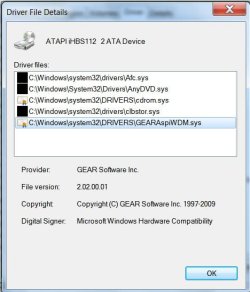
Check what all drivers are installed for your optical drive. A screenshot from my drive below.

DVDROMdrivers.jpg

The first one is installed by Arcsoft's TMT player. The second one by Slysoft's AnyDVD. The third the usual Microsoft driver. The fourth Cyberlink's Power DVD. And the fifth hmm... really difficult to know which program installed it. Almost any program that uses the optical drive could have installed it. It could be itunes, DVD Fab Decrypter, Freemake Video converter,.... almost anything that uses the optical drive. Nothing wrong. It is a genuine driver - I have no problems.

The worst part is some malware can cloak itself as this driver.

So uninstall any or all programs that use your optical drive (including Virtual drives)

Uninstall all drivers as suggested by youllbelost and then the drive too.

On reboot you should have only one driver, the Microsoft one.

If you have anything else force-delete it from the source directory, and run a malware check. Malwarebytes is most reommended by many here.

The other thing you can do is a cleanboot and then troubleshoot to find out what is responsible for the problem.

http://www.sevenforums.com/tutorial...ation-conflicts-performing-clean-startup.html

Good luck.
 

My Computer My Computer

At a glance

Windows 7 Home Premium 32 bit
OS
Windows 7 Home Premium 32 bit
Back
Top