Solved My experience with EaseUS Partition Master

BuckSkin

New member
Power User
VIP
Local time
3:10 AM
Messages
521
Before anyone gets the wrong idea, I really like EaseUS Partition Master and it has done things for me that Disk Management would not touch.

However, I have finally narrowed down my list of "persons of interest" and elevated EaseUS Partition Master to prime suspect.
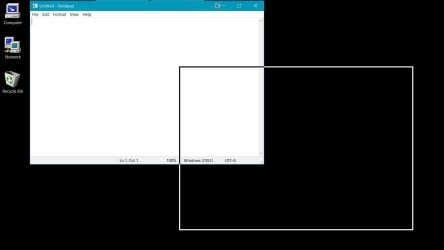
Although many Partition Master tasks do not require a restart; immediately after every use that does require a restart, the behavior of moving and arranging windows has changed from "move window and contents" to just the outline moving and then the contents snapping into the newly positioned window.

This behavior is only a minor annoyance and I will not take any stars away from Partition Master for this little glitch, but it took me ages to figure out what was changing my window moving behavior.

Does this happen to everyone or only to me ?
 

My Computer

Computer type
PC/Desktop
Computer Manufacturer/Model Number
Dell Optiplex 780m "mini-tower"
OS
Windows 7 Pro x64
CPU
Intel Core Two Duo E8600 3.33 ghz
Motherboard
Whatever DELL put in it
Memory
8GB
Graphics Card(s)
Gigabyte Radeon R7 240
Monitor(s) Displays
HP 2159m
PSU
750 Watt Corsair CX750
Keyboard
Logitech Wireless
Mouse
Logitech Wireless
Browser
Chrome, Firefox, IE
It sounds like the new behavior that you do not like is the behavior I have always had. In the pic I opened up notepad, pressed left-click and dragged its title bar down and to the right BUT have not yet released the left click yet in the pic. The instant I do, the whole notepad window snaps to the new location. Is that what you are saying is your new behavior? If not, maybe post a pic of what you mean.
 

Attachments

  • Clipboard01.jpg
    Clipboard01.jpg
    38.2 KB · Views: 0

My Computer

Computer type
PC/Desktop
Computer Manufacturer/Model Number
diy
OS
Win7 pro x64
CPU
stock i7 7700k
Motherboard
Gigabyte Z270N-WIFI mini-ITX
Memory
Corsair Vengeance LPX 16GB (2x8GB) DDR4 @ 3200MHz
Graphics Card(s)
integrated Intel HD 630
Sound Card
onboard Realtek ALC1220
Monitor(s) Displays
two vertically mounted samsung 55" 4k un55mu8000
Screen Resolution
1920x1280
Hard Drives
256GB Samsung EVO 960 M.2 pci-e NVMe SSD
PSU
SilverStone Nightjar ST45NF 450Watt Fanless
Case
No case. Motherboard is mounted directly onto power supply
Cooling
Evercool low profile 815EP with Panaflow 12L fan at 7v
Keyboard
Ortek MCK-86 mini
Mouse
Belkin 5-button USB
Internet Speed
spectrum 400mbps
johnhoh,

that doesn't happen on my win7. I think the OP is describing changing from normal behaviour, to what you describe.

I haven't used easeus pm for a while, so I can't comment if that is the cause.
 

My Computers

System One System Two

  • Computer type
    PC/Desktop
    OS
    7 X64
    CPU
    i5 8400
    Motherboard
    gigabyte b365m ds3h
    Memory
    2x8gb 3200mhz
    Hard Drives
    various
    PSU
    pure power 11 400w cm
    Case
    Coolermaster
    Cooling
    cryorig m9i
  • Computer type
    PC/Desktop
    OS
    7x64
    CPU
    g5400
    Motherboard
    ga b365m ds3h
    Memory
    8gb ddr4 2400
    PSU
    xfx pro 450w
EaseUS must be unchecking the below

start > run > systempropertiesadvanced > enter > Performance > Settings > Show Window Contents While Dragging
 

My Computer

Computer type
PC/Desktop
Computer Manufacturer/Model Number
diy
OS
Win7 pro x64
CPU
stock i7 7700k
Motherboard
Gigabyte Z270N-WIFI mini-ITX
Memory
Corsair Vengeance LPX 16GB (2x8GB) DDR4 @ 3200MHz
Graphics Card(s)
integrated Intel HD 630
Sound Card
onboard Realtek ALC1220
Monitor(s) Displays
two vertically mounted samsung 55" 4k un55mu8000
Screen Resolution
1920x1280
Hard Drives
256GB Samsung EVO 960 M.2 pci-e NVMe SSD
PSU
SilverStone Nightjar ST45NF 450Watt Fanless
Case
No case. Motherboard is mounted directly onto power supply
Cooling
Evercool low profile 815EP with Panaflow 12L fan at 7v
Keyboard
Ortek MCK-86 mini
Mouse
Belkin 5-button USB
Internet Speed
spectrum 400mbps
Yes, johnhoh, the picture is exactly what I see; and , you are right in assuming EaseUS Partition Master is unchecking the option.

Thanks for giving the navigation route to system properties advanced; that saves me quite a bit of looking for it.

It is curious that a program that does such good work and does so many things that cannot be done in Windows alone, would also have such a silly behavior as to uncheck that box.
 

My Computer

Computer type
PC/Desktop
Computer Manufacturer/Model Number
Dell Optiplex 780m "mini-tower"
OS
Windows 7 Pro x64
CPU
Intel Core Two Duo E8600 3.33 ghz
Motherboard
Whatever DELL put in it
Memory
8GB
Graphics Card(s)
Gigabyte Radeon R7 240
Monitor(s) Displays
HP 2159m
PSU
750 Watt Corsair CX750
Keyboard
Logitech Wireless
Mouse
Logitech Wireless
Browser
Chrome, Firefox, IE
Back
Top