
My Explorer Icon Changed

Grommett

New member
Local time
11:14 AM
Messages
3
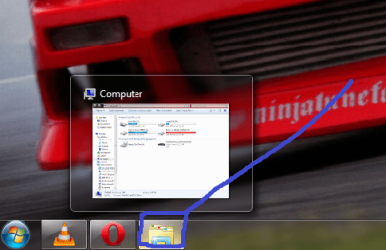
Hey all, I have noticed this problem for a while and didn't bother me until I started having a lot of App's running.

View attachment 27941

I am not sure how to fix this Issue and its getting really annoying. Thanks.
 

Attachments
  • My Problem.png
    My Problem.png
    54.5 KB · Views: 110

My Computer

OS
Windows 7
CPU
Intel Core 2 Duo E8400 @ 3.6Ghz
Motherboard
Gigabyte EP35-DS3P rev.2
Memory
6Gb of Corsair Dominator
Graphics Card(s)
nVidia 9800GTX+ O'Clock
Monitor(s) Displays
Viewsonic 19"
Hard Drives
2x120Gb Seagate Barracuda's
2x500Gb Seagate Barracuda's
PSU
Corsair HX 620 Watt
Case
NZXT Tempest (Heavily Modified)
Cooling
6x120mm Fans and 2 140mm Fans
hi Grommett and welcome to sevenforums,

my explorer icon has always looked like that!

what did yours used to look like?
 

My Computer

Computer Manufacturer/Model Number
mickey megabyte 1234
OS
ultimate 64 sp1
CPU
i5 2500K [email protected]
Motherboard
MSI P67A-GD53
Memory
8 gigs GSkill Ripjaws 1600
Graphics Card(s)
amd hd6950
Sound Card
creative x-fi gamer
Monitor(s) Displays
samsung 24"
Screen Resolution
1920x1080
Hard Drives
ocz vertex 2e 60 gig, samsung f3 1tb, buffalo 2tb ext
PSU
antec 550
Case
antec three hundred
Cooling
i'm a cooling fan
Keyboard
saitek eclipse ii
Mouse
logitech g3
Internet Speed
about 4 Mbps
Other Info
i love win7
Hi Grommett.
This is default icon for windows explorer in Win 7
 

My Computer

OS
OS
Yes that is an awful looking blue line there.
 

My Computer

Computer Manufacturer/Model Number
Self Build 64bit
OS
Vista Ult64, Win7600
CPU
Intel Core 2 Quad Q6600 @ 2400 MHz 64bit OS
Motherboard
Asus P5E3 Deluxe WiFi @p 64 bit OS
Memory
4096 MB DDR3-SDRAM
Graphics Card(s)
ATI Radeon HD 3870 Series x2 Crossfired
Sound Card
Realtek on board
Monitor(s) Displays
Samsung SyncMaster - 23 inches
Screen Resolution
1680x1050 pixels at 60 Hz in True Colors
Hard Drives
Hitachi (250 GB)/Samsung 750 GB. /Barracuda 160 GB.
My Book 1 TB external..
PSU
Cooler Master 1000w
Case
Cooler Master Cosmos 1000.
Cooling
Fans and fresh air,
Keyboard
Wireless
Mouse
Wireless
Internet Speed
Never fast enough
Other Info
I use a Magnum.
As has been said this is the new default icon for the explorer in Windows 7
However, it is not fixed and can be easily changed :)

Right click on the taskbar icon to show the jumplist.
right click on the Windows Explorer entry on the jumplist.
Select the Change Icon option from the presented dialog.
Browse to an .Ico or suitable .dll file and select an icon.

Ok out of the dialog to set the icon

It may take a reboot or log off to get the change to take but I assure you It does work

Taskbar Icons.PNG

None of these icons are original other than the bin and start button :D
 

My Computers

System One System Two

  • Computer type
    PC/Desktop
    Computer Manufacturer/Model Number
    ChillBlast - Custom to my design
    OS
    Windows 11 Pro x64 [Latest Release and Release Preview]
    CPU
    Ryzen 9 5950X, 3.8 - 5.2 MHz
    Motherboard
    Asus Prime X570-Pro
    Memory
    64GB [2 x 32GB] DDR4 3200MHz
    Graphics Card(s)
    4GB NVIDIA GEFORCE GTX 1650 Ti
    Sound Card
    On-board SPDIF to 5.1 System + HDMI [5.1 system]
    Monitor(s) Displays
    32" UHD 32 Bit HDR Monitor + 43" UHD 4K 32Bit HDR TV
    Screen Resolution
    2 x 3840 x 2160 @60Hz
    Hard Drives
    1TB M2 SSD OS, 500GB Fast Access SSD, 2 x 8TB Data + Various Externals from 1TB to 4TB, 10TB NAS
    PSU
    NZXT C750 80 PLUS Gold 750W Modular PSU
    Case
    Workstation Case [Matt Black]
    Cooling
    NZXT Kraken X63 280mm CPU Cooler +2x Quiet Case fans
    Keyboard
    Logitech Wireless MX Keys & K400 + others
    Mouse
    Logitech Wireless MX Master 3S
    Internet Speed
    920 MB Down 50 MB Up
    Antivirus
    BitDefender Total Security Pro
    Browser
    Chrome (always run latest Non-Beta)
    Other Info
    Also run ...
    Laptop - Quad 8GB - Windows 10 Pro x64
    Nexus 7 Android tablet x2
    Samsung 10.2" tablet
    Blackview TAB 8 4G Android Tablet c/w Keyboard
    Wacom Intuos Pro Medium Pen Pad
    Wacom Intuos Pro Small Pen Pad
    Wacom Expresskeys Remote
    Loopdeck+ Graphics Controller
    Shuttle Pro v2 Control
  • Computer type
    Laptop
    System Manufacturer/Model Number
    Dell XPS 17 10750H
    OS
    Windows 11 Pro x64 Latest RP
    CPU
    Intel I7 10750H 5.0GHz
    Motherboard
    Dell XPS
    Memory
    32GB [2x16GB] DDR4 2933 MHz
    Graphics Card(s)
    nVidia GTX1650Ti 4 GB GDDR6
    Sound Card
    Stock [Realtek] 4 Speaker
    Monitor(s) Displays
    17" IPS UHD+ Infinity Edge Touchscreen
    Screen Resolution
    3840 x 2400
    Hard Drives
    2TB M2 NVMe, 4TB External + various 500GB & 1TB External NVMe (also have access to spinner HDD from
    PSU
    Stock
    Case
    Stock XPS Aluminium & Carbon Fibre
    Cooling
    Stock - Active Fan Control
    Keyboard
    Backlit + Various Logitech
    Mouse
    Stock Track Pad + Logitech MX Trackball
    Internet Speed
    72 MB Down 18MB Up
    Browser
    Chrome
    Other Info
    Also run ...
    Laptop - Quad 8GB - Windows 10 Pro x64
    Nexus 7 Android tablet x2
    10.2" tablet
    Sony Z3 Android Smartphone
    Wacom Intuos Pro Medium Pen Pad
    Wacom Intuos Pro Small Pen Pad
    Wacom Expresskeys Remote
    Loopdeck+ Graphics Controller
    Shuttle Pro v2 Control Pad
    10TB NAS
Thankyou Barman58, It worked well, I noticed that when I pinned Explorer, Then Unpinned the Icon would Change. See for Yourself, I Used an Awful Blue Line because of that Exact Reason It is Noticeable. Thanks Again Guys.
 

My Computer

OS
Windows 7
CPU
Intel Core 2 Duo E8400 @ 3.6Ghz
Motherboard
Gigabyte EP35-DS3P rev.2
Memory
6Gb of Corsair Dominator
Graphics Card(s)
nVidia 9800GTX+ O'Clock
Monitor(s) Displays
Viewsonic 19"
Hard Drives
2x120Gb Seagate Barracuda's
2x500Gb Seagate Barracuda's
PSU
Corsair HX 620 Watt
Case
NZXT Tempest (Heavily Modified)
Cooling
6x120mm Fans and 2 140mm Fans
Back
Top
