My External HDD Data is not excess able in win 7 !

caption

New member
Local time
1:07 PM
Messages
3
Location
Karachi Pakistan
Hi,

Can any one help me out to resolve that strange issue as follows

My External HDD Data is not excess able in win 7 but in win XP working fine

Description :

when i attached my External HDD to my computer or laptop EXT HDD is deducting but all of my folder are empty. but the free space of my EXT HDD is showing correct space. i cant even del or make new folder in it. But when i move to win XP there is no issue at all. i can use my date normally

Please help me out

Please find below some attached files


My Computer My Computer

At a glance

win 7 home basic 32 bit
OS
win 7 home basic 32 bit
Hello caption and welcome to Seven Fourms.

1. Have you tried using a different USB port on the Windows 7 computer?
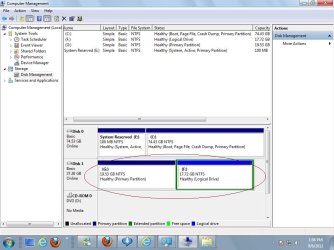
2. What does Disk Management show? Please post a screenshot. Maximize the screen shot window before posting so all info is visible.

How To Access Disk Management in Windows 7

http://www.sevenforums.com/tutorials/9733-screenshots-files-upload-post-seven-forums.html

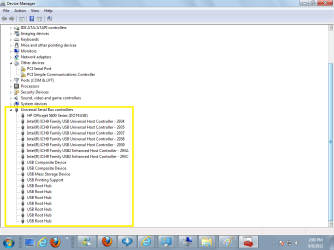
3. Open Device Manager and see if any of the USB controllers are showing yellow or red warnings. Could indicate a driver problem.

How Do I Open Device Manager in Windows 7?

Please post back if you have questions or if problem has been resolved.
 

My Computer My Computer

At a glance

Win 7 Pro 64-bitIntel i5 2.4 Ghz8GB DDR3Intel HD 3000
Computer type
Laptop
Computer Manufacturer/Model Number
Sony Vaio VPCEB47GM Laptop
OS
Win 7 Pro 64-bit
CPU
Intel i5 2.4 Ghz
Memory
8GB DDR3
Graphics Card(s)
Intel HD 3000
Sound Card
IDT High Definition
Monitor(s) Displays
15.6 WGXA Anti-Glare LED
Screen Resolution
1280x800
Hard Drives
640Gb 7200rpm
Antivirus
MSE
Browser
Opera (primary) with IE9 backup
Hello caption and welcome to Seven Fourms.

1. Have you tried using a different USB port on the Windows 7 computer?
2. What does Disk Management show? Please post a screenshot. Maximize the screen shot window before posting so all info is visible.

How To Access Disk Management in Windows 7

http://www.sevenforums.com/tutorials/9733-screenshots-files-upload-post-seven-forums.html

3. Open Device Manager and see if any of the USB controllers are showing yellow or red warnings. Could indicate a driver problem.

How Do I Open Device Manager in Windows 7?

Please post back if you have questions or if problem has been resolved.

1- Yes, i have tried many time using different USB port..even on another machine as well..but in win 7 problem is same.

Please find below the screen short
 

Attachments

  • 1.jpg
    1.jpg
    84.8 KB · Views: 7
  • Device Manager.png
    Device Manager.png
    34.2 KB · Views: 5

My Computer My Computer

At a glance

win 7 home basic 32 bit
OS
win 7 home basic 32 bit
Please help..... Any 1 is there?
 

My Computer My Computer

At a glance

win 7 home basic 32 bit
OS
win 7 home basic 32 bit
hmm, try doing what was done in this thread (especially at the end).
 

My Computer My Computer

At a glance

Win 7 Pro 64-bit 7601AMD Phenom 9650 QuadCore, revision DR-B35 GB yes I run 2x 2GB and 1x 1GB, different b...NVIDIA GeForce 9800 GT 512 Mb, unknown manufa...
Computer type
PC/Desktop
Computer Manufacturer/Model Number
custom built
OS
Win 7 Pro 64-bit 7601
CPU
AMD Phenom 9650 QuadCore, revision DR-B3
Motherboard
ASUS M4A78
Memory
5 GB yes I run 2x 2GB and 1x 1GB, different brand, spank me.
Graphics Card(s)
NVIDIA GeForce 9800 GT 512 Mb, unknown manufacturer.
Sound Card
Crappy Realtek Integrated Audio
Monitor(s) Displays
Fujitsu Siemens P19-3P
Screen Resolution
1280 x 1024 x 32 bits @ 60 Hz Oh yeah, 4:3 rocks!
Hard Drives
(1) MAXTOR S TM3320613AS SATA Disk Device (2) STM35004 18AS SATA Disk Device (3) TOSHIBA USB 2.5"-HDD
PSU
whatever, around 450w
Case
Scavenged from old company PC, 10+ years old
Cooling
CPU fan, GPU fan, case fan, nothing fancy
Keyboard
Microsoft, PS/2, white.
Mouse
Optical, logitec.
Internet Speed
effective max speeds: 70-ish kB/s down 30-ish kB/s up
Antivirus
Avira, free edition.
Browser
Firefox with FXChrome to make it look like Google Chrome :P
Other Info
Was discarded by previous owner due to "horrible performance".
Was running Win Xp from a IDE drive. Yeah. Was a pain.
SATA II drive and Win7 and it zips away! Yay!
Back
Top