Solved My External HHD won't recognize my data!

DaYiM

New member
Member
VIP
Local time
6:53 PM
Messages
130
Hello,
i have 1TB external HHD, it's been long time sense i last connected it
to the computer, but when i did i noticed this in my computer:-
12302011121003pm.png

Drive O, also when i checked the Disk Management i have found
that it says it's only 500GB not 1TB!!!
12302011120612pm.png

is there away to fix this issue without formatting the HHD?
PS: i checked my cable it's working with other HHD.
thanks & best regards.
 

My Computer

Computer Manufacturer/Model Number
Qosmio X300-13O
OS
Windows 7, 64Bit
CPU
Intel Mobile Core 2 Duo T9600 @ 2.80GHz
Motherboard
TOSHIBA KSRAA (U2E1)
Memory
8.0GB Dual-Channel DDR3 @ 531MHz
Graphics Card(s)
1024MB GeForce 9800M GTX (Toshiba)
Sound Card
Realtek High Definition Audio
Monitor(s) Displays
Generic PnP Monitor on NVIDIA GeForce 9800M GTX
Screen Resolution
Generic PnP Monitor @ 1440x900
Hard Drives
125GB KINGSTON SV100S2128G ATA Device (SATA)
488GB Seagate ST95005620AS ATA Device (SATA)
Error Checking

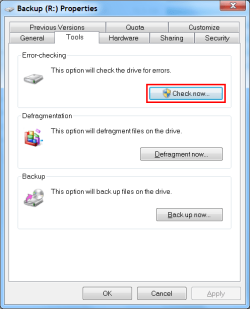
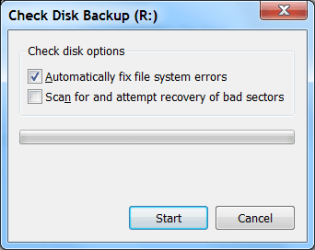
Have you tried running Check Disk (Error checking)?

  • Right click on your HDD icon.
  • Select "Properties"
  • Click on the "Tools" tab
Check Disk.png Check Disk 2.png
 

My Computer

Computer type
PC/Desktop
Computer Manufacturer/Model Number
n/a
OS
W7 Ultimate SP1, LM19.2 MATE, W10 Home 1703, W10 Pro 1703 VM, #All 64 bit
CPU
AMD Phenom II x6 1100T, 3.3 GHz
Motherboard
ASUS M4A88T-M/USB3 (AM3)
Memory
12GB DDR3 1333 G-Skill (4GB x 2), G-Skill (2GB x 2)
Graphics Card(s)
NVIDIA GeForce GTX 660
Sound Card
Realtek?
Monitor(s) Displays
Samsung S23B350
Screen Resolution
1920x1080
Hard Drives
WD Green 2TB (SATA), WD Green 3TB (SATA), WD Blue 4TB (SATA), WD Blue 6TB (SATA)
PSU
Cooler Master
Case
Antec GX300 Tower
Cooling
3x Antec TRICOOL 120mm Fans
Mouse
Wired Optical
Internet Speed
DSL
Antivirus
Avast
Browser
Pale Moon (64 bit)
Other Info
2018-12-27 Upgraded HDDs
2015-12-10 Upgraded case, graphics card, storage
2015-08-15 Upgraded motherboard & RAM
2015-07-15 Upgraded LM17.1 to LM17.2
thanks, but sense i plug it in again to the computer; it's whole another problem;
the HHD doesn't show up in my computer, & in Disk Management:-
it doesn't show in the list, but only down ( with the blue lines ),
here when ever i right click & choose Properties Or Change Drive Letter.....:
gives me this error:
1230201160556pm.png

i have tried everything in this error note to solve this problem,
but it keeps coming up! also the HHD is back to 1TB capacity!
Please HELP!
 

My Computer

Computer Manufacturer/Model Number
Qosmio X300-13O
OS
Windows 7, 64Bit
CPU
Intel Mobile Core 2 Duo T9600 @ 2.80GHz
Motherboard
TOSHIBA KSRAA (U2E1)
Memory
8.0GB Dual-Channel DDR3 @ 531MHz
Graphics Card(s)
1024MB GeForce 9800M GTX (Toshiba)
Sound Card
Realtek High Definition Audio
Monitor(s) Displays
Generic PnP Monitor on NVIDIA GeForce 9800M GTX
Screen Resolution
Generic PnP Monitor @ 1440x900
Hard Drives
125GB KINGSTON SV100S2128G ATA Device (SATA)
488GB Seagate ST95005620AS ATA Device (SATA)
thanks, but sense i plug it in again to the computer; it's whole another problem;
the HHD doesn't show up in my computer, & in Disk Management:-
it doesn't show in the list, but only down ( with the blue lines ),
here when ever i right click & choose Properties Or Change Drive Letter.....:
gives me this error:
1230201160556pm.png

i have tried everything in this error note to solve this problem,
but it keeps coming up! also the HHD is back to 1TB capacity!
Please HELP!

The "Disk Management" picture says the the filesystem is "RAW" (instead of NTFS or FAT32).
This indicates that the
filesystem is damaged (there maybe bad sectors on the HDD).

It also shows that drive is "Active".
Only your boot drive should have an "Active" partition.

I don't think that Windows
"Disk Management" can remove "Active" from it.
I don't see any option when I check my
"Active" partition (I guess that reformatting it would do it).

If the HDD reappears in "Disk Management":

  • Right click on your external HDD partition.
  • Select "Properties"
  • Click on the "Tools" tab
  • Click on "Error checking".
It probably won't work though. :(

If it does work and the HDD starts functioning again, copy your files off it to somewhere else.
I wouldn't trust the external HDD with any important data, since it appears to have become twitchy.


Unless someone else has an idea, my suggestion would be use a Linux Live CD.

Can you get access to a Live Linux CD (e.g. Ubuntu)?
If so, see if you can view your HDD contents.
If you can, copy the files to a new location.

Once you have done that you can try using "Gparted" (a Linux Disk Manager):

  • To check the disk.
  • To remove the "Active" flag (from the external HDD. Don't remove it from your Windows partition).
  • To reformat the disk (worst case).
GParted.jpg GParted2.png
Note: these screenshots are from a Ubuntu 10.04 VM with one drive, so not all of the options are available.
I wouldn't trust the external HDD with any important data, since it appears to have become twitchy.
 
Last edited:

My Computer

Computer type
PC/Desktop
Computer Manufacturer/Model Number
n/a
OS
W7 Ultimate SP1, LM19.2 MATE, W10 Home 1703, W10 Pro 1703 VM, #All 64 bit
CPU
AMD Phenom II x6 1100T, 3.3 GHz
Motherboard
ASUS M4A88T-M/USB3 (AM3)
Memory
12GB DDR3 1333 G-Skill (4GB x 2), G-Skill (2GB x 2)
Graphics Card(s)
NVIDIA GeForce GTX 660
Sound Card
Realtek?
Monitor(s) Displays
Samsung S23B350
Screen Resolution
1920x1080
Hard Drives
WD Green 2TB (SATA), WD Green 3TB (SATA), WD Blue 4TB (SATA), WD Blue 6TB (SATA)
PSU
Cooler Master
Case
Antec GX300 Tower
Cooling
3x Antec TRICOOL 120mm Fans
Mouse
Wired Optical
Internet Speed
DSL
Antivirus
Avast
Browser
Pale Moon (64 bit)
Other Info
2018-12-27 Upgraded HDDs
2015-12-10 Upgraded case, graphics card, storage
2015-08-15 Upgraded motherboard & RAM
2015-07-15 Upgraded LM17.1 to LM17.2
Thaaaaaaaaaaaaaanks a lot,
i used your idea ( but with mac ), & it worked.
Question: sense my very lack of knowledge in Mac, i well use
Windows to format the HHD ( after i transfer my date ),
Do you think it's safe to keep using it after the format?
Or do i buy new one to make sure anything else doesn't happen again?
 

My Computer

Computer Manufacturer/Model Number
Qosmio X300-13O
OS
Windows 7, 64Bit
CPU
Intel Mobile Core 2 Duo T9600 @ 2.80GHz
Motherboard
TOSHIBA KSRAA (U2E1)
Memory
8.0GB Dual-Channel DDR3 @ 531MHz
Graphics Card(s)
1024MB GeForce 9800M GTX (Toshiba)
Sound Card
Realtek High Definition Audio
Monitor(s) Displays
Generic PnP Monitor on NVIDIA GeForce 9800M GTX
Screen Resolution
Generic PnP Monitor @ 1440x900
Hard Drives
125GB KINGSTON SV100S2128G ATA Device (SATA)
488GB Seagate ST95005620AS ATA Device (SATA)
No problems

Thaaaaaaaaaaaaaanks a lot,
i used your idea ( but with mac ), & it worked.
Question: sense my very lack of knowledge in Mac, i well use
Windows to format the HHD ( after i transfer my date ),
Do you think it's safe to keep using it after the format?
Or do i buy new one to make sure anything else doesn't happen again?

Can I ask which idea you used?

I wouldn't keep anything important on it.
I would only use it to transfer files (unimportant ones) between computers.

It may work properly (for a long time) but I would seriously consider buying a new drive to use for important files.


If you think that your problem is fixed, you should click the "Mark as Solved" button (see pictures below). :)
The first option requires you to leave a message.
The second option is the preferred method.

Maybe these pictures will help.

Any post in this thread
(when you are logged in, you should choose one of your own though).

186544-why-sometimes-my-documents-sometimes-documents-triangle.png


Your original post should show the buttons in the red boxes (when you are logged in).

186545-why-sometimes-my-documents-sometimes-documents-solved.png


Scroll through to the end of the thread where you should see a green 'Thread Resolved' button.

Thanks seavixen32. :)
 
Last edited:

My Computer

Computer type
PC/Desktop
Computer Manufacturer/Model Number
n/a
OS
W7 Ultimate SP1, LM19.2 MATE, W10 Home 1703, W10 Pro 1703 VM, #All 64 bit
CPU
AMD Phenom II x6 1100T, 3.3 GHz
Motherboard
ASUS M4A88T-M/USB3 (AM3)
Memory
12GB DDR3 1333 G-Skill (4GB x 2), G-Skill (2GB x 2)
Graphics Card(s)
NVIDIA GeForce GTX 660
Sound Card
Realtek?
Monitor(s) Displays
Samsung S23B350
Screen Resolution
1920x1080
Hard Drives
WD Green 2TB (SATA), WD Green 3TB (SATA), WD Blue 4TB (SATA), WD Blue 6TB (SATA)
PSU
Cooler Master
Case
Antec GX300 Tower
Cooling
3x Antec TRICOOL 120mm Fans
Mouse
Wired Optical
Internet Speed
DSL
Antivirus
Avast
Browser
Pale Moon (64 bit)
Other Info
2018-12-27 Upgraded HDDs
2015-12-10 Upgraded case, graphics card, storage
2015-08-15 Upgraded motherboard & RAM
2015-07-15 Upgraded LM17.1 to LM17.2
thanks.
that i connected my external to Mac & copied all the files.
 

My Computer

Computer Manufacturer/Model Number
Qosmio X300-13O
OS
Windows 7, 64Bit
CPU
Intel Mobile Core 2 Duo T9600 @ 2.80GHz
Motherboard
TOSHIBA KSRAA (U2E1)
Memory
8.0GB Dual-Channel DDR3 @ 531MHz
Graphics Card(s)
1024MB GeForce 9800M GTX (Toshiba)
Sound Card
Realtek High Definition Audio
Monitor(s) Displays
Generic PnP Monitor on NVIDIA GeForce 9800M GTX
Screen Resolution
Generic PnP Monitor @ 1440x900
Hard Drives
125GB KINGSTON SV100S2128G ATA Device (SATA)
488GB Seagate ST95005620AS ATA Device (SATA)
Thanks

I'm glad it worked out alright in the end. :)
 

My Computer

Computer type
PC/Desktop
Computer Manufacturer/Model Number
n/a
OS
W7 Ultimate SP1, LM19.2 MATE, W10 Home 1703, W10 Pro 1703 VM, #All 64 bit
CPU
AMD Phenom II x6 1100T, 3.3 GHz
Motherboard
ASUS M4A88T-M/USB3 (AM3)
Memory
12GB DDR3 1333 G-Skill (4GB x 2), G-Skill (2GB x 2)
Graphics Card(s)
NVIDIA GeForce GTX 660
Sound Card
Realtek?
Monitor(s) Displays
Samsung S23B350
Screen Resolution
1920x1080
Hard Drives
WD Green 2TB (SATA), WD Green 3TB (SATA), WD Blue 4TB (SATA), WD Blue 6TB (SATA)
PSU
Cooler Master
Case
Antec GX300 Tower
Cooling
3x Antec TRICOOL 120mm Fans
Mouse
Wired Optical
Internet Speed
DSL
Antivirus
Avast
Browser
Pale Moon (64 bit)
Other Info
2018-12-27 Upgraded HDDs
2015-12-10 Upgraded case, graphics card, storage
2015-08-15 Upgraded motherboard & RAM
2015-07-15 Upgraded LM17.1 to LM17.2
Back
Top