My font is very bright only when going through folders. Please help

Melovation

New member
Local time
5:47 AM
Messages
4
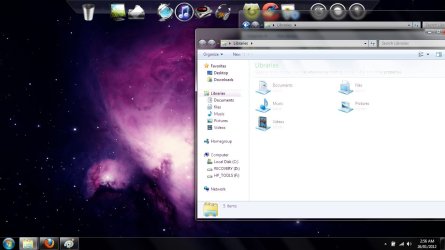
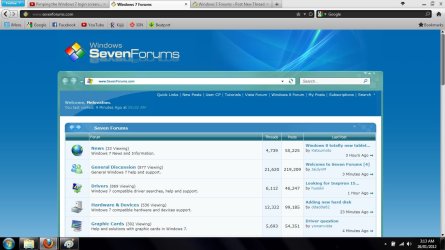
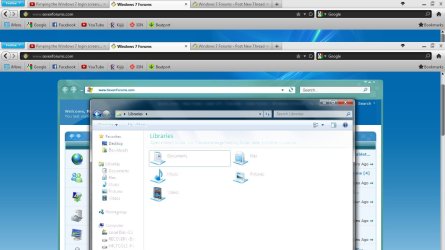
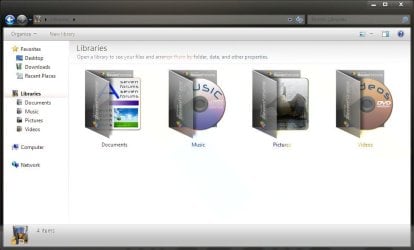
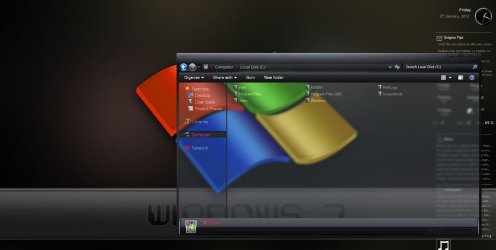
Hi , when i am going through my folders on my computer and i have the window over a certain spot of my screen it goes really bright and i can barely see the font.. it does the same thing if i have a window behind it.. it only does it when im going through my files but not when im using programs.. i have pictures to show you whats going on...

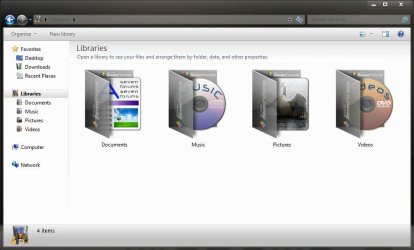
the first picture is an example of the font on the window to the right looking fine when placed over a dark part of the screen and the window to the left is looking bright when placed over a bright part of the screen.. the 2nd is a picture of the font being bright when i place it over a window.. the third is a picture of the internet for example looking perfect fine and the 4th picture is the font once again looking bright once placed over a window

does anyone know how to fix this?
 

Attachments

  • screen problem.jpg
    screen problem.jpg
    84 KB · Views: 36
  • screen problem2.jpg
    screen problem2.jpg
    75.7 KB · Views: 20
  • screen problem3.jpg
    screen problem3.jpg
    102.8 KB · Views: 15
  • screen problem4.jpg
    screen problem4.jpg
    93.4 KB · Views: 15

My Computer My Computer

At a glance

windows 7
OS
windows 7
Try to enter Safe Mode to see if it's happening. if not, could've been your drivers/settings.
 

My Computer My Computer

At a glance

Windows 7 Ultimate 32 bitIntel Core2Quad Q8400Corsair Twin 4 GB DDR2ATI Radeon 4850 512 MB
Computer Manufacturer/Model Number
Custom
OS
Windows 7 Ultimate 32 bit
CPU
Intel Core2Quad Q8400
Motherboard
Gigabyte G31M-ES2C
Memory
Corsair Twin 4 GB DDR2
Graphics Card(s)
ATI Radeon 4850 512 MB
Sound Card
Onboard
Monitor(s) Displays
15' LCD GTC
Screen Resolution
1024x768
Hard Drives
320 GB Western Digital
PSU
Simbadda 500w
Case
Standard
Keyboard
Microsoft Keyboard
Mouse
Microsoft Mouse
Internet Speed
2 mbps ADSL
Hi Melovation :) Welcome aboard.

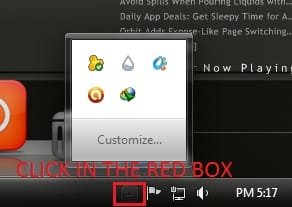
Can you post a screenshot of the hidden system trey icons? Like this one ?

Untitled.jpg

Click on the triangle marked in the pic above. I am assuming that there is an item named "full glass.exe" or something similar . (some themes need this thing to make the explorer background transparent).

If it is there, right click on it, and select "exit" in the context menu. Now reopen the explorer and see if the tests are still creepy.
 

My Computer My Computer

At a glance

Microsoft Windows 10 Pro Insider Preview 64-bitIntel(R) Core(TM) i3-4130 CPU @ 3.40GHzCorsair Vengence 4GB x2 (8.00GB Dual-Channel ...2047MB GeForce GTS 450 (ZOTAC International)
Computer type
PC/Desktop
Computer Manufacturer/Model Number
Self Assembled
OS
Microsoft Windows 10 Pro Insider Preview 64-bit
CPU
Intel(R) Core(TM) i3-4130 CPU @ 3.40GHz
Motherboard
Gigabyte Technology Co., Ltd. B85M-D3H
Memory
Corsair Vengence 4GB x2 (8.00GB Dual-Channel DDR3 @ 798MHz)
Graphics Card(s)
2047MB GeForce GTS 450 (ZOTAC International)
Sound Card
Onboard (Realtek High Definition Audio)
Monitor(s) Displays
LG Flatron E2040T
Screen Resolution
1600x900
Hard Drives
Western Digital 1 TB
Seagate 500 GB
PSU
Corsair VS550
Case
Cooler Master K380
Cooling
Cooler Master Seidon 120V Plus
Keyboard
Logitech MK260r
Mouse
Logitech MK260r
Internet Speed
PMPL Broadband
Antivirus
Windows Defender + MBAM
Browser
Firefox
Other Info
Dell Studio 15" Laptop
hi :)
have you tried to use the ClearType Tuner in windows 7? LINKS >>>
Windows ClearType Tuner
Make text easier to read using ClearType


Make text easier to read using ClearType

ClearType font technology makes the text on your screen almost as sharp and clear as text that's printed on paper. It's on by default in this version of Windows.

To get the full benefit of ClearType, you need a high-quality, flat-panel monitor, such as LCD or plasma. Even on a CRT monitor, you might get some improvement in readability with ClearType.

To turn on ClearType

Open the ClearType Text Tuner by clicking the Start button , and then clicking Control Panel. In the search box, type cleartype, and then click Adjust ClearType text.

On the first page of the tuner, select the Turn on ClearType check box, click Next, and then continue clicking Next until you reach the last page.

On the last page of the tuner, click Finish to turn on ClearType. If you're prompted for an administrator password or confirmation, type the password or provide confirmation.
 

My Computer My Computer

At a glance

Operating System : Windows 7 Home Premium Edi...Processor : Intel Core 2 Quad Q8300 @ 2500 MHzPhysical Memory :8GB Corsair4x 2GB 800MHz C5 ...Video Card : XFX 6700 AMD
Computer Manufacturer/Model Number
packard bell IXTREME M5722
OS
Operating System : Windows 7 Home Premium Edition 6.01.7600 SP1 (x64)
CPU
Processor : Intel Core 2 Quad Q8300 @ 2500 MHz
Motherboard
Mainboard : Packard Bell (Acer EG43M )
Memory
Physical Memory :8GB Corsair4x 2GB 800MHz C5 DDR2
Graphics Card(s)
Video Card : XFX 6700 AMD
Monitor(s) Displays
Maestro 234DL - BenQ V2220 - BenQ VW2420H
Screen Resolution
Current Display :1920x1080p pixels at 60 Hz in HD LED
Hard Drives
Hard Disks : WDC (1000 GB)
Drive C: (Hard Disk) : 428 GB available on 491 GB
Drive D: (Hard Disk) : 426 GB available on 492 GB
SAMSUNG spinpoint HD103SJ 1000.2 GB
(X 2) KINGSTON SSD NOW V 30GB
PSU
XFX ProSeries 550W PSU
Case
PACKARD BELL IXTREME
Cooling
System Blower Current: 150mA Air Flow16CFM ;Akasa 90mm rear
Keyboard
Gigabyte Aivia K8100
Mouse
TRUST-Wireless Laser Mouse - Carbon edition MI-7770C
Internet Speed
TP-LINK > TL-WN951N / AV500 Gigabit Powerline Adapters
Browser
chrome dev
Other Info
EXTRA COOLING>(FAN CONTROLLER) PC Bay Cooler 3 x 40mm fans; Akasa AK-HD-BL Blue hard drive cooler 2 x 40 mm fan 4500 rpm 29.7 dBA
Bios> American Megatrends Inc.
Version : P01-A1
Date : 08/31/2009
This is a non-black explorer theme, with Full Glass enabled :
2.JPG

And this is when I exit the full Glass :
1.JPG
 

My Computer My Computer

At a glance

Microsoft Windows 10 Pro Insider Preview 64-bitIntel(R) Core(TM) i3-4130 CPU @ 3.40GHzCorsair Vengence 4GB x2 (8.00GB Dual-Channel ...2047MB GeForce GTS 450 (ZOTAC International)
Computer type
PC/Desktop
Computer Manufacturer/Model Number
Self Assembled
OS
Microsoft Windows 10 Pro Insider Preview 64-bit
CPU
Intel(R) Core(TM) i3-4130 CPU @ 3.40GHz
Motherboard
Gigabyte Technology Co., Ltd. B85M-D3H
Memory
Corsair Vengence 4GB x2 (8.00GB Dual-Channel DDR3 @ 798MHz)
Graphics Card(s)
2047MB GeForce GTS 450 (ZOTAC International)
Sound Card
Onboard (Realtek High Definition Audio)
Monitor(s) Displays
LG Flatron E2040T
Screen Resolution
1600x900
Hard Drives
Western Digital 1 TB
Seagate 500 GB
PSU
Corsair VS550
Case
Cooler Master K380
Cooling
Cooler Master Seidon 120V Plus
Keyboard
Logitech MK260r
Mouse
Logitech MK260r
Internet Speed
PMPL Broadband
Antivirus
Windows Defender + MBAM
Browser
Firefox
Other Info
Dell Studio 15" Laptop
Hi Melovation :) Welcome aboard.

Can you post a screenshot of the hidden system trey icons? Like this one ?

View attachment 195106

Click on the triangle marked in the pic above. I am assuming that there is an item named "full glass.exe" or something similar . (some themes need this thing to make the explorer background transparent).

If it is there, right click on it, and select "exit" in the context menu. Now reopen the explorer and see if the tests are still creepy.


hey thanks a lot! i checked the icon tray and there was a "full glass.exe" file and i closed it but will i have to close it everytime i log in ? or is it closed for good?
 

My Computer My Computer

At a glance

windows 7
OS
windows 7
Hey thanks a lot! I checked the icon tray and i exited the full glass.exe and everything is back to normal.. Thanks once again
 

My Computer My Computer

At a glance

windows 7
OS
windows 7
I just have one more question..Can i do something so that i dont have to keep closing it from the icon tray every time i log in to solve this problem?
 

My Computer My Computer

At a glance

windows 7
OS
windows 7
Do one more thing. Prevent Full Glass.exe to auto start alongwith windows, if it is there.

Click on the windows button and R key simultaneously on your keyboard, to open the Run box. Type "msconfig" in the box, without the quote marks, and hit enter . It will open the system configuration window. The fourth (before last) tab is startup, make it sure that Full Glass is not listed in the list. If it is there, uncheck the entry, apply and OK. If it is not there, you need not do do anything.

FullGlass.exe makes the explorer background transparent, provided the explorer background is black/dark. Otherwise it makes the texts creepy !
 

My Computer My Computer

At a glance

Microsoft Windows 10 Pro Insider Preview 64-bitIntel(R) Core(TM) i3-4130 CPU @ 3.40GHzCorsair Vengence 4GB x2 (8.00GB Dual-Channel ...2047MB GeForce GTS 450 (ZOTAC International)
Computer type
PC/Desktop
Computer Manufacturer/Model Number
Self Assembled
OS
Microsoft Windows 10 Pro Insider Preview 64-bit
CPU
Intel(R) Core(TM) i3-4130 CPU @ 3.40GHz
Motherboard
Gigabyte Technology Co., Ltd. B85M-D3H
Memory
Corsair Vengence 4GB x2 (8.00GB Dual-Channel DDR3 @ 798MHz)
Graphics Card(s)
2047MB GeForce GTS 450 (ZOTAC International)
Sound Card
Onboard (Realtek High Definition Audio)
Monitor(s) Displays
LG Flatron E2040T
Screen Resolution
1600x900
Hard Drives
Western Digital 1 TB
Seagate 500 GB
PSU
Corsair VS550
Case
Cooler Master K380
Cooling
Cooler Master Seidon 120V Plus
Keyboard
Logitech MK260r
Mouse
Logitech MK260r
Internet Speed
PMPL Broadband
Antivirus
Windows Defender + MBAM
Browser
Firefox
Other Info
Dell Studio 15" Laptop
Or you could completely uninstall it since you clearly don't want it running. No sense in keeping something you have to disable every time at startup because you don't want it.
 

My Computer My Computer

At a glance

XP / Win7 x64 ProIntel Quad-Core Q9450 @ 3.2GHz2x2GB GSkill DDR2NVIDIA GeForce 8600 GTS (EVGA)
OS
XP / Win7 x64 Pro
CPU
Intel Quad-Core Q9450 @ 3.2GHz
Motherboard
Asus P5-E
Memory
2x2GB GSkill DDR2
Graphics Card(s)
NVIDIA GeForce 8600 GTS (EVGA)
Monitor(s) Displays
Dell 2408WFP
Screen Resolution
1920x1200
Or you could completely uninstall it since you clearly don't want it running. No sense in keeping something you have to disable every time at startup because you don't want it.
This is a standalone executable .... double click to activate, remove from systrey to deactivate. So you cannot uninstall it. What you can do is to disable it from startup, if it is added there.
 

My Computer My Computer

At a glance

Microsoft Windows 10 Pro Insider Preview 64-bitIntel(R) Core(TM) i3-4130 CPU @ 3.40GHzCorsair Vengence 4GB x2 (8.00GB Dual-Channel ...2047MB GeForce GTS 450 (ZOTAC International)
Computer type
PC/Desktop
Computer Manufacturer/Model Number
Self Assembled
OS
Microsoft Windows 10 Pro Insider Preview 64-bit
CPU
Intel(R) Core(TM) i3-4130 CPU @ 3.40GHz
Motherboard
Gigabyte Technology Co., Ltd. B85M-D3H
Memory
Corsair Vengence 4GB x2 (8.00GB Dual-Channel DDR3 @ 798MHz)
Graphics Card(s)
2047MB GeForce GTS 450 (ZOTAC International)
Sound Card
Onboard (Realtek High Definition Audio)
Monitor(s) Displays
LG Flatron E2040T
Screen Resolution
1600x900
Hard Drives
Western Digital 1 TB
Seagate 500 GB
PSU
Corsair VS550
Case
Cooler Master K380
Cooling
Cooler Master Seidon 120V Plus
Keyboard
Logitech MK260r
Mouse
Logitech MK260r
Internet Speed
PMPL Broadband
Antivirus
Windows Defender + MBAM
Browser
Firefox
Other Info
Dell Studio 15" Laptop
Ok... then remove it from the system tray to deactivate it and keep it from starting up. I'm failing to see why you would enable something in your system to tray to start, then disable it via selective startup services.
 

My Computer My Computer

At a glance

XP / Win7 x64 ProIntel Quad-Core Q9450 @ 3.2GHz2x2GB GSkill DDR2NVIDIA GeForce 8600 GTS (EVGA)
OS
XP / Win7 x64 Pro
CPU
Intel Quad-Core Q9450 @ 3.2GHz
Motherboard
Asus P5-E
Memory
2x2GB GSkill DDR2
Graphics Card(s)
NVIDIA GeForce 8600 GTS (EVGA)
Monitor(s) Displays
Dell 2408WFP
Screen Resolution
1920x1200
I'm failing to see why you would enable something in your system to tray to start, then disable it via selective startup services.
Enable ... to customize windows, and disable to revert the customization.
 
Last edited:

My Computer My Computer

At a glance

Microsoft Windows 10 Pro Insider Preview 64-bitIntel(R) Core(TM) i3-4130 CPU @ 3.40GHzCorsair Vengence 4GB x2 (8.00GB Dual-Channel ...2047MB GeForce GTS 450 (ZOTAC International)
Computer type
PC/Desktop
Computer Manufacturer/Model Number
Self Assembled
OS
Microsoft Windows 10 Pro Insider Preview 64-bit
CPU
Intel(R) Core(TM) i3-4130 CPU @ 3.40GHz
Motherboard
Gigabyte Technology Co., Ltd. B85M-D3H
Memory
Corsair Vengence 4GB x2 (8.00GB Dual-Channel DDR3 @ 798MHz)
Graphics Card(s)
2047MB GeForce GTS 450 (ZOTAC International)
Sound Card
Onboard (Realtek High Definition Audio)
Monitor(s) Displays
LG Flatron E2040T
Screen Resolution
1600x900
Hard Drives
Western Digital 1 TB
Seagate 500 GB
PSU
Corsair VS550
Case
Cooler Master K380
Cooling
Cooler Master Seidon 120V Plus
Keyboard
Logitech MK260r
Mouse
Logitech MK260r
Internet Speed
PMPL Broadband
Antivirus
Windows Defender + MBAM
Browser
Firefox
Other Info
Dell Studio 15" Laptop
Right... he doesn't like the customization, so he's trying to remove it. Why not remove it from the system tray so that it never starts in the first place? It sounds like the advice is to leave it in the system tray and have it try to start up every time but then prevent it from starting up by selectively disabling its startup service. This doesn't make sense to me so I must be missing something here.
 

My Computer My Computer

At a glance

XP / Win7 x64 ProIntel Quad-Core Q9450 @ 3.2GHz2x2GB GSkill DDR2NVIDIA GeForce 8600 GTS (EVGA)
OS
XP / Win7 x64 Pro
CPU
Intel Quad-Core Q9450 @ 3.2GHz
Motherboard
Asus P5-E
Memory
2x2GB GSkill DDR2
Graphics Card(s)
NVIDIA GeForce 8600 GTS (EVGA)
Monitor(s) Displays
Dell 2408WFP
Screen Resolution
1920x1200
:D
Right... he doesn't like the customization, so he's trying to remove it. Why not remove it from the system tray so that it never starts in the first place? It sounds like the advice is to leave it in the system tray and have it try to start up every time but then prevent it from starting up by selectively disabling its startup service. This doesn't make sense to me so I must be missing something here.
In the post http://www.sevenforums.com/general-...-through-folders-please-help.html#post1764720, it is clearly advised to remove the entry from system trey.

But if it is added in the startup, it will sit right there after the next restart. So in the post http://www.sevenforums.com/general-...-through-folders-please-help.html#post1764962, it is advised to search the entry in startup list, and if it is there , disable it.

What you might be missing is this thing ....

Capture.JPG
 

My Computer My Computer

At a glance

Microsoft Windows 10 Pro Insider Preview 64-bitIntel(R) Core(TM) i3-4130 CPU @ 3.40GHzCorsair Vengence 4GB x2 (8.00GB Dual-Channel ...2047MB GeForce GTS 450 (ZOTAC International)
Computer type
PC/Desktop
Computer Manufacturer/Model Number
Self Assembled
OS
Microsoft Windows 10 Pro Insider Preview 64-bit
CPU
Intel(R) Core(TM) i3-4130 CPU @ 3.40GHz
Motherboard
Gigabyte Technology Co., Ltd. B85M-D3H
Memory
Corsair Vengence 4GB x2 (8.00GB Dual-Channel DDR3 @ 798MHz)
Graphics Card(s)
2047MB GeForce GTS 450 (ZOTAC International)
Sound Card
Onboard (Realtek High Definition Audio)
Monitor(s) Displays
LG Flatron E2040T
Screen Resolution
1600x900
Hard Drives
Western Digital 1 TB
Seagate 500 GB
PSU
Corsair VS550
Case
Cooler Master K380
Cooling
Cooler Master Seidon 120V Plus
Keyboard
Logitech MK260r
Mouse
Logitech MK260r
Internet Speed
PMPL Broadband
Antivirus
Windows Defender + MBAM
Browser
Firefox
Other Info
Dell Studio 15" Laptop
Ahhh, that's it! I was missing the portion where it was initially suggested to remove it from the tray, and the secondary action to disable it from starting up again if it's set to do so. Thanks for taking the time to help me sift through where my logic wasn't adding up.
 

My Computer My Computer

At a glance

XP / Win7 x64 ProIntel Quad-Core Q9450 @ 3.2GHz2x2GB GSkill DDR2NVIDIA GeForce 8600 GTS (EVGA)
OS
XP / Win7 x64 Pro
CPU
Intel Quad-Core Q9450 @ 3.2GHz
Motherboard
Asus P5-E
Memory
2x2GB GSkill DDR2
Graphics Card(s)
NVIDIA GeForce 8600 GTS (EVGA)
Monitor(s) Displays
Dell 2408WFP
Screen Resolution
1920x1200
Back
Top