My FTP isnt working across the internet.

zaytsevi

New member
Local time
4:31 AM
Messages
12
I installed the IIS FTP and I am able to browse my ftp from the PC by going to the computer name ftp://main or IP address ftp://192.168.1.100 .

I went to my router and enabled port forwarding of port 20 and 21 to 192.168.1.100 but when i go to my ftp from the internet. It does work...ftp://76.121.180.144

what can I do? what step did I miss? any help please.
 

My Computer My Computer

At a glance

Windows 7 x64
OS
Windows 7 x64
ok i opened up 20 and 21 on the PC and now I am able to get to a logon screen going to ftp://76.121.180.144. However when i type in the credentials it times out...
 

My Computer My Computer

At a glance

Windows 7 x64
OS
Windows 7 x64
Did you forward the ports to 192.168.1.100, if you didn't that will be the problem. You have to tell the information where to go. Just connecting to 76.121.180.144 is not enough. The device may have FTP turned on so you are trying to log into the device, when you meant to be transferred to 192.168.1.100 to log in.
 

My Computer My Computer

At a glance

Windows 7 Enterprise (x64); Windows Server 20...16GB
Computer type
PC/Desktop
Computer Manufacturer/Model Number
Dell OP7010
OS
Windows 7 Enterprise (x64); Windows Server 2008 R2 (x64)
Memory
16GB
Monitor(s) Displays
4 Dell 24" LCD
Screen Resolution
1280x1024
Keyboard
Dell
Mouse
Dell Optical
Internet Speed
40meg
Yes ofcourse. that was the first thing that I did:

2hggrw6.png

Here are all the settings: what am i missing or what am i doing wrong
2lm312s.png

5z05z.png

e6c1kz.png


Ethernet adapter Local Area Connection:

Connection-specific DNS Suffix . : hsd1.wa.comcast.net.

Link-local IPv6 Address . . . . . : fe80::c51d:4d91:8208:d811%11
IPv4 Address. . . . . . . . . . . : 192.168.1.100
Subnet Mask . . . . . . . . . . . : 255.255.255.0
Default Gateway . . . . . . . . . : 192.168.1.1

avsynl.png

34isjg4.png

a0h09i.png


My Computer My Computer

At a glance

Windows 7 x64
OS
Windows 7 x64
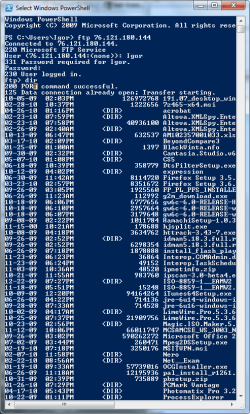
Hey Im able to connect to it from powershell! why cant i do it from internet explorer, or firefox or chrome!!!!!???
ahh this is driving me crazy!
I am able to connect to the ftp from a remote location via the command prompt.
 

Attachments

  • sfd.png
    sfd.png
    28 KB · Views: 38
Last edited:

My Computer My Computer

At a glance

Windows 7 x64
OS
Windows 7 x64
The day I posted my message I was able to connect to your FTP and was prompted for username and password. Now I don't get a connection. You may have had it working and now it is not.

In your second screen shot: I can't remember off the top of my head but you may not need that set because you already have the correct setting in the first screen shot. Since the ports are forwarded you don't need your public address information in the FTP server. Anyway something to try.
 

My Computer My Computer

At a glance

Windows 7 Enterprise (x64); Windows Server 20...16GB
Computer type
PC/Desktop
Computer Manufacturer/Model Number
Dell OP7010
OS
Windows 7 Enterprise (x64); Windows Server 2008 R2 (x64)
Memory
16GB
Monitor(s) Displays
4 Dell 24" LCD
Screen Resolution
1280x1024
Keyboard
Dell
Mouse
Dell Optical
Internet Speed
40meg
The reason was because my computer was turned off at the time you tried it.

I went ahead and set the ftp firewall to 0-0 for the ports and no ipaddress.

i can connect with firefox: ftp://192.168.1.100/ but not ftp://76.121.180.144

i can connect with command: ftp 192.168.1.100 and 76.121.180.144

i can remotely connect with command: ftp 76.121.180.144 but not with firefox or any other browser for that matter.
 

My Computer My Computer

At a glance

Windows 7 x64
OS
Windows 7 x64
Are you trying to access it from completely outside your network? In other words to you have a laptop and you go to a coffee shop and test this? The reason I ask is because some routers will not let you connect to an outside address and test. The router is smart enough to know that you are on the same network so you will get mixed results.

If you don't mind setting it up for READ ONLY I will be more than happy to test it from my system to yours. Just PM me with a username and password.
 

My Computer My Computer

At a glance

Windows 7 Enterprise (x64); Windows Server 20...16GB
Computer type
PC/Desktop
Computer Manufacturer/Model Number
Dell OP7010
OS
Windows 7 Enterprise (x64); Windows Server 2008 R2 (x64)
Memory
16GB
Monitor(s) Displays
4 Dell 24" LCD
Screen Resolution
1280x1024
Keyboard
Dell
Mouse
Dell Optical
Internet Speed
40meg
Yes I tried this from a diffrent PC in a diffrent house in a diffrent State.

I am able to connect via ftp from the command promp but not through internet explorer.
 

My Computer My Computer

At a glance

Windows 7 x64
OS
Windows 7 x64
I didn't think you could use IE anymore for FTP, I thought that was retired in IE6?

Try a client like filezilla.
 

My Computer My Computer

At a glance

Windows 11
Computer type
PC/Desktop
OS
Windows 11
I didn't think you could use IE anymore for FTP, I thought that was retired in IE6?

Try a client like filezilla.

im tried using the firefox ftp addon: fireftp and its not able to connect.


well it says it connecing.. then it keeps retrying ever 10 seconds.
 

My Computer My Computer

At a glance

Windows 7 x64
OS
Windows 7 x64
Check your PM I found the problem. Everything should work now.
 

My Computer My Computer

At a glance

Windows 7 Enterprise (x64); Windows Server 20...16GB
Computer type
PC/Desktop
Computer Manufacturer/Model Number
Dell OP7010
OS
Windows 7 Enterprise (x64); Windows Server 2008 R2 (x64)
Memory
16GB
Monitor(s) Displays
4 Dell 24" LCD
Screen Resolution
1280x1024
Keyboard
Dell
Mouse
Dell Optical
Internet Speed
40meg
YESSSSSSSSS!! it works

Internet Explorer > Tools > Internet Options > Advanced > Uncheck "Use Passive FTP"
 

My Computer My Computer

At a glance

Windows 7 x64
OS
Windows 7 x64
Not able to get it working on FireFTP on firefox. I disabled the PassiveFTP in there but it doesnt connect.

Any ideas how I can make my ftp server a Passive FTP? thx!
 

My Computer My Computer

At a glance

Windows 7 x64
OS
Windows 7 x64
My FTP also does not work.......

Check your PM I found the problem. Everything should work now.

Please let me know what you told this guy.
Thanks,
John.
 

My Computer My Computer

At a glance

Windows 7 Home 32 bit
OS
Windows 7 Home 32 bit
Back
Top